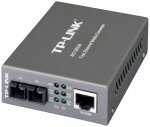
This is the cheapest price I think for the duplex model. Well revued (from a small number of reviewers). You could probably pay a lot for a 'professional' model You would normally need two of course :smiley: Just received mine :smiley: includes a 'lifetime warranty' shades of the old 3com! :smiley:
Top comments
zizzles
30 Jun 1721#3
Trust me, you're not a techie
CampGareth to Delio79
30 Jun 1719#9
This box converts between bog standard copper ethernet and fibre optic cables. That's all you need to know about how it works. As for why you'd get one, the answer is probably range. Read on for more depth.
(warning: dodgy physics ahead)
Remember the days of ADSL? When the speed of your connection depended on how far away you were from the telephone exchange? Ever wondered why? Well, it's a capacitance thing, the longer the cable the greater the amount of charge required before its voltage changes.
It's similar to a water pipe that's normally filled with air. If you put some water in one end of a 10cm pipe you really don't need much water before it fills the pipe and starts coming out the other end. If your pipe is 1km long you need a lot of water before it fills the pipe and comes out the other end. If we had more water flowing into the pipe then it would take less time for water to start flowing out the other end.
Back to ADSL, your modem has a tiny power supply and it must use that to change the voltage of the cable back to the telephone exchange, if the cable is 10 metres that task doesn't take long. If it's 10km it takes a very long time. If one voltage-change is one bit, then you can transfer more bits per second with a shorter cable.
This applies to HDMI, USB, ethernet, anything that transfers data through copper by the way. Those things all have a fixed speed they have to reach and limited power to do it with, so say your 10m HDMI cable is too long for your DVD player to make it oscillate at 340MHz, well you can't transfer 1080p video then!
To get around this we use a different medium, fibre optic. You don't need to continuously shine a light into fibre optic to 'charge' the entire cable, you can just send a pulse and it'll keep bouncing its way through the cable until it comes out the other end. Suddenly the length of the cable doesn't matter, you can generate a signal on one end that's as fast as you like and it'll come out perfectly on the other end, so that 10 metre HDMI cable can now be 10km without issue. In fact 340MHz is easy, with fibre you can do signals on the order of 300 terahertz (half the carrier speed, carrier is red light).
There are some other advantages at scale, for instance in a datacentre there are a lot (100+ per 2 x 2 metre square) ethernet links and they're all running at higher than 1 gigabit speeds, so the power spent making signals on cables oscillate and spent overcoming the resistance of cables is significant. We're talking 2-5W per link here, increasing with distance. With fibre we need under 1W for any distance.
TL;DR fibre optic has uses in high speed, long distance, low power applications or any combination thereof.
speed007
30 Jun 176#10
Seriously...!?
All you had to say was, to do a home networking for longer runs of cables one can use fibre cabling instead of CAT5/6/7 whatever's available then use one of the above devices to convert the fibre ends to normal rj45 connection sockets... simples..!
don't need to go in to history of the internet/intranet.
OrribleHarry to poundshopper
1 Jul 174#31
Technically yes as it uses glass instead of wire :confused:
All comments (87)
CampGareth
30 Jun 17#1
What about gigabit? 10gig?
I've been looking at wiring up my flat but hiding the cables in channels in the walls. Fibre optic's thinner so easier to hide, but it's also more flexible in that it can carry ethernet, hdmi, thunderbolt etc with capacity only limited by the media converters on either end.
jasee to CampGareth
30 Jun 171#4
(And no electrical/rf interference).
Sorry this is only megabit I'm afraid.
I'm just extending a network to a security camera which is about 40 metres away. Beyond easy wi-fi. So this seems ideal. I'm also going to include a copper cable. If that doesn't work or slows down the whole network then it will be useful for alarms etc. In your case it may be worthwhile looking for some sort of fiber hub? If they exist at an economical price.
hukdplan to CampGareth
1 Jul 171#25
Forgot to mention this if you need to hide cable - D-line trunking, cheap and easy to use.
OrribleHarry to CampGareth
1 Jul 171#32
I'd advise against unless you are determined and/or rich.
Unless using pre-made patch leads then you will need an expensive fibre splice tool. Not only that, fibre media converters are needed at each end that require power and are expensive.
Cat5 or 6 will do everything you require (Inc Hdmi) for much less money and you will also be able to easily terminate into decorative faceplates so will be more aesthetically pleasing.
Delio79
30 Jun 173#2
Although a techie, this seems quite a specialist product which I don't see an immediate need for nor remotely understand. As a result I don't feel I'm in a position to vote either way and would urge readers to refrain from voting if they don't really understand what they're voting for.
flickflack to Delio79
30 Jun 17#5
would this increase the range compared to cat 5/6
CampGareth to Delio79
30 Jun 1719#9
This box converts between bog standard copper ethernet and fibre optic cables. That's all you need to know about how it works. As for why you'd get one, the answer is probably range. Read on for more depth.
(warning: dodgy physics ahead)
Remember the days of ADSL? When the speed of your connection depended on how far away you were from the telephone exchange? Ever wondered why? Well, it's a capacitance thing, the longer the cable the greater the amount of charge required before its voltage changes.
It's similar to a water pipe that's normally filled with air. If you put some water in one end of a 10cm pipe you really don't need much water before it fills the pipe and starts coming out the other end. If your pipe is 1km long you need a lot of water before it fills the pipe and comes out the other end. If we had more water flowing into the pipe then it would take less time for water to start flowing out the other end.
Back to ADSL, your modem has a tiny power supply and it must use that to change the voltage of the cable back to the telephone exchange, if the cable is 10 metres that task doesn't take long. If it's 10km it takes a very long time. If one voltage-change is one bit, then you can transfer more bits per second with a shorter cable.
This applies to HDMI, USB, ethernet, anything that transfers data through copper by the way. Those things all have a fixed speed they have to reach and limited power to do it with, so say your 10m HDMI cable is too long for your DVD player to make it oscillate at 340MHz, well you can't transfer 1080p video then!
To get around this we use a different medium, fibre optic. You don't need to continuously shine a light into fibre optic to 'charge' the entire cable, you can just send a pulse and it'll keep bouncing its way through the cable until it comes out the other end. Suddenly the length of the cable doesn't matter, you can generate a signal on one end that's as fast as you like and it'll come out perfectly on the other end, so that 10 metre HDMI cable can now be 10km without issue. In fact 340MHz is easy, with fibre you can do signals on the order of 300 terahertz (half the carrier speed, carrier is red light).
There are some other advantages at scale, for instance in a datacentre there are a lot (100+ per 2 x 2 metre square) ethernet links and they're all running at higher than 1 gigabit speeds, so the power spent making signals on cables oscillate and spent overcoming the resistance of cables is significant. We're talking 2-5W per link here, increasing with distance. With fibre we need under 1W for any distance.
TL;DR fibre optic has uses in high speed, long distance, low power applications or any combination thereof.
BurnToasT333 to Delio79
30 Jun 17#24
You not voting based if you understand the product or not. Is the product cheaper else where?
- If not then vote hot.
- If yes, hen vote cold and provide link or post deal to cheaper deal.
zizzles
30 Jun 1721#3
Trust me, you're not a techie
jasee
30 Jun 172#6
I've added my reason for getting this.
People shouldn't in my opinion vote cold just because they don't understand what they're voting for. All that is necessary is a quick search. Just don't vote otherwise. Otherwise people will vote it down and others will never even look at it.
I get a bit tired of cold votes for no reason other than other people have given it cold votes. Sometimes something will get heat in the hundreds then when it is posted again later (at an even cheaper price) it will go into the hundreds minus (for no good reason)
Citrix20
30 Jun 17#7
\x0d\x0a\x0d\x0aYes CAT 5/6 is rated to 100 Meters.\x0d\x0a\x0d\x0aMultimode fiber somewhere upto 2KM
visibleman
30 Jun 171#8
Cheap for what it is! +1
speed007
30 Jun 176#10
Seriously...!?
All you had to say was, to do a home networking for longer runs of cables one can use fibre cabling instead of CAT5/6/7 whatever's available then use one of the above devices to convert the fibre ends to normal rj45 connection sockets... simples..!
don't need to go in to history of the internet/intranet.
Delio79 to speed007
30 Jun 172#12
XD
Thanks speed007... I know what the device does just by reading the deal title, but couldn't think what this could be used for, nor how much is the usually going rate for such a device. You've enlightened me on the use case, so thanks for that!
CampGareth to speed007
30 Jun 17#15
That was the first sentence, then there was a 'skip if you like'. Dude said he didn't understand the product, well now he definitely does. What it is, why it exists. Needs a little more than "copper is bad because stuff"
Delio79
30 Jun 17#11
That's exactly what I was trying to say above. don't vote if you don't understand what you're voting for -likely you'll be unnecessarily voting cold for what could be a good deal!

![Fresh Breakfast Meat Box (Using code) @ Campbells Meat [Haggis / Lorne Sausage / Bacon / Black Pudding & More]](/images/topics/208684_1.jpg)




































![[Xbox One] Q. u. b. e: Director's Cut on Deals with Gold](/images/topics/208716_1.jpg)


















Opening post
Well revued (from a small number of reviewers).
You could probably pay a lot for a 'professional' model
You would normally need two of course :smiley:
Just received mine :smiley: includes a 'lifetime warranty' shades of the old 3com! :smiley:
Top comments
(warning: dodgy physics ahead)
Remember the days of ADSL? When the speed of your connection depended on how far away you were from the telephone exchange? Ever wondered why? Well, it's a capacitance thing, the longer the cable the greater the amount of charge required before its voltage changes.
It's similar to a water pipe that's normally filled with air. If you put some water in one end of a 10cm pipe you really don't need much water before it fills the pipe and starts coming out the other end. If your pipe is 1km long you need a lot of water before it fills the pipe and comes out the other end. If we had more water flowing into the pipe then it would take less time for water to start flowing out the other end.
Back to ADSL, your modem has a tiny power supply and it must use that to change the voltage of the cable back to the telephone exchange, if the cable is 10 metres that task doesn't take long. If it's 10km it takes a very long time. If one voltage-change is one bit, then you can transfer more bits per second with a shorter cable.
This applies to HDMI, USB, ethernet, anything that transfers data through copper by the way. Those things all have a fixed speed they have to reach and limited power to do it with, so say your 10m HDMI cable is too long for your DVD player to make it oscillate at 340MHz, well you can't transfer 1080p video then!
To get around this we use a different medium, fibre optic. You don't need to continuously shine a light into fibre optic to 'charge' the entire cable, you can just send a pulse and it'll keep bouncing its way through the cable until it comes out the other end. Suddenly the length of the cable doesn't matter, you can generate a signal on one end that's as fast as you like and it'll come out perfectly on the other end, so that 10 metre HDMI cable can now be 10km without issue. In fact 340MHz is easy, with fibre you can do signals on the order of 300 terahertz (half the carrier speed, carrier is red light).
There are some other advantages at scale, for instance in a datacentre there are a lot (100+ per 2 x 2 metre square) ethernet links and they're all running at higher than 1 gigabit speeds, so the power spent making signals on cables oscillate and spent overcoming the resistance of cables is significant. We're talking 2-5W per link here, increasing with distance. With fibre we need under 1W for any distance.
TL;DR fibre optic has uses in high speed, long distance, low power applications or any combination thereof.
All you had to say was, to do a home networking for longer runs of cables one can use fibre cabling instead of CAT5/6/7 whatever's available then use one of the above devices to convert the fibre ends to normal rj45 connection sockets... simples..!
don't need to go in to history of the internet/intranet.
All comments (87)
I've been looking at wiring up my flat but hiding the cables in channels in the walls. Fibre optic's thinner so easier to hide, but it's also more flexible in that it can carry ethernet, hdmi, thunderbolt etc with capacity only limited by the media converters on either end.
Sorry this is only megabit I'm afraid.
I'm just extending a network to a security camera which is about 40 metres away. Beyond easy wi-fi. So this seems ideal. I'm also going to include a copper cable. If that doesn't work or slows down the whole network then it will be useful for alarms etc. In your case it may be worthwhile looking for some sort of fiber hub? If they exist at an economical price.
Unless using pre-made patch leads then you will need an expensive fibre splice tool. Not only that, fibre media converters are needed at each end that require power and are expensive.
Cat5 or 6 will do everything you require (Inc Hdmi) for much less money and you will also be able to easily terminate into decorative faceplates so will be more aesthetically pleasing.
(warning: dodgy physics ahead)
Remember the days of ADSL? When the speed of your connection depended on how far away you were from the telephone exchange? Ever wondered why? Well, it's a capacitance thing, the longer the cable the greater the amount of charge required before its voltage changes.
It's similar to a water pipe that's normally filled with air. If you put some water in one end of a 10cm pipe you really don't need much water before it fills the pipe and starts coming out the other end. If your pipe is 1km long you need a lot of water before it fills the pipe and comes out the other end. If we had more water flowing into the pipe then it would take less time for water to start flowing out the other end.
Back to ADSL, your modem has a tiny power supply and it must use that to change the voltage of the cable back to the telephone exchange, if the cable is 10 metres that task doesn't take long. If it's 10km it takes a very long time. If one voltage-change is one bit, then you can transfer more bits per second with a shorter cable.
This applies to HDMI, USB, ethernet, anything that transfers data through copper by the way. Those things all have a fixed speed they have to reach and limited power to do it with, so say your 10m HDMI cable is too long for your DVD player to make it oscillate at 340MHz, well you can't transfer 1080p video then!
To get around this we use a different medium, fibre optic. You don't need to continuously shine a light into fibre optic to 'charge' the entire cable, you can just send a pulse and it'll keep bouncing its way through the cable until it comes out the other end. Suddenly the length of the cable doesn't matter, you can generate a signal on one end that's as fast as you like and it'll come out perfectly on the other end, so that 10 metre HDMI cable can now be 10km without issue. In fact 340MHz is easy, with fibre you can do signals on the order of 300 terahertz (half the carrier speed, carrier is red light).
There are some other advantages at scale, for instance in a datacentre there are a lot (100+ per 2 x 2 metre square) ethernet links and they're all running at higher than 1 gigabit speeds, so the power spent making signals on cables oscillate and spent overcoming the resistance of cables is significant. We're talking 2-5W per link here, increasing with distance. With fibre we need under 1W for any distance.
TL;DR fibre optic has uses in high speed, long distance, low power applications or any combination thereof.
- If not then vote hot.
- If yes, hen vote cold and provide link or post deal to cheaper deal.
People shouldn't in my opinion vote cold just because they don't understand what they're voting for. All that is necessary is a quick search. Just don't vote otherwise. Otherwise people will vote it down and others will never even look at it.
I get a bit tired of cold votes for no reason other than other people have given it cold votes. Sometimes something will get heat in the hundreds then when it is posted again later (at an even cheaper price) it will go into the hundreds minus (for no good reason)
All you had to say was, to do a home networking for longer runs of cables one can use fibre cabling instead of CAT5/6/7 whatever's available then use one of the above devices to convert the fibre ends to normal rj45 connection sockets... simples..!
don't need to go in to history of the internet/intranet.
Thanks speed007... I know what the device does just by reading the deal title, but couldn't think what this could be used for, nor how much is the usually going rate for such a device. You've enlightened me on the use case, so thanks for that!