This is the cheapest price I think for the duplex model. Well revued (from a small number of reviewers). You could probably pay a lot for a 'professional' model You would normally need two of course :smiley: Just received mine :smiley: includes a 'lifetime warranty' shades of the old 3com! :smiley:
Top comments
zizzles
30 Jun 1721#3
Trust me, you're not a techie
CampGareth to Delio79
30 Jun 1719#9
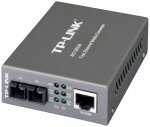
This box converts between bog standard copper ethernet and fibre optic cables. That's all you need to know about how it works. As for why you'd get one, the answer is probably range. Read on for more depth.
(warning: dodgy physics ahead)
Remember the days of ADSL? When the speed of your connection depended on how far away you were from the telephone exchange? Ever wondered why? Well, it's a capacitance thing, the longer the cable the greater the amount of charge required before its voltage changes.
It's similar to a water pipe that's normally filled with air. If you put some water in one end of a 10cm pipe you really don't need much water before it fills the pipe and starts coming out the other end. If your pipe is 1km long you need a lot of water before it fills the pipe and comes out the other end. If we had more water flowing into the pipe then it would take less time for water to start flowing out the other end.
Back to ADSL, your modem has a tiny power supply and it must use that to change the voltage of the cable back to the telephone exchange, if the cable is 10 metres that task doesn't take long. If it's 10km it takes a very long time. If one voltage-change is one bit, then you can transfer more bits per second with a shorter cable.
This applies to HDMI, USB, ethernet, anything that transfers data through copper by the way. Those things all have a fixed speed they have to reach and limited power to do it with, so say your 10m HDMI cable is too long for your DVD player to make it oscillate at 340MHz, well you can't transfer 1080p video then!
To get around this we use a different medium, fibre optic. You don't need to continuously shine a light into fibre optic to 'charge' the entire cable, you can just send a pulse and it'll keep bouncing its way through the cable until it comes out the other end. Suddenly the length of the cable doesn't matter, you can generate a signal on one end that's as fast as you like and it'll come out perfectly on the other end, so that 10 metre HDMI cable can now be 10km without issue. In fact 340MHz is easy, with fibre you can do signals on the order of 300 terahertz (half the carrier speed, carrier is red light).
There are some other advantages at scale, for instance in a datacentre there are a lot (100+ per 2 x 2 metre square) ethernet links and they're all running at higher than 1 gigabit speeds, so the power spent making signals on cables oscillate and spent overcoming the resistance of cables is significant. We're talking 2-5W per link here, increasing with distance. With fibre we need under 1W for any distance.
TL;DR fibre optic has uses in high speed, long distance, low power applications or any combination thereof.
speed007
30 Jun 176#10
Seriously...!?
All you had to say was, to do a home networking for longer runs of cables one can use fibre cabling instead of CAT5/6/7 whatever's available then use one of the above devices to convert the fibre ends to normal rj45 connection sockets... simples..!
don't need to go in to history of the internet/intranet.
OrribleHarry to poundshopper
1 Jul 174#31
Technically yes as it uses glass instead of wire :confused:
Latest comments (87)
jasee
5 Jul 17#87
Thanks, that's very interesting. They've got leds for alignment and apparently two ethernet inputs and outputs.
Too much to ask for a hardware breakdown for this 10gbit network then? Figures. Ironic really because most techies could give an exact list of parts for their gear. I know I can.
OrribleHarry
4 Jul 17#84
Technical ignorance? You really have no idea who I am or what I know. Very ignorant assumption.
Now go enjoy your "nerd house" and remember that there are real girls outside, you know in the daylight, outside, where the normal people live.....
hukdplan
4 Jul 17#83
Smilies don't hide the trail of technical ignorance in your posts
This reply is almost as bad as the ignorant replies by the other blowhard - the NAS runs much faster than 1Gb/s - SFP+ runs at 1Gb and 10Gb - guess which one I chose for the connection. 10Gb, the faster of the two options? Correct.
Quantum computers aren't about data throughput ...but perhaps in the future I'll get people with basic technical knowledge replying.
jasee
4 Jul 17#82
I'd be interested to know what equipment you actually used. In my case, I own the land between me and the 30 metre point, (where there is a security camera) so a wired or fiber connection makes sense. But wires can obviously get cut, accidentally or otherwise.
OrribleHarry
3 Jul 17#81
I have used these twice (well gigabit versions), once when I needed some terminals in an area beyond normal ethernet range. I installed dozens of them in node cubicles scattered around a large plant to allow the data to reach the control room some 400m away. It was an extremely electrically noisey plant with some intrinsic areas so the solution worked quite well.
Only other time I've used was to extend some cat5 KVMs beyond the designed distance but that was mainly due to having some spare from previous installation.
Jediben
3 Jul 17#80
An ssd will give a tangible, measurable benefit over mechanical. Data storage requirements are ever increasing. A multi-device 100mbit network could easily become saturated so a 1gbit one is more resilient to load. However that use case is significantly more likely than a situation where your NAS is somehow outperforming the 10gbit network you purport to be replacing with fibre. How many simultaneous devices are on your network and exactly how can they be just as fast as the NAS, given that you are saying the NAS is the fastest thing on the loop? You are saying the NAS is faster than mechanical, therefore it is either an array of mechanical, or one or more SSDs. Given your NAS ram is only going to fill as fast as the drive feeding it, and this is supposedly fast enough to flood a 10gbit network... are you running a quantum computer from the future?
jhw
3 Jul 171#79
That's what I mean - who has a home that would be beyond CAT5 cable range? - nobody, I expect.
Darude
3 Jul 17#78
agreed, if you want reliability, you can't beat a wired network. But I managed to run a point-to-point wireless bridged network over the last 2 years, surprisingly without trouble throughout the year (gust, rain and snow) over 400m with only 2ms latecy. the kit wasn't expensive and the firmware felt polished, if I could achieve that, then a next door neighbour wireless network must be trivial (think office wireless network for example)
OrribleHarry
2 Jul 17#77
Nope is pointless in that instance and will actually slightly increase ping times.
This is mainly used for distances beyond Cat5 range.
OrribleHarry
2 Jul 17#76
"Grow up".....how childish.
I will consider that an admission that you don't need a 10gb fibre network you merely want one, that's all you needed to say. :smile:
jhw
2 Jul 17#75
What's the point of converting your ADSL signal to fibre once it's inside your home? - by that time it's already slowed to what it's going to be and transmitting the signal another 20 metres around your house, by whatever method, isn't going to make much difference.
hukdplan
2 Jul 17#74
Do you have an SSD in any of your computers? Do you have a disk bigger than your storage needs? How much bigger? Do you run a 1Gb network when you could run a cheaper 100Mb? Why do you need any of those? Explain, we could be here all night ...
The only real argument you've got is that you find 10Gb exotic ... yes, it's £30 a card worth of exotica. Outrageous!
Do grow up ...
OrribleHarry
2 Jul 17#73
You have not explained why you need it, you only keep reiterating what you have.
Like I said it's up to you just never known anyone to have an actual requirement for this type of kit at home.
I do indeed work in IT and have done for many years, not sure why that would worry you?
Like I said you have same speed network as our data warehouse containing 49 servers and over 200tb of storage and just wondered why you would need that at home that's all.
hukdplan
2 Jul 17#72
It's been explained to you numerous times - it enables cheap,fast, redundant storage, on a 10Gb bus - as opposed to loading each PC with SSDs.
No, it isn't used for every network client. No, it doesn't use much power. No, it isn't expensive. No, the NAS is not as slow as a single mechanical drive.
You've just posted a whole list of ignorant comments, which I've had to spend time correcting ... you sound like you work in IT, which is worrying frankly.
jomay
2 Jul 171#71
You are both nerds 'aving an online fight on hukd. :wink:
jasee
2 Jul 17#70
(Actually I didn't agree with much of what was said).
However, wireless (wi-fi) has strict distance limitations. Directional aerials are possible but seem to be experimental and expensive. You need line of sight. Even so it can be affected by rain, birds etc. Cabling has always been a better option even within the home IMO
jasee
2 Jul 17#69
I'm guessing that people prefer the hold films etc on a central server. It means they can all be backed up and displayed on devices wherever you want. And indexed. Related information can also be stored. CD and DVD/Bluray physical storage has limits and it's easy to collect an unmanageable number.
(I have collected an unmanageable number!) as well
The move to 4k has literally quadrupled the storage space required.
Storage on a cloud based system is fashionable but is really not necessary, IMO and wastes bandwidth.
My two cents
jasee
2 Jul 17#68
Obviously, you didn't read my description :disappointed:
fishmaster
1 Jul 17#67
Why do people have TB's of Hard Drive space?
Why are people networking up their homes?
Why is the question?
I thought it was 2017 not 1999
I'm literally trying to get the smallest storage possible and everyone else seems to want more? You're all nutters.
Darude
1 Jul 17#66
nice use case, but I'd rather stick with wireless for that.
OrribleHarry
1 Jul 17#65
I did! Price still shows for a single item.
jasee
1 Jul 17#64
Also, in my case, where running overground externally, not susceptible (directly) to lightning strikes :smiley:
jasee
1 Jul 17#63
Listing removed!
jasee
1 Jul 17#62
Try reading my op
Si__
1 Jul 17#61
There seems to be a little confusing by a few people here in why a media converter is used and what fiber is used for.
Firstly, this box itself. It's a media converter. That's it's primary task. It allows you to connect fiber networks to Ethernet networks. That's it's job. Nothing more and nothing less. Fiber goes in, Ethernet comes out.
Why it's used is really up to the user who has a requirement for it. Distance over 100 meters is not really a viable excuse, as you'd typically be able to run a cheap low power dumb switch mid point and get 200meters quite easily, more then most small businesses need for long runs in a single building let alone a home/office type setup.
Where these really excel is linking two buildings that have their own power.
I'll use the example of you and your neighbours house. The ground your house uses for earth wire is not connected directly to your neighbours. The power itself is on it's on mini-grid once it enters your home, and if you try to simply connect your ether network with your neighbours for sharing internet or just having a big old fun net work to play with, then you can fun the risk of creating a ground loop. Not only will this create problems for you network, but can in some cases trip residual-current device in your meters, or worse if ether of you have power spikes (lightning or surges etc). These media converters are easy to fit between buildings and creates an isolation between the two electrical systems.
hukdplan
1 Jul 17#60
Your NAS set-up is a personal thing really, what might suit me won't suit you, etc. I started with FreeNAS, now I'm trying Xpenology(supports Mellanox 10Gb out of the box). All depends what redundancy/performance/ease of use you require(backup your NAS!).
check_your_bank
1 Jul 17#59
so only of use of you have 100m + stretch to cable, and if you don't mind being limited to 100mb.
seema a bit strange as fibre usually added for performance, but if it fits your need, great.
I had a fibre switch to serve data from a nas primarily , it's a fun exercise if you are interested in networking, and doesn't have to cost too much.
I no longer have it set up though, is nice to test the speed and see the potential, but in reality nothing that's required or even noticeable for most household use.
I now just use 5ghz AC for convenience, most of my cables have been stripped out now, just one going out to garden cabin from a switch in the loft used for nothing else.
there was a time when physical kit was my thing, but now I work in cloud tech, which doesn't take up so much space :smile:
kester76
1 Jul 17#58
Why are my smiley faces being converted into words ?
kester76
1 Jul 17#57
Yeah, should of worded that better :smile:
Darude
1 Jul 17#56
so who here actually bought one and knows what to do with it?
OrribleHarry
1 Jul 17#55
All I did was wire all my Cat6 sockets to one central patch panel in my media cupboard containing all AV equipment and router etc. I can patch anything from telephone, broadband to HDMI to anywhere in the house with a couple of patch leads.
CampGareth
1 Jul 17#54
I'm curious to know what you use for network storage. I'm using Ceph at home due to the ability to scale beyond a single box and recover from problems in a smart manner. Previously I used freenas until that one box blew up and I lost data as a result.
CampGareth
1 Jul 17#53
Determined yes, rich no. I suppose the logic was that I have point to point versatile links in the entire flat, if I want to hook up HDMI from the bedroom to the living room, that's fine, same with office to living room.
That point's diminished if you can plan all your uses ahead of time or you won't be in a place long enough to outlive 10gig ethernet (though 40gig infiniband is darned tempting).
nublets2k
1 Jul 172#52
I think you'll find 10GB/s is faster than 40Gb/s :wink:
OrribleHarry
1 Jul 17#51
I'm thinking more bullied nerd that barely leaves the house?
mikerr
1 Jul 17#50
Might be as well to get a used switch from ebay with fiber module already included ?
cold from me because it's very old technology, using 100FX over fibre, only has a few uses cases, which I doubt any home user has any need for. I'm sure the Gigabit 1000SX versions of these are only £10 more, but I havent checked.
RoosterNo1
1 Jul 171#48
Nobody NEEDS this in their house...
Its only the well heeled or deluded that would even think about it.
Think middle aged man with sports car...
OrribleHarry
1 Jul 171#47
OK, it's your life so crack on, you're obviously very happy with what you have created.
I was merely enquiring why you needed all this kit in your home something which you have not answered so instead I have drawn my own conclusions :smile:
hukdplan
1 Jul 17#46
Actually NAS writes will pretty much saturate a 10Gb link - because they hit NAS RAM first - so it's probably best to get your facts right before wading into this issue. And the speed of NAS read/writes by the disks depends on the number and exact NAS setup.
Again, if you had bothered to read what I wrote, you'd realise I'm now able to cheaply expand disk storage - at performance between SSD and single mechanical, and just drop a 10Gb network card into any machine rather than cramming it with drives.
Your use case is different to mine ... and I know more about my use case than you do.
OrribleHarry
1 Jul 17#45
You haven't said anything there that tells me why you would need this.
NAS access at those speeds is neither needed at home or possible with a mechanical drive.
My gigabit copper network at home can copy a 4Gb file in around 40seconds, more than enough for home usage with likely half the power usage.
hukdplan
1 Jul 17#44
The main use case is high performance access to storage(NAS), the 10Gb network and lower performance 1Gb and UniFi wireless networks cover the property.
OrribleHarry
1 Jul 17#43
Cheap TOSLINK cables are what's referred to as POF and are polymer but are not the same thing nor compliant with same standards due to the very short range, slow data rate and only single direction stream.
Fibre Optic data cables are made from silica glass.
hukdplan
1 Jul 171#42
Sigh, here we go ... 10Gb is dirt cheap to install using refurbed equipment(about £30/card including transceiver), would you choose 100Mb over 1Gb - because it's cheaper and most network transfers don't utilise 1Gb?
It's not "overkill" because I don't use it everywhere, but the backbone is there to be used when I choose ... as I said, in my case I decided I wanted good NAS access, and to future proof my network with a 10Gb backbone - a 10Gb NAS connection is a reasonable half way house between SSD and mechanical performance, and obviously cheaper than purchasing SSD storage per machine.
As far as power costs go, that would depend on switch utilisation, which is not high in my case - l'm using a very old switch that pulls around 70 watts or about £1.15/week ... that's not breaking the bank.
bluenotesmiley
1 Jul 17#41
You know that glass is an amorphous solid? It's also pulled so thin that it is allowed to bend to a certain degree. As said above.
paulpso
1 Jul 17#40
Only Christmas trees? So a cheap TOSLINK cable is glass?
paulpso
1 Jul 171#39
Flexible glass? ...We've gone too far...
OrribleHarry
1 Jul 17#38
Rubbish! It's 9um thick so flexible enough although they have a maximum bending radius.
Only Xmas trees are plastic fibres.
bluenotesmiley
1 Jul 17#37
They do use glass, or glass resins.
kingosticks
1 Jul 17#36
Would you mind sharing what your use case is? I'm really curious now!
paulpso
1 Jul 17#35
Shame it's not 10/100/1000.
What? If an optical cable used glass fibre it would crack as soon as you move it. They use plastic fibre.
Optimus_Toaster
1 Jul 17#33
I'm so glad this got hot.
OrribleHarry to Optimus_Toaster
1 Jul 17#34
Price is misleading though as you normally buy in pairs.
CampGareth
30 Jun 17#1
What about gigabit? 10gig?
I've been looking at wiring up my flat but hiding the cables in channels in the walls. Fibre optic's thinner so easier to hide, but it's also more flexible in that it can carry ethernet, hdmi, thunderbolt etc with capacity only limited by the media converters on either end.
jasee to CampGareth
30 Jun 171#4
(And no electrical/rf interference).
Sorry this is only megabit I'm afraid.
I'm just extending a network to a security camera which is about 40 metres away. Beyond easy wi-fi. So this seems ideal. I'm also going to include a copper cable. If that doesn't work or slows down the whole network then it will be useful for alarms etc. In your case it may be worthwhile looking for some sort of fiber hub? If they exist at an economical price.
hukdplan to CampGareth
1 Jul 171#25
Forgot to mention this if you need to hide cable - D-line trunking, cheap and easy to use.
OrribleHarry to CampGareth
1 Jul 171#32
I'd advise against unless you are determined and/or rich.
Unless using pre-made patch leads then you will need an expensive fibre splice tool. Not only that, fibre media converters are needed at each end that require power and are expensive.
Cat5 or 6 will do everything you require (Inc Hdmi) for much less money and you will also be able to easily terminate into decorative faceplates so will be more aesthetically pleasing.
poundshopper
1 Jul 17#26
is this wireless?
phishwak to poundshopper
1 Jul 17#29
I'm going to assume you're not joking. The "wire" is the whole point of this device - it converts an electrical signal (from a copper cable) to an optical signal (through optic fibre) and vice versa.
OrribleHarry to poundshopper
1 Jul 174#31
Technically yes as it uses glass instead of wire :confused:
OrribleHarry
1 Jul 171#30
Not being funny but that's incredible overkill in a home environment.
I work in an enterprise environment with over 6,000 users across 4 sites. We only have a 10gb fibre as a link to our data warehouse.
It will be costing you a fortune in electricity too. Our fibre data switches and servers use a lot of power, I recently had to upgrade the UPS in there with a 40Kva unit.
The Quanta LB6M uses around 130w alone.
OrribleHarry
1 Jul 17#28
That's the main usage for these as it can take ethernet beyond the 100m copper range.
zizzles
1 Jul 17#27
That's what it does, yes
Delio79
30 Jun 173#2
Although a techie, this seems quite a specialist product which I don't see an immediate need for nor remotely understand. As a result I don't feel I'm in a position to vote either way and would urge readers to refrain from voting if they don't really understand what they're voting for.
flickflack to Delio79
30 Jun 17#5
would this increase the range compared to cat 5/6
CampGareth to Delio79
30 Jun 1719#9
This box converts between bog standard copper ethernet and fibre optic cables. That's all you need to know about how it works. As for why you'd get one, the answer is probably range. Read on for more depth.
(warning: dodgy physics ahead)
Remember the days of ADSL? When the speed of your connection depended on how far away you were from the telephone exchange? Ever wondered why? Well, it's a capacitance thing, the longer the cable the greater the amount of charge required before its voltage changes.
It's similar to a water pipe that's normally filled with air. If you put some water in one end of a 10cm pipe you really don't need much water before it fills the pipe and starts coming out the other end. If your pipe is 1km long you need a lot of water before it fills the pipe and comes out the other end. If we had more water flowing into the pipe then it would take less time for water to start flowing out the other end.
Back to ADSL, your modem has a tiny power supply and it must use that to change the voltage of the cable back to the telephone exchange, if the cable is 10 metres that task doesn't take long. If it's 10km it takes a very long time. If one voltage-change is one bit, then you can transfer more bits per second with a shorter cable.
This applies to HDMI, USB, ethernet, anything that transfers data through copper by the way. Those things all have a fixed speed they have to reach and limited power to do it with, so say your 10m HDMI cable is too long for your DVD player to make it oscillate at 340MHz, well you can't transfer 1080p video then!
To get around this we use a different medium, fibre optic. You don't need to continuously shine a light into fibre optic to 'charge' the entire cable, you can just send a pulse and it'll keep bouncing its way through the cable until it comes out the other end. Suddenly the length of the cable doesn't matter, you can generate a signal on one end that's as fast as you like and it'll come out perfectly on the other end, so that 10 metre HDMI cable can now be 10km without issue. In fact 340MHz is easy, with fibre you can do signals on the order of 300 terahertz (half the carrier speed, carrier is red light).
There are some other advantages at scale, for instance in a datacentre there are a lot (100+ per 2 x 2 metre square) ethernet links and they're all running at higher than 1 gigabit speeds, so the power spent making signals on cables oscillate and spent overcoming the resistance of cables is significant. We're talking 2-5W per link here, increasing with distance. With fibre we need under 1W for any distance.
TL;DR fibre optic has uses in high speed, long distance, low power applications or any combination thereof.
BurnToasT333 to Delio79
30 Jun 17#24
You not voting based if you understand the product or not. Is the product cheaper else where?
- If not then vote hot.
- If yes, hen vote cold and provide link or post deal to cheaper deal.
I run 10Gb fibre in my house(have a 10Gb switch for a backbone) - but at the moment only where necessary, which basically means PCs that need good NAS access.
10Gb fibre is cheap, the cards (like refurbed Mellanox on US eBay are cheap(use the cheap Global Shipping Programme)), coming in around $15-20 each, transceivers say £15-20 each. The issue is really with switches - a 24 SFP+ port Quanta LB6M will run you £200-300 from eBay(and you may want to put quiet fans in - it's enterprise). The LB4Ms have a couple of 10Gb ports and are under £100 - or if you just have a few machines to link you can do point-to-point 10Gb cards.
Agharta
30 Jun 17#19
You can buy single SSDs that can read at 48Gbs and that's before you start thinking of RAID.
These are enterprise drives and obviously not M.2.
kester76
30 Jun 17#18
True 40gbit is nuts as bandwidth wise the fastest m.2 drives can't get near that and even ram disks top around 10GB/s. :smiley:
jasee
30 Jun 17#17
I've got cat 5 unshielded. 50 metres of fiber is £12 on Ebay. Plus it's probably less vulnerable to physical damage. I'll probably put the lot in a hose pipe if I can get them in. I don't need gigabit. So I can't see why I would need infiniband, it's probably got proprietary conectors. KISS :smiley:
kester76
30 Jun 17#16
Not aimed directly but just in general as someone might just buy one thinking they come as a pair and when routing rj45 you don't have the connector on the end so it's a lot smaller :smiley: A good quality external shielded cat 6 cable should be fine whilst outside over a reasonable distance as 100mbit is easily achievable.
Connection wise I'm looking at infiniband tech on ebay as the cheap 10-40Gbit connections seem incredible at the price but cable length is pretty poor per £ but it's 40GBit :smiley:
speed007
30 Jun 176#10
Seriously...!?
All you had to say was, to do a home networking for longer runs of cables one can use fibre cabling instead of CAT5/6/7 whatever's available then use one of the above devices to convert the fibre ends to normal rj45 connection sockets... simples..!
don't need to go in to history of the internet/intranet.
Delio79 to speed007
30 Jun 172#12
XD
Thanks speed007... I know what the device does just by reading the deal title, but couldn't think what this could be used for, nor how much is the usually going rate for such a device. You've enlightened me on the use case, so thanks for that!
CampGareth to speed007
30 Jun 17#15
That was the first sentence, then there was a 'skip if you like'. Dude said he didn't understand the product, well now he definitely does. What it is, why it exists. Needs a little more than "copper is bad because stuff"
kester76
30 Jun 17#13
Unless you're going through highly explosive gas or an electrically charged environment why would you need this ? Plus unless your switch supports this you would require two of these units. Trying to route the head of that connector through a tight space would be a nightmare on its own.
jasee to kester76
30 Jun 17#14
If this is directed at me? Of course you need two. And I'm basically going through an open field and I like the idea of no interference. Are you serious about routing in a tight space? Of course the connector is quite large, no larger than an rj45, but you only need to thread one through at the time. I'm actually going to run copper alongside so it'll be interesting to compare the two.
Also, the copper is solid, so I normally route it through junction boxes. This may be a disadvantage in this long run.
Delio79
30 Jun 17#11
That's exactly what I was trying to say above. don't vote if you don't understand what you're voting for -likely you'll be unnecessarily voting cold for what could be a good deal!
visibleman
30 Jun 171#8
Cheap for what it is! +1
Citrix20
30 Jun 17#7
\x0d\x0a\x0d\x0aYes CAT 5/6 is rated to 100 Meters.\x0d\x0a\x0d\x0aMultimode fiber somewhere upto 2KM
jasee
30 Jun 172#6
I've added my reason for getting this.
People shouldn't in my opinion vote cold just because they don't understand what they're voting for. All that is necessary is a quick search. Just don't vote otherwise. Otherwise people will vote it down and others will never even look at it.
I get a bit tired of cold votes for no reason other than other people have given it cold votes. Sometimes something will get heat in the hundreds then when it is posted again later (at an even cheaper price) it will go into the hundreds minus (for no good reason)

![Fresh Breakfast Meat Box (Using code) @ Campbells Meat [Haggis / Lorne Sausage / Bacon / Black Pudding & More]](/images/topics/208684_1.jpg)




































![[Xbox One] Q. u. b. e: Director's Cut on Deals with Gold](/images/topics/208716_1.jpg)


















Opening post
Well revued (from a small number of reviewers).
You could probably pay a lot for a 'professional' model
You would normally need two of course :smiley:
Just received mine :smiley: includes a 'lifetime warranty' shades of the old 3com! :smiley:
Top comments
(warning: dodgy physics ahead)
Remember the days of ADSL? When the speed of your connection depended on how far away you were from the telephone exchange? Ever wondered why? Well, it's a capacitance thing, the longer the cable the greater the amount of charge required before its voltage changes.
It's similar to a water pipe that's normally filled with air. If you put some water in one end of a 10cm pipe you really don't need much water before it fills the pipe and starts coming out the other end. If your pipe is 1km long you need a lot of water before it fills the pipe and comes out the other end. If we had more water flowing into the pipe then it would take less time for water to start flowing out the other end.
Back to ADSL, your modem has a tiny power supply and it must use that to change the voltage of the cable back to the telephone exchange, if the cable is 10 metres that task doesn't take long. If it's 10km it takes a very long time. If one voltage-change is one bit, then you can transfer more bits per second with a shorter cable.
This applies to HDMI, USB, ethernet, anything that transfers data through copper by the way. Those things all have a fixed speed they have to reach and limited power to do it with, so say your 10m HDMI cable is too long for your DVD player to make it oscillate at 340MHz, well you can't transfer 1080p video then!
To get around this we use a different medium, fibre optic. You don't need to continuously shine a light into fibre optic to 'charge' the entire cable, you can just send a pulse and it'll keep bouncing its way through the cable until it comes out the other end. Suddenly the length of the cable doesn't matter, you can generate a signal on one end that's as fast as you like and it'll come out perfectly on the other end, so that 10 metre HDMI cable can now be 10km without issue. In fact 340MHz is easy, with fibre you can do signals on the order of 300 terahertz (half the carrier speed, carrier is red light).
There are some other advantages at scale, for instance in a datacentre there are a lot (100+ per 2 x 2 metre square) ethernet links and they're all running at higher than 1 gigabit speeds, so the power spent making signals on cables oscillate and spent overcoming the resistance of cables is significant. We're talking 2-5W per link here, increasing with distance. With fibre we need under 1W for any distance.
TL;DR fibre optic has uses in high speed, long distance, low power applications or any combination thereof.
All you had to say was, to do a home networking for longer runs of cables one can use fibre cabling instead of CAT5/6/7 whatever's available then use one of the above devices to convert the fibre ends to normal rj45 connection sockets... simples..!
don't need to go in to history of the internet/intranet.
Latest comments (87)
https://www.amazon.co.uk/Ubiquiti-Networks-NSM5-NanoStation-Router-x/dp/B00HXT8KJ4 @ £79
Now go enjoy your "nerd house" and remember that there are real girls outside, you know in the daylight, outside, where the normal people live.....
This reply is almost as bad as the ignorant replies by the other blowhard - the NAS runs much faster than 1Gb/s - SFP+ runs at 1Gb and 10Gb - guess which one I chose for the connection. 10Gb, the faster of the two options? Correct.
Quantum computers aren't about data throughput ...but perhaps in the future I'll get people with basic technical knowledge replying.
Only other time I've used was to extend some cat5 KVMs beyond the designed distance but that was mainly due to having some spare from previous installation.
This is mainly used for distances beyond Cat5 range.
I will consider that an admission that you don't need a 10gb fibre network you merely want one, that's all you needed to say. :smile:
The only real argument you've got is that you find 10Gb exotic ... yes, it's £30 a card worth of exotica. Outrageous!
Do grow up ...
Like I said it's up to you just never known anyone to have an actual requirement for this type of kit at home.
I do indeed work in IT and have done for many years, not sure why that would worry you?
Like I said you have same speed network as our data warehouse containing 49 servers and over 200tb of storage and just wondered why you would need that at home that's all.
No, it isn't used for every network client. No, it doesn't use much power. No, it isn't expensive. No, the NAS is not as slow as a single mechanical drive.
You've just posted a whole list of ignorant comments, which I've had to spend time correcting ... you sound like you work in IT, which is worrying frankly.
You are both nerds 'aving an online fight on hukd. :wink:
However, wireless (wi-fi) has strict distance limitations. Directional aerials are possible but seem to be experimental and expensive. You need line of sight. Even so it can be affected by rain, birds etc. Cabling has always been a better option even within the home IMO
(I have collected an unmanageable number!) as well
The move to 4k has literally quadrupled the storage space required.
Storage on a cloud based system is fashionable but is really not necessary, IMO and wastes bandwidth.
My two cents
Why are people networking up their homes?
Why is the question?
I thought it was 2017 not 1999
I'm literally trying to get the smallest storage possible and everyone else seems to want more? You're all nutters.
Firstly, this box itself. It's a media converter. That's it's primary task. It allows you to connect fiber networks to Ethernet networks. That's it's job. Nothing more and nothing less. Fiber goes in, Ethernet comes out.
Why it's used is really up to the user who has a requirement for it. Distance over 100 meters is not really a viable excuse, as you'd typically be able to run a cheap low power dumb switch mid point and get 200meters quite easily, more then most small businesses need for long runs in a single building let alone a home/office type setup.
Where these really excel is linking two buildings that have their own power.
I'll use the example of you and your neighbours house. The ground your house uses for earth wire is not connected directly to your neighbours. The power itself is on it's on mini-grid once it enters your home, and if you try to simply connect your ether network with your neighbours for sharing internet or just having a big old fun net work to play with, then you can fun the risk of creating a ground loop. Not only will this create problems for you network, but can in some cases trip residual-current device in your meters, or worse if ether of you have power spikes (lightning or surges etc). These media converters are easy to fit between buildings and creates an isolation between the two electrical systems.
seema a bit strange as fibre usually added for performance, but if it fits your need, great.
I had a fibre switch to serve data from a nas primarily , it's a fun exercise if you are interested in networking, and doesn't have to cost too much.
I no longer have it set up though, is nice to test the speed and see the potential, but in reality nothing that's required or even noticeable for most household use.
I now just use 5ghz AC for convenience, most of my cables have been stripped out now, just one going out to garden cabin from a switch in the loft used for nothing else.
there was a time when physical kit was my thing, but now I work in cloud tech, which doesn't take up so much space :smile:
That point's diminished if you can plan all your uses ahead of time or you won't be in a place long enough to outlive 10gig ethernet (though 40gig infiniband is darned tempting).
As there are plenty of cheap used switches e.g. 48 gigabit sfp:
http://www.ebay.co.uk/itm/3com-Baseline-Switch-2928-SFP-Plus-3CRBSG2893-24-Port-Gigabit-Switch-/122548269595
Its only the well heeled or deluded that would even think about it.
Think middle aged man with sports car...
I was merely enquiring why you needed all this kit in your home something which you have not answered so instead I have drawn my own conclusions :smile:
Again, if you had bothered to read what I wrote, you'd realise I'm now able to cheaply expand disk storage - at performance between SSD and single mechanical, and just drop a 10Gb network card into any machine rather than cramming it with drives.
Your use case is different to mine ... and I know more about my use case than you do.
NAS access at those speeds is neither needed at home or possible with a mechanical drive.
My gigabit copper network at home can copy a 4Gb file in around 40seconds, more than enough for home usage with likely half the power usage.
Fibre Optic data cables are made from silica glass.
It's not "overkill" because I don't use it everywhere, but the backbone is there to be used when I choose ... as I said, in my case I decided I wanted good NAS access, and to future proof my network with a 10Gb backbone - a 10Gb NAS connection is a reasonable half way house between SSD and mechanical performance, and obviously cheaper than purchasing SSD storage per machine.
As far as power costs go, that would depend on switch utilisation, which is not high in my case - l'm using a very old switch that pulls around 70 watts or about £1.15/week ... that's not breaking the bank.
Only Xmas trees are plastic fibres.
What? If an optical cable used glass fibre it would crack as soon as you move it. They use plastic fibre.
I've been looking at wiring up my flat but hiding the cables in channels in the walls. Fibre optic's thinner so easier to hide, but it's also more flexible in that it can carry ethernet, hdmi, thunderbolt etc with capacity only limited by the media converters on either end.
Sorry this is only megabit I'm afraid.
I'm just extending a network to a security camera which is about 40 metres away. Beyond easy wi-fi. So this seems ideal. I'm also going to include a copper cable. If that doesn't work or slows down the whole network then it will be useful for alarms etc. In your case it may be worthwhile looking for some sort of fiber hub? If they exist at an economical price.
Unless using pre-made patch leads then you will need an expensive fibre splice tool. Not only that, fibre media converters are needed at each end that require power and are expensive.
Cat5 or 6 will do everything you require (Inc Hdmi) for much less money and you will also be able to easily terminate into decorative faceplates so will be more aesthetically pleasing.
I work in an enterprise environment with over 6,000 users across 4 sites. We only have a 10gb fibre as a link to our data warehouse.
It will be costing you a fortune in electricity too. Our fibre data switches and servers use a lot of power, I recently had to upgrade the UPS in there with a 40Kva unit.
The Quanta LB6M uses around 130w alone.
(warning: dodgy physics ahead)
Remember the days of ADSL? When the speed of your connection depended on how far away you were from the telephone exchange? Ever wondered why? Well, it's a capacitance thing, the longer the cable the greater the amount of charge required before its voltage changes.
It's similar to a water pipe that's normally filled with air. If you put some water in one end of a 10cm pipe you really don't need much water before it fills the pipe and starts coming out the other end. If your pipe is 1km long you need a lot of water before it fills the pipe and comes out the other end. If we had more water flowing into the pipe then it would take less time for water to start flowing out the other end.
Back to ADSL, your modem has a tiny power supply and it must use that to change the voltage of the cable back to the telephone exchange, if the cable is 10 metres that task doesn't take long. If it's 10km it takes a very long time. If one voltage-change is one bit, then you can transfer more bits per second with a shorter cable.
This applies to HDMI, USB, ethernet, anything that transfers data through copper by the way. Those things all have a fixed speed they have to reach and limited power to do it with, so say your 10m HDMI cable is too long for your DVD player to make it oscillate at 340MHz, well you can't transfer 1080p video then!
To get around this we use a different medium, fibre optic. You don't need to continuously shine a light into fibre optic to 'charge' the entire cable, you can just send a pulse and it'll keep bouncing its way through the cable until it comes out the other end. Suddenly the length of the cable doesn't matter, you can generate a signal on one end that's as fast as you like and it'll come out perfectly on the other end, so that 10 metre HDMI cable can now be 10km without issue. In fact 340MHz is easy, with fibre you can do signals on the order of 300 terahertz (half the carrier speed, carrier is red light).
There are some other advantages at scale, for instance in a datacentre there are a lot (100+ per 2 x 2 metre square) ethernet links and they're all running at higher than 1 gigabit speeds, so the power spent making signals on cables oscillate and spent overcoming the resistance of cables is significant. We're talking 2-5W per link here, increasing with distance. With fibre we need under 1W for any distance.
TL;DR fibre optic has uses in high speed, long distance, low power applications or any combination thereof.
- If not then vote hot.
- If yes, hen vote cold and provide link or post deal to cheaper deal.
http://www.ebay.co.uk/itm/142417457198
10Gb fibre is cheap, the cards (like refurbed Mellanox on US eBay are cheap(use the cheap Global Shipping Programme)), coming in around $15-20 each, transceivers say £15-20 each. The issue is really with switches - a 24 SFP+ port Quanta LB6M will run you £200-300 from eBay(and you may want to put quiet fans in - it's enterprise). The LB4Ms have a couple of 10Gb ports and are under £100 - or if you just have a few machines to link you can do point-to-point 10Gb cards.
These are enterprise drives and obviously not M.2.
Connection wise I'm looking at infiniband tech on ebay as the cheap 10-40Gbit connections seem incredible at the price but cable length is pretty poor per £ but it's 40GBit :smiley:
All you had to say was, to do a home networking for longer runs of cables one can use fibre cabling instead of CAT5/6/7 whatever's available then use one of the above devices to convert the fibre ends to normal rj45 connection sockets... simples..!
don't need to go in to history of the internet/intranet.
Thanks speed007... I know what the device does just by reading the deal title, but couldn't think what this could be used for, nor how much is the usually going rate for such a device. You've enlightened me on the use case, so thanks for that!
Also, the copper is solid, so I normally route it through junction boxes. This may be a disadvantage in this long run.
People shouldn't in my opinion vote cold just because they don't understand what they're voting for. All that is necessary is a quick search. Just don't vote otherwise. Otherwise people will vote it down and others will never even look at it.
I get a bit tired of cold votes for no reason other than other people have given it cold votes. Sometimes something will get heat in the hundreds then when it is posted again later (at an even cheaper price) it will go into the hundreds minus (for no good reason)