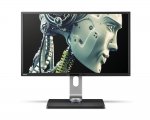
32 inch Monitor with 2560 x 1440 resolution finally under £350 brand new. I have 2 of these at home already working fine with gaming ( Overwatch, Division, Titanfall2 ) as well as Photoshop work and general use. 32" with 1440p resolution is a perfect match, no scaling required.
2 USB and SD card reader on the right handside also very handy
Just give me the postcode, I'll find it for you.
You're welcome.
hamzahuk
28 Apr 17#3
Wonder what 1440p looks like at 32", woulda defo been better at 4k.
Either way nice find op.
meherenow to hamzahuk
28 Apr 172#5
I have an AOC 32" and the 1440p is just lovely looking. 4k is extreme overkill at 32", plus your choices for 60 fps gaming are still limited gfx card wise anyway.
Syst3mzero to hamzahuk
30 Apr 17#25
too small for 4k monitor, I have a 27inch at 1440p and to be honest some fonts are too small, i can read them but its just not as comfortable (i have perfect vision).
you see if you increase font size in Windows it doesn't change all fonts as not all browsers/apps/programs support Windows font resizing.
Yes some of them have their own resizing but not always.
For some reason even Valve don't have an option for font size increase in steam, you would think Valve would support higher resolutions.
For that reason I chose to get a 1440p over a 4k as I had seen 4k monitors around the 30" mark.
For gaming 1440p is better too, 4k may be magnificent but you can achieve much higher frame rates at 1440p and run your gfx card without maxing your fans if its a reasonable card.
example on my radeon 480 factory oc
bioshock infinite, 1440p, 70-80 fps, barely a peep (fan speed rarely over 950rpm).
bioshock infinite, 4k, 40-50 fps, sounds like my case if packed with vacuum cleaners (fan speed often over 2000rpm).
Please note i did use VSR on my monitor to achieve 4k but AMD claims that performance is no different than if you were running on a normal 4K monitor. my fps are a little high compared to reviews, 2 reasons, overclocked and the settings aren't all maxed.
same thing goes for the nvidia gtx 1080 you can achieve 60fps at 4k on that card but not without the accompanied noise. at 1440p it can hit 120fps however limiting it to under 100fps you will be able to hear the game.
I would say if this monitor had an area to improve it would be better refresh rate as 60hz is a bit low. 60fps makes me sad. it isn't a gaming monitor so I will let it off.
RedRain
28 Apr 17#4
this 60hz looking for a 100hz yep its 60hz
DrRamtop
28 Apr 17#6
I've owned 3 of these monitors and they're lovely, solidly built and very good image quality. The 32" VA panels are a bit of a lottery, though. Some are fine, some have faint vertical striping.
But, woe betide you if they ever develop a fault (particularly an intermittent or non-terminal one). BenQ customer support is poor and even if they do grant a return, BenQ use an outfit called Repairtech to do RMA service and they are terrible. My personal experience is they will repeatedly send out obviously defective replacement monitors in shoddy packaging.
Dealing with returning BL3200PTs has put BenQ firmly on my never-buy-from list.
jorglenhof
28 Apr 17#7
These are down to £313.49 at box.co.uk until 30/04. Slightly more than previously but still a good price.
techniques to jorglenhof
29 Apr 17#8
I'm seeing £329?
jorglenhof
29 Apr 17#9
Just add it to you basket and go to the checkout. Until 30/04 they have an extra 5% off monitors.
Lucky88
29 Apr 17#10
Apparently Hdmi resolution is only at 1080 due to bandwidth limitations. :-(
Agharta to Lucky88
29 Apr 17#11
HDMI 1.3 supports 2560×1600 @60Hz so should be fine as it was released over 10 years ago.

![Fresh Breakfast Meat Box (Using code) @ Campbells Meat [Haggis / Lorne Sausage / Bacon / Black Pudding & More]](/images/topics/208684_1.jpg)




































![[Xbox One] Q. u. b. e: Director's Cut on Deals with Gold](/images/topics/208716_1.jpg)


















Opening post
2 USB and SD card reader on the right handside also very handy
All comments (30)
https://www.pricesearcher.com/shop?product=BenQ+BL3200PT
You're welcome.
Either way nice find op.
you see if you increase font size in Windows it doesn't change all fonts as not all browsers/apps/programs support Windows font resizing.
Yes some of them have their own resizing but not always.
For some reason even Valve don't have an option for font size increase in steam, you would think Valve would support higher resolutions.
For that reason I chose to get a 1440p over a 4k as I had seen 4k monitors around the 30" mark.
For gaming 1440p is better too, 4k may be magnificent but you can achieve much higher frame rates at 1440p and run your gfx card without maxing your fans if its a reasonable card.
example on my radeon 480 factory oc
bioshock infinite, 1440p, 70-80 fps, barely a peep (fan speed rarely over 950rpm).
bioshock infinite, 4k, 40-50 fps, sounds like my case if packed with vacuum cleaners (fan speed often over 2000rpm).
Please note i did use VSR on my monitor to achieve 4k but AMD claims that performance is no different than if you were running on a normal 4K monitor. my fps are a little high compared to reviews, 2 reasons, overclocked and the settings aren't all maxed.
same thing goes for the nvidia gtx 1080 you can achieve 60fps at 4k on that card but not without the accompanied noise. at 1440p it can hit 120fps however limiting it to under 100fps you will be able to hear the game.
I would say if this monitor had an area to improve it would be better refresh rate as 60hz is a bit low. 60fps makes me sad. it isn't a gaming monitor so I will let it off.
But, woe betide you if they ever develop a fault (particularly an intermittent or non-terminal one). BenQ customer support is poor and even if they do grant a return, BenQ use an outfit called Repairtech to do RMA service and they are terrible. My personal experience is they will repeatedly send out obviously defective replacement monitors in shoddy packaging.
Dealing with returning BL3200PTs has put BenQ firmly on my never-buy-from list.
http://www.tftcentral.co.uk/reviews/benq_bl3200pt.htm#intro
http://www.tomshardware.co.uk/benq-bl3200pt-qhd-monitor,review-33026-10.html
PPI is the same as for a 24" 1920x1200 which is the sweet spot for me.
TEMPTED.