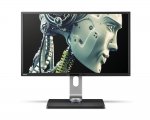
32 inch Monitor with 2560 x 1440 resolution finally under £350 brand new. I have 2 of these at home already working fine with gaming ( Overwatch, Division, Titanfall2 ) as well as Photoshop work and general use. 32" with 1440p resolution is a perfect match, no scaling required.
2 USB and SD card reader on the right handside also very handy
Latest comments (30)
efem
1 May 17#30
yeah I see no difference between 3x24" ( 72" ) and 5760*1080 and 3x32" ( 96" ) 7680*1440 resolution :man:
Agharta
30 Apr 171#29
Well except for the fact that you get 78% more actual real estate for multi-tasking and the screen is dramatically bigger for video playback etc there's no difference! :smiley:
hamzahuk
30 Apr 17#28
I got a 1440p 144hz 27" monitor paired next to a 4k 27", honestly cant really see the quality difference unless actually having to focus.
Text unless upscalled on the 4k monitor is mostly a strain to read and even regular navigation/desktop icons causes irritation.
I have a R9 Fury and it just about gets me 60fps on 1440p, the games I play are witcher 3, gta 5 (modded) and watch dogs 2 (unoptimized piece of sh*t). If I now go on to my 4k monitor I struggle like crazy with even getting 40fps with settings tuned down... Only thing is bluray movies look better on the 4k due to the perfect upscalling from 1080p straight to 4k instead of 1080p to 1440p.
For me my sweet spot has to be 27" 1440p, but all our eyes and preferences differ so what ever suites an individual.
I could only assume 32" at 1440p would look the same as 23" at 1080p, which isnt a good or bad thing, just kinda defeats the purpose of a higher resolution.
Agharta
30 Apr 17#27
Thanks for the clarification.
I was tempted to buy but the quality control with BenQ sounds slightly poor but the deal breaker for me is that Customer Support sounds well below par. I'm used to Dell and they have next day swap out with monitors.
If you don't mind the slight risk this is excellent value.
meherenow
30 Apr 17#26
Sorry to disagree, but I have a Strix 1080 OC and it barely makes a whisper at full pelt.
Yes, 60fps is POSSIBLE at 4k, in the likes of Rocket League, Lego City Undercover + anything that can display that res from yesteryear, but you would have to compromise other visual settings to hit 60fps in the vast majority of AAA titles from the last year or so. I know because I've got this rig plugged into my 65" 4k TV and I'm stuck with 60Hz there so 60fps is a definite target, but man is it big and beautiful.
hamzahuk
28 Apr 17#3
Wonder what 1440p looks like at 32", woulda defo been better at 4k.
Either way nice find op.
meherenow to hamzahuk
28 Apr 172#5
I have an AOC 32" and the 1440p is just lovely looking. 4k is extreme overkill at 32", plus your choices for 60 fps gaming are still limited gfx card wise anyway.
Syst3mzero to hamzahuk
30 Apr 17#25
too small for 4k monitor, I have a 27inch at 1440p and to be honest some fonts are too small, i can read them but its just not as comfortable (i have perfect vision).
you see if you increase font size in Windows it doesn't change all fonts as not all browsers/apps/programs support Windows font resizing.
Yes some of them have their own resizing but not always.
For some reason even Valve don't have an option for font size increase in steam, you would think Valve would support higher resolutions.
For that reason I chose to get a 1440p over a 4k as I had seen 4k monitors around the 30" mark.
For gaming 1440p is better too, 4k may be magnificent but you can achieve much higher frame rates at 1440p and run your gfx card without maxing your fans if its a reasonable card.
example on my radeon 480 factory oc
bioshock infinite, 1440p, 70-80 fps, barely a peep (fan speed rarely over 950rpm).
bioshock infinite, 4k, 40-50 fps, sounds like my case if packed with vacuum cleaners (fan speed often over 2000rpm).
Please note i did use VSR on my monitor to achieve 4k but AMD claims that performance is no different than if you were running on a normal 4K monitor. my fps are a little high compared to reviews, 2 reasons, overclocked and the settings aren't all maxed.
same thing goes for the nvidia gtx 1080 you can achieve 60fps at 4k on that card but not without the accompanied noise. at 1440p it can hit 120fps however limiting it to under 100fps you will be able to hear the game.
I would say if this monitor had an area to improve it would be better refresh rate as 60hz is a bit low. 60fps makes me sad. it isn't a gaming monitor so I will let it off.
efem
29 Apr 171#24
I agree with you. Linus's review on youtube was wrong, I use this monitor with both hdmi and DP and get the native resolution
Agharta
29 Apr 17#23
I noticed that but the reviews clearly state for this model that it supports 1.4 which has enough bandwidth. So if it doesn't support the native resolution via HDMI it is not to do with bandwidth hence why I don't take the YouTube review at face value.
bobo53
29 Apr 17#22
that is related to the 4k monitor the 3201 and they do not mention anything about the other one
scooter
29 Apr 17#21
Hi i have got a GTX 1070 strix asus what monitor would go well with that any ideas thanks
bobo53
29 Apr 17#20
it does not matter what it does but the main purpose for that on this type of monitors it is for connecting a player. It is an office/designer monitor and they usually do that. I also got a similar monitor at max 1920x1080 and the hdmi can only do 1080p at a lower chroma, just good enough for a movie player up to a bluray (did cost £500 at the time). If I connect it to the pc, the picture is really bad even at 1080p. Obviously I got your point but I cannot help why and why not they do it this way. It still does not mean that it does not do the 1440p but looks like that Lucky88 found some info and I agree with him in this circumstance. Anyway, incidentally I do not think that does exist a monitor at 1440p where they allow to connect an hdmi for the purpose of being used at 1440p. DVI or DP or usually both. I might be wrong on this but it is interesting why they do not enable hdmi @ 1440p . I also got a more recent very expensive office monitor and there is no hdmi at all., plenty dvi and Dports. There must be a reason why they could not build a proper HDMI. I there was one I am sure it would only be for connecting a player etc...
Jawseff
29 Apr 171#19
92 ppi for those who are interested.
If this were 4k it would be 138 ppi which is far from the "extreme overkill" mentioned in other comments.
To put it in perspective, the first iPad (non retina) has a ppi of 132, and most printed documents have a dpi of 300.
Not saying this monitor is bad. far from it. But some users enjoy not seeing individual pixels.
Agharta
29 Apr 17#18
Thanks, with rant being the operative word. :smiley:
The guy is just quoting generic out of date info about HDMI and I had no confidence he was right so have downloaded the product manual from the manufacturer which states for the HDMI inputs:
Never take a random Youtube video as being definitive info.
Lucky88
29 Apr 17#17
Lol 2:32 onwards
Agharta
29 Apr 17#16
At what point in the video is that mentioned to help people that are interested?
As I said if it's V1.3 it has the bandwidth but if they used an older version then it doesn't.
But if you have a laptop with HDMI 1.3 then you should be able to use a HDMI to DVI dual link cable for video but you obviously won't have digital audio input that way.
If its HDMI 1.3 then you are incorrect sir.
en.wikipedia.org/wiki/HDMI
bobo53
29 Apr 17#13
he is right, that must be used for video reproduction only, usually a movie. DVI and DP would do the job very well. Anyway, not a proper gaming monitor (irrelevant to the many of us) but colors and clarity must be amazing on this 10bit monitor
PPI is the same as for a 24" 1920x1200 which is the sweet spot for me. TEMPTED.
Lucky88
29 Apr 17#10
Apparently Hdmi resolution is only at 1080 due to bandwidth limitations. :-(
Agharta to Lucky88
29 Apr 17#11
HDMI 1.3 supports 2560×1600 @60Hz so should be fine as it was released over 10 years ago.
jorglenhof
29 Apr 17#9
Just add it to you basket and go to the checkout. Until 30/04 they have an extra 5% off monitors.
jorglenhof
28 Apr 17#7
These are down to £313.49 at box.co.uk until 30/04. Slightly more than previously but still a good price.
techniques to jorglenhof
29 Apr 17#8
I'm seeing £329?
DrRamtop
28 Apr 17#6
I've owned 3 of these monitors and they're lovely, solidly built and very good image quality. The 32" VA panels are a bit of a lottery, though. Some are fine, some have faint vertical striping.
But, woe betide you if they ever develop a fault (particularly an intermittent or non-terminal one). BenQ customer support is poor and even if they do grant a return, BenQ use an outfit called Repairtech to do RMA service and they are terrible. My personal experience is they will repeatedly send out obviously defective replacement monitors in shoddy packaging.
Dealing with returning BL3200PTs has put BenQ firmly on my never-buy-from list.

![Fresh Breakfast Meat Box (Using code) @ Campbells Meat [Haggis / Lorne Sausage / Bacon / Black Pudding & More]](/images/topics/208684_1.jpg)




































![[Xbox One] Q. u. b. e: Director's Cut on Deals with Gold](/images/topics/208716_1.jpg)


















Opening post
2 USB and SD card reader on the right handside also very handy
Latest comments (30)
Text unless upscalled on the 4k monitor is mostly a strain to read and even regular navigation/desktop icons causes irritation.
I have a R9 Fury and it just about gets me 60fps on 1440p, the games I play are witcher 3, gta 5 (modded) and watch dogs 2 (unoptimized piece of sh*t). If I now go on to my 4k monitor I struggle like crazy with even getting 40fps with settings tuned down... Only thing is bluray movies look better on the 4k due to the perfect upscalling from 1080p straight to 4k instead of 1080p to 1440p.
For me my sweet spot has to be 27" 1440p, but all our eyes and preferences differ so what ever suites an individual.
I could only assume 32" at 1440p would look the same as 23" at 1080p, which isnt a good or bad thing, just kinda defeats the purpose of a higher resolution.
I was tempted to buy but the quality control with BenQ sounds slightly poor but the deal breaker for me is that Customer Support sounds well below par. I'm used to Dell and they have next day swap out with monitors.
If you don't mind the slight risk this is excellent value.
Yes, 60fps is POSSIBLE at 4k, in the likes of Rocket League, Lego City Undercover + anything that can display that res from yesteryear, but you would have to compromise other visual settings to hit 60fps in the vast majority of AAA titles from the last year or so. I know because I've got this rig plugged into my 65" 4k TV and I'm stuck with 60Hz there so 60fps is a definite target, but man is it big and beautiful.
Either way nice find op.
you see if you increase font size in Windows it doesn't change all fonts as not all browsers/apps/programs support Windows font resizing.
Yes some of them have their own resizing but not always.
For some reason even Valve don't have an option for font size increase in steam, you would think Valve would support higher resolutions.
For that reason I chose to get a 1440p over a 4k as I had seen 4k monitors around the 30" mark.
For gaming 1440p is better too, 4k may be magnificent but you can achieve much higher frame rates at 1440p and run your gfx card without maxing your fans if its a reasonable card.
example on my radeon 480 factory oc
bioshock infinite, 1440p, 70-80 fps, barely a peep (fan speed rarely over 950rpm).
bioshock infinite, 4k, 40-50 fps, sounds like my case if packed with vacuum cleaners (fan speed often over 2000rpm).
Please note i did use VSR on my monitor to achieve 4k but AMD claims that performance is no different than if you were running on a normal 4K monitor. my fps are a little high compared to reviews, 2 reasons, overclocked and the settings aren't all maxed.
same thing goes for the nvidia gtx 1080 you can achieve 60fps at 4k on that card but not without the accompanied noise. at 1440p it can hit 120fps however limiting it to under 100fps you will be able to hear the game.
I would say if this monitor had an area to improve it would be better refresh rate as 60hz is a bit low. 60fps makes me sad. it isn't a gaming monitor so I will let it off.
If this were 4k it would be 138 ppi which is far from the "extreme overkill" mentioned in other comments.
To put it in perspective, the first iPad (non retina) has a ppi of 132, and most printed documents have a dpi of 300.
Not saying this monitor is bad. far from it. But some users enjoy not seeing individual pixels.
The guy is just quoting generic out of date info about HDMI and I had no confidence he was right so have downloaded the product manual from the manufacturer which states for the HDMI inputs:
"Supports up to 3840 x 2160 @ 30 Hz". That is fine for 2560x1440 @ 60Hz
Manual is here - http://www.benq.co.uk/product/monitor/bl3200pt/downloads/
Never take a random Youtube video as being definitive info.
As I said if it's V1.3 it has the bandwidth but if they used an older version then it doesn't.
But if you have a laptop with HDMI 1.3 then you should be able to use a HDMI to DVI dual link cable for video but you obviously won't have digital audio input that way.
en.wikipedia.org/wiki/HDMI
http://www.tftcentral.co.uk/reviews/benq_bl3200pt.htm#intro
http://www.tomshardware.co.uk/benq-bl3200pt-qhd-monitor,review-33026-10.html
PPI is the same as for a 24" 1920x1200 which is the sweet spot for me.
TEMPTED.
But, woe betide you if they ever develop a fault (particularly an intermittent or non-terminal one). BenQ customer support is poor and even if they do grant a return, BenQ use an outfit called Repairtech to do RMA service and they are terrible. My personal experience is they will repeatedly send out obviously defective replacement monitors in shoddy packaging.
Dealing with returning BL3200PTs has put BenQ firmly on my never-buy-from list.
https://www.pricesearcher.com/shop?product=BenQ+BL3200PT
You're welcome.