Wanted a second one of these for a while for my secondary PC, but holding out for a price drop as it wasn't critical. Picked up the first one at a previous Currys/PC World deal for £54.99 I saw on here back in May which I though was an excellent price, so this is superb!
I'm sure everyone who knows of these mice knows what they are like - if not, here's Logitech's blurb:
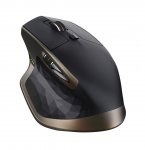
Crafted for optimum comfort and response, the Logitech MX Master Wireless Darkfield Mouse offers comfortable and precise control.
Hand-sculpted
The ergonomic design supports your hand and wrist in a comfortable, natural position for optimum comfort during use.
A Darkfield laser sensor delivers accurate tracking on virtually any surface, including glass and high-gloss surfaces.
Adaptive scrolling
With the speed-adaptive scroll wheel you'll be able to scroll through long documents and web pages quicker and easier.
The thumb wheel enables side-to-side scrolling with just a stroke of your thumb. The actions of the scroll wheels and buttons are fully customisable to suit you thanks to the downloadable Logitech Options software.
Wireless connectivity
This wireless mouse uses dual connectivity for optimum performance – connect to your PC or Mac via the included Logitech Unifying Receiver or via Bluetooth Smart technology. You can pair up to three devices and easily switch between them at the touch of a button.
Free from trailing cables, the MX Master offers excellent versatility, ideal for use in the home or office. Recharging quickly, this wireless mouse provides up to 40 days of power from a full charge.
Top comments
fort
21 Nov 167#18
Currently £38 used - warehousedeals and with 20% off all warehousedeals. Making it ~£30. Even more of a bargain.
Solly92
21 Nov 163#4
Way too many 1 star reviews on Amazon.
I had a Revolution MX (think that is what it was called) which was great till it was basically just worn out. I bought a Performance MX and another spare. Using a single instead of double AA battery life was way worse than halved, but, I have a load of eneloop AA's and it takes a few seconds to swap so I could live with it. I would much rather swap a battery than have to plug in the mouse to charge. I wore out the first one and am a few months into the spare and already considering what to replace it with.
Looks like this MX Master has lost the thumb button which was by far the most useful 'non-standard' button on the MX range and the battery is built in so it will have to be plugged in. So Logitech seem to again have made a new product worse than the old product and the 1 star reviews indicate their quality control hasn't improved either. I had an Anywhere MX with an unbalanced scroll wheel, in non-ratchet mode when you let go it might rotate up to half a turn in either direction as the heavy side of the wheel sunk to the bottom - incredibly annoying and should never have got through quality control.
All comments (62)
shuttsies
21 Nov 162#1
Cheapest it's been according to camel x3!
grove39
21 Nov 16#2
just paid 58 quid each for a couple of these about 2 days ago from Alza. Looks like i'm getting another one lol
noddle36
21 Nov 16#3
Heat Thanks! Here comes the update to my Logitech Performance MX Mouse
Solly92
21 Nov 163#4
Way too many 1 star reviews on Amazon.
I had a Revolution MX (think that is what it was called) which was great till it was basically just worn out. I bought a Performance MX and another spare. Using a single instead of double AA battery life was way worse than halved, but, I have a load of eneloop AA's and it takes a few seconds to swap so I could live with it. I would much rather swap a battery than have to plug in the mouse to charge. I wore out the first one and am a few months into the spare and already considering what to replace it with.
Looks like this MX Master has lost the thumb button which was by far the most useful 'non-standard' button on the MX range and the battery is built in so it will have to be plugged in. So Logitech seem to again have made a new product worse than the old product and the 1 star reviews indicate their quality control hasn't improved either. I had an Anywhere MX with an unbalanced scroll wheel, in non-ratchet mode when you let go it might rotate up to half a turn in either direction as the heavy side of the wheel sunk to the bottom - incredibly annoying and should never have got through quality control.

![Fresh Breakfast Meat Box (Using code) @ Campbells Meat [Haggis / Lorne Sausage / Bacon / Black Pudding & More]](/images/topics/208684_1.jpg)




































![[Xbox One] Q. u. b. e: Director's Cut on Deals with Gold](/images/topics/208716_1.jpg)


















Opening post
I'm sure everyone who knows of these mice knows what they are like - if not, here's Logitech's blurb:
Crafted for optimum comfort and response, the Logitech MX Master Wireless Darkfield Mouse offers comfortable and precise control.
Hand-sculpted
The ergonomic design supports your hand and wrist in a comfortable, natural position for optimum comfort during use.
A Darkfield laser sensor delivers accurate tracking on virtually any surface, including glass and high-gloss surfaces.
Adaptive scrolling
With the speed-adaptive scroll wheel you'll be able to scroll through long documents and web pages quicker and easier.
The thumb wheel enables side-to-side scrolling with just a stroke of your thumb. The actions of the scroll wheels and buttons are fully customisable to suit you thanks to the downloadable Logitech Options software.
Wireless connectivity
This wireless mouse uses dual connectivity for optimum performance – connect to your PC or Mac via the included Logitech Unifying Receiver or via Bluetooth Smart technology. You can pair up to three devices and easily switch between them at the touch of a button.
Free from trailing cables, the MX Master offers excellent versatility, ideal for use in the home or office. Recharging quickly, this wireless mouse provides up to 40 days of power from a full charge.
Top comments
I had a Revolution MX (think that is what it was called) which was great till it was basically just worn out. I bought a Performance MX and another spare. Using a single instead of double AA battery life was way worse than halved, but, I have a load of eneloop AA's and it takes a few seconds to swap so I could live with it. I would much rather swap a battery than have to plug in the mouse to charge. I wore out the first one and am a few months into the spare and already considering what to replace it with.
Looks like this MX Master has lost the thumb button which was by far the most useful 'non-standard' button on the MX range and the battery is built in so it will have to be plugged in. So Logitech seem to again have made a new product worse than the old product and the 1 star reviews indicate their quality control hasn't improved either. I had an Anywhere MX with an unbalanced scroll wheel, in non-ratchet mode when you let go it might rotate up to half a turn in either direction as the heavy side of the wheel sunk to the bottom - incredibly annoying and should never have got through quality control.
All comments (62)
I had a Revolution MX (think that is what it was called) which was great till it was basically just worn out. I bought a Performance MX and another spare. Using a single instead of double AA battery life was way worse than halved, but, I have a load of eneloop AA's and it takes a few seconds to swap so I could live with it. I would much rather swap a battery than have to plug in the mouse to charge. I wore out the first one and am a few months into the spare and already considering what to replace it with.
Looks like this MX Master has lost the thumb button which was by far the most useful 'non-standard' button on the MX range and the battery is built in so it will have to be plugged in. So Logitech seem to again have made a new product worse than the old product and the 1 star reviews indicate their quality control hasn't improved either. I had an Anywhere MX with an unbalanced scroll wheel, in non-ratchet mode when you let go it might rotate up to half a turn in either direction as the heavy side of the wheel sunk to the bottom - incredibly annoying and should never have got through quality control.
as cheap as it's been on Amazon, thanks!
partofyou at safemail dot net