Wanted a second one of these for a while for my secondary PC, but holding out for a price drop as it wasn't critical. Picked up the first one at a previous Currys/PC World deal for £54.99 I saw on here back in May which I though was an excellent price, so this is superb!
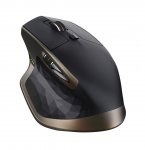
I'm sure everyone who knows of these mice knows what they are like - if not, here's Logitech's blurb:
Crafted for optimum comfort and response, the Logitech MX Master Wireless Darkfield Mouse offers comfortable and precise control.
Hand-sculpted
The ergonomic design supports your hand and wrist in a comfortable, natural position for optimum comfort during use.
A Darkfield laser sensor delivers accurate tracking on virtually any surface, including glass and high-gloss surfaces.
Adaptive scrolling
With the speed-adaptive scroll wheel you'll be able to scroll through long documents and web pages quicker and easier.
The thumb wheel enables side-to-side scrolling with just a stroke of your thumb. The actions of the scroll wheels and buttons are fully customisable to suit you thanks to the downloadable Logitech Options software.
Wireless connectivity
This wireless mouse uses dual connectivity for optimum performance – connect to your PC or Mac via the included Logitech Unifying Receiver or via Bluetooth Smart technology. You can pair up to three devices and easily switch between them at the touch of a button.
Free from trailing cables, the MX Master offers excellent versatility, ideal for use in the home or office. Recharging quickly, this wireless mouse provides up to 40 days of power from a full charge.
Top comments
fort
21 Nov 167#18
Currently £38 used - warehousedeals and with 20% off all warehousedeals. Making it ~£30. Even more of a bargain.
Solly92
21 Nov 163#4
Way too many 1 star reviews on Amazon.
I had a Revolution MX (think that is what it was called) which was great till it was basically just worn out. I bought a Performance MX and another spare. Using a single instead of double AA battery life was way worse than halved, but, I have a load of eneloop AA's and it takes a few seconds to swap so I could live with it. I would much rather swap a battery than have to plug in the mouse to charge. I wore out the first one and am a few months into the spare and already considering what to replace it with.
Looks like this MX Master has lost the thumb button which was by far the most useful 'non-standard' button on the MX range and the battery is built in so it will have to be plugged in. So Logitech seem to again have made a new product worse than the old product and the 1 star reviews indicate their quality control hasn't improved either. I had an Anywhere MX with an unbalanced scroll wheel, in non-ratchet mode when you let go it might rotate up to half a turn in either direction as the heavy side of the wheel sunk to the bottom - incredibly annoying and should never have got through quality control.
All comments (62)
shuttsies
21 Nov 162#1
Cheapest it's been according to camel x3!
grove39
21 Nov 16#2
just paid 58 quid each for a couple of these about 2 days ago from Alza. Looks like i'm getting another one lol
noddle36
21 Nov 16#3
Heat Thanks! Here comes the update to my Logitech Performance MX Mouse
Solly92
21 Nov 163#4
Way too many 1 star reviews on Amazon.
I had a Revolution MX (think that is what it was called) which was great till it was basically just worn out. I bought a Performance MX and another spare. Using a single instead of double AA battery life was way worse than halved, but, I have a load of eneloop AA's and it takes a few seconds to swap so I could live with it. I would much rather swap a battery than have to plug in the mouse to charge. I wore out the first one and am a few months into the spare and already considering what to replace it with.
Looks like this MX Master has lost the thumb button which was by far the most useful 'non-standard' button on the MX range and the battery is built in so it will have to be plugged in. So Logitech seem to again have made a new product worse than the old product and the 1 star reviews indicate their quality control hasn't improved either. I had an Anywhere MX with an unbalanced scroll wheel, in non-ratchet mode when you let go it might rotate up to half a turn in either direction as the heavy side of the wheel sunk to the bottom - incredibly annoying and should never have got through quality control.
Still think the Performance MX was the best of these.
Guardsmon to Picard123
21 Nov 16#22
MX rev was a trooper. still going strong, but starting to ware a little. tempted with the marathon instead
logitechme to Picard123
21 Nov 16#35
I have one of these for same if you need, £20 for wave keyboard and this mouse.
partofyou at safemail dot net
ssimonian
21 Nov 16#7
Still running a g9x which is reaching the end of its life. Is it wrong to want a high end mouse that is still wired?
AzNDeals
21 Nov 16#8
Just bought one, no idea why. I suppose if I don't like it, I'll just send it back or pass it on as a christmas gift.
playstak
21 Nov 16#9
The mx anywhere 2 is also going for £27. Good options for those using ultrabooks and want to keep the gear compact.
daBluone
21 Nov 161#10
Wowzer! I like using mine so much I bought one for work. Paid alot more than this! Heated.
sam1970
21 Nov 16#11
this or the mx anywhere 2?
PowerPantsPete to sam1970
21 Nov 16#36
Both :smile:
BigYoSpeck
21 Nov 16#12
Been waiting for one of these to drop below £50 for a while. Bargain, bought and heat added. Cheers.
PCie
21 Nov 16#13
Ordered this exactly a week ago from Amazon using the 30% logitech discount. Got it for effectively £45 which I thought was an absolute steal. Got the MX anywhere 2 as the second item and was pretty happy with it.
Spoke to Amazon chat and they weren't able to refund the difference :disappointed:
Asked me to return the items and place a new order. Not sure it's worth the hassle for the sake of a few pounds...
CampGareth
21 Nov 16#14
I have one of these and ho boy is it a comfy mouse, though I've never found a use for that button under the thumb rest, seems too hard to press.
BogBeast
21 Nov 16#15
Have been after one of these for a while, its exactly what I was hoping would come up somewhere during Black Friday. My raggy old Perfromance MX will go to a backup...
Woke up this morning and found an email from 3 camels, came here to post it. Should have realised I'd be way too slow.. :wink:
NikLP
21 Nov 16#16
Found this and the Anywhere as "new" deals myself this morning too, bit annoyed! Not sure whether to plump for the Anywhere or Master?
Of course, I bought an 8 quid mouse from PC World here last week... :neutral_face:
Hunkerdown
21 Nov 16#17
Great mouse and a bargain.
fort
21 Nov 167#18
Currently £38 used - warehousedeals and with 20% off all warehousedeals. Making it ~£30. Even more of a bargain.
aaron1uk to fort
21 Nov 161#20
cheers for this at this price I'm going in for it.
Deeco to fort
21 Nov 16#23
Excluding warranty, rather pay the extra convenience
BigYoSpeck to fort
21 Nov 16#33
Good spot!
aaron1uk
21 Nov 16#19
I had the Revolution back in the day and to this day is the best mouse I have ever owned. I used it for design and gaming. I'm not sure I put much stock in specific gaming mice. Would I find this okay for gaming?
Deeco
21 Nov 16#21
HOOOTTT!! Glad I waiting, thanks OP
morocco1
21 Nov 16#24
Quick Q - is it possible to set the two scroll wheels to perform different tasks? I'm thinking one for scroll and one for zoom when photo editing.
Deeco to morocco1
21 Nov 16#25
What do you mean the 'two scroll wheels'? If you mean the thumb scroll, you can't program that, afaik, but you can program the back/forward buttons and the gesture buttons to pretty much anything.
djwilliams100 to morocco1
22 Nov 16#40
You can program the thumb wheel to do certain functions. I've got 2 of these and the thumb wheel I use for scrolling across spreadsheets for example.
ElBuc
21 Nov 16#26
I've had this for over a year and use every day.
Built in battery lasts about a month and it's a really nice sturdy build. Wheel works well, thumb button's a bit odd as you sort of press down onto it but you get used to it. There are loads of programmable options which I don't use.
Highly recommended for serious users!
morocco1
21 Nov 16#27
I mean the two as in having separate functions on top and the side scroll wheels. If the thumb scroll simply replicates the middle-finger scroll, then it's no use to me.
ElBuc
21 Nov 16#28
There are 9 options for thumb wheel - navigation, volume, screen switching, zoom etc
Deeco
21 Nov 16#29
Ah okay, that's even better. I read somewhere online that it wasn't.
AzNDeals
21 Nov 16#30
Got my MX Master delivered this morning, and just finally got around to start playing with it.
First impressions: I'm finding it very difficult to find a comfortable position. It feels very weird, I must say, but I guess it will be something to get used to over time.
ElBuc to AzNDeals
21 Nov 16#31
The way I find most natural is to hold it gently with thumb and little finger and keep your palm just away from the mouse (except where it meets the little finger), and the middle three fingers just hover or rest until needed.
This may take time to get used to if you've been using a mouse with a standard thumb button. Oh, no good for left handers...
Kulaak
21 Nov 16#32
Shame the Stone colour isn't the same price.
Kulaak
21 Nov 16#34
Yee Ha, £33.65 with my gift card :stuck_out_tongue:
2015
21 Nov 161#37
2 quick questions I would appreciate input on please.
Is this any good for PC gaming?
Is it possible to connect to Xbox one to use for internet browsing?
Thinking of buying for a gift
Thanks in advance.
superjules to 2015
21 Nov 161#39
Found this on Amazon
Its a good mouse quick and responsive good for normal Facebook games etc but not a proper gaming mouse, Logitech have some good gaming mice if that's just what it's for but the mx is a good all rounder
By gary fernandez on 04 June 2016
streety_
21 Nov 16#38
Bought one of these this year and they are great. Fantastic deal +1
thestormtrooper
22 Nov 16#41
There seems to be lots of reviews of this mouse stating that the scroll wheel stops working and ends up using only the free flow mode? so maybe that's why they've reduced them in price?
Kulaak
22 Nov 16#42
Inconveinient, yes, but you could always plug the supplied cable into a standard phone charger to charge the mouse when not in use just like you would do when charging your phone or those batteries. Bit of a faff tho' I agree.
Why they can't provide a charging station with it like they have done many times before for some previous mice.
Smash41
22 Nov 16#43
To anyone that has this. Can you set the button below the wheel to search Google for highlighted text?
You can on the MX Revolution I have and it's great.
Deeco to Smash41
23 Nov 16#44
I would assume so, I just got the device, it has application specific settings, but so many options that I can't get my head around lol
ElBuc to Smash41
24 Nov 16#53
It has a list of 20+ options for this button, and one of them is 'Search', one is 'Keystroke Assignment', one is 'Advanced Click' - so one of them should be at least part of the way to do what you need!
carlos777uk
23 Nov 16#45
Just bought one of these to replace an MX Revolution that's lasted 10 years - sad times!
Let's hope it's half as good.
TheGlennster
23 Nov 16#46
Hot for me. I've own two of these, I ended up buying one for work as well. Everybody comments how comfy it it to use. The only problem is there can be an issue with the ratchet on the scroll wheel failing (one of mine did this) there is an easy DIY fix if you Youtube the symptoms. Maybe this is why the price has dropped ?
thestormtrooper to TheGlennster
23 Nov 16#47
This is what puts me off buying it? does the youtube fix sort it permanently? If I was buying a mouse for £41.99 I'd expect it not to need a fix? surely there is a better mouse out there that doesn't need a fix that's also very good for this price range?
mumihp
23 Nov 16#48
Hot.........I was disappointed that I missed the deal few days ago as the price jumped back up but thankfully found this deal on amazon again. Great price, I have been looking for a wireless mouse for the last few months, I have the Logitech K400 so using the touchpad there but at this price, I can't resist. It's going to be weird not using the K400 but won't regret it with this. Great review on this, glad I waited...at this moment, this is still selling for £70+++ so about £30++ saving is great.
Deeco
23 Nov 16#49
I believe the issue has been fixed with a new revision, the box looks different compared to those youtube videos and upon looking reddit, someone mentioned the serial numbers representing year of revision, not sure on this.
mumihp
24 Nov 16#50
I think this is the new edition 2015 so any problems should have been fixed. The only reason for the price drop is Black friday. Other stores, eg. Currys, Argos are still selling this for over £70......as soon as BF is done, this will jump back up to the £65++ price.
EsiEmi
24 Nov 16#51
been using it for two days now, very comfortable mouse, very accurate too, get it while its cheap, you get till end of January to send it back for refund if it goes wrong.
compared to my g602, 602 doesn't feel natural, sharp buttons on the side and heavy due to its two AA batteries, MX is a much better mouse, i know its not a gaming mouse but i don't game anymore.
Kulaak
24 Nov 16#52
Popped into Currys/PcWorld today & found is same price. So if you can't wait dash down there.
Since I managed to get mine cheaper (with gift card) I'm a still waiting........ Tried a cheeky discount in store but they were having none of it :smile:
max84
25 Nov 16#54
would this be much of a upgrade to a Logitech MX1000 Laser Wireless Bluetooth Mouse (logitech m-rba97) ?
it's funny when i looked up that model on ebay i saw one listed for over £200 that's crazy!!!
adamthedudley
28 Nov 16#55
I just plugged this in. It's fantastic. Not quite as comfortable as the mx 1000 laser. But I like the ratchet vs free flow scroll wheel. Also thumb scroll is better than pushing normal scroll wheel to the left or right.
thestormtrooper
28 Nov 16#56
I just got this also. However... I'm considering returning it. There's nothing really wrong with it, I've just quickly realised I'm so much faster with keyboard shortcuts rather than using mouse shortcuts. Kind of makes it an expensive mouse when I really only need a mouse for moving the pointer it seems.
adamthedudley to thestormtrooper
28 Nov 16#57
Yes. I used to be the same. When doing coding, anything that required me to move to the mouse was annoying.
But now I do more design and diagrams, so more mouse work. TBH it's just great to find a mouse almost as comfortable as my mx 1000. With its ageing battery and very sticky scroll wheel.
Kulaak
28 Nov 16#58
Not sure I like mine. feels very cheap (especially the scroll wheel) in comparison to my MX900. It also has no support for Vista although everything functions just plugging it in. Not a major worry as Vista is just a temporary measure.
I guess plus point is I don't have to keep charging batteries every 3 days!
BigYoSpeck
2 Dec 16#59
10 days later and the scroll wheel is stuck in freespin mode, a very common fault so they can have it back. A shame because it was an otherwise awesome mouse.
max84 to BigYoSpeck
2 Dec 16#60
damn that sucks, i hope that doesn't happen to mine, or i might send it back as well i don't want to i really like the mouse
BigYoSpeck
2 Dec 16#61
Ok so slightly embarrassing but it's not faulty... I use it on two devices and I disabled the mode shift button on one device. That's the middle button that switching the wheel to ratchet or free spin mode because flicking the wheel automatically goes into that mode so I don't see the need for it. But, on the second device, I forgot to do this and that button still did the mode shift.
So it's actually still working fine and I've cancelled the return.
max84
2 Dec 16#62
great to hear that, this mouse was nearly free for me after selling my older logitech mx 1000 on ebay

![Fresh Breakfast Meat Box (Using code) @ Campbells Meat [Haggis / Lorne Sausage / Bacon / Black Pudding & More]](/images/topics/208684_1.jpg)




































![[Xbox One] Q. u. b. e: Director's Cut on Deals with Gold](/images/topics/208716_1.jpg)


















Opening post
I'm sure everyone who knows of these mice knows what they are like - if not, here's Logitech's blurb:
Crafted for optimum comfort and response, the Logitech MX Master Wireless Darkfield Mouse offers comfortable and precise control.
Hand-sculpted
The ergonomic design supports your hand and wrist in a comfortable, natural position for optimum comfort during use.
A Darkfield laser sensor delivers accurate tracking on virtually any surface, including glass and high-gloss surfaces.
Adaptive scrolling
With the speed-adaptive scroll wheel you'll be able to scroll through long documents and web pages quicker and easier.
The thumb wheel enables side-to-side scrolling with just a stroke of your thumb. The actions of the scroll wheels and buttons are fully customisable to suit you thanks to the downloadable Logitech Options software.
Wireless connectivity
This wireless mouse uses dual connectivity for optimum performance – connect to your PC or Mac via the included Logitech Unifying Receiver or via Bluetooth Smart technology. You can pair up to three devices and easily switch between them at the touch of a button.
Free from trailing cables, the MX Master offers excellent versatility, ideal for use in the home or office. Recharging quickly, this wireless mouse provides up to 40 days of power from a full charge.
Top comments
I had a Revolution MX (think that is what it was called) which was great till it was basically just worn out. I bought a Performance MX and another spare. Using a single instead of double AA battery life was way worse than halved, but, I have a load of eneloop AA's and it takes a few seconds to swap so I could live with it. I would much rather swap a battery than have to plug in the mouse to charge. I wore out the first one and am a few months into the spare and already considering what to replace it with.
Looks like this MX Master has lost the thumb button which was by far the most useful 'non-standard' button on the MX range and the battery is built in so it will have to be plugged in. So Logitech seem to again have made a new product worse than the old product and the 1 star reviews indicate their quality control hasn't improved either. I had an Anywhere MX with an unbalanced scroll wheel, in non-ratchet mode when you let go it might rotate up to half a turn in either direction as the heavy side of the wheel sunk to the bottom - incredibly annoying and should never have got through quality control.
All comments (62)
I had a Revolution MX (think that is what it was called) which was great till it was basically just worn out. I bought a Performance MX and another spare. Using a single instead of double AA battery life was way worse than halved, but, I have a load of eneloop AA's and it takes a few seconds to swap so I could live with it. I would much rather swap a battery than have to plug in the mouse to charge. I wore out the first one and am a few months into the spare and already considering what to replace it with.
Looks like this MX Master has lost the thumb button which was by far the most useful 'non-standard' button on the MX range and the battery is built in so it will have to be plugged in. So Logitech seem to again have made a new product worse than the old product and the 1 star reviews indicate their quality control hasn't improved either. I had an Anywhere MX with an unbalanced scroll wheel, in non-ratchet mode when you let go it might rotate up to half a turn in either direction as the heavy side of the wheel sunk to the bottom - incredibly annoying and should never have got through quality control.
as cheap as it's been on Amazon, thanks!
partofyou at safemail dot net
Spoke to Amazon chat and they weren't able to refund the difference :disappointed:
Asked me to return the items and place a new order. Not sure it's worth the hassle for the sake of a few pounds...
Woke up this morning and found an email from 3 camels, came here to post it. Should have realised I'd be way too slow.. :wink:
Of course, I bought an 8 quid mouse from PC World here last week... :neutral_face:
Built in battery lasts about a month and it's a really nice sturdy build. Wheel works well, thumb button's a bit odd as you sort of press down onto it but you get used to it. There are loads of programmable options which I don't use.
Highly recommended for serious users!
First impressions: I'm finding it very difficult to find a comfortable position. It feels very weird, I must say, but I guess it will be something to get used to over time.
This may take time to get used to if you've been using a mouse with a standard thumb button. Oh, no good for left handers...
Is this any good for PC gaming?
Is it possible to connect to Xbox one to use for internet browsing?
Thinking of buying for a gift
Thanks in advance.
Its a good mouse quick and responsive good for normal Facebook games etc but not a proper gaming mouse, Logitech have some good gaming mice if that's just what it's for but the mx is a good all rounder
By gary fernandez on 04 June 2016
Why they can't provide a charging station with it like they have done many times before for some previous mice.
You can on the MX Revolution I have and it's great.
Let's hope it's half as good.
compared to my g602, 602 doesn't feel natural, sharp buttons on the side and heavy due to its two AA batteries, MX is a much better mouse, i know its not a gaming mouse but i don't game anymore.
Since I managed to get mine cheaper (with gift card) I'm a still waiting........ Tried a cheeky discount in store but they were having none of it :smile:
it's funny when i looked up that model on ebay i saw one listed for over £200 that's crazy!!!
But now I do more design and diagrams, so more mouse work. TBH it's just great to find a mouse almost as comfortable as my mx 1000. With its ageing battery and very sticky scroll wheel.
I guess plus point is I don't have to keep charging batteries every 3 days!
So it's actually still working fine and I've cancelled the return.