Deal of the week!? 525GB has never been so cheap!! :sunglasses:
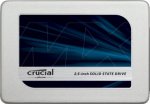
Crucial MX300 525 GB SATA 2.5 Inch Internal Solid State Drive with 9.5 mm Adapter - Grey/Blue.
Sequential reads/writes up to 530 / 510 MB/s on all file types
Random reads/writes up to 92k / 83k on all file types
Over 90x more energy efficient than a typical hard drive
Accelerated by Micron 3D NAND technology
Dynamic Write Acceleration technology delivers faster saves and file transfers
Top comments
scoon to RiverDragon8
28 Nov 169#15
That's cos Brexit hasn't happened yet
chieftex
28 Nov 164#127
Yes, I can confirm this works.
Place in mouth, and connect cable to left ear (faster) or right ear (more capacity).
nomnomnomnom
28 Nov 163#55
It's pretty much exactly the same, no matter if laptop or desktop, as long as you have a SATA port. Basic steps are:
Install Acronis or Reflect (Free). Make a boot disk from within the application, so install it first and make it before doing anything else.
Remove old drive
Install new drive
Boot from the clone disk you made in step 1
Clone the old drive to the new one
Done
There are slight variations, but you'll need some way to have both drives in one system (either via SATA or USB) to clone the stuff across.
batista
28 Nov 163#6
thanks op, was gutted when I missed the 750gb offer the other day, but glad to get this, :smiley:
All comments (248)
scerstt
28 Nov 16#1
I guess you better get this whilst it's not so hot ;D
Panda221
28 Nov 161#2
Cracking Price.
benhorne12
28 Nov 16#3
Hi does anyone know if this will fit a 2010 MacBook Pro. Do I need an adaptors or anything?
Cheers not come across a SSD first hand so not sure on the basics

![Fresh Breakfast Meat Box (Using code) @ Campbells Meat [Haggis / Lorne Sausage / Bacon / Black Pudding & More]](/images/topics/208684_1.jpg)




































![[Xbox One] Q. u. b. e: Director's Cut on Deals with Gold](/images/topics/208716_1.jpg)


















Opening post
Crucial MX300 525 GB SATA 2.5 Inch Internal Solid State Drive with 9.5 mm Adapter - Grey/Blue.
Sequential reads/writes up to 530 / 510 MB/s on all file types
Random reads/writes up to 92k / 83k on all file types
Over 90x more energy efficient than a typical hard drive
Accelerated by Micron 3D NAND technology
Dynamic Write Acceleration technology delivers faster saves and file transfers
Top comments
Place in mouth, and connect cable to left ear (faster) or right ear (more capacity).
Install Acronis or Reflect (Free). Make a boot disk from within the application, so install it first and make it before doing anything else.
Remove old drive
Install new drive
Boot from the clone disk you made in step 1
Clone the old drive to the new one
Done
There are slight variations, but you'll need some way to have both drives in one system (either via SATA or USB) to clone the stuff across.
All comments (248)
Cheers not come across a SSD first hand so not sure on the basics
https://www.youtube.com/watch?v=jd3RS-GGsCI
Ben
Get one of these as well
https://www.amazon.co.uk/Sabrent-2-5-Inch-Adapter-Optimized-EC-SSHD-x/dp/B011M8YACM/ref=pd_bxgy_147_2?_encoding=UTF8&psc=1&refRID=S7Y4SKB5DZY471BASEXH