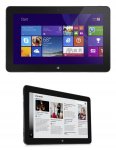
Fantastic FHD 10 inch tablet with an i5 processor, 4GB RAM and 128GB SSD for under £175! Bargain! Add the WWAN card for a tablet with Internet access on the go.
MCS Technology are selling a great value Dell Venue 11 Pro for only £143.40+vat&delivery.
Venue 11 Pro (7130) Tablet
Intel Core i5-4300Y 1.6GHz
4Gb DDR3
128Gb SSD
Intel HD Graphics
10.8″ FHD 1920 x 1080
8MP Rear Camera & 2MP Front Camera
mini HDMI
Full size USB 3.0.
Micro-SD Card Reader
36Whr Swappable Battery
Bluetooth + Wireless
They are refurbished and come without an operating system but you can add Windows 10 for just £14 and a WWAN card for £7!
Total price with VAT & Delivery would be is £184.14
Please see my post below for some reviews and usual support and accessories links.
Top comments
BigYoSpeck
30 Nov 1551#8
I've got the i3 4020Y version, honestly I don't think there is a strong case for going i5 with a Y series processor. Mine doesn't thermal throttle but it does throttle on power usage. It can burst mode 11.5W but then settles down to 6W to preserve battery life. The i5 is going to do the same and limit itself to 6W so gaming rig this is not.
Build quality wise there is a reason so many of these are available as refurbished units but if you get a good one they're pretty good.
The first unit I got thermal throttled all the time, would spin the fan constantly at high speed and didn't recognise the keyboard that you can get for them. Once I let Mark at MCS know he sent out a replacement the next day so top service from them. This one works almost perfectly, but if I let the battery run flat it loses all the bios settings and the back panel feels a bit flimsy.
Unless you have a Windows license to put on it already get one with an OS. I figured with the way Microsoft licensing works I'd just be able to install myself and activate but the Windows key has been removed from them. There is no MSDM table under ACPI so neither Windows 8 or 10 will activate.
There was however a Windows 7 SLIC license but installing Windows 7 is a major hassle as there are no touchscreen or wifi drivers available. Just save yourself the time and get it with an OS.
It only really works with the charger it comes with even though that is a Micro USB charger. It's a 23W charger and it does something kooky with the voltage to charge the tablet. A normal charger like from your phone will take forever to charge it if it's powered off, and if you try to charge it and use at the same time it throttles the CPU back to like 300mhz and is practically unusable.
I've both keyboards for it. The folio type one is ok, better than touchscreen typing but it's no Model M. The laptop type keyboard with the inbuilt battery is pretty good. It's not exactly a Lenovo quality keyboard but it's alright for a chiclet keyboard. Dell build quality issues are still there there though with these. The brand new one I bought from ebay had a defective batter and the touchpad wasn't properly glued down. I got a full refund though through ebay but come on Dell!
So overall my recommendation is go for the i3 as once it throttles on power usage the i5 doesn't have any advantage. Get it with an OS from MCS, don't be a hero just get it ready to use. Go for the laptop style keyboard and it's a decent little ultrabook style unit you can take the screen off of. And be prepared that you might receive a dud so if this is a Christmas gift for someone test it thoroughly before handing it over.
Keyboards can be bought of fleabay for about £50 for the slim, and £90 for the keyboard with battery. **EDIT** price going up due to Supply & Demand.
Regards
Flea
plewis00
30 Nov 154#16
MCS is a good and reliable company but this tablet is not - there are overwhelming issues with this device exiting sleep and/or draining the battery as a result of the suspend issues (Google it). There was a new revision of these but it's hard to tell what you'll end up with and Dell was swapping them out under warranty. I had two both like this - in the end I bit the bullet and bought a Surface Pro 3 as that's what I was trying to save money on by buying the Dell in the first place; usually really like Dell products (all my laptops and desktops are Dell) but never before has the phrase 'buy cheap, buy twice' been more relevant.
BigYoSpeck
1 Dec 153#126
Here's the fix I posted on the last offer:
You need to download the deployment pack for Windows 10 from here:
Then you need to extract the files, I use 7-zip. With that you just right click the 7130-Win10-A00-FXC3H.CAB file and select 7-Zip followed by Extract to "7130-Win10-A00-FXC3H.CAB\"
Once that's done right click the start menu and click device manager. Double click SD host adapters. It should then list two SDA Standard Compliant SD Host Controller devices. On my system the bottom of those two was the one to update the driver on but your system may have them the other way round. Either way it will only let you update the driver for the correct one.
Start with the bottom one then and double click it, then go to the Driver tab and click Update Driver. Click Browse my computer for driver software and browse to the directory to extracted the 7130-Win10-A00-FXC3H.CAB file into. Then make sure Include subfolders is checked and click next. It should then update the driver to a BayhubTech/O2Micro driver and this one no longer crashes when connecting or removing the power cable.
It's also worth doing the same for the IDE ATA/ATAPI controllers entry if it's just using the standard Microsoft driver. Changing this to the Intel 8 Series driver gives a reasonable speed boost to the onboard SSD.
All comments (424)
todd3utler
30 Nov 15#1
will this run a full version of photoshop and can anyone recommend a decent pen to use to directly draw on screen.?
Fleabum to todd3utler
30 Nov 15#6
Yes it will. Dell sell an active Stylus to use with the Venue 11 Pro for about £30. (details below)
Keyboards can be bought of fleabay for about £50 for the slim, and £90 for the keyboard with battery. **EDIT** price going up due to Supply & Demand.
Regards
Flea
benjammin316
30 Nov 153#3
VAT added at checkout.
If you have the WWAN card and windows, plus delivery it comes to £209!
Fleabum to benjammin316
30 Nov 153#4
Exactly, it has the capacity to be a pre-installed Windows 10, 10" FHD, i5, 4GB, 128GB tablet with on the go Internet ability for £209, awesome.
Regards
Flea
benjammin316
30 Nov 152#5
I know, I was just stating with delivery and windows added it's more than £172.
Just ordered as this will be perfect for streaming to from my Xbox
PinkyPonk Driver
30 Nov 15#7
Thanks Op ordered :wink:
BigYoSpeck
30 Nov 1551#8
I've got the i3 4020Y version, honestly I don't think there is a strong case for going i5 with a Y series processor. Mine doesn't thermal throttle but it does throttle on power usage. It can burst mode 11.5W but then settles down to 6W to preserve battery life. The i5 is going to do the same and limit itself to 6W so gaming rig this is not.
Build quality wise there is a reason so many of these are available as refurbished units but if you get a good one they're pretty good.
The first unit I got thermal throttled all the time, would spin the fan constantly at high speed and didn't recognise the keyboard that you can get for them. Once I let Mark at MCS know he sent out a replacement the next day so top service from them. This one works almost perfectly, but if I let the battery run flat it loses all the bios settings and the back panel feels a bit flimsy.
Unless you have a Windows license to put on it already get one with an OS. I figured with the way Microsoft licensing works I'd just be able to install myself and activate but the Windows key has been removed from them. There is no MSDM table under ACPI so neither Windows 8 or 10 will activate.
There was however a Windows 7 SLIC license but installing Windows 7 is a major hassle as there are no touchscreen or wifi drivers available. Just save yourself the time and get it with an OS.
It only really works with the charger it comes with even though that is a Micro USB charger. It's a 23W charger and it does something kooky with the voltage to charge the tablet. A normal charger like from your phone will take forever to charge it if it's powered off, and if you try to charge it and use at the same time it throttles the CPU back to like 300mhz and is practically unusable.
I've both keyboards for it. The folio type one is ok, better than touchscreen typing but it's no Model M. The laptop type keyboard with the inbuilt battery is pretty good. It's not exactly a Lenovo quality keyboard but it's alright for a chiclet keyboard. Dell build quality issues are still there there though with these. The brand new one I bought from ebay had a defective batter and the touchpad wasn't properly glued down. I got a full refund though through ebay but come on Dell!
So overall my recommendation is go for the i3 as once it throttles on power usage the i5 doesn't have any advantage. Get it with an OS from MCS, don't be a hero just get it ready to use. Go for the laptop style keyboard and it's a decent little ultrabook style unit you can take the screen off of. And be prepared that you might receive a dud so if this is a Christmas gift for someone test it thoroughly before handing it over.
fishmaster to BigYoSpeck
30 Nov 153#24
It's common for Dell not to store the key in the MSDM table, you need a USB installer created for the tablet itself from Dell. Did you try the open source utility called Snappy Driver (terrible name)? Which is in my experience the best driver utility repository available anywhere and is continually updated for free in the program. The total driver count is 12GB currently however when you install there are 48 driver packs available, you can tell it to only obtain driver packs for the machine you're installing it on, you download the Index file and once that's done it will highlight all the driver packs that are applicable to the device. I use this utility on a daily basis >
I occasionally have a game of Civ V on mine but that's a game where it's fine to drop down to like 10 fps and be playable. I wouldn't bother with anything that you want a high frames per second for though, once the CPU throttling kicks in it's not likely to be a smooth experience. And playing a first person shooter on a 10" screen?
MarcoLoves360
30 Nov 15#11
just some gaming for when i go for holidays. i want it to watch anime and movies too and web browsing. i have been looking to the atom z8700 too wich one should be a better choise? my budget is £200. plus this have big ssd.. thanks

![Fresh Breakfast Meat Box (Using code) @ Campbells Meat [Haggis / Lorne Sausage / Bacon / Black Pudding & More]](/images/topics/208684_1.jpg)




































![[Xbox One] Q. u. b. e: Director's Cut on Deals with Gold](/images/topics/208716_1.jpg)


















Opening post
MCS Technology are selling a great value Dell Venue 11 Pro for only £143.40+vat&delivery.
Venue 11 Pro (7130) Tablet
Intel Core i5-4300Y 1.6GHz
4Gb DDR3
128Gb SSD
Intel HD Graphics
10.8″ FHD 1920 x 1080
8MP Rear Camera & 2MP Front Camera
mini HDMI
Full size USB 3.0.
Micro-SD Card Reader
36Whr Swappable Battery
Bluetooth + Wireless
They are refurbished and come without an operating system but you can add Windows 10 for just £14 and a WWAN card for £7!
Total price with VAT & Delivery would be is £184.14
Please see my post below for some reviews and usual support and accessories links.
Top comments
Build quality wise there is a reason so many of these are available as refurbished units but if you get a good one they're pretty good.
The first unit I got thermal throttled all the time, would spin the fan constantly at high speed and didn't recognise the keyboard that you can get for them. Once I let Mark at MCS know he sent out a replacement the next day so top service from them. This one works almost perfectly, but if I let the battery run flat it loses all the bios settings and the back panel feels a bit flimsy.
Unless you have a Windows license to put on it already get one with an OS. I figured with the way Microsoft licensing works I'd just be able to install myself and activate but the Windows key has been removed from them. There is no MSDM table under ACPI so neither Windows 8 or 10 will activate.
There was however a Windows 7 SLIC license but installing Windows 7 is a major hassle as there are no touchscreen or wifi drivers available. Just save yourself the time and get it with an OS.
It only really works with the charger it comes with even though that is a Micro USB charger. It's a 23W charger and it does something kooky with the voltage to charge the tablet. A normal charger like from your phone will take forever to charge it if it's powered off, and if you try to charge it and use at the same time it throttles the CPU back to like 300mhz and is practically unusable.
I've both keyboards for it. The folio type one is ok, better than touchscreen typing but it's no Model M. The laptop type keyboard with the inbuilt battery is pretty good. It's not exactly a Lenovo quality keyboard but it's alright for a chiclet keyboard. Dell build quality issues are still there there though with these. The brand new one I bought from ebay had a defective batter and the touchpad wasn't properly glued down. I got a full refund though through ebay but come on Dell!
So overall my recommendation is go for the i3 as once it throttles on power usage the i5 doesn't have any advantage. Get it with an OS from MCS, don't be a hero just get it ready to use. Go for the laptop style keyboard and it's a decent little ultrabook style unit you can take the screen off of. And be prepared that you might receive a dud so if this is a Christmas gift for someone test it thoroughly before handing it over.
Trusted Reviews - Dell Venue Pro 11 review
Alphr - Dell Venue 11 Pro 7000 review
Laptop Mag - Dell Venue 11 Pro 7000 Series Review
TechRadar - Dell Venue 11 Pro review
Other useful links:-
Support
Dell driver page for the 7130 - INCLUDES FIRMWARE UPDATES
Dell Venue Pro 11 - 7130/7139 User’s Guide
Recommended updates for optimal performance of your Venue 11 Pro 7130/7139 Tablet
SD Card reader driver (thanks to sambartle_theone post #201)
Accessories
Genuine Original Dell Active Stylus Pen for Venue Pro 8 & 11 Tablet - DABS £26.65 delivered (3% Quidco cashback)(thanks fuiseog)
Genuine Original Dell Venue 11 Pro SLIM Tablet Keyboard, Layout UK - Amazon £74.99
Genuine Original Dell Venue 11 Pro Tablet Keyboard (Includes 2nd battery), Layout UK - Amazon £129.99
Genuine Original Dell Docking Station for Venue 11 Pro - Amazon £49.99
Keyboards can be bought of fleabay for about £50 for the slim, and £90 for the keyboard with battery. **EDIT** price going up due to Supply & Demand.
Regards
Flea
You need to download the deployment pack for Windows 10 from here:
http://downloads.dell.com/FOLDER03235453M/1/7130-Win10-A00-FXC3H.CAB
Then you need to extract the files, I use 7-zip. With that you just right click the 7130-Win10-A00-FXC3H.CAB file and select 7-Zip followed by Extract to "7130-Win10-A00-FXC3H.CAB\"
Once that's done right click the start menu and click device manager. Double click SD host adapters. It should then list two SDA Standard Compliant SD Host Controller devices. On my system the bottom of those two was the one to update the driver on but your system may have them the other way round. Either way it will only let you update the driver for the correct one.
Start with the bottom one then and double click it, then go to the Driver tab and click Update Driver. Click Browse my computer for driver software and browse to the directory to extracted the 7130-Win10-A00-FXC3H.CAB file into. Then make sure Include subfolders is checked and click next. It should then update the driver to a BayhubTech/O2Micro driver and this one no longer crashes when connecting or removing the power cable.
It's also worth doing the same for the IDE ATA/ATAPI controllers entry if it's just using the standard Microsoft driver. Changing this to the Intel 8 Series driver gives a reasonable speed boost to the onboard SSD.
All comments (424)
Regards
Flea
Dell Active Stylus
Trusted Reviews - Dell Venue Pro 11 review
Alphr - Dell Venue 11 Pro 7000 review
Laptop Mag - Dell Venue 11 Pro 7000 Series Review
TechRadar - Dell Venue 11 Pro review
Other useful links:-
Support
Dell driver page for the 7130 - INCLUDES FIRMWARE UPDATES
Dell Venue Pro 11 - 7130/7139 User’s Guide
Recommended updates for optimal performance of your Venue 11 Pro 7130/7139 Tablet
SD Card reader driver (thanks to sambartle_theone post #201)
Accessories
Genuine Original Dell Active Stylus Pen for Venue Pro 8 & 11 Tablet - DABS £26.65 delivered (3% Quidco cashback)(thanks fuiseog)
Genuine Original Dell Venue 11 Pro SLIM Tablet Keyboard, Layout UK - Amazon £74.99
Genuine Original Dell Venue 11 Pro Tablet Keyboard (Includes 2nd battery), Layout UK - Amazon £129.99
Genuine Original Dell Docking Station for Venue 11 Pro - Amazon £49.99
Keyboards can be bought of fleabay for about £50 for the slim, and £90 for the keyboard with battery. **EDIT** price going up due to Supply & Demand.
Regards
Flea
If you have the WWAN card and windows, plus delivery it comes to £209!
Regards
Flea
Just ordered as this will be perfect for streaming to from my Xbox
Build quality wise there is a reason so many of these are available as refurbished units but if you get a good one they're pretty good.
The first unit I got thermal throttled all the time, would spin the fan constantly at high speed and didn't recognise the keyboard that you can get for them. Once I let Mark at MCS know he sent out a replacement the next day so top service from them. This one works almost perfectly, but if I let the battery run flat it loses all the bios settings and the back panel feels a bit flimsy.
Unless you have a Windows license to put on it already get one with an OS. I figured with the way Microsoft licensing works I'd just be able to install myself and activate but the Windows key has been removed from them. There is no MSDM table under ACPI so neither Windows 8 or 10 will activate.
There was however a Windows 7 SLIC license but installing Windows 7 is a major hassle as there are no touchscreen or wifi drivers available. Just save yourself the time and get it with an OS.
It only really works with the charger it comes with even though that is a Micro USB charger. It's a 23W charger and it does something kooky with the voltage to charge the tablet. A normal charger like from your phone will take forever to charge it if it's powered off, and if you try to charge it and use at the same time it throttles the CPU back to like 300mhz and is practically unusable.
I've both keyboards for it. The folio type one is ok, better than touchscreen typing but it's no Model M. The laptop type keyboard with the inbuilt battery is pretty good. It's not exactly a Lenovo quality keyboard but it's alright for a chiclet keyboard. Dell build quality issues are still there there though with these. The brand new one I bought from ebay had a defective batter and the touchpad wasn't properly glued down. I got a full refund though through ebay but come on Dell!
So overall my recommendation is go for the i3 as once it throttles on power usage the i5 doesn't have any advantage. Get it with an OS from MCS, don't be a hero just get it ready to use. Go for the laptop style keyboard and it's a decent little ultrabook style unit you can take the screen off of. And be prepared that you might receive a dud so if this is a Christmas gift for someone test it thoroughly before handing it over.
http://sourceforge.net/projects/snappy-driver-installer/