Much better card than the hideously slow and unreliable SanDisk Ultra (U1 class) microSD cards that people keep on posting on here without realising that they're basic entry level cards (the 'Ultra' tag in the model name is just a marketing con). My SanDisk Ultra card also failed after 18 months.
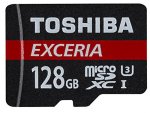
The Toshiba M302 here is in the faster U3 category of MicroSD cards. It's not the read speeds of 90MB/s+ that's the big deal, its the guaranteed minimum sequential write speed of 30MB/s that is more important. Good for recording high bit rate / high FPS 1080p video as well as standard 4K video which is more demanding in terms of data transfer speed requirements. Obviously, you'll see a speed boost when copying photos, MP3s etc as well.
- Specialised for 4K and Full HD recording
- Line-up from 16GB to 128GB Capacity
- Read Speed: Up to 90 MB/s
- Shockproof
- Waterproof
- X-ray Proof
- 5 Years Warranty
Great price for a 128GB and U3 speed class card as almost all cards at this price point are the slower Class 10 / U1 class.
This the cheapest it's ever been on Amazon, and its unlikely to stay this price for long, so pick up a bargain! Make sure you select the 2016 model as they seem to make slight improvements with each revision.
SD cards are given a speed class rating that refers to its category for writing data, with each category describing a real-world video recording use.
Class 2 supports SD video recording with a minimum serial write speed of 2 MB/s.
Classes 4 and 6 are designed to support from 720p and 1080p video (but not all framerates) with a minimum serial write speed of 4 MB/s and 6 MB/s respectively.
Class 10 is designed to support 1080p recording at minimum (but again, not at all framerates) with a minimum serial write speed of 10 MB/s. You’ll often see it marketed as “full HD”, but that’s pretty outdated now. What “full HD” means in this context is 1080HD video, which is no longer a cutting edge HD video mode.
U1 is designed to support real-time broadcasts and HD video (720p and 1080p) with a minimum serial write speed of 10 MB/s.
U3 is designed to support 4K video recording at a sustained video capture rate of 30MB/s.
For practical purposes, the most common currently are Class 10, U1, and U3, with U3 being the current fastest consumer class card. It is technically still possible to find older, slower cards that are class 2, 4, or 6, but most modern cameras are likely to work better with at least class 10 cards, especially for recording video.
UHS-I vs UHS-II
Newer microSDHC and microSDXC cards have a feature called ultra high-speed bus, which refers to the interface. So far, there is UHS-I and UHS-II.
UHS-II is the newer, and potentially faster, system but adoption is still not widespread. And a UHS-II isn’t necessarily guaranteed to be faster than every UHS-I card in practice, as you can see from the test results above. The UHS-I category refers a type of interface that has a potential maximum speed of 104MB/sec.
The product labeling for cards with this technology will have either UHS-I or UHS-II, or sometimes just I or II. Technically, it should be Roman numerals, but you’ll sometimes see it list with a number 1, like UHS-1, even by some manufacturers.
You can also tell them apart by looking at the cards themselves. UHS-I cards have a single row of pins on the back.
But it’s important to note that taking advantage of the potential speed increases of UHS-II requires that both the card and the host (eg. card reader or camera) support it. Using a UHS-II card in a camera or host that only supports UHS-I will result in it falling back to UHS-I speeds. Put another way, if you use a UHS-II card in a card reader or device that’s only rated for UHS-I, you’ll only get a maximum potential of UHS-I.
General Recommendations
- There are counterfeit memory cards out there. Buying from a reputable retailer helps minimize the risk of getting a fake.
- Memory cards are complicated electronic products. A small percentage of electronic products end up being faulty from the manufacturing process. So it’s good practice to test your card before using it in a mission critical application. Better yet, have spare/s as backup.
- Memory cards are not designed for long-term archival storage of photos and video. It’s good practice to download the data as soon as practical and get it backed up securely.
- Format the card in the camera rather than with your computer. It reduces the risk of formatting problems.
Latest comments (42)
Picard123
23 Dec 16#42
Card arrived today. Took ages due to the Amazon deciding to send one from Italy and using snail mail... :disappointed:
Did some quick benchmarks with A1SD (an app on Google Play store) on a completely blank card inserted in my phone, and got the following results:-
(A1SD - "Accurate with reboot" test setting)
Read: 61.92 MB/s
Write: 37.91 MB/s
(A1SD - "Random I/O with reboot" test setting)
Read: 26.08 MB/s
Write: 0.62 MB/s
shadders139
14 Dec 16#41
Thank you, the listing on 7dayshop seems to be for a U1 speed card, rather than the U3 speed on this deal, which is a shame. hard to bite the bullet knowing i could have gotten higher speeds for the same price if i'd been a bit quicker!
Edit: Actually I might be getting confused between UHS-I and U3 and whatnot, that might be the same card? although just seen that their delivery speeds would mean I wouldn't receive it before I fly on tuesday anyway.
Saulosi
14 Dec 16#40
Its the cheapest price you can get it so surely it is?
SpitfireXXI
14 Dec 161#39
Well personally I'm kind-of glad I missed this deal....as I really don't need yet ANOTHER microSD card to add to my collection.
It was a good deal for a 128gb card though, so have some retrospective heat! ☺
who_are_you_uk
14 Dec 161#38
7 dayshop are doing it for £24.99
mrmindful
13 Dec 16#37
So it's not a bloody deal is it?
shadders139
13 Dec 16#36
Looks like I missed this :disappointed: would be be ideal to have a 128gb card for my camera before I go on hol in a week. Could anyone point me towards the next best 128gb microsd deal? All the others seem to be expired
Picard123
13 Dec 16#35
You can only really compare benchmarks when it's the same person doing the benchmarking using the same hardware rig, with the same version of the benchmarking software etc. Otherwise, anomalies seem to arise. However, of the benchmarks I've seen, the M302 writes 4kb at 1.1-1.2MB/s on CrystalDisk 5.0.2. Something like the Sandisk Ultra is slightly faster at around 1.5-1.6MB/s (though slower with sequential writes). Like the other poster mentioned previously, the performance of this M302 card is really in the area of sequential writes eg. recording videos, photos, MP3s, large file transfers etc, rather than random small bitty 4kbyte type files. Obviously, its read speeds are very fast, but most modern MicroSD cards (eg. Class 10) are usually adequate in that regard.
In my opinion, MicroSD cards should only really be used in phones where you're using it as true storage (I use it for videos, photos, music, audiobooks, eBooks etc). Using it as an extension of the phone's built in storage for apps just results in a performance hit as it's not designed for that purpose and is slower than the phone's built in eMMC storage. As someone once said, MicroSD / SD cards are bottom of the memory food chain - they only exist because they're small and thin. In terms of performance, USB3.0 flash drives, eMMC, SSD, M.2 SSD etc will almost always be faster. With an Samsung Evo 840 SSD for example, you'll get around 115MB/s for 4kbyte writes on CrystalDiskMark, whereas with something like the Sandisk Ultra MicroSD card, the 4kbyte write speed is about 1.6MB/s. Huge difference!
banana_keano
13 Dec 16#33
can anyone recommend a microSD card for a samsung s7?
i know nothing about them
blurb182 to banana_keano
13 Dec 161#34
For the price I don't think you can go too far wrong with this card. It should do everything your S7 can throw at it.
I have two already in my action cams.
Good guide about memory cards. Here they talk about M301 and not M302. Anyone knows the 4KB read/write speed of M302 for comparison/#
iby2012
12 Dec 16#31
Have you tried one of these? I have one permanently plugged into my Chromebook. The only time it got knocked out was when I threw the Chromebook into a duffel bag without a laptop sleeve and took it on a trip. Probably more likelihood of it being knocked out in a tablet, though you might be able to attach/glue a thin piece of wire or thread to stop it accidentally getting knocked out and lost as it has a small hole for a keyring loop.https://www.amazon.co.uk/dp/B016ZSZUAUhttp://www.teknobitsltd.co.uk/user/products/large/64gb-3[3].jpg
Obviously, if you can't abide anything jutting out, then a MicroSD card is the only way to go.[/quote]Neat might get one of these but aiming for a 256gb micro sd card as that will leave my only usb port free but yeah this looks good , would mean though that the magnetice pen would have to go on the lhs
prasathvishnu
12 Dec 16#30
My tablet hybrid has 128 GB SSD. Since I cannot upgrade it, I wanted a cheap and easy way for extra capacity. While fitting the Nano USB Drive is a choice, I have only one USB 3.0 which I think will need to keep swapping with the other devices often.
On the other hand, if I insert this Micro SD card into the card reader slot, I am less likely to swap it with other micro SD cards.
BTW, what speed I could get if I use it in a laptop / tablet with these cards?
Picard123
12 Dec 16#29
Amazon are seriously rubbish these days in terms of delivery logistics. Ordered this yesterday and dispatched today..........from Piacenza, Italy, with a delivery estimate for 20 December :disappointed: Ordered a laptop bag a few weeks ago and it was dispatched from........Spain. Took over a week to arrive.
Do they not have a UK Warehouse?
leaih
12 Dec 16#28
Heat, just what I need for my new kindle :sunglasses:
DoctorDeals
12 Dec 16#27
'Engage'
mikedefieslife
12 Dec 16#26
It all depends. A lot of apps will store logs and other data on SD cards. It's not like it's going to be bad. And the price is great, it's just for everyday use the Samsung Evo and particularly the Evo+ are better. They are only U1 cards though, so not fast enough for quality 4k video.
Anyway, I just thought it was worth pointing out.
Picard123
12 Dec 16#25
If anything the price is likely to go back up, not least because of Brexit, the weak pound etc. It's usually U1 cards that drop to this price, not U3, but each to their own....
NRE123
12 Dec 16#24
Its not a massive price drop ! Will wait for further price dip !
NRE123
12 Dec 16#22
It was £24.99 on Nov 28 !
Saulosi to NRE123
12 Dec 16#23
And?
mikedefieslife
12 Dec 161#19
These are good cards for camera's and video but not so good for storage on phones and tablets as their 4Kb performance is poor compared to the likes of the Samsung Evo U1 cards, and the Sandisk Ultras. The latter two are slower cards in terms of maximum burst speed and writing large files (hence no good for 4k video) but better as general storage.
Picard123 to mikedefieslife
12 Dec 161#21
But what files does Android produce as part of its day to day running that would use a MicroSD card? I look at the system logs on my phone and all Android does is produce a handful of tiny logs measured in bytes. Even then it uses eMMC system storage rather than MicroSD storage.
musical
12 Dec 16#20
But still showing on Quidco.
Strange.
shidahmid
12 Dec 16#16
Is this any good for my Samsung S7 Edge Android? Worries about the write speeds and whether to pay the extra and get a Samsung pro sd card??
Picard123 to shidahmid
12 Dec 16#18
If you're using the stock camera app, it will be fine for recording video. The default video bit rates on the Samsung are actually set very low, possibly to cater for people with slower MicroSD cards.
8bits to one byte, so that's roughly 6MB/s (mega bytes / second ) write speeds you would need for 4K and 9MB/s at 720p/240fps. This card has a minimum of 30MB/s.
I actually use Open Camera instead of the default camera app as it allows you to increase the bit rates massively. Your resulting file sizes will be big though if you're recording at 1080p/50/60 or 4K but the quality is noticeably better as there's more data being captured.
musical
11 Dec 16#13
My memory appears to have disappeared from TCB. Any ideas why?
Have you tried one of these? I have one permanently plugged into my Chromebook. The only time it got knocked out was when I threw the Chromebook into a duffel bag without a laptop sleeve and took it on a trip. Probably more likelihood of it being knocked out in a tablet, though you might be able to attach/glue a thin piece of wire or thread to stop it accidentally getting knocked out and lost as it has a small hole for a keyring loop.
Obviously, if you can't abide anything jutting out, then a MicroSD card is the only way to go.
iby2012
11 Dec 16#12
Problem is I only have 1 usb port and it has a dedicated micro sd card slot which i assume is for expanded storage, memory sticks would probably be cheaper too but want something that will stay in its slot out of they way as the slot is there.
blurb182
11 Dec 16#11
Same price on MyMemory plus 4.4% cashback, so another quid off!
mickrick
11 Dec 16#10
Great price. Only I got one of the SanDisk £10 quidco bonus cashback deals on black Friday I would have gone for one of these. It should be all the storage I need for my phantom 3 pro for a while.
prasathvishnu
11 Dec 16#9
Thank you. I think I would go with your option of USB 3.0 for my tablet hybrid. Will it be a better fit for my RX 100 Mark 1 (with SD Card adapter)
Picard123
11 Dec 161#8
You can use it for a tablet, Surface 4 etc, but if your device has a USB3.0 port, I would always choose a fast nano sized USB 3.0 flash drive over MicroSD as they're faster. MicroSD cards aren't really intended to be used like you would an SSD (though people do use it like that). They're more for temporary storage.
louloul
11 Dec 16#7
hottie hot hot
iby2012
11 Dec 161#4
trying to find a 256gb micro sd card for my surface or should i just get a 128gb one as the 256gb ones seem to be way more them double the price
prasathvishnu to iby2012
11 Dec 16#6
I have same question. Is it good for a laptop / tablet hybrid. I will be using it for my Acer Switch 11 tablet / laptop.
On the other hand, will it be a good match for my Sony RX100 Mark 1 camera
swanlake
11 Dec 161#5
Nice one. Needed an SD card for my daughters tablet for xmas, so i'll buy this for myself and put the 32gb from my phone into the tablet - win win
twe
11 Dec 16#3
These are good cards. Bought for my phone and work better than my lexar branded one.
nabeel6235
11 Dec 16#2
This is pretty decent, cheers! :smiley:
Picard123
11 Dec 166#1
Speed Classes
SD cards are given a speed class rating that refers to its category for writing data, with each category describing a real-world video recording use.
Class 2 supports SD video recording with a minimum serial write speed of 2 MB/s.
Classes 4 and 6 are designed to support from 720p and 1080p video (but not all framerates) with a minimum serial write speed of 4 MB/s and 6 MB/s respectively.
Class 10 is designed to support 1080p recording at minimum (but again, not at all framerates) with a minimum serial write speed of 10 MB/s. You’ll often see it marketed as “full HD”, but that’s pretty outdated now. What “full HD” means in this context is 1080HD video, which is no longer a cutting edge HD video mode.
U1 is designed to support real-time broadcasts and HD video (720p and 1080p) with a minimum serial write speed of 10 MB/s.
U3 is designed to support 4K video recording at a sustained video capture rate of 30MB/s.
For practical purposes, the most common currently are Class 10, U1, and U3, with U3 being the current fastest consumer class card. It is technically still possible to find older, slower cards that are class 2, 4, or 6, but most modern cameras are likely to work better with at least class 10 cards, especially for recording video.
UHS-I vs UHS-II
Newer microSDHC and microSDXC cards have a feature called ultra high-speed bus, which refers to the interface. So far, there is UHS-I and UHS-II.
UHS-II is the newer, and potentially faster, system but adoption is still not widespread. And a UHS-II isn’t necessarily guaranteed to be faster than every UHS-I card in practice, as you can see from the test results above. The UHS-I category refers a type of interface that has a potential maximum speed of 104MB/sec.
The product labeling for cards with this technology will have either UHS-I or UHS-II, or sometimes just I or II. Technically, it should be Roman numerals, but you’ll sometimes see it list with a number 1, like UHS-1, even by some manufacturers.
You can also tell them apart by looking at the cards themselves. UHS-I cards have a single row of pins on the back.
But it’s important to note that taking advantage of the potential speed increases of UHS-II requires that both the card and the host (eg. card reader or camera) support it. Using a UHS-II card in a camera or host that only supports UHS-I will result in it falling back to UHS-I speeds. Put another way, if you use a UHS-II card in a card reader or device that’s only rated for UHS-I, you’ll only get a maximum potential of UHS-I.
General Recommendations
- There are counterfeit memory cards out there. Buying from a reputable retailer helps minimize the risk of getting a fake.
- Memory cards are complicated electronic products. A small percentage of electronic products end up being faulty from the manufacturing process. So it’s good practice to test your card before using it in a mission critical application. Better yet, have spare/s as backup.
- Memory cards are not designed for long-term archival storage of photos and video. It’s good practice to download the data as soon as practical and get it backed up securely.
- Format the card in the camera rather than with your computer. It reduces the risk of formatting problems.

![Fresh Breakfast Meat Box (Using code) @ Campbells Meat [Haggis / Lorne Sausage / Bacon / Black Pudding & More]](/images/topics/208684_1.jpg)




































![[Xbox One] Q. u. b. e: Director's Cut on Deals with Gold](/images/topics/208716_1.jpg)


















Opening post
The Toshiba M302 here is in the faster U3 category of MicroSD cards. It's not the read speeds of 90MB/s+ that's the big deal, its the guaranteed minimum sequential write speed of 30MB/s that is more important. Good for recording high bit rate / high FPS 1080p video as well as standard 4K video which is more demanding in terms of data transfer speed requirements. Obviously, you'll see a speed boost when copying photos, MP3s etc as well.
- Specialised for 4K and Full HD recording
- Line-up from 16GB to 128GB Capacity
- Read Speed: Up to 90 MB/s
- Shockproof
- Waterproof
- X-ray Proof
- 5 Years Warranty
Great price for a 128GB and U3 speed class card as almost all cards at this price point are the slower Class 10 / U1 class.
Toshiba also offer a 5 year guaratee with these cards:
http://www.toshiba.co.uk/flash-memory/microsd-cards/exceria-m302/
http://www.toshiba-memory.com/cms/en/products/microsd-cards/exceria/exceria-pro-m302-ec.html
This the cheapest it's ever been on Amazon, and its unlikely to stay this price for long, so pick up a bargain! Make sure you select the 2016 model as they seem to make slight improvements with each revision.
http://uk.camelcamelcamel.com/Toshiba-Exceria-128GB-Micro-Memory/product/B01EAKAUUK
Top comments
Speed Classes
SD cards are given a speed class rating that refers to its category for writing data, with each category describing a real-world video recording use.
Class 2 supports SD video recording with a minimum serial write speed of 2 MB/s.
Classes 4 and 6 are designed to support from 720p and 1080p video (but not all framerates) with a minimum serial write speed of 4 MB/s and 6 MB/s respectively.
Class 10 is designed to support 1080p recording at minimum (but again, not at all framerates) with a minimum serial write speed of 10 MB/s. You’ll often see it marketed as “full HD”, but that’s pretty outdated now. What “full HD” means in this context is 1080HD video, which is no longer a cutting edge HD video mode.
U1 is designed to support real-time broadcasts and HD video (720p and 1080p) with a minimum serial write speed of 10 MB/s.
U3 is designed to support 4K video recording at a sustained video capture rate of 30MB/s.
For practical purposes, the most common currently are Class 10, U1, and U3, with U3 being the current fastest consumer class card. It is technically still possible to find older, slower cards that are class 2, 4, or 6, but most modern cameras are likely to work better with at least class 10 cards, especially for recording video.
UHS-I vs UHS-II
Newer microSDHC and microSDXC cards have a feature called ultra high-speed bus, which refers to the interface. So far, there is UHS-I and UHS-II.
UHS-II is the newer, and potentially faster, system but adoption is still not widespread. And a UHS-II isn’t necessarily guaranteed to be faster than every UHS-I card in practice, as you can see from the test results above. The UHS-I category refers a type of interface that has a potential maximum speed of 104MB/sec.
The product labeling for cards with this technology will have either UHS-I or UHS-II, or sometimes just I or II. Technically, it should be Roman numerals, but you’ll sometimes see it list with a number 1, like UHS-1, even by some manufacturers.
You can also tell them apart by looking at the cards themselves. UHS-I cards have a single row of pins on the back.
But it’s important to note that taking advantage of the potential speed increases of UHS-II requires that both the card and the host (eg. card reader or camera) support it. Using a UHS-II card in a camera or host that only supports UHS-I will result in it falling back to UHS-I speeds. Put another way, if you use a UHS-II card in a card reader or device that’s only rated for UHS-I, you’ll only get a maximum potential of UHS-I.
General Recommendations
- There are counterfeit memory cards out there. Buying from a reputable retailer helps minimize the risk of getting a fake.
- Memory cards are complicated electronic products. A small percentage of electronic products end up being faulty from the manufacturing process. So it’s good practice to test your card before using it in a mission critical application. Better yet, have spare/s as backup.
- Memory cards are not designed for long-term archival storage of photos and video. It’s good practice to download the data as soon as practical and get it backed up securely.
- Format the card in the camera rather than with your computer. It reduces the risk of formatting problems.
Latest comments (42)
Did some quick benchmarks with A1SD (an app on Google Play store) on a completely blank card inserted in my phone, and got the following results:-
(A1SD - "Accurate with reboot" test setting)
Read: 61.92 MB/s
Write: 37.91 MB/s
(A1SD - "Longer - default" test setting)
Read: 56.65 MB/s
Write: 30.05 MB/s
(A1SD - "Quick" test setting)
Read: 66.33 MB/s
Write: 39.21 MB/s
(A1SD - "Random I/O with reboot" test setting)
Read: 26.08 MB/s
Write: 0.62 MB/s
Edit: Actually I might be getting confused between UHS-I and U3 and whatnot, that might be the same card? although just seen that their delivery speeds would mean I wouldn't receive it before I fly on tuesday anyway.
It was a good deal for a 128gb card though, so have some retrospective heat! ☺
In my opinion, MicroSD cards should only really be used in phones where you're using it as true storage (I use it for videos, photos, music, audiobooks, eBooks etc). Using it as an extension of the phone's built in storage for apps just results in a performance hit as it's not designed for that purpose and is slower than the phone's built in eMMC storage. As someone once said, MicroSD / SD cards are bottom of the memory food chain - they only exist because they're small and thin. In terms of performance, USB3.0 flash drives, eMMC, SSD, M.2 SSD etc will almost always be faster. With an Samsung Evo 840 SSD for example, you'll get around 115MB/s for 4kbyte writes on CrystalDiskMark, whereas with something like the Sandisk Ultra MicroSD card, the 4kbyte write speed is about 1.6MB/s. Huge difference!
i know nothing about them
I have two already in my action cams.
Good guide about memory cards. Here they talk about M301 and not M302. Anyone knows the 4KB read/write speed of M302 for comparison/#
Obviously, if you can't abide anything jutting out, then a MicroSD card is the only way to go.[/quote]Neat might get one of these but aiming for a 256gb micro sd card as that will leave my only usb port free but yeah this looks good , would mean though that the magnetice pen would have to go on the lhs
On the other hand, if I insert this Micro SD card into the card reader slot, I am less likely to swap it with other micro SD cards.
BTW, what speed I could get if I use it in a laptop / tablet with these cards?
Do they not have a UK Warehouse?
Anyway, I just thought it was worth pointing out.
Strange.
2160p 30fps: 48mbit/s
1080p 60fps: 28mbit/s
1080p 30fps: 17mbit/s
720p 240fps: 72mbit/s
8bits to one byte, so that's roughly 6MB/s (mega bytes / second ) write speeds you would need for 4K and 9MB/s at 720p/240fps. This card has a minimum of 30MB/s.
I actually use Open Camera instead of the default camera app as it allows you to increase the bit rates massively. Your resulting file sizes will be big though if you're recording at 1080p/50/60 or 4K but the quality is noticeably better as there's more data being captured.
https://www.topcashback.co.uk/mymemory/
https://www.amazon.co.uk/dp/B016ZSZUAU
http://www.teknobitsltd.co.uk/user/products/large/64gb-3[3].jpg
Obviously, if you can't abide anything jutting out, then a MicroSD card is the only way to go.
On the other hand, will it be a good match for my Sony RX100 Mark 1 camera
Speed Classes
SD cards are given a speed class rating that refers to its category for writing data, with each category describing a real-world video recording use.
Class 2 supports SD video recording with a minimum serial write speed of 2 MB/s.
Classes 4 and 6 are designed to support from 720p and 1080p video (but not all framerates) with a minimum serial write speed of 4 MB/s and 6 MB/s respectively.
Class 10 is designed to support 1080p recording at minimum (but again, not at all framerates) with a minimum serial write speed of 10 MB/s. You’ll often see it marketed as “full HD”, but that’s pretty outdated now. What “full HD” means in this context is 1080HD video, which is no longer a cutting edge HD video mode.
U1 is designed to support real-time broadcasts and HD video (720p and 1080p) with a minimum serial write speed of 10 MB/s.
U3 is designed to support 4K video recording at a sustained video capture rate of 30MB/s.
For practical purposes, the most common currently are Class 10, U1, and U3, with U3 being the current fastest consumer class card. It is technically still possible to find older, slower cards that are class 2, 4, or 6, but most modern cameras are likely to work better with at least class 10 cards, especially for recording video.
UHS-I vs UHS-II
Newer microSDHC and microSDXC cards have a feature called ultra high-speed bus, which refers to the interface. So far, there is UHS-I and UHS-II.
UHS-II is the newer, and potentially faster, system but adoption is still not widespread. And a UHS-II isn’t necessarily guaranteed to be faster than every UHS-I card in practice, as you can see from the test results above. The UHS-I category refers a type of interface that has a potential maximum speed of 104MB/sec.
The product labeling for cards with this technology will have either UHS-I or UHS-II, or sometimes just I or II. Technically, it should be Roman numerals, but you’ll sometimes see it list with a number 1, like UHS-1, even by some manufacturers.
You can also tell them apart by looking at the cards themselves. UHS-I cards have a single row of pins on the back.
But it’s important to note that taking advantage of the potential speed increases of UHS-II requires that both the card and the host (eg. card reader or camera) support it. Using a UHS-II card in a camera or host that only supports UHS-I will result in it falling back to UHS-I speeds. Put another way, if you use a UHS-II card in a card reader or device that’s only rated for UHS-I, you’ll only get a maximum potential of UHS-I.
General Recommendations
- There are counterfeit memory cards out there. Buying from a reputable retailer helps minimize the risk of getting a fake.
- Memory cards are complicated electronic products. A small percentage of electronic products end up being faulty from the manufacturing process. So it’s good practice to test your card before using it in a mission critical application. Better yet, have spare/s as backup.
- Memory cards are not designed for long-term archival storage of photos and video. It’s good practice to download the data as soon as practical and get it backed up securely.
- Format the card in the camera rather than with your computer. It reduces the risk of formatting problems.