Cheapest it's been according to CamelCamelCamel (43.24GBP)
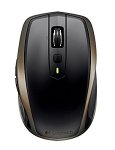
MX Anywhere 2
From office to external meeting to business trip to home and back to the office, Logitech MX Anywhere 2 works anywhere and everywhere you work, including on glass. Crafted to fit your hand, it provides the comfort and control you expect from a wireless mouse. You can connect to Windows and Mac via the small Pico Unifying receiver (included) or via Bluetooth Smart wireless technology. Pair this mouse with up to three devices and easily switch between them with the touch of the button, thanks to Easy-Switch technology.
That depends, what are you using at the moment? I already have one of these that goes everywhere with my laptop because of it's portability. You can use it for office but if it's not going anywhere, and you don't mind the larger size of the master, go for that as it should be more comfortable.
jimbob86 to blurr
24 Nov 16#22
master for the office. This while on the move. top deal. if I didn't have the anywhere I'd get this!
omgpleasespamme
21 Nov 16#3
I have this mouse. I like the fact that there's a choice of Bluetooth or an RF dongle. It also has forward and back buttons positioned for the right thumb which not many Bluetooth mice have.
Shengis
21 Nov 16#5
"Ambidextrous Design for Right and Left-handed People "
Yeah right...... Shame they no longer do the 515 as that really was ambidextrous. Main concern would be the battery.
Negatives aside, good deal imho.
Edit: Btw, for leftys who get ****ed at all these buttons getting in the way and to make it truly ambidextrous : CLICK HERE ;-)
masai to Shengis
21 Nov 16#8
Im a lefty and have no issues with this mouse. Never accidentally pressed the buttons on the side.
Bought another as a spare. Cheers OP!
sam1970
21 Nov 16#6
good deal..thanks
korny2
21 Nov 16#7
Almost brought a logitech Bluetooth mouse yesterday, thanks for posting this model seems much better replacing my tonor mouse as it loses connection all the time.
brilly
21 Nov 161#9
surely its not about accidentally pressing them but about properly pressing them!
wouldn't you have to use your pinky to press them? much harder than thumb so not really ambidextrous at all
edit: hmm i see shengis wants to block them rather than use them properly...
damn you lefties!
pjazzy
21 Nov 16#10
Needed a new mouse, bluetooth and wireless is an awesome feature. Bought.

![Fresh Breakfast Meat Box (Using code) @ Campbells Meat [Haggis / Lorne Sausage / Bacon / Black Pudding & More]](/images/topics/208684_1.jpg)




































![[Xbox One] Q. u. b. e: Director's Cut on Deals with Gold](/images/topics/208716_1.jpg)


















Opening post
MX Anywhere 2
From office to external meeting to business trip to home and back to the office, Logitech MX Anywhere 2 works anywhere and everywhere you work, including on glass. Crafted to fit your hand, it provides the comfort and control you expect from a wireless mouse. You can connect to Windows and Mac via the small Pico Unifying receiver (included) or via Bluetooth Smart wireless technology. Pair this mouse with up to three devices and easily switch between them with the touch of the button, thanks to Easy-Switch technology.
All comments (25)
http://uk.camelcamelcamel.com/Logitech-MX-Anywhere-Wireless-Windows/product/B0107N87DQ
Yeah right...... Shame they no longer do the 515 as that really was ambidextrous. Main concern would be the battery.
Negatives aside, good deal imho.
Edit: Btw, for leftys who get ****ed at all these buttons getting in the way and to make it truly ambidextrous : CLICK HERE ;-)
Bought another as a spare. Cheers OP!
wouldn't you have to use your pinky to press them? much harder than thumb so not really ambidextrous at all
edit: hmm i see shengis wants to block them rather than use them properly...
damn you lefties!