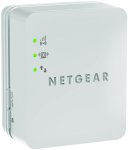
Helps Improves WiFi strength for smartphones, iPads, Kindle, FireTV and furthermore
hope you like it.
Top comments
nanuek to AndyRoyd
24 Oct 166#4
Never seen much point in posts like yours.
AndyRoyd
24 Oct 163#3
Never seen much point in paying good money to slow my wifi by 50%.
All comments (20)
ST3123
24 Oct 16#1
Heated, very good price for this.
I had one before and while it mostly worked well after a while I would find that the low signal light (red) would keep flashing up after a few days and it needed rebooting (complete power off then back on) to return it to a good signal. It could have been the location I had it but it seems strange that it would always start with a full signal then reduce over time but was good when it worked normally, maybe I just had a bad one and with this being Amazon returns would be a breeze if necessary....
lolamont
24 Oct 16#2
Thanks for this
AndyRoyd
24 Oct 163#3
Never seen much point in paying good money to slow my wifi by 50%.
nanuek to AndyRoyd
24 Oct 166#4
Never seen much point in posts like yours.
slipd
24 Oct 16#5
Are these, Netgear extenders in general, updatable?
Thanks.
henlowstu
24 Oct 16#6
Can't decide one of these or just getting a decent router to replace the crap one my provider has given me
henlowstu
24 Oct 16#7
Can't decide one of these or just getting a decent router to replace the crap one my provider has given me
prash_2k to henlowstu
24 Oct 161#8
Replace it
Fingers2909 to henlowstu
24 Oct 16#12
I did that some time back. Worked like a charm until the replacement router packed up after only 18 months!!
Publix to henlowstu
25 Oct 16#16
I have a Virgin SuperHub Version 1 Router.
I had cat5 or cat5e cables:
1:Router to desk top direct LAN cable only; 3m
2:Router to TP-Link 1200 powerline; 2m
3:Router to Zyxel 600 powerline; 2m
4,5:Paired Powerlines to laptops. 2m
I changed the 5 Lan cables to 2m/3m cat6 cables during the recent Maplin cable sale posted here.
The speeds to both desktop and laptops went up from 60 Mbps max to 75 Mbps on the TP-link and max 30Mbps to max 60 Mbps on the Zyxel.
The intermittent connection problems with the Zyxel disappeared.
The most dramatic improvement was changing cales going into the pcs, i.e. Ringmain powerline > laptop.
So I would recommend changing cables to cat6.
Blade3 to henlowstu
25 Oct 16#19
Do you always repeat yourself..Do you always repeat yourself
Mandroid578
24 Oct 162#9
Frequently purchased together with "urine off" wtf
urmum
24 Oct 161#10
The reviews on the 1st Amazon page all say its rubbish

![Fresh Breakfast Meat Box (Using code) @ Campbells Meat [Haggis / Lorne Sausage / Bacon / Black Pudding & More]](/images/topics/208684_1.jpg)




































![[Xbox One] Q. u. b. e: Director's Cut on Deals with Gold](/images/topics/208716_1.jpg)


















Opening post
Helps Improves WiFi strength for smartphones, iPads, Kindle, FireTV and furthermore
hope you like it.
Top comments
All comments (20)
I had one before and while it mostly worked well after a while I would find that the low signal light (red) would keep flashing up after a few days and it needed rebooting (complete power off then back on) to return it to a good signal. It could have been the location I had it but it seems strange that it would always start with a full signal then reduce over time but was good when it worked normally, maybe I just had a bad one and with this being Amazon returns would be a breeze if necessary....
Thanks.
I had cat5 or cat5e cables:
1:Router to desk top direct LAN cable only; 3m
2:Router to TP-Link 1200 powerline; 2m
3:Router to Zyxel 600 powerline; 2m
4,5:Paired Powerlines to laptops. 2m
I changed the 5 Lan cables to 2m/3m cat6 cables during the recent Maplin cable sale posted here.
The speeds to both desktop and laptops went up from 60 Mbps max to 75 Mbps on the TP-link and max 30Mbps to max 60 Mbps on the Zyxel.
The intermittent connection problems with the Zyxel disappeared.
The most dramatic improvement was changing cales going into the pcs, i.e. Ringmain powerline > laptop.
So I would recommend changing cables to cat6.