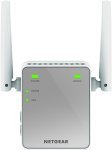
Extend network - extend internet access throughout your home for wireless devices like iPads, iPods, laptops, smart phones, game consoles, TVs and Fire TV Stick streaming media player
Enhance existing equipment - keep your current equipment and improve coverage to eliminate wireless dead zones
Plug-and-play - sets up in minutes, no need to insert a CD or plug in Ethernet cables
Push N Connect: Push N Connect using Wi-Fi Protected Setup (WPS) connects computers and/or routers to the extender quickly and securely
15 comments
hellofriday
10 Oct 16#1
sorry but how does this thing work
arch68 to hellofriday
10 Oct 163#2
If you're asking you probably don't need one.
AzeemB to hellofriday
10 Oct 161#3
If I had to guess, it connects to your existing wifi and spreads it around.
So if your wifi router thing was on one side of the house, you would plug this in the middle of your house so you can get a signal on the otherside of your house.
ChambyR33
10 Oct 16#4
i had one of theese and it was rubbish
wouldnt hold a signal even tho it was in the perfect place in the house and it made a whining noise too
was a pitty as i got it cheaper than this
ended up just upgrading the router in the end
SuperMariosDad
11 Oct 161#5
I have one of these and it works great. Gives me a solid connection to my bathroom so I can relax in the bath and stream videos. :smiley:
I'm sure it's pretty much always this price on amazon though.
cullies
11 Oct 16#6
Did not work for me. If you want to extend your wifi buy Powerplugs, dont waste your money on this
toonarama
11 Oct 16#7
Good price. I paid £19.99 for one from Amazon a few months ago and it is working just fine.
ronmo329921
11 Oct 161#8
One thing i could say is do not buy any tplink range extender is trash..got 3 of them all disconnect within 5 minutes. Can someone please recommend a better range extender ty
michaelfentonplymouth
11 Oct 16#9
currently 14.99
Gatey10
11 Oct 16#10
These do half your network speed in my experience, as they don't produce their own wifi signal per say. They just boost the original.
My advice would be to buy one which produces it's own wifi signal. That way you won't get the speed reduction.
UnknownConcept
12 Oct 16#11
Its best to try use a powerline set up equivalent, though it is more expensive and dependent on your the layout of the wires which could effect performance.
gona
12 Oct 16#12
In case your pc (or ethernet only device) is far away from your router, It can be used as wifi adapter using its ethernet port
Herc
17 Oct 16#13
If you set these up right they are good I have one in my garage and it works a treat, works best with dual band routers 5/2.4ghz in which in case it wont halve your connections speed as one radio is used to connect your router and the other to make its own network. It works so well in fact I have devices accidentally connecting to it rather than the router and still work well....
Herc
17 Oct 16#14
The same scenario I tried various powerline adapters and they barely get a signal not useable, this is in a brand new house as well so cabling should be pretty good.

![Fresh Breakfast Meat Box (Using code) @ Campbells Meat [Haggis / Lorne Sausage / Bacon / Black Pudding & More]](/images/topics/208684_1.jpg)




































![[Xbox One] Q. u. b. e: Director's Cut on Deals with Gold](/images/topics/208716_1.jpg)


















Opening post
Enhance existing equipment - keep your current equipment and improve coverage to eliminate wireless dead zones
Plug-and-play - sets up in minutes, no need to insert a CD or plug in Ethernet cables
Push N Connect: Push N Connect using Wi-Fi Protected Setup (WPS) connects computers and/or routers to the extender quickly and securely
15 comments
So if your wifi router thing was on one side of the house, you would plug this in the middle of your house so you can get a signal on the otherside of your house.
wouldnt hold a signal even tho it was in the perfect place in the house and it made a whining noise too
was a pitty as i got it cheaper than this
ended up just upgrading the router in the end
I'm sure it's pretty much always this price on amazon though.
My advice would be to buy one which produces it's own wifi signal. That way you won't get the speed reduction.