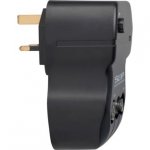
RRP: £12.99 - Less than half price. Amplifies the signal to 1 TV.
Plugs in to electrical wall socket to provide a sufficient boost of power to the original aerial.
I now receive all Freeview HD channels in my room, thanks to this beauty!
Top comments
nomnomnomnom to Meathotukdeals
24 Aug 165#15
It's really difficult to say, as different devices act very differently. Some will 'break up' the image, some will black screen, some will tell you there is a signal problem, some will say 'no lock'...it's just impossible to say. Signal indicators rarely mean anything on their own, as you don't really know what value / formula it is using to say the signal is fine.
If you have a high end PC tuner, you can normally examine the transport stream and see what the issue is exactly. These are expensive though and not really a way to troubleshoot.
You can buy a signal meter from ebay for a few quid, but these are normally 'all or nothing' devices, and little drop outs rarely get picked up on them.
By far the cheapest way, and least hassle is to renew the equipment. Namely the TV aerial and the coax cable.
The correct coax is really important. If you have older stuff installed, it will have issues with the latest signals. See this for a breakdown and explanation: http://www.satcure.co.uk/tech/cable.htm
Any decent aerial will do. Screwfix and the usual places will have an offer on no doubt.
If you want to 'split' the cable to go to more than one device, you should absolutely invest in a 'mast head' amplifier where your aerial is installed.
Making a cable is very easy. See: https://www.youtube.com/watch?v=zNqJcmslwyM
You don't need to buy any equipment if you have some pliers around. Although some copper grease is good to put on the cable where the thread will screw onto to make your life easier :innocent:
There are other options, like compression connectors, but you really don't need them for the home.
Hope that helps a bit.
nomnomnomnom
24 Aug 163#7
I've been through a number of boosters like this and they were all quite poor. You're boosting an already bad signal, along with the errors and noise in the stream.
You need to put a 'masthead amplifier' close to the aerial and ensure you have good quality coax. High quality coax makes a huge difference alone.
wasn't aware something like this existed! brilliant, so does this mean a tv would need a wall socket aerial not an external wirey one?
letslaughadam to cb_scavenger
24 Aug 16#2
Hi,
Not at all, usually this device provides means for 'improving' or 'boosting' the signal that indoor TV aerials have. You would plug this into the wall/or extension lead and plug your usual antenna (TV indoor aerial) and then plug the booster to the TV coaxial socket.
Think of this device as 'turbo-charging' your indoor aerial to provide better quality and reception.
CrazyBob
24 Aug 16#3
Thanks OP
col996s
24 Aug 161#4
With digital TV it's often the quality of the signal that counts not the quantity. If it's rubbish in the first place this may not help.
youchoose to col996s
24 Aug 16#5
It would be interesting to get some feedback from people who have used this to let us know if it does make a improvement to their reception.
jkgeyti
24 Aug 161#6
I've used a similar product before for a digital signal, and they do work. You just have to be realistic about what it can do with what's already a poor signal. I had a few channels that would jump in and out occasionally, and a booster *just* made it tolerable. I went from losing the signal every 10 seconds to slight hiccups every few minutes. People have had success with getting channels they couldn't receive at all before, but I wouldn't count on it working consistently.
nomnomnomnom
24 Aug 163#7
I've been through a number of boosters like this and they were all quite poor. You're boosting an already bad signal, along with the errors and noise in the stream.
You need to put a 'masthead amplifier' close to the aerial and ensure you have good quality coax. High quality coax makes a huge difference alone.
I've got a booster like this and it does the job for me, but it doesn't work for everybody. The £5 Argos amplifier might be good enough for a lot of people and it's easy to fit and try out. For a masthead amplifier there's several reasonably priced ones at Screwfix and Amazon, but you will need a power socket close to the mast, so you are probably going to be fiddling about in the loft. For 5 quid the booster is worth trying first.
Mandroid578
24 Aug 16#8
Lol @ TV ariel. 1999 called they want their technology back.
Spod to Mandroid578
24 Aug 16#10
If your broadband speeds are crap because you don't live in a big town you're still going to need an aerial.
Blame BT, not lack of tech awareness.
BTW - Lol @ 2016 technology - apparently still can't auto-correct "TV ariel" to "TV aerial"! :stuck_out_tongue:
nomnomnomnom
24 Aug 16#11
I don't disagree with what you're saying, but it's highly situational with digital. I've just not had much success myself. Even the devices react differently to poor signals, so it's very hard to make a solid recommendation to anyone (other than a mast head, which will always solve the issue if you can get the signal in the first place). But for 5 quid, it's worth a shot. You can also return easily to Argos if it doesn't work!
On the power front though: Not quite. You can get mastheads you can power through the coax cable. See the link I posted above for an example in one of the images. It means even with no power in the loft, it's trivial to install one :innocent:
Banjo_McBanj
24 Aug 16#12
I've got a plug in booster from Amazon and it makes the difference between being able to receive HD channels or not in a bedroom. Worth a try.

![Fresh Breakfast Meat Box (Using code) @ Campbells Meat [Haggis / Lorne Sausage / Bacon / Black Pudding & More]](/images/topics/208684_1.jpg)




































![[Xbox One] Q. u. b. e: Director's Cut on Deals with Gold](/images/topics/208716_1.jpg)


















Opening post
Plugs in to electrical wall socket to provide a sufficient boost of power to the original aerial.
I now receive all Freeview HD channels in my room, thanks to this beauty!
Top comments
If you have a high end PC tuner, you can normally examine the transport stream and see what the issue is exactly. These are expensive though and not really a way to troubleshoot.
You can buy a signal meter from ebay for a few quid, but these are normally 'all or nothing' devices, and little drop outs rarely get picked up on them.
It's interesting that you mention it was a few years ago, as this could coincide with the 4G turn on, depending on your area: https://ukfree.tv/maps/4g
4G has caused some issues for TV signals: http://www.techradar.com/news/phone-and-communications/mobile-phones/4g-could-ruin-your-tv-here-s-what-will-save-it-1199804
By far the cheapest way, and least hassle is to renew the equipment. Namely the TV aerial and the coax cable.
The correct coax is really important. If you have older stuff installed, it will have issues with the latest signals. See this for a breakdown and explanation: http://www.satcure.co.uk/tech/cable.htm
Any decent aerial will do. Screwfix and the usual places will have an offer on no doubt.
If you want to 'split' the cable to go to more than one device, you should absolutely invest in a 'mast head' amplifier where your aerial is installed.
Finally, make sure your entire cable run uses F-connectors: http://www.screwfix.com/c/electrical-lighting/lead-connectors/cat830560
EVERY end of the cable should have an F-connector on it, which you can then plug into the correct coupling plug, if one is needed. For example:
On each end of the cable: http://www.screwfix.com/p/f-connector-for-sky-cable-pack-of-10/98173
Need to join 2 together: http://www.screwfix.com/p/labgear-f-plug-to-f-plugs-pack-of-10/95730
Need to use it on a TV with only a 'pin' connector, use these on the end: http://www.screwfix.com/p/labgear-f-to-coax-plugs-pack-of-10/39772
A lot of recent equipment just accepts the F-connector directly. All satellite equipment should by default.
Making a cable is very easy. See: https://www.youtube.com/watch?v=zNqJcmslwyM
You don't need to buy any equipment if you have some pliers around. Although some copper grease is good to put on the cable where the thread will screw onto to make your life easier :innocent:
There are other options, like compression connectors, but you really don't need them for the home.
Hope that helps a bit.
You need to put a 'masthead amplifier' close to the aerial and ensure you have good quality coax. High quality coax makes a huge difference alone.
Loads of good reading at: http://www.aerialsandtv.com/loftaerials.html#AmplifiersAndSplitters
All comments (24)
Not at all, usually this device provides means for 'improving' or 'boosting' the signal that indoor TV aerials have. You would plug this into the wall/or extension lead and plug your usual antenna (TV indoor aerial) and then plug the booster to the TV coaxial socket.
Think of this device as 'turbo-charging' your indoor aerial to provide better quality and reception.
You need to put a 'masthead amplifier' close to the aerial and ensure you have good quality coax. High quality coax makes a huge difference alone.
Loads of good reading at: http://www.aerialsandtv.com/loftaerials.html#AmplifiersAndSplitters
Blame BT, not lack of tech awareness.
BTW - Lol @ 2016 technology - apparently still can't auto-correct "TV ariel" to "TV aerial"! :stuck_out_tongue:
On the power front though: Not quite. You can get mastheads you can power through the coax cable. See the link I posted above for an example in one of the images. It means even with no power in the loft, it's trivial to install one :innocent: