Just noticed amazon has dropped this further to the lowest price ever. I have one and recommend it (outstanding reviews also).
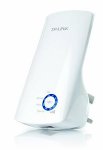
Upgraded version compatible with all broadband routers BT/SKY/TalkTalk/Virgin Media etc
Boosts wireless signal to previously unreachable or hard-to-wire areas flawlessly
Easily expand wireless coverage at a push of WPS button
Extra fast Ethernet port for wired device
300 Mbps wireless data rates suitable for video streaming, online gaming and internet calling
Top comments
FREEZIN WOLF
11 Jun 166#2
Not surprised they've dropped the price. They are rubbish!
cullies
11 Jun 163#22
I use a TP link POWERLINE extender which works(uses the house electrical circuit), this rubbish thing on here does NOT!!
No every time you add a repeater you halve the bandwidth. So if you have a 40Mb connection roughly after using one repeater the devices connecting via the repeater will have 20Mb bandwidth to play with. Also to use a repater correctly you need to put them where the signal is very good. They don't magically enhance the signal they just repeat the signal on from where it's still strong. If you position a repeater incorrectly then it's mostly useless.
The reason repeaters introduce a heavy bandwidth loss is due to the packet hops. I've nicked this description from someone else >
"Count the packet hops.
"PC and router = 1 request and 1 reply.
PC, repeater = 1 PC request to repeater, 1 repeater to router, 1 router to repeater and 1 repeater to PC."
The quick answer is you don't want to do any of what you asked.
The whole Internet is based on the TCP/IP protocol, which was invented around 1973/74 and introduced in 1983. So we're talking about a 40 year old protocol, which was designed for the Telephony technology of the day, eventually we'll move to more efficient protocols such as ones that use Named Data Networking and Linear Network Coding, long way off though.
WBRacing
11 Jun 163#12
Yeah but an arrogant sounding a$$ on a deal forum has said that it is rubbish, so you and they are clearly all wrong.
The fact is (as a helpful poster, like fishmaster has explained) they aren't great. But can serve a purpose if switched on as and when needed, which is what I do.
All comments (69)
arma_gera
11 Jun 16#1
FREEZIN WOLF
11 Jun 166#2
Not surprised they've dropped the price. They are rubbish!
arma_gera to FREEZIN WOLF
11 Jun 16#4
you are entitle to share your opinion of course... at least 2469 more have given this product 4/5 stars and i also have one and happy with it.
Zatos
11 Jun 16#3
Can you have 2 of these fitted? I mean one towards the end of the routers signal range and then another towards the end of the first wifi boosters range, technically doubling the routers range.
fishmaster to Zatos
11 Jun 163#10
No every time you add a repeater you halve the bandwidth. So if you have a 40Mb connection roughly after using one repeater the devices connecting via the repeater will have 20Mb bandwidth to play with. Also to use a repater correctly you need to put them where the signal is very good. They don't magically enhance the signal they just repeat the signal on from where it's still strong. If you position a repeater incorrectly then it's mostly useless.
The reason repeaters introduce a heavy bandwidth loss is due to the packet hops. I've nicked this description from someone else >
"Count the packet hops.
"PC and router = 1 request and 1 reply.
PC, repeater = 1 PC request to repeater, 1 repeater to router, 1 router to repeater and 1 repeater to PC."
The quick answer is you don't want to do any of what you asked.
The whole Internet is based on the TCP/IP protocol, which was invented around 1973/74 and introduced in 1983. So we're talking about a 40 year old protocol, which was designed for the Telephony technology of the day, eventually we'll move to more efficient protocols such as ones that use Named Data Networking and Linear Network Coding, long way off though.
mistermoneysaver
11 Jun 162#5
I have one of these. OK as an Ethernet extender, but i concur its rubbish as a WiFi extender.
FREEZIN WOLF
11 Jun 16#6
Congratulations
arma_gera
11 Jun 162#7
cheers!
schnecker
11 Jun 161#8
use one of these and very happy with it. have some heat.
DracUK
11 Jun 161#9
same here great item
chantelle310
11 Jun 161#11
Heat for the price. But have to agree I've attempted these and they're rubbish. I have God awful wifi upstairs tho so perhaps none of these would work for me. Never tried any of the others to confirm or deny.
WBRacing
11 Jun 163#12
Yeah but an arrogant sounding a$$ on a deal forum has said that it is rubbish, so you and they are clearly all wrong.
The fact is (as a helpful poster, like fishmaster has explained) they aren't great. But can serve a purpose if switched on as and when needed, which is what I do.
cullies
11 Jun 16#13
As a wifi Extender its not worth 99p never mind £9.98
Mine went into the bin
arma_gera to cullies
11 Jun 16#14
you could have returned it... :smiley: so how much you paid for yours?
UM4R
11 Jun 16#15
Thanks buddy
Marvo434
11 Jun 16#16
so my daughter has our loft room, and the wifi is near zero up there, our router is front of home on ground floor. What should i use (router cannot move) to extend if not this?
mistermoneysaver
11 Jun 16#17
Anyone use it as a WiFi extender? I would be interested to know!
moley
11 Jun 16#18
mine worked great with my old sky router but won't connect to the new talk talk one
mymymy
11 Jun 16#19
I've got this to use as an extender and I don't think it works. I got it off here a couple of years ago.
mymymy
11 Jun 16#20
Also the extender is picked up on my phone when it's the weaker signal. Mine says it has a 3yr guarantee on the box.
arma_gera
11 Jun 16#21
mine works fine with wifi extender....check amazon Q&As to have a better view.
cullies
11 Jun 163#22
I use a TP link POWERLINE extender which works(uses the house electrical circuit), this rubbish thing on here does NOT!!
What do you thing this one uses?? have you even looked at the product? this also is wall plugin!
Bubuka83
11 Jun 161#26
same here
cullies
11 Jun 16#27
What do you thing this one uses?? have you even looked at the product? this also is wall plugin!
This only uses electric socket to power it
A Powerline has two units. A Transmitter plugged in at the router by LAN cable. A receiver anywhere else on the elecrical house circuit which receives the signal via the house wiring. The Receiver then can transmit Wifi from that location
M1sterDeeds
11 Jun 162#28
I moved into a small open plan bungalow and measured the location of the centre of the house with a laser measure. I then mounted my router in that location suspended from the ceiling.
It solved all my wi-fi issues and I had money left over from the sale of the house to go on a P & O ferry cruise to Hull.
cullies
11 Jun 16#29
This product only boosts the wifi by a very tiny margin, NOT as shown in arma_gera's reproduced diagram which is false advertising in my book
cullies
11 Jun 16#30
Very simple practical solution
arma_gera
11 Jun 16#31
this was extracted from their page...any complaints contact them not me
Cepultura
11 Jun 16#32
Would the so much better if these worked over wires like home plugs
cullies
11 Jun 16#33
Because they are cheaper nonpowerline/ homeplugs and so are useless
cullies
11 Jun 161#34
I have already complained to them, not your fault arma_gera bye the way!
Captainbeavus
11 Jun 161#35
I placed mine in an area where there was a strong signal. Unfortunately it did more than halve the speed. They may be of some use in cases when you really a connection in a black spot but you'd be better off trying to relocate your router or buying a better one.
secretmsg
11 Jun 16#36
How good are these powerlines? i am thinking to get for the shed.
billy bronco
11 Jun 162#37
ive got one of these, keeps dropping connection after a few days, needs rebooting constantly, rubbish in my opinion..
Alnilam81
11 Jun 161#38
I bought one about a month ago for £20, it does work but it isn't great. It occasionally just brain farts at times and locks up for a short while. The most annoying thing is that it adds massively to my latency, my ping time is a lot worse using it than it is without. I'm in a frustrating place where I can have terrible dl speeds but a decent ping connecting direct to my router, or decent download speeds but with an awful ping using this.
Ultimately i'm going to be rewiring to not have to use it anymore as it really doesn't do what I need, so not a great buy... However I might then use it to feed an ethernet cable to my freesat box upstairs, so it's not a complete waste.
cullies
11 Jun 161#39
As long as the shed is connected to the same consumer unit/ electric board they should work. They will sometimes not work properly on an extension lead especially a circuit breaker one!
EN1GMA
11 Jun 161#40
Get powerline adapters
Towers9
11 Jun 16#41
My dad bought one of these and had similar issue of not being able to connect it to the router.
cullies
11 Jun 16#42
Its a mystery why this item is voted hot by over 200' ??
When my teapot is a much better wifi extender :stuck_out_tongue:
It has nice flashing lights bye the way
agentjont
11 Jun 16#43
I was thinking of getting one of these to boost signal to the garden. Anyone know of anything better? Rather keep it below £20 as its only for browsing and maybe some video playback (albeit can barely see the laptop screen when the sun is really out!).
cullies
11 Jun 16#44
Nothing below/around £20, cheapest powerline/homeplug is around £30
Relocating the router can work wonders, locate it raised off the floor.....the higher the better
See post #28 above by M1sterDeeds
CaptainSocks
11 Jun 16#45
Powerline if you can.
Or even a better router.
I hate these.
Cuts your bandwidth in half.
mbuckhurst
11 Jun 161#46
Install some wifi monitoring software like Inssider free, my neighbours regularly change suppliers and when they do, their wifi channel changes, in doing so, **** up my wifi range, so I manually change it to avoid overlap. Routers are supposed to do this automatically, but from my experience with D-Link, Netgear and Linksys equipment, they're not very good at it.
I have a fully wired house, so to cover the extremities for things like Chromecast Audios, I've got my house router at the front, and a second router configured as an access point upstairs and diagonally opposite. If the two are too close, even if they use completely separate channels they used to interfere with each other.
I tried powerline adaptors but they introduced noise on my wiring, messed up some of my home automation equipment, and consumed way more electricity than they should (constantly even when nothing was connected). I guess they may be better now, but early ones were pretty rubbish.
To be honest I'd try and figure out a way to get a cable to a shed in the garden, unless the shed is attached directly to the consumer unit in the house, usually they're on spurs.
mike
SkyBlues1990
11 Jun 16#47
Am I right in thinking I could run a Ethernet cable from my router to one of these and then it would act as another hotspot for Wifi connections? As that would be much better than just connecting it to your router somewhere else in your house as the speeds will be much better.
cullies
11 Jun 16#48
Don't think they work like that. The ethernet socket is OUT, but I'n not sure?
5Rivers79
11 Jun 16#49
What's the difference between this and a wireless access point? Thanks.
Captainbeavus
11 Jun 16#50
This got 300 degrees on HUKD.
amuseboy
11 Jun 16#51
I would rather go for the Netgear or belkin as they seem more reliable.
arma_gera
11 Jun 16#52
or maybe because this deal is a better price... no one saying this is the best product out there! but if can get one wireless point for a tenner share it
arma_gera
11 Jun 16#53
of course they are.... but for the same price can you get one?
youchoose
11 Jun 16#54
Could you tell me if the type that run through your electricity line work any better tia
cullies
11 Jun 16#55
I use the powerline/homeplug and the speed is a good 80% plus on any speed test I performed.
I suppose it all depends on the state of your electirc wiring?
Buy from Amazon and if they don't work for you send them back.
Don't bother with the non powerline type ornament promoted here. It will show you are connected Ok but the speed is useless for your device
maani12
11 Jun 161#56
Thanks op
Just ordered and heat given
3 year warranty and supplied by Amazon is a no brainer at this price
Have the powerline adapters for my PlayStation by TP Link and had no issues so far but I have noted that they have to be plugged in 24/7 to maintain connection. If you keep on switching off at the mains then they have to be reconfigured as they loose their pairing ability.
shaky1910
11 Jun 16#57
bought one of these for my sky router.... complete waste of time and made no difference to extending the WiFi signal whatsoever...went straight back
makes me wonder when a company makes a product that simply doesn't do what it says on the tin
reckon it's hit n miss whether it works or not
helal94
11 Jun 16#58
17.99 for me. deal gone?
dahat
11 Jun 16#59
I had this model in 2014 as it was supposed to be a good example and it was fairly dissapointing unless you just twant to look at the odd web page.
I replaced with Linksys RE6500 and it works great...can stream video and download files through it...wifI coverage everywhere
cullies
11 Jun 16#60
Pity the Amazon returns department having to process the large number of returns from the people who really test them and not accept that it is connecting to ultra slow wifi
FREEZIN WOLF
11 Jun 161#61
Yeah but these get 4 out of 5 stars from nineand a half billion reviews :smirk:
fishmaster
11 Jun 161#62
You mean homeplugs, they're not repeaters, they're just a LAN connection, so yes usually they would perform better than a repeater.Due to the physical nature of Wifi, Ethernet is better.
Ethernet uses CSMA/CD and Wifi uses CSMA/CA, which is packet collision detection versus avoidance, the former can't be employed in Wifi networks due to the hidden node problem >
Of course maybe, just maybe, those who are happy, haven't had the problems you've had, given that wifi is very much affected by the environment it's used (walls, metal content and especially neighbours), it might work wonders for some people, and if you've not got the equipment that can't use the performance, then you might not care.
I could see this having a purpose for simply connecting a Chromecast audio, say, where you certainly don't need the latest wifi protocols or performance, and this was cheaper than buying Google's own ethernet solution for the Chromecast.
I've got plenty of old routers lying around, most can be converted to access points, but I'm guessing many don't, plus it's a tidy solution in comparison.
mike
argosextra
11 Jun 16#64
How the hell do you connect these
argosextra
11 Jun 16#65
How did you set your one up I have a sky router but I can't get the thing to set up I'm struggling please help
argosextra
11 Jun 161#66
Can you give it to me it will go to safe place
argosextra
11 Jun 16#67
Thanks for the story but how did you connect yours
arma_gera
12 Jun 16#68
asked "cullies" some questions also and no reply... he's just here to moan! :smiley: he must be very rich to buy things, they don't work and bin them...

![Fresh Breakfast Meat Box (Using code) @ Campbells Meat [Haggis / Lorne Sausage / Bacon / Black Pudding & More]](/images/topics/208684_1.jpg)




































![[Xbox One] Q. u. b. e: Director's Cut on Deals with Gold](/images/topics/208716_1.jpg)


















Opening post
Upgraded version compatible with all broadband routers BT/SKY/TalkTalk/Virgin Media etc
Boosts wireless signal to previously unreachable or hard-to-wire areas flawlessly
Easily expand wireless coverage at a push of WPS button
Extra fast Ethernet port for wired device
300 Mbps wireless data rates suitable for video streaming, online gaming and internet calling
Top comments
This is what you need;
https://www.amazon.co.uk/gp/product/B00ECBRGW8/ref=oh_aui_detailpage_o01_s00?ie=UTF8&psc=1
The reason repeaters introduce a heavy bandwidth loss is due to the packet hops. I've nicked this description from someone else >
"Count the packet hops.
"PC and router = 1 request and 1 reply.
PC, repeater = 1 PC request to repeater, 1 repeater to router, 1 router to repeater and 1 repeater to PC."
http://www.cnet.com/forums/discussions/do-repeaters-bridges-etc-all-cut-wi-fi-speed-in-half-534670/
The quick answer is you don't want to do any of what you asked.
The whole Internet is based on the TCP/IP protocol, which was invented around 1973/74 and introduced in 1983. So we're talking about a 40 year old protocol, which was designed for the Telephony technology of the day, eventually we'll move to more efficient protocols such as ones that use Named Data Networking and Linear Network Coding, long way off though.
The fact is (as a helpful poster, like fishmaster has explained) they aren't great. But can serve a purpose if switched on as and when needed, which is what I do.
All comments (69)
The reason repeaters introduce a heavy bandwidth loss is due to the packet hops. I've nicked this description from someone else >
"Count the packet hops.
"PC and router = 1 request and 1 reply.
PC, repeater = 1 PC request to repeater, 1 repeater to router, 1 router to repeater and 1 repeater to PC."
http://www.cnet.com/forums/discussions/do-repeaters-bridges-etc-all-cut-wi-fi-speed-in-half-534670/
The quick answer is you don't want to do any of what you asked.
The whole Internet is based on the TCP/IP protocol, which was invented around 1973/74 and introduced in 1983. So we're talking about a 40 year old protocol, which was designed for the Telephony technology of the day, eventually we'll move to more efficient protocols such as ones that use Named Data Networking and Linear Network Coding, long way off though.
The fact is (as a helpful poster, like fishmaster has explained) they aren't great. But can serve a purpose if switched on as and when needed, which is what I do.
Mine went into the bin
This is what you need;
https://www.amazon.co.uk/gp/product/B00ECBRGW8/ref=oh_aui_detailpage_o01_s00?ie=UTF8&psc=1
This only uses electric socket to power it
A Powerline has two units. A Transmitter plugged in at the router by LAN cable. A receiver anywhere else on the elecrical house circuit which receives the signal via the house wiring. The Receiver then can transmit Wifi from that location
It solved all my wi-fi issues and I had money left over from the sale of the house to go on a P & O ferry cruise to Hull.
Ultimately i'm going to be rewiring to not have to use it anymore as it really doesn't do what I need, so not a great buy... However I might then use it to feed an ethernet cable to my freesat box upstairs, so it's not a complete waste.
When my teapot is a much better wifi extender :stuck_out_tongue:
It has nice flashing lights bye the way
Relocating the router can work wonders, locate it raised off the floor.....the higher the better
See post #28 above by M1sterDeeds
Or even a better router.
I hate these.
Cuts your bandwidth in half.
I have a fully wired house, so to cover the extremities for things like Chromecast Audios, I've got my house router at the front, and a second router configured as an access point upstairs and diagonally opposite. If the two are too close, even if they use completely separate channels they used to interfere with each other.
I tried powerline adaptors but they introduced noise on my wiring, messed up some of my home automation equipment, and consumed way more electricity than they should (constantly even when nothing was connected). I guess they may be better now, but early ones were pretty rubbish.
To be honest I'd try and figure out a way to get a cable to a shed in the garden, unless the shed is attached directly to the consumer unit in the house, usually they're on spurs.
mike
I suppose it all depends on the state of your electirc wiring?
Buy from Amazon and if they don't work for you send them back.
Don't bother with the non powerline type ornament promoted here. It will show you are connected Ok but the speed is useless for your device
Just ordered and heat given
3 year warranty and supplied by Amazon is a no brainer at this price
Have the powerline adapters for my PlayStation by TP Link and had no issues so far but I have noted that they have to be plugged in 24/7 to maintain connection. If you keep on switching off at the mains then they have to be reconfigured as they loose their pairing ability.
makes me wonder when a company makes a product that simply doesn't do what it says on the tin
reckon it's hit n miss whether it works or not
I replaced with Linksys RE6500 and it works great...can stream video and download files through it...wifI coverage everywhere
Ethernet uses CSMA/CD and Wifi uses CSMA/CA, which is packet collision detection versus avoidance, the former can't be employed in Wifi networks due to the hidden node problem >
https://en.wikipedia.org/wiki/Hidden_node_problem
I could see this having a purpose for simply connecting a Chromecast audio, say, where you certainly don't need the latest wifi protocols or performance, and this was cheaper than buying Google's own ethernet solution for the Chromecast.
I've got plenty of old routers lying around, most can be converted to access points, but I'm guessing many don't, plus it's a tidy solution in comparison.
mike