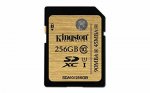
Great price for this card. Not the fastest one around but should be fine for most applications (I have one full of FLAC files in my car stereo). Lifetime warranty from the manufacturer and Amazon's peerless customer service. You could always run it past Flubit for anything up to another 15% off.
Top comments
intranix
12 Jun 165#3
Explain the logic please. Why not use a 4GB card instead of your 32GB?
jackvdbuk
12 Jun 164#2
I just purchased a 32gb sd card, i think the main worry with such large storage in a camera is if it gets corrupted or damaged thats alot of data to lose.. Bettef imo to have multiple sd cards of a smaller size.
or have one large one... totally up to you :wink:
nomnomnomnom
12 Jun 164#4
People have been saying this since the days of the floppy disk.
You could lose your other SD cards. They could corrupted when you plug them into a reader. You could get attacked by Noel Edmonds who stamps of them in a fit of rage.
You either have a backup or you don't. It's that simple. This notion of having multiple data sources, with the same data spread across them being 'safer' is absurd.
Take some pictures / video. Remove the card when you're done and plug it into your PC / laptop. Copy the images off (which should be syncing to the cloud anyway) so they are part of your backup procedure for that device (you have one, RIGHT!?). Delete them or leave them on the card.
There is *nothing* more to it. This entire 'lot of data to lose' mindset needs to die in a big ball of fiery death.
We might as well carry around 32 * 1GB cards going on your logic.
fireman1
12 Jun 163#10
I personally prefer to use a few thousand 128mb cards.
Losing data is then never an issue but on the other hand i have lost endless cards.
All comments (21)
Mghf
12 Jun 16#1
Best price that this class 10 UHS-1 card has been on sale for according to the Camel.
jackvdbuk
12 Jun 164#2
I just purchased a 32gb sd card, i think the main worry with such large storage in a camera is if it gets corrupted or damaged thats alot of data to lose.. Bettef imo to have multiple sd cards of a smaller size.
or have one large one... totally up to you :wink:
intranix
12 Jun 165#3
Explain the logic please. Why not use a 4GB card instead of your 32GB?
nomnomnomnom
12 Jun 164#4
People have been saying this since the days of the floppy disk.
You could lose your other SD cards. They could corrupted when you plug them into a reader. You could get attacked by Noel Edmonds who stamps of them in a fit of rage.
You either have a backup or you don't. It's that simple. This notion of having multiple data sources, with the same data spread across them being 'safer' is absurd.
Take some pictures / video. Remove the card when you're done and plug it into your PC / laptop. Copy the images off (which should be syncing to the cloud anyway) so they are part of your backup procedure for that device (you have one, RIGHT!?). Delete them or leave them on the card.
There is *nothing* more to it. This entire 'lot of data to lose' mindset needs to die in a big ball of fiery death.
We might as well carry around 32 * 1GB cards going on your logic.
pavel76
12 Jun 16#5
Not so great deal...U3 version with 80Gb write speed is only less than £4 from Amazon
airdsuk
12 Jun 16#6
I'd go for the Lexar Pro 64Gb x1000/150MB/s speed card for around the £22 quid mark with code at MyMemory this weekend. (Be quick) They hold 9700 or so JPGs in my Fuji. Or even get 2, and still have change .
I personally prefer to use a few thousand 128mb cards.
Losing data is then never an issue but on the other hand i have lost endless cards.
wenttoabetterplace
12 Jun 161#12
So the OP gives a perfect example of why someone would need a card like this (large FLAC music collection) - and still we are hearing from the usual chumney warners telling us that lots of small cards are better.
This website gives me a headache.
jackvdbuk to wenttoabetterplace
13 Jun 16#14
i did start this off, everyones needs are different, i personally with a camera average say max 1000 photos at 1mb + some video and hardly will touch 32gb. i think larger storage for camera like sdxc creates complacency and you will never off load or upload the files to safer storage as you will "never" fill it completely?
of course i agree with having one larger sd card at times just like i do with hdds.
scarl
13 Jun 16#13
You need a device that is UHS-II capable to take advantage of the maximum speed.
UHS-II cards have a second row of contacts to provide a 4-lane bus and operate up to a maximum 312 MB/s speed. UHS-II cards are reverse compatible with standard SD and UHS-I capable devices, but will operate at lower speed.
wenttoabetterplace
13 Jun 161#15
Yes, but your original comment was rather irrelevant. After all, the OP bought this for their large FLAC collection - yet you were talking about the benefits of smaller SD cards when taking photos.
Your advice is of no benefit to anyone that actually has a need for such a big card.
It's just the irrelevance of the comment - and the regularity with which they pop up on such threads.
nomnomnomnom
13 Jun 16#16
Then that's absolutely nothing to do with the card size, and everything to do with poor backup discipline on your behalf. The two have nothing to do with each other.
pgilc1
13 Jun 16#17
I've just ordered one to put into the card slot of my HP Envy. It has a 256GB SSD and instead of pulling it apart to fit a 512GB M.2 SSD at around £170-£200, i will be adding this and using it as a second drive.
Result :smiley:
nomnomnomnom to pgilc1
15 Jun 16#18
I'm not sure if you're serious....but if you are, than flash cards like this are really not designed for that.
If you're using it just for storage, you'll be fine. If you're going to start installing stuff to it (and can put up with the slower IOPS over a SSD) then you'll wear the card much faster.
They really are quite different to each other.
You can get a m2 500GB SSD from around £128, so your figures are well off.
wenttoabetterplace
15 Jun 16#19
If they have a 256GB SSD already, then they clearly are not going to be saving program files to this SD card!
nomnomnomnom
15 Jun 16#20
Well given they were comparing it to a SSD, then that's not really a clear cut case. 256GB isn't a lot for some people.
I'm just pointing out that it's not the best idea if they are considering this.
pgilc1
15 Jun 16#21
No, just mainly for storage and the odd movie. Wouldnt install to it.

![Fresh Breakfast Meat Box (Using code) @ Campbells Meat [Haggis / Lorne Sausage / Bacon / Black Pudding & More]](/images/topics/208684_1.jpg)




































![[Xbox One] Q. u. b. e: Director's Cut on Deals with Gold](/images/topics/208716_1.jpg)


















Opening post
Top comments
or have one large one... totally up to you :wink:
You could lose your other SD cards. They could corrupted when you plug them into a reader. You could get attacked by Noel Edmonds who stamps of them in a fit of rage.
You either have a backup or you don't. It's that simple. This notion of having multiple data sources, with the same data spread across them being 'safer' is absurd.
Take some pictures / video. Remove the card when you're done and plug it into your PC / laptop. Copy the images off (which should be syncing to the cloud anyway) so they are part of your backup procedure for that device (you have one, RIGHT!?). Delete them or leave them on the card.
There is *nothing* more to it. This entire 'lot of data to lose' mindset needs to die in a big ball of fiery death.
We might as well carry around 32 * 1GB cards going on your logic.
Losing data is then never an issue but on the other hand i have lost endless cards.
All comments (21)
or have one large one... totally up to you :wink:
You could lose your other SD cards. They could corrupted when you plug them into a reader. You could get attacked by Noel Edmonds who stamps of them in a fit of rage.
You either have a backup or you don't. It's that simple. This notion of having multiple data sources, with the same data spread across them being 'safer' is absurd.
Take some pictures / video. Remove the card when you're done and plug it into your PC / laptop. Copy the images off (which should be syncing to the cloud anyway) so they are part of your backup procedure for that device (you have one, RIGHT!?). Delete them or leave them on the card.
There is *nothing* more to it. This entire 'lot of data to lose' mindset needs to die in a big ball of fiery death.
We might as well carry around 32 * 1GB cards going on your logic.
Use thew code SUMM10 at checkout (note the case, and it ends at midnight)
Losing data is then never an issue but on the other hand i have lost endless cards.
This website gives me a headache.
of course i agree with having one larger sd card at times just like i do with hdds.
UHS-II cards have a second row of contacts to provide a 4-lane bus and operate up to a maximum 312 MB/s speed. UHS-II cards are reverse compatible with standard SD and UHS-I capable devices, but will operate at lower speed.
Your advice is of no benefit to anyone that actually has a need for such a big card.
It's just the irrelevance of the comment - and the regularity with which they pop up on such threads.
Result :smiley:
If you're using it just for storage, you'll be fine. If you're going to start installing stuff to it (and can put up with the slower IOPS over a SSD) then you'll wear the card much faster.
They really are quite different to each other.
You can get a m2 500GB SSD from around £128, so your figures are well off.
I'm just pointing out that it's not the best idea if they are considering this.