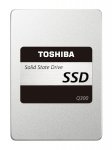
MOVE BEYOND HDD If your PC can‘t keep up with you, it‘s time to upgrade with a Toshiba Q300 Solid State Drive. With 3-bit-per-cell flash and unique Toshiba controller technology, you‘ll experience high-speed boot up and fast system responsiveness. A Q300 SSD is a fantastic upgrade that will increase your performance both in the office and out.
Box Contains
1 x Solid State Drive
Spacer for 9.5mm applications
Quick Start Guide
Warranty Leaflet
Specifications
Storage memory - 3-bit-per-cell 15 nm NAND Flash.
Capacity - 960 GB, 480 GB, 240 GB, 120 GB.
Controller - Toshiba TC58NC1000.
Interface - SATA III
Max. transfer rate - 6.0 Gbit/s.
Dimension - 100 x 69.85 x 7 (mm).
Weight - 57 - 61 g typical
14 comments
chapchap
8 May 161#1
I saw this the other week and posted below- pretty good price I thought.
A lot of negative recent feedback about it failing.
smileypete to Predikuesi
9 May 16#6
Almost all of it for the 120GB ones though.
BeachyBall
9 May 16#3
I have an Acer Revo R3610 mini PC. Since updating to Windows 10 it runs so slowly, making it almost unusable.
If I replaced the standard 500 GB internal drive with the Toshiba, would it solve the problem?
Any advice would be appreciated ☺
netjock to BeachyBall
9 May 161#4
I would do a clean install of Win 10 first. SSD will do wonders but if you get an SSD then clone the install it might be slower than expected. Cheapest way is to do a clean install to see whether there is something that is causing the slowdown (missing driveres, loops, corruption etc)
TimJWL
9 May 161#5
I had an older Windows 7 Q6600 quad core, despite 6gb of ram and a seperate 1gb graphics card - it was running slow. I did as mentioned above, put a clean install of Windows 10 on a SSD (but left it dual boot)- the difference is quite unbelievable - it boots up in seconds and everything runs so quick.
BeachyBall
9 May 161#7
Thanks very much for the advice netjock and TimJWL. What I did was reset Windows 7 to fresh using the restore partition, then downloaded Windows 10. I'll create a clean install bootable USB this time. Tempted to get the SSD, such a great price and get a caddy for the HDD ☺
Predikuesi
9 May 16#8
If put one of these in my Toshiba Satellite could I copy the contents of the partition contain the Toshiba setup onto a partition on the SSD first, then install from there? Or is there a quicker (better) way of putting my system on the SSD?
mercutio98uk to Predikuesi
9 May 161#11
If you have a spare drive bay in the laptop/a USB 3 to Sata cable/a desktop PC that can host both the drives for a while, the easiest way will be to clone the drive. There's tonnes of tools around, everyone has their favourite. I find "mini tool partition wizard" very simple to use. You can either do it manually or there's a "migrate OS to SSD" wizard that should handle it all for you :smiley: It's free as well.
Assuming you have a "normal" laptop (as they usually only have one drive bay) and don't have a desktop handy, the USB 3 to sata cable will be the easiest. One of these is what you are after: Clicky
634miyamoto
9 May 16#9
I ordered this two days ago, didn't realise it was a bargain until I saw this ☺️
Novezeil
9 May 16#10
Not bad price for TLC!
barbiee
10 May 16#12
RE: bad Amazon reviews - interesting to note most of those are from unverified purchasers, who mostly only reviewed that single product, and conveniently someone has commented under many of them "recommending" Kingspec instead.
Great deal OP - heat from me - seems only yesterday I paid this much for a 40GB drive :confused:
3guesses
10 May 16#13
I recently bought a USB 3.0-2.5" SATA III cable from eBay for ~£3.

![Fresh Breakfast Meat Box (Using code) @ Campbells Meat [Haggis / Lorne Sausage / Bacon / Black Pudding & More]](/images/topics/208684_1.jpg)




































![[Xbox One] Q. u. b. e: Director's Cut on Deals with Gold](/images/topics/208716_1.jpg)


















Opening post
MOVE BEYOND HDD If your PC can‘t keep up with you, it‘s time to upgrade with a Toshiba Q300 Solid State Drive. With 3-bit-per-cell flash and unique Toshiba controller technology, you‘ll experience high-speed boot up and fast system responsiveness. A Q300 SSD is a fantastic upgrade that will increase your performance both in the office and out.
Box Contains
1 x Solid State Drive
Spacer for 9.5mm applications
Quick Start Guide
Warranty Leaflet
Specifications
Storage memory - 3-bit-per-cell 15 nm NAND Flash.
Capacity - 960 GB, 480 GB, 240 GB, 120 GB.
Controller - Toshiba TC58NC1000.
Interface - SATA III
Max. transfer rate - 6.0 Gbit/s.
Dimension - 100 x 69.85 x 7 (mm).
Weight - 57 - 61 g typical
14 comments
http://www.hotukdeals.com/deals/toshiba-q300-480gb-2-5-inch-solid-state-drive-internal-sata-iii-79-99-amazon-2438016
If I replaced the standard 500 GB internal drive with the Toshiba, would it solve the problem?
Any advice would be appreciated ☺
Assuming you have a "normal" laptop (as they usually only have one drive bay) and don't have a desktop handy, the USB 3 to sata cable will be the easiest. One of these is what you are after: Clicky
Great deal OP - heat from me - seems only yesterday I paid this much for a 40GB drive :confused: