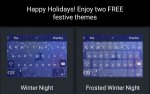
Free Christmas keyboards, nice touch for the festive season.
13 comments
Kyhas
10 Dec 15#1
shame I'm a swype user. Look good!
decosparkle25
10 Dec 15#2
Lovely, ta!
Marin
10 Dec 151#3
go into the app on phone, click on themes, then explore at the top.
ratsdomino
10 Dec 15#4
i do like switftkey but does anyone else get really annoyed when trying to type 'three'
their website says to get a double 'ee' you just hold on the 'e', but that simply doesnt work
Dogeared to ratsdomino
10 Dec 15#5
I don't have that problem with it at all. I've just tried it and it predicted the word before I even got to the e. In the previous sentence I probably had to type a maximum 9 letters in total.... it reads my mind!
I am using the festive keyboard at the moment.
woldranger to ratsdomino
10 Dec 15#10
user error in afraid. I've no problems with getting multiple characters predicted
CubicZirconia
10 Dec 15#6
ho ho ho. nice touch
jai47
10 Dec 15#7
Is this only on android?
I can't find it on the iOS version.
If you find the predictive text is causing more errors than corrections, you can delete its existing corrections library and create a new one...
Within the App, go to Profile -> Privacy Settings -> Delete the Local and Remote data.
You'll end up with a fresh keyboard and it will re-learn your typing style, auto corrections and custom words.
NIgelK to jai47
10 Dec 15#9
Or press and hold the prediction you don't like and it gives you the option to delete that prediction rather than the whole learned dictionary.
ratsdomino
10 Dec 15#8
does it not predict the before it gets to three? thats what mine does and it is doing my head in! i seem to have to type three all the time
ratsdomino
10 Dec 15#11
I've contacted them about it but it doesn't matter. I've just downloaded Google keyboard and am instantly impressed!
eset12345
10 Dec 15#12
or it just reads and logs everything you have ever typed and bases your predictions on what it thinks you want to say

![Fresh Breakfast Meat Box (Using code) @ Campbells Meat [Haggis / Lorne Sausage / Bacon / Black Pudding & More]](/images/topics/208684_1.jpg)




































![[Xbox One] Q. u. b. e: Director's Cut on Deals with Gold](/images/topics/208716_1.jpg)


















Opening post
13 comments
their website says to get a double 'ee' you just hold on the 'e', but that simply doesnt work
I am using the festive keyboard at the moment.
I can't find it on the iOS version.
If you find the predictive text is causing more errors than corrections, you can delete its existing corrections library and create a new one...
Within the App, go to Profile -> Privacy Settings -> Delete the Local and Remote data.
You'll end up with a fresh keyboard and it will re-learn your typing style, auto corrections and custom words.