Edit: There's one with built in Wi-fi and Bluetooth for not much more.
Top comments
ackbar to shootomanUK
30 Jun 1714#12
Yes it will
b1g1an
30 Jun 178#7
Also bear in mind the Zero (either version) doesn't have a 3.5mm out or the associated filters so you'll either have to knock one up yourself if you're handy with a soldering iron ( about £2-3 in components ), use a USB one but you'll then need a hub to plug the microphone in as well or spend more money on a speaker hat.
Perfectly doable and a fun project but if you don't go for the DIY approach it starts eating into the £20 difference between one of these and a Pi 3 which is plug and play.
Definitely recommend a PS3 Eye for a microphone, cheapest decent array mic by some margin, particularly if you pick one up for 50p from CEX :smile:
b1g1an
30 Jun 174#1
Might as well get the W by the time you've added wifi.
Smithers37
30 Jun 173#25
You don't need one.
Latest comments (66)
mikerr
12 Jul 171#65
Pihole needs to be running 24/7 - so don't turn the pi off when you turn the TV off if running kodi on the same box.
no_Sunshine to mikerr
18 Jul 17#66
Great, thanks!
no_Sunshine
10 Jul 17#64
Thanks!
AdamBrunt
9 Jul 171#63
You can certainly run retropie and Kodi on the same one [ it will only ever be running 1 of them at once anyway ]
Not sure what sort of processor hot Pi Hole is to know whether you can run it and Kodi/retropie at the same time
no_Sunshine
9 Jul 17#62
Thanks. Can I use one Pi for all three simultaneously? I.e. Pi-hole, retropie with kids games & Kodi for streaming or will I need three different ones?
no_Sunshine
8 Jul 17#59
Okay, been resisting buying a Pi for many years, but now I am tempted. I am thinking of running Pi-hole to block ads, also install retro pie for old games for the kids and maybe stream Kodi or something similar. Can these all be done on the same Pi? Thinking of buying Pi 3 B model. Thanks in advance.
AdamBrunt to no_Sunshine
8 Jul 17#61
I don't see why not .
I have a Pi 3 in the lounge, connected to the main TV, running Kodi and it is the equal of any other streaming box I have seen. The Pi3 copes perfectly well streaming 1080p as well.
I have another on in the kid's room running Kodi and retropie in a dual boot setup.
Both run seamlessly.
Have a spare Pi lying around in the study which I might install Pi-hole on. Never heard of it before and most of the apps on the devices we have are the as-riddled versions so win-win :smile:
no_Sunshine
8 Jul 17#60
Also, if I buy a Pi 3 model B, will it come with all or most accessories like USB power supply, HDMI cable, SD card with OS & even a cover, or will I need to buy these separately? Thanks again!
shootomanUK
30 Jun 173#9
will this run battlefield one ??
ackbar to shootomanUK
30 Jun 1714#12
Yes it will
OrribleHarry to shootomanUK
30 Jun 17#18
Yep but low frame rate at 4K
retro_pie to shootomanUK
30 Jun 17#23
No but it will run minesweepers perfectly at full resolution and 60 fps
MissBlondie to shootomanUK
7 Jul 17#58
If you turn shadows off you should get a solid 60fps
Mex5150
1 Jul 17#51
Heat added. I've been VERY tempted to get one form of Pi or another since they came out, problem is, I have no idea what I'd do with one, I already have a PLEX server set up on a normal Linux box, and I'm not into games, so a retro gaming box isn't of much interest. Any ideas for putting one to use?
Shengis to Mex5150
2 Jul 172#52
1. A paperweight.
2. Use to fill that last bit of drawer space so everything is nice and tight in there......
3. You don't need one. Seriously. They're a curio that can do most things, badly, and at a higher cost than you originally thought.
reddragon105 to Mex5150
3 Jul 17#57
Like I said in another comment above, these are not meant to be bought for their power, they're meant to be bought for their size. While they're technically fully fledged computers, they're designed to be used as microcontrollers - i.e. the 'brain' inside a basic electronics device.
As examples of their use, I've got one in a birdhouse outside that's used to power/control an infrared camera and stream the video to YouTube. I've got another one in my coffee machine that can switch it on/off via a web server that it hosts - so I can put water + coffee grounds in when I leave the house and switch it on via my phone when I'm on my way home so the coffee is freshly brewed when I get back, so if I could have done it cheaper I'd be interested in knowing how.
andrewp
2 Jul 17#56
That can be the case, but its more about learning to code/electronics and the achievement of doing it yourself rather than buying something off the shelf. If you have enough knowledge you can innovate new ideas, hence the reason google worked with raspberry pi with the AIY project they gave away with the magazine.
Its not going to be for everyone, but its a neat little product
Mex5150
2 Jul 17#55
I use overpriced magic tricks for that ;^>
b1g1an
2 Jul 171#54
Spot on there, though it can be a fun way to use stuff you have lying around at little extra cost. For instance, there's no need to waste money on cases, you're bound to have something suitable already, I have my ambilight pi zero running in an old tictac box and my home assistant one lives inside an old router case complete with it's power supply, retro pie has replaced the guts of a dead N64 and I'm thinking of putting the Google Assistant one inside a Mr Potato Head.
I'm fairly tech savvy, but so far I've missed the Pi cart, can anyone help a little?
I'm looking for something to run retro arch and as a media player/streamer for the living room, I'm guessing the Pi 3 would be a much better bet as said by many above? seems a much more complete and capable machine.
reddragon105 to Daddy_Bear2
1 Jul 17#50
Yes, Pi 3 would be best - that's what I use in the living room for emulators and streaming media from my NAS drive. A Zero would do it but it might struggle with some things (hi-def/bitrate/compressed video and more demanding emulators) plus connectivity would be easier with a full size Pi (mmm, full size Pi...).
I'd recommend RetroPie - you can download an SD card image with everything setup ready for you, including EmulationStation as a frontend for RetroArch, giving you emulators for most older games consoles, all you need to do is copy the ROMs over. You can also use it to install Kodi (for all your multimedia needs) as an optional package so setup would be a breeze for you - all you'd need to do is add your choice of controller!
alweekes
1 Jul 171#49
The 'W' version makes a fabulous IP Cam when coupled to the new raspberry pi camera module and the official case. Add MotionEyeOS (https://github.com/ccrisan/motioneyeos/wiki) and you have a far more powerful device than most off the peg IP cameras for less money.
OSMC runs ok on a Pi Zero but the Pi3 will be better as the processor is quicker
Blasphemous
30 Jun 17#35
Tried to get AI Project (from the MagPi Magazine Promo), running on my Zero, failed! Don't 'really' want to upgrade to the the 3 but the Zero is fairly limiting.
mne2 to Blasphemous
1 Jul 171#45
I got it running on a Zero W. Was slow doing certain things but did work
andrewp
1 Jul 17#44
Yes Pi3 is always going to run better for that kind of thing. A lot of emulators will run fine on the Pi Zero, but for a media player streaming video you will be much better off with the 3.
mikerr
1 Jul 171#43
No, it operates at dns level - so doesn't affect transfer speed.
It does speed up browsing (no ads) and since it's network wide - even removes ads from android apps :smiley:
dwl99
1 Jul 17#42
Yes, definitely go for the Pi3 for this. There's a good guide here
Im confused. How does it connect to the network if it doesnt have Ethernet (or in this case WIFI) ?
amour3k to jonesjd
30 Jun 17#29
That actually look's decent. :-)
dwl99 to jonesjd
1 Jul 17#41
Pi-hole looks interesting. Would it ever have the unwanted effect of throttling your internet connection if you're doing stuff like streaming 4K video from Netflix? I already have a Pi2 with Raspbian Lite and running Kodi, Plex Media Server and Logitech Media Server. Would adding Pi-hole significantly slow things down?
reddragon105
1 Jul 172#39
Yes, you can.
Yes, but obviously, considering its size and price, it's not a fast computer and because it has an ARM CPU (the type you'd get in a phone, rather than a desktop PC) it's rather limited in what software it can run - the standard OS for it is Raspbian, which is based on Debian (so Unix/Linux essentially), you won't be able to install any normal version of Windows on it (it only supports Windows 10 IoT, which it's ideal for if you have a use for that) or any native Windows apps. You could hook one of these up to a keyboard, mouse, monitor and speakers, go online and browse the internet, watch videos and play music, download files, write text documents, make spreadsheets and play games, all the usual computer stuff, but - again, given its size and price - it's meant to be used more as a microcontroller, i.e. the 'brain' of any smart device you might want to make. Typical uses for a Pi Zero include adding a camera to turn it into a webcam that's always on, adding sensors and using it as a weather station, using it as a low power torrent client or put it inside an old handheld games console or controller and use it to run emulators - basically anything that would take advantage of its small size. The larger Raspberry Pis are more powerful and would be better suited as full-fledged computers, but still have the same limitations in terms of what they can run.
It has micro USB ports so you would connect a USB Wi-Fi dongle (or Ethernet adapter) with a micro USB to USB-A (standard sized USB) adapter. One is included with the 'Essentials Kit' if you order that from the PiHut. You can also solder an adapter directly to the pads on the underside of one of the USB ports or the GPIO pins if you want a permanent solution.
For multimedia you would be better off with the more powerful Raspberry Pi 3. Like I said above, this is intended more for microcontroller purposes. But you wouldn't really need additional parts - just a USB power cable, HDMI cable and something to control it with (keyboard/mouse or it could be controlled remotely from your phone or laptop, possibly even with your TV's remote control if your TV supports it). The main problem you'd have is there are no native Netflix or Amazon Prime apps for it. Last time I checked, to watch Netflix you'd have to install Chromium (open source version of Chrome) and for Prime you could use a Kodi plug-in.
I have one in my home office I use as a PC and while its not as quick as a modern PC/Laptop, its brilliant for £30 and does everything I need it to do. Like you say, if you overload it then it can struggle.
andrewp
30 Jun 17#37
I've got a zero i've had for a few months now and haven't figured out what to do with. I might get the Zero W and the snes controllers pihut sell for £5 and use an emulator to make my own tiny snes. Cheaper than the £80 one that's sold out everywhere.
b1g1an
30 Jun 17#36
Power supply yes but you don't need anything else with a W other than an SD card. All the gui does is slow it down so just use the lite version of the os and SSH into it headless, you so all the good stuff in a terminal window anyway.
leaston
30 Jun 17#34
It depends which version of Linux you run and how you configure it. I've had cheap Windows laptops that struggled with exactly what you describe. The Pi isn't perfect or massively powerful, but it certainly can be a desktop replacement if you only need web browsing, basic games (retro gaming on it is outstanding), media, productivity and coding :smiley:
OrribleHarry
30 Jun 17#33
What OS were you running?
Solipsist
30 Jun 172#32
Also note, that you are likely to need something like a Pi Zero Essentials kit along with a power supply to get going with either this Pi Zero, or the better Pi Zero W. https://thepihut.com/products/raspberry-pi-zero-essential-kit
In particular, you are going to want the mini HDMI adapter if you want to see what is going on.
If you are new to Raspberry Pi, you will have a much easier experience with a Pi 3.
Get this if you want to move on to battery powered projects. It's the low power consumption, not the low price that makes the Pi Zero good.
Solipsist
30 Jun 17#31
Well you can add a USB WiFi dongle, but once you've bought that you would have been better off going for the Pi Zero W - especially since the Pi Zero doesn't have many spare USB ports.
There are plenty of embedded projects which don't need any networking - those are the sort of projects that this Pi Zero is best suited for. You might talk to it over the serial port for example. For everyone else, interested in more typical computing, get a Pi with some networking onboard.
JumpMan1980
30 Jun 17#30
Oh you little rotter you :laughing:
Josh.Rogan
30 Jun 171#28
With respect, i wouldn't go that far - I did have one running as a kitchen computer but really it wasn't up to the task, any more than 4 tabs open in a browser or streaming media and you are going to end up frustrated.
Josh.Rogan
30 Jun 17#27
I wouldn't recommend it, firstly the pi 3 would be much better equipped, secondly while i think that netflix is possible using chromium, it wouldn't be an ideal solution - i, personally, haven't done it so apologies if i sound a little vague. The pi zero and zero w would be best suited to those that have a job in mind, some sort of script to run, home automation that kind of thing, to have a bit of a better computer or media centre i would always recommend the pi 3. That said if it is JUST for a media center there may even be better options at the £30 price point
heeljames
30 Jun 17#26
Skyrim PI edition is being announced soon!
Smithers37
30 Jun 173#25
You don't need one.
leaston
30 Jun 17#24
Yep. The £30 Raspberry Pi 3 can be set up in half an hour with a full operating system and will do pretty much what any entry level laptop will do.
Oh. Good shout. Gonna see if i can cancel my order and get that instead... :smile:
hotshot to Josh.Rogan
30 Jun 17#20
I want one for a media device for TV run Prime and Netflix etc would this do the job ? Would I need additional parts
OrribleHarry
30 Jun 17#19
Whatever a computer can do, so can this.
JumpMan1980
30 Jun 17#17
What's it for?
Silverbullet767
30 Jun 17#16
It also drives you to work and is a two week holiday.
b1g1an
30 Jun 178#7
Also bear in mind the Zero (either version) doesn't have a 3.5mm out or the associated filters so you'll either have to knock one up yourself if you're handy with a soldering iron ( about £2-3 in components ), use a USB one but you'll then need a hub to plug the microphone in as well or spend more money on a speaker hat.
Perfectly doable and a fun project but if you don't go for the DIY approach it starts eating into the £20 difference between one of these and a Pi 3 which is plug and play.
Definitely recommend a PS3 Eye for a microphone, cheapest decent array mic by some margin, particularly if you pick one up for 50p from CEX :smile:
sotomonkey to b1g1an
30 Jun 17#15
Can't you just have the audio carried over HDMI?
mikerr
30 Jun 17#14
Pimoroni.com and modmypi.com also have them at same price,
and those two give free postage on orders over £50 - thepihut doesn't.
XP200
30 Jun 173#13
I was just in Greggs and they also a zero raspberry pi's. :stuck_out_tongue:
kencol
30 Jun 171#11
Is this not the usual price? Pimoroni has stock too. Didn't think these were in short supply these days.
Valtiel
30 Jun 171#8
may as well spend a little bit more and get the pi zero w
JumpMan1980
30 Jun 171#4
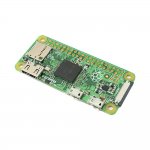
What the devil is this device?
_sion to JumpMan1980
30 Jun 17#5
It's a mini computer
powerbrick
30 Jun 171#2
It's the non wi-fi/Bluetooth one.
b1g1an
30 Jun 174#1
Might as well get the W by the time you've added wifi.

![Fresh Breakfast Meat Box (Using code) @ Campbells Meat [Haggis / Lorne Sausage / Bacon / Black Pudding & More]](/images/topics/208684_1.jpg)




































![[Xbox One] Q. u. b. e: Director's Cut on Deals with Gold](/images/topics/208716_1.jpg)


















Opening post
Edit: There's one with built in Wi-fi and Bluetooth for not much more.
Top comments
Perfectly doable and a fun project but if you don't go for the DIY approach it starts eating into the £20 difference between one of these and a Pi 3 which is plug and play.
Definitely recommend a PS3 Eye for a microphone, cheapest decent array mic by some margin, particularly if you pick one up for 50p from CEX :smile:
Latest comments (66)
Not sure what sort of processor hot Pi Hole is to know whether you can run it and Kodi/retropie at the same time
I have a Pi 3 in the lounge, connected to the main TV, running Kodi and it is the equal of any other streaming box I have seen. The Pi3 copes perfectly well streaming 1080p as well.
I have another on in the kid's room running Kodi and retropie in a dual boot setup.
Both run seamlessly.
Have a spare Pi lying around in the study which I might install Pi-hole on. Never heard of it before and most of the apps on the devices we have are the as-riddled versions so win-win :smile:
2. Use to fill that last bit of drawer space so everything is nice and tight in there......
3. You don't need one. Seriously. They're a curio that can do most things, badly, and at a higher cost than you originally thought.
Like I said in another comment above, these are not meant to be bought for their power, they're meant to be bought for their size. While they're technically fully fledged computers, they're designed to be used as microcontrollers - i.e. the 'brain' inside a basic electronics device.
As examples of their use, I've got one in a birdhouse outside that's used to power/control an infrared camera and stream the video to YouTube. I've got another one in my coffee machine that can switch it on/off via a web server that it hosts - so I can put water + coffee grounds in when I leave the house and switch it on via my phone when I'm on my way home so the coffee is freshly brewed when I get back, so if I could have done it cheaper I'd be interested in knowing how.
Its not going to be for everyone, but its a neat little product
Enjoy :smiley:
I'm looking for something to run retro arch and as a media player/streamer for the living room, I'm guessing the Pi 3 would be a much better bet as said by many above? seems a much more complete and capable machine.
I'd recommend RetroPie - you can download an SD card image with everything setup ready for you, including EmulationStation as a frontend for RetroArch, giving you emulators for most older games consoles, all you need to do is copy the ROMs over. You can also use it to install Kodi (for all your multimedia needs) as an optional package so setup would be a breeze for you - all you'd need to do is add your choice of controller!
https://photos.google.com/album/AF1QipPnnIJx8bYo32MKXlUfIDMzXEMj80SpICqk3lvL
It does speed up browsing (no ads) and since it's network wide - even removes ads from android apps :smiley:
Yes, but obviously, considering its size and price, it's not a fast computer and because it has an ARM CPU (the type you'd get in a phone, rather than a desktop PC) it's rather limited in what software it can run - the standard OS for it is Raspbian, which is based on Debian (so Unix/Linux essentially), you won't be able to install any normal version of Windows on it (it only supports Windows 10 IoT, which it's ideal for if you have a use for that) or any native Windows apps. You could hook one of these up to a keyboard, mouse, monitor and speakers, go online and browse the internet, watch videos and play music, download files, write text documents, make spreadsheets and play games, all the usual computer stuff, but - again, given its size and price - it's meant to be used more as a microcontroller, i.e. the 'brain' of any smart device you might want to make. Typical uses for a Pi Zero include adding a camera to turn it into a webcam that's always on, adding sensors and using it as a weather station, using it as a low power torrent client or put it inside an old handheld games console or controller and use it to run emulators - basically anything that would take advantage of its small size. The larger Raspberry Pis are more powerful and would be better suited as full-fledged computers, but still have the same limitations in terms of what they can run.
It has micro USB ports so you would connect a USB Wi-Fi dongle (or Ethernet adapter) with a micro USB to USB-A (standard sized USB) adapter. One is included with the 'Essentials Kit' if you order that from the PiHut. You can also solder an adapter directly to the pads on the underside of one of the USB ports or the GPIO pins if you want a permanent solution.
For multimedia you would be better off with the more powerful Raspberry Pi 3. Like I said above, this is intended more for microcontroller purposes. But you wouldn't really need additional parts - just a USB power cable, HDMI cable and something to control it with (keyboard/mouse or it could be controlled remotely from your phone or laptop, possibly even with your TV's remote control if your TV supports it). The main problem you'd have is there are no native Netflix or Amazon Prime apps for it. Last time I checked, to watch Netflix you'd have to install Chromium (open source version of Chrome) and for Prime you could use a Kodi plug-in.
I have one in my home office I use as a PC and while its not as quick as a modern PC/Laptop, its brilliant for £30 and does everything I need it to do. Like you say, if you overload it then it can struggle.
https://thepihut.com/products/raspberry-pi-zero-essential-kit
In particular, you are going to want the mini HDMI adapter if you want to see what is going on.
If you are new to Raspberry Pi, you will have a much easier experience with a Pi 3.
Get this if you want to move on to battery powered projects. It's the low power consumption, not the low price that makes the Pi Zero good.
There are plenty of embedded projects which don't need any networking - those are the sort of projects that this Pi Zero is best suited for. You might talk to it over the serial port for example. For everyone else, interested in more typical computing, get a Pi with some networking onboard.
Perfectly doable and a fun project but if you don't go for the DIY approach it starts eating into the £20 difference between one of these and a Pi 3 which is plug and play.
Definitely recommend a PS3 Eye for a microphone, cheapest decent array mic by some margin, particularly if you pick one up for 50p from CEX :smile:
and those two give free postage on orders over £50 - thepihut doesn't.