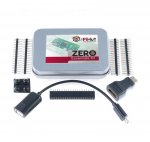
Raspberry Pi Zero W with 'essentials kit'
Use discount code: TWITTER20K
Kit details:
4 x Rubber Feet (To protect your Raspberry Pi Zero)
1 x MiniHDMI > HDMI adapter (to allow the use of standard HDMI cables)
1 x MicroUSB > USB adapter (to allow the use of standard USB devices)
2 x Single row, 20 pin GPIO headers
1 x Dual row, 40 pin female GPIO header
1 x Dual row, 40 pin right-angled GPIO header
1 x Dual row, 40 pin GPIO header
All comments (21)
nougat
20 Apr 17#1
The code only works for this item. I tried a few others but no joy.
I was going to post this, but i didnt think it was that great value to start, let alone with a code off
z80
20 Apr 17#4
Fair do's. It seems reasonable to me. Is it available cheaper somewhere else?
What was it that made you initially consider posting the deal?
The bundle itself is £15.60 which is the same price as buying separately, if that is what you mean? With 20% off it's a good deal though.
I was in the middle of ordering it at the full price when I searched for any discount codes and the twitter code came up.
b1g1an
20 Apr 171#5
It's effectively £2.90 for the extra bits, £12.10 with postage from elsewhere. If you need them it's a good price if you don't it isn't.
For a Zero W it's debatable whether you'd use the extra, out of any of the Pis, particularly now with the built in wifi, this one is most likely going to be used headless buried away somewhere doing a specific purpose and you can solder everything direct to gpio including power.
I have one behind my tv running my ambilight, never likely to touch it again unless it dies. Only thing I ever plugged into it apart from the sd card obviously, was power just to set it up in the first place and you don't need an adaptor for that.
reddragon105 to b1g1an
20 Apr 172#6
+1 to this - If you're using a Zero then chances are you have a permanent setup in mind so you don't really need to add the pin headers because they're for jumper cables, you can just solder directly the the GPIO holes instead, which also saves space. I've used a couple of original Zeroes in projects where I did that, and added Wi-Fi to them by breaking open little USB adaptors and soldering them directly to the second USB ports (a standard mod for a Zero). But then I also have other Raspberry Pis that I used to test my setups before I committed them to the Pi Zero, so if this is your first Pi then maybe you would want the pin headers so that you've got the flexibility.
callum84 to b1g1an
20 Apr 17#9
Would love an ambilight setup but wouldnt know where to start.
See loads of projects out there, what one did you use?
bma1445
20 Apr 171#7
I actually needed a couple of header pin sets, so I've ordered the kit.
Really annoying that you can't order more than one per transaction (I'm assuming because the profit is limited so they make it up with the postage fee).
androoski to bma1445
21 Apr 17#21
I think the postage is £2.50.
The problem is to do with the profit, but more connected to the availability of production capacity in Wales as the production lines give more time to making the Pi3B and other things for the distribution partners, these have a higher profit margin.
Because of the limited production time available for Zero they have been in short supply and so RPF decreed a 1 per purchase constraint in an attempt to get them spread round more fairly.
XP200
20 Apr 171#8
£15 for a Raspberry pi, must taste really good.
Heat......in oven or is it ready to eat cold. :wink:
Joni23
20 Apr 171#10
lucky I came here knowing what a Dual row, 40 pin right-angled GPIO header is but was a little unsure about a rubber foot. This post reminds me of work :smile:
Spaz
20 Apr 171#11
I know zip about these, would this be a good starter for a 10 year old to learn on?
androoski to Spaz
21 Apr 17#20
For a 10 year old a Pi3B would be a better option. Quite a bit more expensive (£30ish), but more responsive.
People tend to put zeros into projects rather than using them interactively.
Wolf0x
20 Apr 171#12
It's quite straightforward though the way you go about setting it up really depends on what you want to use Ambilight for. What do you plan on using it for, just Kodi or everything you put on your TV or just games on a computer?
callum84
20 Apr 17#13
Preferably everything displayed on tv. Sky, PS4, firestick. Is that possible?
Wolf0x
20 Apr 171#14
I've not got that sort of setup myself but it is possible. If you just have a normal Sky box and PS4 then you will have no problem at all, if you have the Sky Q or PS4 Pro then your costs to set this up will be a good bit higher, the issue being they require more specialised hardware to handle. So assuming you don't have either of those two devices then this link:
I want this for a kodi box is the Zero W with official case a better option ?
callum84
20 Apr 17#16
Thanks mate, thats ideal.
cookd
20 Apr 172#17
Thanks for posting this. I had a Pi Zero W and a couple of spare 40 pin headers in my basket there from earlier today. Glad I spotted this and saved a few £ :smiley:
b1g1an
20 Apr 17#18
I'm using Hyperion, my set up is quite simple as i only want the full light experience when watching Blu-rays which i do through Kodi and the rest of the time i want a static subtle light as you get from traditional backlights. Personally think it's too much for normal TV watching but if you want that you'll get into cobbling hdmi convertors and image grabbers together which can be fraught with problems.
The guide on Hyperion's site makes basic set up sound overly complicated but there are some simple guides on YouTube, look for the most recent ones as Hyperion is open source and therefore ever changing, Great Scott's latest using a zero w isn't bad.
Two tips, make sure you get a hefty power supply, at least 20A for 5m strip, will run you about £13 from Amazon, no cheaper direct from China, and spend the extra to get APA102 60/m LEDs, much less likely to have any issues setting them up, colour accuracy is better and effects are smoother, the will run you £30-40 from Aliexpress or silly money if you buy locally. Make sure you tap the power in at several places to avoid patchy colour.
Ignore the shaky start butthisgives you a decent idea of what's possible...

![Fresh Breakfast Meat Box (Using code) @ Campbells Meat [Haggis / Lorne Sausage / Bacon / Black Pudding & More]](/images/topics/208684_1.jpg)




































![[Xbox One] Q. u. b. e: Director's Cut on Deals with Gold](/images/topics/208716_1.jpg)


















Opening post
Use discount code: TWITTER20K
Kit details:
4 x Rubber Feet (To protect your Raspberry Pi Zero)
1 x MiniHDMI > HDMI adapter (to allow the use of standard HDMI cables)
1 x MicroUSB > USB adapter (to allow the use of standard USB devices)
2 x Single row, 20 pin GPIO headers
1 x Dual row, 40 pin female GPIO header
1 x Dual row, 40 pin right-angled GPIO header
1 x Dual row, 40 pin GPIO header
All comments (21)
Here is a link to their message on Twitter - https://twitter.com/ThePiHut/status/855050132005548033
What was it that made you initially consider posting the deal?
The bundle itself is £15.60 which is the same price as buying separately, if that is what you mean? With 20% off it's a good deal though.
I was in the middle of ordering it at the full price when I searched for any discount codes and the twitter code came up.
For a Zero W it's debatable whether you'd use the extra, out of any of the Pis, particularly now with the built in wifi, this one is most likely going to be used headless buried away somewhere doing a specific purpose and you can solder everything direct to gpio including power.
I have one behind my tv running my ambilight, never likely to touch it again unless it dies. Only thing I ever plugged into it apart from the sd card obviously, was power just to set it up in the first place and you don't need an adaptor for that.
See loads of projects out there, what one did you use?
Really annoying that you can't order more than one per transaction (I'm assuming because the profit is limited so they make it up with the postage fee).
The problem is to do with the profit, but more connected to the availability of production capacity in Wales as the production lines give more time to making the Pi3B and other things for the distribution partners, these have a higher profit margin.
Because of the limited production time available for Zero they have been in short supply and so RPF decreed a 1 per purchase constraint in an attempt to get them spread round more fairly.
Heat......in oven or is it ready to eat cold. :wink:
People tend to put zeros into projects rather than using them interactively.
Your text here
Is a good place to start looking at.
The guide on Hyperion's site makes basic set up sound overly complicated but there are some simple guides on YouTube, look for the most recent ones as Hyperion is open source and therefore ever changing, Great Scott's latest using a zero w isn't bad.
Two tips, make sure you get a hefty power supply, at least 20A for 5m strip, will run you about £13 from Amazon, no cheaper direct from China, and spend the extra to get APA102 60/m LEDs, much less likely to have any issues setting them up, colour accuracy is better and effects are smoother, the will run you £30-40 from Aliexpress or silly money if you buy locally. Make sure you tap the power in at several places to avoid patchy colour.
Ignore the shaky start butthisgives you a decent idea of what's possible...
https://youtube.com/watch?v=T2AFUlOyQ7g