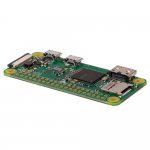
Now with WiFi! Not to be mistaken with the standard Raspberry Pi Zero, this new model has WiFi and Bluetooth built in!
Raspberry Pi Zero W (Wireless) Details:
BCM2835 (same as Pi 1) but up-clocked to 1GHz, so 40% faster
512MB RAM
Mini HDMI
USB On-The-Go port
Micro USB power
HAT-compatible 40-pin header
Composite video and reset headers
CSI camera connector
802.11b/g/n Wireless LAN
Bluetooth 4.1 .
Bluetooth Low Energy (BLE)
Top comments
mrcyco
28 Feb 1722#22
Don't think of it as a drawer... think of it as a small museum
b33r
28 Feb 177#24
I used mine to level a table. Worked great.
voodooboard
28 Feb 176#17
Think carefully if you have a use for it because probably 3/4 of Raspberry Pi's sold end up sitting around unused in drawers and cupboards. People buying them on impulse is why there are always shortages.
And specifically for the Zero, decide whether you really need something in the smallest and lowest-powered form-factor with minimum of ports - eg drone, balloon project, battery powered stuff etc. If it's just for Kodi, Retrostation etc then you'll be much better off with a 2 or 3 rather than have a Zero with a bunch of adapters and hubs hanging off it.
CDR
28 Feb 174#6
I've got 3 of the Pi2's and 1 of the Zero's..
Only have 2 running at the minute - one running PiHole, blocking adverts from all internet connected devices on my network and one running an ADSB receiver, providing updates to flightware for flight tracking purposes..
I recommend pihole to stop adverts when browsing for sure, and it also stops adverts in games on phones etc.
All comments (152)
Holly1985
28 Feb 17#1
This looks good thanks for sharing, I never got round to building mine have all sorts of bits and cases laying around lol may have to buy this and get started xD
dogsballs
28 Feb 17#2
may also get this and give it a go
CosmicAero to dogsballs
28 Feb 171#4
what's the price usually?
fireman1 to dogsballs
28 Feb 171#7
would this be powerful enough to run retropie for emulation?
smallclone
28 Feb 171#3
"Please note! Due to heavy demand orders including a Pi Zero W may take up to three days to ship."
bigbak
28 Feb 173#5
Bummer. I've got 3 of the old type I still haven't used.
CDR
28 Feb 174#6
I've got 3 of the Pi2's and 1 of the Zero's..
Only have 2 running at the minute - one running PiHole, blocking adverts from all internet connected devices on my network and one running an ADSB receiver, providing updates to flightware for flight tracking purposes..
I recommend pihole to stop adverts when browsing for sure, and it also stops adverts in games on phones etc.
it's 9.60 plus 2.50 delivery.
not a deal if you're looking for a discount, but a deal in terms of bargain price hobby gadget.
and nice timing, i had the previous version in my shopping basket for a week, was going to buy today, now i don't need the wifi dongle.
Joshimitsu91
28 Feb 171#12
It was just released, this is the standard price. Good deal for what you get though.
GerBoyle28
28 Feb 17#13
Its only the Pi itself no cable :disappointed:
Dodge62
28 Feb 171#14
What cable were you expecting? Power lead? Surely anyone who's enough of a geek to want to play with one of these must have a boxload of micro USB cables.
I suppose a miniHDMI cable (or adapter) would be useful, but many people will run it headless so it would be a waste to ship one with every unit.
briandajones
28 Feb 17#15
pi zero will run retropie no problems just not the 32 bit consoles, I built 4 for Xmas presents using a nes cartridge, very cool, this new zero adds wi-fi n Bluetooth which will make kodi another easy option plus configuring the pi through ssh, so glad they did this well worth a tenner
cmncomp
28 Feb 17#16
can this run kodi with hdmi out?
voodooboard
28 Feb 176#17
Think carefully if you have a use for it because probably 3/4 of Raspberry Pi's sold end up sitting around unused in drawers and cupboards. People buying them on impulse is why there are always shortages.
And specifically for the Zero, decide whether you really need something in the smallest and lowest-powered form-factor with minimum of ports - eg drone, balloon project, battery powered stuff etc. If it's just for Kodi, Retrostation etc then you'll be much better off with a 2 or 3 rather than have a Zero with a bunch of adapters and hubs hanging off it.
Dodge62
28 Feb 17#18
What cable were you expecting? Power lead? Surely anyone who's enough of a geek to want to play with one of these must have a boxload of micro USB cables.
I suppose a miniHDMI cable (or adapter) would be useful, but many people will run it headless so it would be a waste to ship one with every unit.
I have no need for this (like my other Pi which I used to use for XBMC and the BBC micro that I've never used)... but of course I'll buy one as I'll definitly use it in a project, yes, I'm very sure I will....hmmmm
From_the_Midlands
28 Feb 17#21
What's this used for?
mrcyco
28 Feb 1722#22
Don't think of it as a drawer... think of it as a small museum
GlentoranMark
28 Feb 173#23
It's a bare bones PC mainly used for DIY projects, Kodi and taking up space in drawers (that's where mine is).
To get this running you need a power source (mobile phone charger), micro SD memory card, keyboard and mouse and an ability to access the internet. A virtual keyboard and mouse controlled by your phone may work as it contains Bluetooth? (Can anyone confirm?) So you may well have all that is needed to get this up and running.
Tempted but I was also tempted on the last Pi deal and I know in all honesty it will get played with for an afternoon and then put in the drawer with my other Pi.
Damn you HUKD.
Edit, forgot to add a micro HDMI to HDMI lead so you can see it on your TV.
b33r
28 Feb 177#24
I used mine to level a table. Worked great.
CDR
28 Feb 172#25
If you need to ask, its probably not something you're interested in.
Its got a million uses, all computer based, either retro games console, low-traffic website hosting, kodi/streaming, weather monitoring, ship/aircraft monitoring, blocking adverts on networks, file hosting etc..
GlentoranMark
28 Feb 17#26
In fairness it's a great way to get into tinkering. I know I done nothing with my Pi except get Ubuntu and Python on my TV but I'm now developing Android Apps. Most people bought these for a cheap version of Kodi but even that involves having to dig a bit deeper than switching a PC on. Go for it FromTheMidlands.
dean_brfc
28 Feb 17#27
Is it easy to set Kodi up on this? Will it handle 1080p content ok?
pete_l
28 Feb 172#28
Maximum 1 per order. Are they EVER going to manufacture zeros in sensible quantites?
Still, maybe it will cause FriendlyArm and Orange Pi to lower the prices on their Wifi enabled devices.
cochon
28 Feb 171#29
Yes on both counts, note the HDMI is a mini connector, so appropriate cable or adapter required. Installation is straightforward, 1080p playback is fine in h264 format, video decoding is one of the pi's strongpoint, the KODI interface itself will seem a little slow though if you want to surf around the channels.
stefromuk to cochon
28 Feb 17#34
So how does that work ?
Does it remove the ad completely or is there a blank box where the ad should be?
bigbak
28 Feb 17#30
I currently use a Squid proxy with a VPN (among other things) on an HP Micro Server.
I've bought an XBOX duke controller to put one of my zero's in.
A camera for another.
And a spare which would have been nice to have wifi for.
nja1
28 Feb 17#31
Coming up as £15.60 for me
rev6
28 Feb 172#32
It will be fine for video playback, but as mentioned by cochon, the I/O will be fairly slow, the GUI won't be so responsive. If you want something purely for Kodi, maybe invest in a well supported S905/X Android box and put LibreELEC on it.
stefromuk
28 Feb 17#33
So how does that work ?
Does it remove the ad completely or is there a blank box where the ad should be?
mikered123
28 Feb 171#35
Thank you! I now have a use for my Pi
thefemaleboook
28 Feb 17#36
is the cable included
rev6
28 Feb 17#37
It's barebones. Just the Pi Zero.
MarcoLoves360
28 Feb 17#38
does it run drastic?
othen
28 Feb 17#39
I think this is the regular price, so it is not really a good deal, but I've still voted hot because these are such good value anyway. These are marvelous for dads to help their 12 year old sons learn about IT :-)
k1ngchr15
28 Feb 171#40
The pi-hole software looks interesting. I will be trying that out when I next have some time.
Got to say, the pi zero for £9.60 vs the £4 standard is actually fantastic value. The £5.60 difference disappears on an otg adapter and wifi module for all the other zeroes I have. Lately I've been reaching up for the edimax 7811 over the no brand ebay dongles, so that alone is more £££. The factory overclock thrown in is just great.
So I've now ordered from pimaroni and pi hut. The annoying part is that I ordered a v1.3 just last night. Probably won't be cancelling the order anytime soon though....
I have more of the pi's than I have time to actually do a different thing with each of them. It started out all those years ago with a v1 B just to force me to learn some disciplined linux. (Long time reluctant windows user :/ )
Now the inventory stands at:
1 x B (with the free 512mb upgrade thanks to the huge lead time... wasn't it months or something??)
1 x 2B
1 x 3
1 x Zero v1.0
2 x Zero v1.2
4 x Zero v1.3
2 x ZW
And the only thing i've specifically had to learn during my playing was a bit of systemd. (And Nano to be fair....)
JoeSpur
28 Feb 171#41
Can the Pi Zero W be powered by USB, say on a TV, instead of a PSU? Surely it's power requirements are lower than standard Pi?
DealPerv2016
28 Feb 171#42
I used the Pi2 for this which worked perfectly!
DealPerv2016
28 Feb 17#43
You can but you get a rainbow square error (not sure what this error is) when not plugged into an actual socket.
DealPerv2016
28 Feb 17#44
Yes.
maui
28 Feb 17#45
Nice! I am just setting up an Octopi with a USB wireless adapter - ordered this so I don't need a USB Hub :sunglasses:
rev6
28 Feb 17#46
Depends how much power the TV gives out the USB. If it's 5V 2A (surprised if it is) it should be fine.1A will probably struggle.
mrcyco
28 Feb 171#47
rainbow square general means that the CPU is overload/not drawing enough power.
if I remember right, if you update your pi to Raspbian Pixel. that symbol is much easier to understand
Just a question to those in the know, would a powerbank power these? I remember running my V1.0 off an AA battery (without keyboard support). I've a 2,000 MAh unused. Just wondering would there be enough juice to run the Bluetooth and send power to the screen.
androoski
28 Feb 17#53
1 Amp is plenty for the standard Zero. When I get mine I'll find out how much of a difference having the wifi or the BT on makes.
androoski
28 Feb 171#54
No, the page starts with that bundle. You have to click on it to drop down the choices and pick the Pi Zero only option.
duncanhill
28 Feb 17#55
This will be an interesting project to build an Alex Voice unit, just need to find a powered speaker with enough internal space for the PI Zero and a USB mic.
So we have Kodi, Alexa Voice, Mame Console what other projects are people considering?
brilly
28 Feb 171#56
whats this pihole witchcraft?
why did noone pm me about it!
k1ngchr15
28 Feb 17#57
V1.0 off a single 1.5V AA. Through a Boost Regulator??
Your link doesn't specify the ampage of the battery output. The hdmi signal itself doesn't take much power. The screen power is another thing entirely, depends on what it is. A 22" LCD back in the day would use ~20W. Which would be 4Amps at 5V (assuming no loss from other regulators). So it'll probably power the pi zero with an hdmi out, but the screen depends....
I plan on building a poker clock controlled through my phone and hopefully powered by my powerbank for my local pub game. If not it'll be like Trivial Pursuit where I'm collecting Pi's :o
laki
28 Feb 17#61
What software aerial did you use? I used a dvb aerial off ebay and cant get it work :disappointed:
madmal
28 Feb 17#62
It can, plays 1080p movies no problem. But it's not snappy and you find yourself hanging around waiting for things to load etc. You're better off with a cheap android box.
I bought the non wifi pi Zero to play around and first thing I did was try kodi on it.
amour3k
28 Feb 17#63
Thanx. :-)
amour3k
28 Feb 17#64
Interesting that (sounds cool), hmmmmmmmmmmm.
Out of interest, which of your Raspberry Pi's are you running your Ad Blocking software off of?.
The Zero?, the 2?, the 1?, thanx. :-)
amour3k
28 Feb 17#65
Hmmmmmmmmmmmmmmmmmmmmmmmm, hehehehehehehe.
So, has your 'lesson' been learnt then?, or ..... lol. ;-)
i always wanted to do that, do you know roughly how much it costs for the two way glass?
Ian2014
28 Feb 17#74
The Pi Zero doesn't have an ethernet port. This new version has WiFi so if your router also has WiFi then you could connect using that. As for a ReadyNas Duo, don't know at the moment although it does run Linux in some form.
cheapskate4545
28 Feb 17#75
Omg where has this been all my life. Will the new zero run this ok?
CDR
28 Feb 17#76
A3 Size is £19 plus shipping. Just need to get the size of the mirror approved from the g/f then I will be ordering
duncanhill
28 Feb 17#77
Same here such a simple solution, I have an older Pi 2 with CAT5 that I plan to use for PiHole, it doesn't need to be anything fantastic as it won't be doing much. Hopefully power it via USB port on the back of my NAS. The newer Pi devices are probably a little too good to be used for this.
Good news my Zero W has just shipped....
duncanhill
28 Feb 17#78
Same here such a simple solution, I have an older Pi 2 with CAT5 that I plan to use for PiHole, it doesn't need to be anything fantastic as it won't be doing much. Hopefully power it via USB port on the back of my NAS. The newer Pi devices are probably a little too good to be used for this.
Good news my Zero W has just shipped....
asad786r
28 Feb 17#79
where are you ordering from? if you don't mind me asking...and have you ordered from them before?
willysnapper
28 Feb 17#80
Don't know much about these but was interested to use with PiHole AdBlocker however it seems it can't be plugged in to the router as it doesn't have a LAN connection.
As far as I understand, this would cause a bottleneck and introduces unreliability.
Is there some other way to "hard wire" this to your router?:neutral_face:
k1ngchr15
28 Feb 17#81
Ah, yeah that would be a boost regulator to output 5V.
A single AA has a max output of about 2A @ 1.5V. So 5V at (let's say) 90% efficient would be:
((2*1.5)/5)*0.9 = 540mA maximum output.
That's a best case scenario with a perfectly designed boost chip and circuitry, so expect lower.
With those numbers there should be plenty of juice for you pi and bluetooth. Especially since it's the newer Low Energy stuff.
k1ngchr15
28 Feb 17#82
Yes......probably...... atleast until I get an email for the stock notification I setup on the next batch of v1.3 Zero....
Skylark56
28 Feb 17#83
I have a Pi 3 and it runs N64 and PS1 games at a fairly stable FPS, its very good for RetroPie or the new OS, Lakka (which I prefer). Just bought the Zero W so I can toy around with Programming and stuff :smiley:
jaydeeuk1
28 Feb 17#84
I tried that, bought a pi a few months before Alexa came to UK. Doesn't work anywhere near as good as a £40 dot though. Tried using a PS eye cam as a mic as it has 4 built in microphones, biggest issue was (at the time) you had to press something to initiate voice recognition.
Mines now controlling my observatory.
marky489
28 Feb 17#85
Comes up as £9.60 for just the pi for me so happy days. There's so much you can do with these. I might have a go at making a mini retropi in a nes game case. You can also make mini hand held retropie emulator game systems. Fantastic bit of kit! Heat
smileypete
28 Feb 17#86
1 gig RAM would have been nice...
MrHot
28 Feb 17#87
Eventually nothing will come with USB cables and though...
Specially AC to USB, as the cables are cheap so you end up with loads but no wall adaptors.
androoski
28 Feb 17#88
For £4 ?
It has WiFi now and the price rises by £5.60.
Magnets
28 Feb 17#89
I'm not saying it should have wifi and cost £4, but that it would have made sense to come with wifi originally.
This has always been £6.50 since you can only order 1 unit and each supplier charges the same £2.50 postage.
Wifi on the orange pi zero is apparently very slow because of bad drivers
Aliexpress standard shipping usually takes 7-10 days and provides full tracking to your door.
supermann
28 Feb 17#91
You don't necessarily need a USB Hub with a regular pi zero, depends what you have knocking around and what you intend to use the pi for.
If you have a wireless keyboard and mouse, you can use that to install everything and set things like wifi up, just that you won't be able to plug a wifi dongle in whilst you're doing it.
You can then just ssh into it.
hcc27
28 Feb 17#92
Fantastic deal, heated!!
I now have a Pi B, a Pi 2B, a Zero v1.o and now just purchased this!. Not sure what to do with my collection except learning a few extra lines of Python with every new model.
You can download hi-res PDF files of all past issues of the the excellent MagPi magazine at this link (hosted by raspberrypi.org itself, so nothing illegal here!!):
convincing argument! bought one here with the essential kit. please be aware that whatever happen next to my Pi is forever your fault, I'll tell that to my wife :smiley:
amour3k
28 Feb 17#95
HahahahahahHa, luvvvvvvvvvv it!.
Made my evening that, loool. ;-)
amour3k
28 Feb 17#96
Yep, lol.
amour3k
28 Feb 17#97
Where'd you find/buy a wireless USB Hub from please?. :-)
I thought the OP's Raspberry Pi Zero W was Wireless already? (as denoted by it's 'W' in it's naming convention?).
So, why would you therefore need to to Wireless that up again for then?, or ..... lol.
amour3k
28 Feb 17#98
Supermann .. just reread you comment, I get it now, hehehe. :-)
ali254
28 Feb 171#99
Its showing as £15 now
djbenny1
28 Feb 17#100
Any good for Battlefield 1 on Ultra?
XP200
28 Feb 17#101
I cooled mine with water, but the crust went all soggy.
thespud01
28 Feb 17#102
I want to replace an old pi so I have wifi to my speaker setup. Seeing as this now has no 3.5mm jack. What's the best way to output the audio? My amp has 3.5mm & standard phone inputs. Do I need to purchase pHAT DAC for my audio out?
Any help appreciated.
m600
28 Feb 171#103
click the options tab then select just the pi
amour3k
28 Feb 17#104
Call me a bit ignorant here, but ...
What is this magic mirror thing? ('ve heard of such in the past), but have no clue anyway ..... thanx.
amour3k
28 Feb 17#105
As per comment 54 before it, also mentioned again here:
Enjoy. :-)
amour3k
28 Feb 17#106
Thanx for that, other than slow wifi issues, how does this fair against a Raspberry Pi Device?.
mrcyco
28 Feb 17#107
you could try a HDMI male to RCA cable... However I doubt that will work properly (and you need a HDMI to mini HDMI adapter) there is a lot DACs out ATM. but your looking £10+ :neutral_face:
It's a two-way mirror (like In police interigation scenes in movies) that has a monitor behind that gives you the latest weather, time, traffic updates, news & social media update etc .. all whilst your just getting that final look at yourself before you leave the house.
amour3k
1 Mar 17#111
WOW!, hehe, sounds gooooood, hmmmmmm, how do you intend to achieve that Project?, thanx. :-)
adderrson
1 Mar 171#112
Accidental Clickbait? :wink:
mako
1 Mar 17#113
It's a new release
JasonRose98
1 Mar 17#114
I can definitely second that
ollie87
1 Mar 17#115
Even then the 3 isn't properly fast enough really. Mine can't even play SNES games most the time.
It's now sitting next to my router on Pi-Hole duties.
maui
1 Mar 17#116
I would if I wanted network connectivity and a USB connection to the 3D printer! Octopi is based on using the USB port to connect to 3D printer, so would need hub for wireless N adapter, and USB cable to printer.
Sure I could probably find a serial interface on the print controller and wire into that, but I'd be opening myself to more hassle!
simate
1 Mar 17#117
Can I make this into a little PC for word processing and Internet usage? If so which OS would be the most suitable?
vivski123
1 Mar 17#118
Sniff! My i7 8.5Ghz overclocked evian-watercooled gaming rig would deeeee-stroy this POS! Sniff!
just-me
1 Mar 17#119
Mine shipped yesterday :¬}
rkl
1 Mar 171#120
Yes, it can. I have a Xiaomi 10000 mAh powerbank (8 quid from Gearbest) and ran a script that wrote (and synced) a log line every 5 seconds with the number of seconds since the script had run. It eventually died (starting from a fully charged powerbank) after 13 hours and 46 minutes on a Pi 2. You'd probably get even longer with a Pi Zero W.
nanuek
1 Mar 17#121
My Pi Zero plays SNES fine so maybe the problem isn't the Pi?
gabesdad
1 Mar 17#122
Mine shipped yesterday. So much for the 3 day wait mentioned when ordering.
nascent
1 Mar 17#123
Told myself I wasn't going to buy another raspberry pi, have pretty much one of every model sitting in drawers, but still ended up buying one. Bought one of the existing raspberry pi zero cases off ebay for £1.80, couldn't justify £5/6 on an 'official' case.
ollie87
1 Mar 17#124
Perhaps, but a quick Google reveals it's not just me having this issue.
Even using the official RPi 3 power adapter too.
mrcyco
1 Mar 171#125
these are the most common OS's for Pi, (stick with Jessie if your new).
https://www.raspberrypi.org/downloads/
Pi zeros are slow, but workable. The benefit now is that with Bluetooth and wireless you don't have to carry a box of connections with you (just power and USB) and are handy for hotels
xl125
1 Mar 171#126
Could you use it as a print server, I have a canon inkjet printer that I can't link to my laptop due to no updated driver available. Must be ten years old but great printer and I have plenty of inks for it.
mrcyco
1 Mar 17#127
would it have Linux drivers?
k1ngchr15
1 Mar 171#128
>>Maybe at 64 x 48.
>>I'd leave AA off though...
Change my answer, no of course not... It uses wireless. You'll have a ping of more than 10 and it'll be an unplayable mess with that kinda second rate internet connection. LAG!
utopiangames
1 Mar 17#129
Cold can't fit an RX 480 in it :smiley: (Joke) :smiley: HEAT!
SartoriX
1 Mar 17#130
Excellent thanks, just ordered one, looking forward to seeing what I can do with it!
joepbailey
1 Mar 17#131
this wifi card wont support 5ghz will it?
MrHot
1 Mar 17#132
I would get one with Ethernet if you want your other devices to rely on it for internet browsing.
willysnapper
1 Mar 17#133
I was hoping to use the zero for PiHole duty but lacking an ethernet port would mean relying on WiFi. :confused: Found this though which might offer a work around, but I really don't know what I'm talking about perhaps others could confirm if it's possible?
CDR
1 Mar 173#134
My VPN Network:
My Pi-Hole Network:
Sometimes though I just get grey boxes where the advert should have been instead of a blank space.
CDR
1 Mar 171#135
Just buy the Raspberry Pi 3 or a cheap 2 off ebay.. they come with ethernets, just not the new zero's
willysnapper
1 Mar 17#136
That would be too expensive to be an option.:disappointed:
bubs866
2 Mar 172#137
My 10 year old daughter wanted one to build an arcade with retropie, is that not allowed? :wink:
othen
2 Mar 17#138
I'm not sure I see your point.
BungalowBill
2 Mar 17#139
Received mine today, damaged. Frankly poor packaging choice, very thin jiffy bag. Now to see how good their customer service is to get a swap!
justanotherpunter
3 Mar 17#140
My VPN network with ublock origin for free looks exactly the same as your pi-hole.....and with the money and time saved I can scratch my a-hole :wink:
klaudiu_vs
3 Mar 17#141
Sold out and now it shows as £15.60 :disappointed:
jamiedb
3 Mar 17#142
Ordered one but received two today with nothing else in the envelope :confused:
What makes you say that? I had Octopi running just fine on an RPi 1 and this is clocked 40% faster! I have just got it running but not printed yet.
Bear in mind, there is no Octopi image *yet* and if you use Raspbian make sure you download the latest build from RPi site as it's only just released for Pi Zero W
mikerr
6 Mar 17#148
It's fine for octopi so long as you don't use the camera live.
I found viewing the live camera caused 3d prints to stutter on pi zero, no issues on pi3.
hasj2
11 Mar 17#149
does this not have the pins, to connect directly into a LCD display, instead of through the HDMI?
laki
14 Mar 17#150
I got the aerial you recommend and now I can track planes to may hearts content, thanks :smiley:
CDR
14 Mar 17#151
Make sure you register your device with FlightAware to get the upgraded membership (Valued at £80/m or something!).
elmat
19 Mar 17#152
Anyone else find the Pi slow as hell when using the latest version of Rasbian. e.g. chromium maxes out the processor and can barely load a webpage.

![Fresh Breakfast Meat Box (Using code) @ Campbells Meat [Haggis / Lorne Sausage / Bacon / Black Pudding & More]](/images/topics/208684_1.jpg)




































![[Xbox One] Q. u. b. e: Director's Cut on Deals with Gold](/images/topics/208716_1.jpg)


















Opening post
Now with WiFi! Not to be mistaken with the standard Raspberry Pi Zero, this new model has WiFi and Bluetooth built in!
Raspberry Pi Zero W (Wireless) Details:
BCM2835 (same as Pi 1) but up-clocked to 1GHz, so 40% faster
512MB RAM
Mini HDMI
USB On-The-Go port
Micro USB power
HAT-compatible 40-pin header
Composite video and reset headers
CSI camera connector
802.11b/g/n Wireless LAN
Bluetooth 4.1 .
Bluetooth Low Energy (BLE)
Top comments
And specifically for the Zero, decide whether you really need something in the smallest and lowest-powered form-factor with minimum of ports - eg drone, balloon project, battery powered stuff etc. If it's just for Kodi, Retrostation etc then you'll be much better off with a 2 or 3 rather than have a Zero with a bunch of adapters and hubs hanging off it.
Only have 2 running at the minute - one running PiHole, blocking adverts from all internet connected devices on my network and one running an ADSB receiver, providing updates to flightware for flight tracking purposes..
I recommend pihole to stop adverts when browsing for sure, and it also stops adverts in games on phones etc.
All comments (152)
Only have 2 running at the minute - one running PiHole, blocking adverts from all internet connected devices on my network and one running an ADSB receiver, providing updates to flightware for flight tracking purposes..
I recommend pihole to stop adverts when browsing for sure, and it also stops adverts in games on phones etc.
/me lazy
Answered own question...
https://www.reddit.com/r/raspberry_pi/comments/4xfgn2/is_a_pi_zero_powerful_enough_to_use_as_a_pi_hole/
not a deal if you're looking for a discount, but a deal in terms of bargain price hobby gadget.
and nice timing, i had the previous version in my shopping basket for a week, was going to buy today, now i don't need the wifi dongle.
I suppose a miniHDMI cable (or adapter) would be useful, but many people will run it headless so it would be a waste to ship one with every unit.
And specifically for the Zero, decide whether you really need something in the smallest and lowest-powered form-factor with minimum of ports - eg drone, balloon project, battery powered stuff etc. If it's just for Kodi, Retrostation etc then you'll be much better off with a 2 or 3 rather than have a Zero with a bunch of adapters and hubs hanging off it.
I suppose a miniHDMI cable (or adapter) would be useful, but many people will run it headless so it would be a waste to ship one with every unit.
Just in case stock runs out on thePiHunt
£12.59
To get this running you need a power source (mobile phone charger), micro SD memory card, keyboard and mouse and an ability to access the internet. A virtual keyboard and mouse controlled by your phone may work as it contains Bluetooth? (Can anyone confirm?) So you may well have all that is needed to get this up and running.
Tempted but I was also tempted on the last Pi deal and I know in all honesty it will get played with for an afternoon and then put in the drawer with my other Pi.
Damn you HUKD.
Edit, forgot to add a micro HDMI to HDMI lead so you can see it on your TV.
Its got a million uses, all computer based, either retro games console, low-traffic website hosting, kodi/streaming, weather monitoring, ship/aircraft monitoring, blocking adverts on networks, file hosting etc..
Still, maybe it will cause FriendlyArm and Orange Pi to lower the prices on their Wifi enabled devices.
Yes on both counts, note the HDMI is a mini connector, so appropriate cable or adapter required. Installation is straightforward, 1080p playback is fine in h264 format, video decoding is one of the pi's strongpoint, the KODI interface itself will seem a little slow though if you want to surf around the channels.
Does it remove the ad completely or is there a blank box where the ad should be?
I've bought an XBOX duke controller to put one of my zero's in.
A camera for another.
And a spare which would have been nice to have wifi for.
Does it remove the ad completely or is there a blank box where the ad should be?
Got to say, the pi zero for £9.60 vs the £4 standard is actually fantastic value. The £5.60 difference disappears on an otg adapter and wifi module for all the other zeroes I have. Lately I've been reaching up for the edimax 7811 over the no brand ebay dongles, so that alone is more £££. The factory overclock thrown in is just great.
So I've now ordered from pimaroni and pi hut. The annoying part is that I ordered a v1.3 just last night. Probably won't be cancelling the order anytime soon though....
I have more of the pi's than I have time to actually do a different thing with each of them. It started out all those years ago with a v1 B just to force me to learn some disciplined linux. (Long time reluctant windows user :/ )
Now the inventory stands at:
1 x B (with the free 512mb upgrade thanks to the huge lead time... wasn't it months or something??)
1 x 2B
1 x 3
1 x Zero v1.0
2 x Zero v1.2
4 x Zero v1.3
2 x ZW
And the only thing i've specifically had to learn during my playing was a bit of systemd. (And Nano to be fair....)
if I remember right, if you update your pi to Raspbian Pixel. that symbol is much easier to understand
https://www.raspberrypi.org/downloads/raspbian/
I always wanted a Raspberry Pi, and contrary to mrcyco's comment, I never impulse bought one before, lol.
Until now ..... I may just get one. :-)
Just need to pull my curiosity finger out now ..... lool. :-)
The link to your Deal at:
https://thepihut.com/collections/raspberry-pi-store/products/raspberry-pi-zero-w?
Is showing as £15.60, instead of only £9.60.
You linked up the wrong Product Batch ...
So we have Kodi, Alexa Voice, Mame Console what other projects are people considering?
why did noone pm me about it!
Your link doesn't specify the ampage of the battery output. The hdmi signal itself doesn't take much power. The screen power is another thing entirely, depends on what it is. A 22" LCD back in the day would use ~20W. Which would be 4Amps at 5V (assuming no loss from other regulators). So it'll probably power the pi zero with an hdmi out, but the screen depends....
My bad!. :-)
https://www.raspberrypi.org/forums/viewtopic.php?f=29&t=15974&p=161834#p161834
I plan on building a poker clock controlled through my phone and hopefully powered by my powerbank for my local pub game. If not it'll be like Trivial Pursuit where I'm collecting Pi's :o
I bought the non wifi pi Zero to play around and first thing I did was try kodi on it.
Out of interest, which of your Raspberry Pi's are you running your Ad Blocking software off of?.
The Zero?, the 2?, the 1?, thanx. :-)
So, has your 'lesson' been learnt then?, or ..... lol. ;-)
Something like this;
Good news my Zero W has just shipped....
Good news my Zero W has just shipped....
As far as I understand, this would cause a bottleneck and introduces unreliability.
Is there some other way to "hard wire" this to your router?:neutral_face:
A single AA has a max output of about 2A @ 1.5V. So 5V at (let's say) 90% efficient would be:
((2*1.5)/5)*0.9 = 540mA maximum output.
That's a best case scenario with a perfectly designed boost chip and circuitry, so expect lower.
With those numbers there should be plenty of juice for you pi and bluetooth. Especially since it's the newer Low Energy stuff.
Mines now controlling my observatory.
Specially AC to USB, as the cables are cheap so you end up with loads but no wall adaptors.
It has WiFi now and the price rises by £5.60.
This has always been £6.50 since you can only order 1 unit and each supplier charges the same £2.50 postage.
https://www.aliexpress.com/store/top-rated-products/1553371.html
Wifi on the orange pi zero is apparently very slow because of bad drivers
Aliexpress standard shipping usually takes 7-10 days and provides full tracking to your door.
If you have a wireless keyboard and mouse, you can use that to install everything and set things like wifi up, just that you won't be able to plug a wifi dongle in whilst you're doing it.
You can then just ssh into it.
I now have a Pi B, a Pi 2B, a Zero v1.o and now just purchased this!. Not sure what to do with my collection except learning a few extra lines of Python with every new model.
You can download hi-res PDF files of all past issues of the the excellent MagPi magazine at this link (hosted by raspberrypi.org itself, so nothing illegal here!!):
https://www.raspberrypi.org/magpi-issues/
Made my evening that, loool. ;-)
I thought the OP's Raspberry Pi Zero W was Wireless already? (as denoted by it's 'W' in it's naming convention?).
So, why would you therefore need to to Wireless that up again for then?, or ..... lol.
Any help appreciated.
What is this magic mirror thing? ('ve heard of such in the past), but have no clue anyway ..... thanx.
Enjoy. :-)
Accidental Clickbait? :wink:
It's now sitting next to my router on Pi-Hole duties.
Sure I could probably find a serial interface on the print controller and wire into that, but I'd be opening myself to more hassle!
Even using the official RPi 3 power adapter too.
https://www.raspberrypi.org/downloads/
Pi zeros are slow, but workable. The benefit now is that with Bluetooth and wireless you don't have to carry a box of connections with you (just power and USB) and are handy for hotels
>>I'd leave AA off though...
Change my answer, no of course not... It uses wireless. You'll have a ping of more than 10 and it'll be an unplayable mess with that kinda second rate internet connection. LAG!
Found this though which might offer a work around, but I really don't know what I'm talking about perhaps others could confirm if it's possible?
My Pi-Hole Network:
Sometimes though I just get grey boxes where the advert should have been instead of a blank space.
https://www.modmypi.com/raspberry-pi/raspberry-pi-zero-board/rpi-zero-board/raspberry-pi-zero-wireless
Bear in mind, there is no Octopi image *yet* and if you use Raspbian make sure you download the latest build from RPi site as it's only just released for Pi Zero W
I found viewing the live camera caused 3d prints to stutter on pi zero, no issues on pi3.