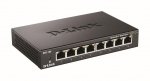
The DGS-105/DGS-108 Gigabit Switch provides a quick, easy and economical way to add high speed networking to home offices and small/medium businesses. With data transfer speeds of up to 2000 Mbps the DGS-105/DGS-108 is ideal for fast file transfers, and smooth media streaming. It provides five or eight Gigabit ports for easy expansion of your network and a quick way to upgrade your network to Gigabit connectivity.
Seems like a good deal for a 8 port metal switch given that it's cheaper than the 5 port version which is £17.99.
EDIT: For those that cant get the £15.02 price, use this link and it will be the top one. :smiley:
Top comments
CampGareth to InTheKnow444
1 Feb 176#3
Since when is a modem also a switch? ;D I'm being pedantic, I know you mean the all-in-one modem-router-switch-AccessPoint units that pretty much every ISP provides. Probably fairer to say this gives 7 extra ports though rather than assuming things about a person's network.
fanpages
2 Feb 173#9
I see what you did there.
All comments (27)
InTheKnow444
1 Feb 17#1
you end up with 10 usable ports with this
4 (on ya modem) plus 8 minus 2 for ya connecting ethernet
Had one a few days now.
CampGareth to InTheKnow444
1 Feb 176#3
Since when is a modem also a switch? ;D I'm being pedantic, I know you mean the all-in-one modem-router-switch-AccessPoint units that pretty much every ISP provides. Probably fairer to say this gives 7 extra ports though rather than assuming things about a person's network.
InTheKnow444
1 Feb 171#2
sorry, mines a TP link switch
InTheKnow444
1 Feb 17#4
Your'e so good at math
Rich44
1 Feb 17#5
I went with the tp link for the lifetime warranty
tek-monkey
2 Feb 17#6
Been using one of these for a few years now, never missed a beat. I'm replacing it with a free meraki one next week but I'll be keeping it as a stand by just in case.
ns6437 to tek-monkey
2 Feb 17#11
You got the MS220-8P? Can't go wrong with it tbh, you'll love Meraki for its analytics and gui alone. I've got a full stack at home, not a single issue in 2 years and free hardware RMA anyway.
Does anyone know how this unit compares with these too frequently-on-offer alternatives?
TP-LINK TL-SG108 or the NETGEAR GS308
To the casual observer (me) it is uses half the energy of either of them, and has speed indicating indicators unlike the Netgear. What else makes this a better pick over the other two?
fanpages
2 Feb 173#9
I see what you did there.
ns6437
2 Feb 171#10
"With data transfer speeds of up to 2000 Mbps the DGS-105/DGS-108 is ideal for fast file transfers, and smooth media streaming. It provides five or eight Gigabit ports"
How can a gig port magically switch at 2gbps lol. Description is misleading, unless it's referring to a port channel or such.
tek-monkey
2 Feb 17#12
Hopefully! Did the mx64 webinar last week and they said they'd send that out once I sent in the vat number. Did the switch one an hour later, emailed to ask if we need another phone call but didn't hear back today. Hopefully they'll send it with the firewall!
Edit: already got the access point.
szferke
2 Feb 17#13
You cannot configure port channel on an unmanaged switch
.
soton26
3 Feb 17#14
Probably referring to full duplex.
paulpso
3 Feb 17#15
Maybe maximum bandwidth it can handle at any one time.
Nah, that's fabric/switching capacity which they list as 10gbps for the 5 port and 16 for the 8, i.e. full synchronous 1gbps per port. I'm guessing they're just saying you can do 1000mbps down and 1000mbps up simultaneously on any one port... "no s**t sherlock, that's what full duplex gigabit means"
tek-monkey
3 Feb 17#18
Just got the email saying they are on their way, be a nice upgrade to my home network!
A quick question if you don't mind, as you have an MX. Have you used the VPN functionality, and if so are you getting acceptable speeds? I was hoping to blanket VPN all wireless traffic and some LAN but heard conflicting info on how well the vpn works.
ns6437
3 Feb 171#19
Well max vpn throughput for mx64 is about 100mbps. I work with meraki day in, day out and it's a case by case scenario - you're never going to hit the max throughput but overall performance for the Meraki appliances is solid. Generally Meraki haters are those that want advanced features and control.
ns6437
3 Feb 17#20
I has a blonde moment. It eas clearly referring to full duplex and yes, unmanaged was the key word lol
tek-monkey
3 Feb 17#21
Interesting, is that on a meraki-meraki vpn only? I've seen several mentions that people have crippled speeds when connecting to non-meraki gear, not entirely sure if it can connect to my current vpn anyway.
Sorry, realise this has gone a bit off topic!
ns6437
3 Feb 171#22
If you have have an ipsec endpoint, you'll be able to configure a site-to-site tunnel. IPSEC is an open standard so you rarely have an issue forming the tunnel. Speed issues might occur when a non Meraki peer is not rate limiting vpn traffic or the peer processor becomes overloaded etc. It's really a "how long is a piece" of string question. If you have any issues, which I doubt you will, give me a buzz.
ns6437
3 Feb 171#23
Also, the same could be said for mx64''s, I'm just yet to see it. Also worth noting mx64 vpn encryption is software driven unlike mx80s and above, that use hardware (don't quote me on this thougj)
tek-monkey to ns6437
7 Feb 17#27
Hope you don't mind me asking you another question? I have the devices now, but failed completely when it came to the VPN. I see I have the option of site to site and client, with client allowing others to remote into my network. I was hoping to use the site to site part to join to a VPN service and push all my network traffic through that, avoiding the governments snooping. The VPN provider I use can only offer PPTP or ovpn options which I can't see how to use, if I change VPN providers do you know if this is possible through the MX64?
luvsadealdealdeal
6 Feb 17#24
still going strong
you don't need to be on Prime to get this price & free delivery - just get your order over £20

![Fresh Breakfast Meat Box (Using code) @ Campbells Meat [Haggis / Lorne Sausage / Bacon / Black Pudding & More]](/images/topics/208684_1.jpg)




































![[Xbox One] Q. u. b. e: Director's Cut on Deals with Gold](/images/topics/208716_1.jpg)


















Opening post
Seems like a good deal for a 8 port metal switch given that it's cheaper than the 5 port version which is £17.99.
EDIT: For those that cant get the £15.02 price, use this link and it will be the top one. :smiley:
Top comments
All comments (27)
4 (on ya modem) plus 8 minus 2 for ya connecting ethernet
Had one a few days now.
https://www.youtube.com/watch?v=4wiW0ImsWeY
TP-LINK TL-SG108 or the NETGEAR GS308
To the casual observer (me) it is uses half the energy of either of them, and has speed indicating indicators unlike the Netgear. What else makes this a better pick over the other two?
How can a gig port magically switch at 2gbps lol. Description is misleading, unless it's referring to a port channel or such.
Edit: already got the access point.
.
http://www.currys.co.uk/gbuk/computing-accessories/networking/network-routers-and-switches/network-switches/tp-link-tl-sg1005d-network-switch-5-port-10137896-pdt.html
A quick question if you don't mind, as you have an MX. Have you used the VPN functionality, and if so are you getting acceptable speeds? I was hoping to blanket VPN all wireless traffic and some LAN but heard conflicting info on how well the vpn works.
Sorry, realise this has gone a bit off topic!
you don't need to be on Prime to get this price & free delivery - just get your order over £20