Product Description
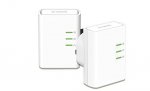
The DHP-509AV PowerLine AV 500 HD Starter Kit comes with two DHP-508AV PowerLine AV 500 HD adapters.
Seems like a good deal for 500mbps adapters which are normally £29.99
19 comments
Fleabum
17 Feb 17#19
Now showing £25.61 . Expired.
Regards
Flea
Gordon.Bell
2 Feb 17#18
You need to understand that broadband speed is determined by the connection between your house to the exchange. If this is poor, no amount of upgrading your network in the house will help. You should try to check this first.
If you can, take an Ethernet cable (network lead), plug into your router and the other end directly into your lan (network) port of your computer (or a laptop). You are usually supplied one of these cables to help set up the router. Check the speed with a direct connection.
If the speed is high, then its not your internet connection, but something in the house.
If the speed does not increase, then first check you have filters at every phone socket that's being used (including if you have a sky box connected). Remember the filter must be the first connector in the phone sockets - so if you are using an port multiplier, the filter goes between the master socket and the port extension.
Try a different router.
It could be that broadband in your area is simply rubbish. No amount of upgrading your house network will help this - its the connection from the house to the exchange. You could try your ISP the see if they can boost it, or test the line in case there is noise on the line.
They always go for around a tenner. I got 2 for a fiver each + 3 quid shipping.
Nice n small to put out the way and work very well. Much more versatile than those plug in jobbies.
ether707
2 Feb 171#16
The download rate I get from steam downloading a game.
ether707
2 Feb 17#14
I just bought a powerline kit. I get 1mbs-2mbs on a wireless connection and now it's gone up to 4mbs with the kit. Still don't know why it's so slow.
Gordon.Bell to ether707
2 Feb 17#15
Are you referring to your broadband speed or the connection from router to computer?
gavin_wales_2005
2 Feb 17#12
Can these be used to get a wifi connection from the second adaptor?
Gordon Bell to gavin_wales_2005
2 Feb 17#13
You would need an 'Access Point' (or an old router can usually be used) to turn the LAN port back into a wireless relay. These do not have a access point embedded in one of the plugs.
Go on to Amazon make a new account with a different email address, and select the free 30 day prime trail, make sure you cancel it straight away so you don't get charged. Then go on to prime now and it will work coz it will think you are a new customer. :sunglasses:
ashyx
2 Feb 17#10
I just tried the code by signing up to prime on my existing account, but the code wasn't accepted.
Looks like new means totally new customer.
garethcollins925
2 Feb 17#9
Just make sure your total order is just over £20, and then apply the code and it will bring the total price down by £5. :sunglasses:
mattcampbell68
2 Feb 17#4
Can you mix these with existing TP Link plugs?
Marek to mattcampbell68
2 Feb 17#5
Yeah usually, as long as they are both the Powerline type. I have used different brands on the same network in the past although it was not as stable.
ashyx to mattcampbell68
2 Feb 171#6
I have 200mbps, 500mbps and 1gbps adapters, all different brands and all work fine with each other.
Gordon Bell to mattcampbell68
2 Feb 17#8
As mentioned, you can usually mix brands. Note that they slow down to the slowest set if you mix speeds (so if you mix 200mps set, 500mps set - they will run at 200mps).
http://www.tp-link.com/us/faq-406.html
Q: Are TP-Link AV200, AV500, AV600, AV1200 Powerline adapters compatible with each other? Are TP-Link PLC adapters compatible with adapters of other Brands?
A: All TP-Link Powerline adapters are backwards compatible. However, if two different adapters are being used with each other, the Powerline rate will automatically run at the lowest adapter’s settings.
If using an adapter from a different brand, they should be compatible with TP-Link adapters if they’re using the same standard. However, the pairing and configuration methods for other adapters will be different and not supported by TP-Link software. We recommend all adapters used on a network be the same brand.
garethcollins925
2 Feb 17#3
you can get this on prime now for £5 less using code NOWFIVE JUST have to make a new account.

![Fresh Breakfast Meat Box (Using code) @ Campbells Meat [Haggis / Lorne Sausage / Bacon / Black Pudding & More]](/images/topics/208684_1.jpg)




































![[Xbox One] Q. u. b. e: Director's Cut on Deals with Gold](/images/topics/208716_1.jpg)


















Opening post
The DHP-509AV PowerLine AV 500 HD Starter Kit comes with two DHP-508AV PowerLine AV 500 HD adapters.
Seems like a good deal for 500mbps adapters which are normally £29.99
19 comments
Regards
Flea
If you can, take an Ethernet cable (network lead), plug into your router and the other end directly into your lan (network) port of your computer (or a laptop). You are usually supplied one of these cables to help set up the router. Check the speed with a direct connection.
If the speed is high, then its not your internet connection, but something in the house.
If the speed does not increase, then first check you have filters at every phone socket that's being used (including if you have a sky box connected). Remember the filter must be the first connector in the phone sockets - so if you are using an port multiplier, the filter goes between the master socket and the port extension.
Try a different router.
It could be that broadband in your area is simply rubbish. No amount of upgrading your house network will help this - its the connection from the house to the exchange. You could try your ISP the see if they can boost it, or test the line in case there is noise on the line.
You can check speeds in your area on sites like this:
https://www.uswitch.com/broadband/speedtest/?gclid=CMaIqpWP8tECFe637QodwSEPbA
This site will give you a speed to your house
http://www.broadbandspeedchecker.co.uk/
http://m.ebay.co.uk/itm/TP-link-TL-WR841N-router-Version-11-/222396152022?
They always go for around a tenner. I got 2 for a fiver each + 3 quid shipping.
Nice n small to put out the way and work very well. Much more versatile than those plug in jobbies.
Alternatively buy a set with an acces point built in:
example:
https://www.amazon.co.uk/gp/product/B01LXOZ4EN/?tag=ho01f-21
Looks like new means totally new customer.
http://www.tp-link.com/us/faq-406.html
Q: Are TP-Link AV200, AV500, AV600, AV1200 Powerline adapters compatible with each other? Are TP-Link PLC adapters compatible with adapters of other Brands?
A: All TP-Link Powerline adapters are backwards compatible. However, if two different adapters are being used with each other, the Powerline rate will automatically run at the lowest adapter’s settings.
If using an adapter from a different brand, they should be compatible with TP-Link adapters if they’re using the same standard. However, the pairing and configuration methods for other adapters will be different and not supported by TP-Link software. We recommend all adapters used on a network be the same brand.