==================================================
It has good reviews and if you're still worried it also comes with 3 year warranty.
Same price at Amazon.
====================================================
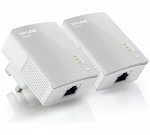
Using advanced Home Plug AV technology, TL-PA4010 KIT provides users with stable, high-speed data transfer rates of up to 600Mbps on a line length of up to 300 meters. With speed of up to 600Mbps, TL-PA4010 KIT enables heavy-bandwidth applications like HD streaming, on-line gaming and large file downloading, turning your home into a robust and high-speed networking.
Homeplug av standard compliant, high-speed data transfer rates of up to 600mbps miniature design, smaller than most powerline adapters at the market, blends discreetly in front of any power outlet no new wires, easy plug and play operation, no configuration required.
Best used with pcs, game consoles and smart tvs.
Compatible with homeplug av2, homeplug av.
Weight 0.42kg.
Size L16.9, W11.8, D8.3cm.
Manufacturer's 3 year guarantee.
EAN: 6935364096076.
Top comments
johnthehuman
1 Nov 164#3
fyi, it was the quality of your cat 5e cables that let you down. Decent quality cat 5 is perfectly capable of Gigabit speeds.
mickgoodie
1 Nov 163#13
this is very much dependant on your current house electrics. I live in a 1930's house, with a 80's extension and the sockets I use can be very hit and miss for the bandwidth you get from them (can be 3-5mb or 25-30mb)
if you do buy them, make sure you do a firmware update on them, that can be checked/done from the utility you can also download, that also gives you the exact speed their running at!
Hfm. Good price. FYI:
I have a pair of TP-Link 1200 pass thru and a pair of Zyxel 600 pass thru.
Changing the four 2m LAN cables to Cat6 from Cat5 or Cat5e dramatically improved performance of the Powerline Adapters.
The intermittent disconnects of the Zyxels went away.
The Cat6 cables were on HUKD posted sale at Maplin.
I then ordered a 3m Cat6 cable so I could replace the Router to Desktop PC Lan cable and that non-powerline direct LAN connection was similarly speed improved. Therefore in my opinion, to get the best performance from any Powerline kit, one should use Cat6 or better LAN cables.
Grumpy_womble
1 Nov 16#2
These are great, download over wifi 7meg but using these I run at 37meg
verbumSapienti to Grumpy_womble
1 Nov 16#20
37meg is a bit slow considering these are 600meg! oh wait you forgot to mention your ISP bottleneck..
johnthehuman
1 Nov 164#3
fyi, it was the quality of your cat 5e cables that let you down. Decent quality cat 5 is perfectly capable of Gigabit speeds.
joethepope
1 Nov 16#4
Just what i was looking for had them in my amazon basket for ages, ordered ty shaft, waka bowow to you. :sunglasses:
shaft to joethepope
1 Nov 16#5
you're welcome
Peamarshy77
1 Nov 16#6
Paid £24.99 from argos about 1 month ago. these worked a treat!
Mandroid578
1 Nov 16#7
Are these compatible with the nano av500
Andboy to Mandroid578
1 Nov 161#9
Yes, I have one of these running with two more AV500. Apart from minor hardware revisions, they are identical apart from the firmware. You can flash the AV500 up to 600Mbps support with the latest firmware from the UK site:
Good price but quite old as only av600. New standard is av2000
joethepope
1 Nov 16#10
thanks Andyboy answered my question also.
HarkrishenM
1 Nov 16#11
I have fibre optic broadband from sky getting 40Mb downstairs over Ethernet ... with the sky wireless booster I get around 25.5 Mb upstairs ....would these allow me to get approx 40Mb upstairs. I was looking to get 30m cat 5e Ethernet cable and run it outside but don't have enough time to carry out this task.
Andboy to HarkrishenM
1 Nov 161#12
Yes. I get the full 76MBPS from my Fibre package across these.
mickgoodie
1 Nov 163#13
this is very much dependant on your current house electrics. I live in a 1930's house, with a 80's extension and the sockets I use can be very hit and miss for the bandwidth you get from them (can be 3-5mb or 25-30mb)
if you do buy them, make sure you do a firmware update on them, that can be checked/done from the utility you can also download, that also gives you the exact speed their running at!
Well, until I saw this believed the same. However having a 2 port tplink 1.2g powerline and cat5e cables (decent) was only able to push 250mb over it. Just bought a pair of cat7, giving a chance... After that only the wiring in the house or tcp tuning can be the only other option.
Dizy
1 Nov 16#15
I think these are good over WiFi but noticed a lot of loss on these running my cctv in the end I got sick and installed a switch and went wired much better and reliable.
les1938
1 Nov 161#16
These get some real stick on Amazon!
davzzp
1 Nov 16#17
We have a limited bb speed due the house being a new build 10mbs if I got these would it effect the overall speed I get when I'm gaming & the wife is on Netflix?
IBadAss
1 Nov 16#18
Does it work from upstairs to downstairs because in my house the upstairs and downstairs are on different ring mains? (You can switch the mains plug sockets off independently for upstairs and downstairs).
A bit more info: they are connected to the same fuse block.
kowalski
1 Nov 16#19
Cat 7 ?!
Surely Cat 5E will be more than sufficient for AV600 plugs?
ronaldmacdonald
1 Nov 16#21
Good price, I paid £23 from Shamazon last week
OrribleHarry
1 Nov 16#22
Well they have a 100Mbs port so pointless listing as 600Mbs
shaft
1 Nov 16#23
i get 77Mbps by connecting directly to the modem and 58Mbps via the powerline plug. It's more than enough for what i do on the internet... which is mostly to go on HUKD and buy stuff i didn't know i needed.
nomnomnomnom
1 Nov 162#24
No it's not. Do we need to go through this every few weeks? It's infuriating seeing this posted again and again by people who have no understanding of what's happening. Please stop spreading this nonsense rumor.
600Mbps is the measurement that is used for the plugs to communicate with each other on the PHY / Physical layer in layer 1 of the OSI Model and part of the IEEE specification.
This is incredibly important to home users. To achieve a higher Mbps at layer 1 on the model, means you can push more data at the same signal to noise ratio. In English, this means that upgrading from a 'lower' powerline kit, to a higher Mbps one can give you more bandwidth on your internal network.
If you're one of the very lucky people who can max out the speed at the physical layer, then you still have all of the other layers in the OSI model (7 in total) to put on top of it. This includes error correction, fragmentation issues, dropped packets, packet headers and plenty of other stuff.
For this reason, only recent, high end powerlines have even a chance of exceeding the bandwidth limit of a 100Mbps port. This is in part due to them using better frequencies (SNR advancements) and using all 3 cables in the UK plug as opposed to 2, where possible.
You can see that even the latest, most expensive powerlines drop dramatically when they're not in the same room. The top end model here (2016 reviews), dropped to 117Mbps in real world use over 2 floors: http://www.pcadvisor.co.uk/review/powerline-adapters/tp-link-av2000-powerline-starter-kit-review-3643494/
So, theoretically, if you had these top end '2000Mbps' (£100) plugs with a 100Mbps port on, you'd lose 17Mbps in real world use by not having a 1000Mbps port on it. And that's with the very latest technology like 2x2 MIMO and beamforming on them.
To claim this is going to be an issue on anything lower, like these 600Mbps models released over 3 years ago, is absurd.
Section 2.1 PHY Rate vs. Application Throughput Rate
A topic that constantly appears in publication articles is the difference between the advertised data rate and the actual
realized data rate that a device delivers.
The advertised data rate for a data communications device is the physical layer rate (PHY rate), also known as the
channel rate. This is the maximum total number of bits per second that the technology is designed to produce over the
network medium.
Please stop worrying about what port it has on it. The list price for a 1Gbps chip (like the RTL8110SC) is under $2 when purchased in bulk.
TP-Link or any other company are not trying to rip you off (They can't save more than 50 cents) - they just know all of this and are providing you with a component that is correct for its use.
When a powerline needs a 1Gbps port, it'll have a 1Gbps port. A manufacturer is not going to build a device like this, spend money on transformers for the power, certification, other various components, and then save almost nothing on the port. They're just going to hurt their product in all reviews for an absolute miniscule cost that could be passed on to the user anyway.
They could even advertise it as coming with a 1Gbps port....because that's better, right?
It's almost like they know all this.
verbumSapienti
2 Nov 161#25
yee mm welll, not really. you kinda sold me with the OSI model that you knew what you were talking about but then you paraphrased pcadvisor, my main snag with their review is that "beamforming" is a wireless technology and neither they nor you picked up on that, I stopped reading when their article listed it as a feature, they should have known that at least. in your defences it is actually listed on the box but I just put that down to promotional crossed wires, translation issues, or laziness.
that aside, 95% of people buying a £20 powerline kit will not have 3 floors in their house and so fortunately will have more chance of getting the 400meg+ the review states (yet you omitted?)
their review also omitted attenuation calculations - which grade cables did they use? "30m over two floors" doesn't cut it I'm afraid. what's that, the estimated diagonal distance from Bob's office pc on 12th floor to Alice's foyer laptop on 14th, in their 1930s windblock tower? what about all the lateral wiring, the crummy copper, the rat-chewed cat2 in the plenum?
I bet in a property with modernish electrical wiring paired with a modernish file transfer protocol, plus the higher quality cables others have mentioned, you'd expect at least 500meg from one side of the house to the other, e.g. the box where the stream starts to where the tv is.
and TCP e.g. file transfer overhead is 10-15% but streaming vids over UDP you're looking at ~4%
gibblesuk
2 Nov 16#26
shows @ 19.99 on page but when adding to basket reverts to 22.99 :neutral_face:
OrribleHarry
2 Nov 16#27
Please, tell me more.....:smile:
joethepope
2 Nov 16#28
Wow, 30p per megga bite :smirk:
nomnomnomnom
2 Nov 161#29
Beamforming is not just for Wifi. It's actual, none marketing name is called 'spatial filtering' and has been part of electrical design for a long time. Please Google it.
Yet again, people are "correcting" others without having any clue what they're on about.
Beamforming being only for Wifi....my word. When will this madness end HUKD?
verbumSapienti
2 Nov 16#30
nice blank quote!
the document you linked to says beamforming is used with MIMO, which is also a wireless-only technology. you're right that spatial filtering is the correct term, well done for googling that, but the technologies are not synonymous. beamforming is being used in the wrong context here.
elaineandjamie
2 Nov 16#31
are these wifi extenders
mickgoodie to elaineandjamie
2 Nov 16#35
nope......homeplugs only. you can get wifi extenders built into a homeplug though.
back to the 600MB or 100MB questions. the bottom line here is down to your home electrical wiring. trust me, I was struggling with a download speed off my xbox of 2/3mb per sec...which is dreadful. I decided to make sure that ALL my homeplugs were from the same manufacturer (tplink in my case) and I download their utility and upgraded all my homeplugs with the latest firmware if it needed updating. This made a big difference to me, and like i said, their utility acually gives you a speed of what the homeplug is working at that you have plugged in. In my case this averages about 110-150 mb per homeplug
nomnomnomnom
2 Nov 161#32
Are you trolling? Seriously?
MIMO being a wireless only technology....I'm just lost for words at this point.
MIMO is not a wireless only technology, although that term is used within the realm of antennas too. It simply means Multiple In, Multiple out. MIMO systems have been in electrical design before WiFi even existed. The linked PDF even explains how this is accomplished in homeplugs:
It's literally telling you how the MIMO is working on the cable, yet you're telling us it's a "wireless-only technology" because it's also used there.
No, it's absolutely not. Using spatial filtering along with MIMO is perfectly valid in electrical design. They are two totally independent areas that happen to be used in conjunction with each other here. MIMO is a control system, nothing more. This is in contrast to SISO systems, which will normally use a root-locus design or a PID.
MIMO on the other hand typically use matrices, which allow the Multiple Input, Multiple Output to be achieved.
The homeplug alliance page linked isn't some random blog, this is the collection of companies which manage the standards were talking about: http://www.homeplug.org/alliance/member-roster/
D-Link, Itron, Teaxs Instruments to name a few.
But let's not stop there. What about the actual integrated circuits inside of these homeplugs?
Well, the first common one on the market to use MIMO and Beamforming was the QCA7500 by Qualcomm. Here is the datasheet from them: http://www.netcheif.com/Reviews/PLA5405/PDF/QCA7500.pdf
It's as clear as day that the physical chips, direct from the manufacturer of the integrated circuits, explain in detail how MIMO works and more importantly, the methods used to do so (AFE here).
So now you know that OFDM (orthogonal frequency division multiplexing) is being used...A subject on which there are endless articles and maths examples....
So clearly not just wireless.
You honestly think that these terms are being used wrongly by the entire homeplug alliance, Texas Instruments, Qualcom (Who make the integrated circuits) and others....ridiculous.
These are the people that made these systems work. They are responsible for making the chips and doing the research for them to exist.
adigraham
2 Nov 16#33
£22.99 now.
OrribleHarry
2 Nov 161#34
nomnomnomnom can I ask.......Have you ever considered taking your eyes away from a screen?
OrribleHarry
2 Nov 161#36
There is really no substitute for hard wiring though so if you can run the network cables then you will get the best possible speeds, I can copy between machines at 110-120MBs (that's 880-960mbps) however I did the wiring whilst I was fully rewiring the house so realise its not for everybody.
mickgoodie
3 Nov 16#37
yeap.... totally agree with you there 100%. you cannot beat a hard wired cat 5/6/7 connection
Mandroid578
6 Nov 16#38
Most excellent. I have a pair I should upgrade. Many thanks.

![Fresh Breakfast Meat Box (Using code) @ Campbells Meat [Haggis / Lorne Sausage / Bacon / Black Pudding & More]](/images/topics/208684_1.jpg)




































![[Xbox One] Q. u. b. e: Director's Cut on Deals with Gold](/images/topics/208716_1.jpg)


















Opening post
http://www.currys.co.uk/gbuk/computing-accessories/networking/powerline/tp-link-tl-pa4010kit-av600-powerline-adapter-twin-pack-10143560-pdt.html?intcmpid=display~RR
==================================================
It has good reviews and if you're still worried it also comes with 3 year warranty.
Same price at Amazon.
====================================================
Using advanced Home Plug AV technology, TL-PA4010 KIT provides users with stable, high-speed data transfer rates of up to 600Mbps on a line length of up to 300 meters. With speed of up to 600Mbps, TL-PA4010 KIT enables heavy-bandwidth applications like HD streaming, on-line gaming and large file downloading, turning your home into a robust and high-speed networking.
Homeplug av standard compliant, high-speed data transfer rates of up to 600mbps miniature design, smaller than most powerline adapters at the market, blends discreetly in front of any power outlet no new wires, easy plug and play operation, no configuration required.
Best used with pcs, game consoles and smart tvs.
Compatible with homeplug av2, homeplug av.
Weight 0.42kg.
Size L16.9, W11.8, D8.3cm.
Manufacturer's 3 year guarantee.
EAN: 6935364096076.
Top comments
if you do buy them, make sure you do a firmware update on them, that can be checked/done from the utility you can also download, that also gives you the exact speed their running at!
firmware url was posted before, but this is how you upgrade them
http://www.tp-link.com/en/faq-1091.html
and here is the utility app you need
http://www.tp-link.com/en/download/TL-PA4010PKIT.html#Utility
All comments (39)
FYI:
I have a pair of TP-Link 1200 pass thru and a pair of Zyxel 600 pass thru.
Changing the four 2m LAN cables to Cat6 from Cat5 or Cat5e dramatically improved performance of the Powerline Adapters.
The intermittent disconnects of the Zyxels went away.
The Cat6 cables were on HUKD posted sale at Maplin.
I then ordered a 3m Cat6 cable so I could replace the Router to Desktop PC Lan cable and that non-powerline direct LAN connection was similarly speed improved.
Therefore in my opinion, to get the best performance from any Powerline kit, one should use Cat6 or better LAN cables.
http://uk.tp-link.com/download/TL-PA4010KIT.html#Firmware
if you do buy them, make sure you do a firmware update on them, that can be checked/done from the utility you can also download, that also gives you the exact speed their running at!
firmware url was posted before, but this is how you upgrade them
http://www.tp-link.com/en/faq-1091.html
and here is the utility app you need
http://www.tp-link.com/en/download/TL-PA4010PKIT.html#Utility
A bit more info: they are connected to the same fuse block.
Surely Cat 5E will be more than sufficient for AV600 plugs?
600Mbps is the measurement that is used for the plugs to communicate with each other on the PHY / Physical layer in layer 1 of the OSI Model and part of the IEEE specification.
This is incredibly important to home users. To achieve a higher Mbps at layer 1 on the model, means you can push more data at the same signal to noise ratio. In English, this means that upgrading from a 'lower' powerline kit, to a higher Mbps one can give you more bandwidth on your internal network.
If you're one of the very lucky people who can max out the speed at the physical layer, then you still have all of the other layers in the OSI model (7 in total) to put on top of it. This includes error correction, fragmentation issues, dropped packets, packet headers and plenty of other stuff.
For this reason, only recent, high end powerlines have even a chance of exceeding the bandwidth limit of a 100Mbps port. This is in part due to them using better frequencies (SNR advancements) and using all 3 cables in the UK plug as opposed to 2, where possible.
You can see that even the latest, most expensive powerlines drop dramatically when they're not in the same room. The top end model here (2016 reviews), dropped to 117Mbps in real world use over 2 floors: http://www.pcadvisor.co.uk/review/powerline-adapters/tp-link-av2000-powerline-starter-kit-review-3643494/
So, theoretically, if you had these top end '2000Mbps' (£100) plugs with a 100Mbps port on, you'd lose 17Mbps in real world use by not having a 1000Mbps port on it. And that's with the very latest technology like 2x2 MIMO and beamforming on them.
To claim this is going to be an issue on anything lower, like these 600Mbps models released over 3 years ago, is absurd.
You don't need to take my word for it though. There are plenty of whitepapers out about this: https://www.devolo.com/downloads/data/devolo-whitepaper-plc-performance-testing.pdf
Section 2.1
PHY Rate vs. Application Throughput Rate
A topic that constantly appears in publication articles is the difference between the advertised data rate and the actual
realized data rate that a device delivers.
The advertised data rate for a data communications device is the physical layer rate (PHY rate), also known as the
channel rate. This is the maximum total number of bits per second that the technology is designed to produce over the
network medium.
Please stop worrying about what port it has on it. The list price for a 1Gbps chip (like the RTL8110SC) is under $2 when purchased in bulk.
TP-Link or any other company are not trying to rip you off (They can't save more than 50 cents) - they just know all of this and are providing you with a component that is correct for its use.
When a powerline needs a 1Gbps port, it'll have a 1Gbps port. A manufacturer is not going to build a device like this, spend money on transformers for the power, certification, other various components, and then save almost nothing on the port. They're just going to hurt their product in all reviews for an absolute miniscule cost that could be passed on to the user anyway.
They could even advertise it as coming with a 1Gbps port....because that's better, right?
It's almost like they know all this.
that aside, 95% of people buying a £20 powerline kit will not have 3 floors in their house and so fortunately will have more chance of getting the 400meg+ the review states (yet you omitted?)
their review also omitted attenuation calculations - which grade cables did they use? "30m over two floors" doesn't cut it I'm afraid. what's that, the estimated diagonal distance from Bob's office pc on 12th floor to Alice's foyer laptop on 14th, in their 1930s windblock tower? what about all the lateral wiring, the crummy copper, the rat-chewed cat2 in the plenum?
I bet in a property with modernish electrical wiring paired with a modernish file transfer protocol, plus the higher quality cables others have mentioned, you'd expect at least 500meg from one side of the house to the other, e.g. the box where the stream starts to where the tv is.
and TCP e.g. file transfer overhead is 10-15% but streaming vids over UDP you're looking at ~4%
Yet again, people are "correcting" others without having any clue what they're on about.
But like I said in my previous post, it's not like this information isn't freely available on the official homeplug.org homepage: http://www.homeplug.org/media/filer_public/2c/32/2c327fc8-25bb-409e-abf7-c398534c24dc/homeplug_av2_whitepaper_130909.pdf
This is the from the HomePlug Alliance, directly:
Beamforming being only for Wifi....my word. When will this madness end HUKD?
the document you linked to says beamforming is used with MIMO, which is also a wireless-only technology. you're right that spatial filtering is the correct term, well done for googling that, but the technologies are not synonymous. beamforming is being used in the wrong context here.
back to the 600MB or 100MB questions. the bottom line here is down to your home electrical wiring. trust me, I was struggling with a download speed off my xbox of 2/3mb per sec...which is dreadful. I decided to make sure that ALL my homeplugs were from the same manufacturer (tplink in my case) and I download their utility and upgraded all my homeplugs with the latest firmware if it needed updating. This made a big difference to me, and like i said, their utility acually gives you a speed of what the homeplug is working at that you have plugged in. In my case this averages about 110-150 mb per homeplug
MIMO being a wireless only technology....I'm just lost for words at this point.
MIMO is not a wireless only technology, although that term is used within the realm of antennas too. It simply means Multiple In, Multiple out. MIMO systems have been in electrical design before WiFi even existed.
The linked PDF even explains how this is accomplished in homeplugs:
It's literally telling you how the MIMO is working on the cable, yet you're telling us it's a "wireless-only technology" because it's also used there.
No, it's absolutely not. Using spatial filtering along with MIMO is perfectly valid in electrical design. They are two totally independent areas that happen to be used in conjunction with each other here. MIMO is a control system, nothing more. This is in contrast to SISO systems, which will normally use a root-locus design or a PID.
MIMO on the other hand typically use matrices, which allow the Multiple Input, Multiple Output to be achieved.
The homeplug alliance page linked isn't some random blog, this is the collection of companies which manage the standards were talking about: http://www.homeplug.org/alliance/member-roster/
D-Link, Itron, Teaxs Instruments to name a few.
But let's not stop there. What about the actual integrated circuits inside of these homeplugs?
Well, the first common one on the market to use MIMO and Beamforming was the QCA7500 by Qualcomm. Here is the datasheet from them: http://www.netcheif.com/Reviews/PLA5405/PDF/QCA7500.pdf
So how is it achieving MIMO?
And guess what? We can also go and read about the AFE with detailed information from Texas Instruments: http://www.ti.com/lit/an/sboa130a/sboa130a.pdf
It's as clear as day that the physical chips, direct from the manufacturer of the integrated circuits, explain in detail how MIMO works and more importantly, the methods used to do so (AFE here).
So you didn't like that review site - fine, here is one from Toms: http://www.tomshardware.co.uk/network-switch-guide,review-33209.html#p1
So now you know that OFDM (orthogonal frequency division multiplexing) is being used...A subject on which there are endless articles and maths examples....
So clearly not just wireless.
You honestly think that these terms are being used wrongly by the entire homeplug alliance, Texas Instruments, Qualcom (Who make the integrated circuits) and others....ridiculous.
These are the people that made these systems work. They are responsible for making the chips and doing the research for them to exist.