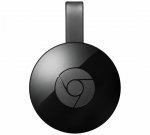
Stream your favourite entertainment, from your phone, tablet or laptop straight to your TV. Use with iPhone, iPad, Android device, Mac, Windows device or Chromebook. Setup in 3 easy steps; plug Chromecast into your TVs HDMI port and power. Then visit chromecast. Com/setup and connect your device to the same Wi-Fi network as your TV. Finally tap the Cast button in a Cast-enabled app to stream content to your TV.
Watch content from 1,000+ of your favourite mobile apps. Enjoy TV shows, movies, videos, songs, games, sports and more through apps like YouTube, Netflix, BBC iPlayer and All4. Find more at chromecast. Com/apps.
What's in the box; Chromecast, power cable and power adaptor. By using your phone, it's easy to browse or control the TV from anywhere in the home. And while streaming, you can still text or call without interrupting what's playing or draining your battery.
1080p.
Video formats:
BBC iPlayer.4oD.Netflix.YouTube.Vimeo.Rent from the largest selection of HD movies.
Interfaces and connectivity:
HDMI port.Wi-Fi enabled.
Top comments
TygerrTygerr to sam_of_london
20 Nov 1613#28
Really, because I find the site frustrating for the posting of so many barely-literate opinions and garbage non-facts that could have been avoided with the most trivial research.
Chromecast Ultra is simply an otherwise-identical higher-resolution version of Chromecast and is an alternative if you need 4k, no more. If you don't have 4k you're spending more than three times the amount for absolutely nothing. Most people can't even use the feature yet. What you are saying is nonsensical.
GoNz017 to bellboys
20 Nov 168#11
If I was passing, it isn't like I come here to throw money away :smiley:
fishmaster to legohead1977
20 Nov 165#36
The Firestick is a bit slow/laggy. I own these devices:
Firestick: Cons: Slow/Laggy/Wifi Only Pros: Has all the TV Catchup Services, ITV Hub, My5, ITV Hub, an actual interface unlike the Chromecast. Mobdro works reasonably well.
Chromecast: Cons: Wifi only/ No interface / Only Facilitates Streaming Pros: Simple
Nvidia TV Shield: Cons: Lack of software support e.g. all the catch-up TV services, Web browsing is a total nightmare and rubbish. Pros: Possibly the fastest Android device, it's so good you can't believe it's Android, excellent for retro gaming as well and Kodi. Modbro works almost flawlessly. Plex server works fantastically.
Droibox Ares: Cons: Supplied remote is a total and utter waste of time, some apps available such as some of the catchup TV services will crash or not load. Pros: Fast as it's using S905X (S912 is even faster but boxes cost more), it can do retro gaming, needs a decent touchpad keyboard to get the most out of it. This device is the best for web browsing, very fast, and the two finger scroll works a treat if you have a cheap touchpad keyboard controller. Modbro works really well, not tried Plex.
LG WebOS 2.x TV Cons: Built in Apps for Amazon and Plex are rubbish, Amazon app makes the Grand Tour look like it was filmed with a potato, Plex app crashes when searching most of the time. Pros: Convenient if you don't have any of the other devices I have I guess. The smart TV features are almost worthless unless I've taken one or more devices round to a mate's house and forgotten to take them back.
Out of all the devices I have the Chromecast is the weakest and the least used, all I used it for is streaming from my phone/tablet to little TV in the kitchen when I'm cooking.
Some people here will know that I dislike Kodi and that hasn't changed, if you want to run Kodi then obviously the Chromecast can't do that. If I had the simple choice of Firestick or Chromecast, Firestick wins everytime.
Kasc4185 to TomLC
20 Nov 165#9
Get it now & take it back if necessary if you get a better Black Friday deal?!
Latest comments (122)
Jelly34
6 Dec 16#122
So annoyed i've missed all the £20 deals.
Yeedeal
6 Dec 16#121
Bought but can someone explain how to get 3 months free Netflix?thanks
tflis007
25 Nov 16#120
£18 in Currys
Newbie005
25 Nov 16#119
It was £18 in Curry's yesterday.
Halz1985
24 Nov 16#118
Or Fast Track orders (pay online and collect instore) but the 10% has expired now anyway
Steph312
23 Nov 16#117
Yes but would this have only worked for online delivered orders?
Treboeth
23 Nov 16#116
OP states Quidco til midnight, 3 days ago so guess it`s finished :disappointed:
Steph312
23 Nov 16#115
What were the conditions for the 10% cashback as its not working.
Pink pixie
21 Nov 16#114
Google says on website for chromecast all colours reduced to £20 until 5 December so you can buy direct from google store and get colour you want if prefer this to 2 year warranty in black with JL
amour3k
21 Nov 16#113
Hahahahahahaha.
TheVoice
21 Nov 16#112
If it's any consolation, you probably won't care what colour it is when it's connected to the back of your TV out of sight!
amour3k
21 Nov 16#111
Number 1, the shape/design of the Chromecast Version 2 is wayyyyyy different to that of your older Chromecast Version 2 Device.
And Number 2, the Chromecast Version 2 supports BOTH 2.5GHz & 5.4GHz Wave Bands simultaneously! (whereas your Chromecast Version 1 supports only 2.5GHz Wave Band, etc?).
Worth baring in mind also perhaps ..... :-)
uggla
21 Nov 16#110
Just use Kodi to open Acestream and clone the screen, works really well as long as nobody ring your phone.
fishmaster
21 Nov 161#109
Yes thanks I have Opera installed, it's OK but the Droibox Ares is still far superior for web browsing.
barbiegirl
21 Nov 16#108
Can you tell me how you've done it please? Are you having it open the stream in a different, chromecast enabled app?
DocDock
21 Nov 16#107
How much of an improvement is this over the first model? thinking of upgrading
pnaylor39
21 Nov 16#106
Old Model. This is chromecast 2. Are you're referring to ultra which is not out yet?. If so it's priced at 3 x cost of this .
amour3k
21 Nov 16#105
It's a shame that Retailers only Stock the Black ones of these? (as opposed to the Red, and/or Crimson ones too!).
As as of current £20 price, having to pay the extra £10 required (eg. £30), to get your otherwise preferred Colour directly from Google at a GREATER COST is somewhat long winded?!, hmmmmmmmmmm.
It's a shame.
ataritheone
21 Nov 16#104
Just use the screen mirroring in Google cast/home app
wizbowes
21 Nov 16#103
Grand Tour looked amazing on mine in UHD. Goliath looks better in HD than UHD though.
junaidhassan
21 Nov 16#102
Ordered and Heat added Cheers!
TygerrTygerr
21 Nov 16#101
No idea. Only one way to find out!
But I'd at least consider a Chromecast. If I had to pick only one device, that would be it, and just screencast Amazon Video from my phone. But everybody has their own favourites.
IRONM4N_UK
20 Nov 16#100
Thinking, if I sideloaded Amazon Prime video onto the Now TV box (essentially a Roku) would it work or even have the same content as the Firestick?
Tried Now TV app on the firestick and it doesn't work :-(
TygerrTygerr
20 Nov 16#99
It's an American model, iPlayer doesn't work currently and it's unclear what other parts are guaranteed to work forever. I would have gone for that one but it lacked sureness.
They don't intend to release any updated hardware in this country. Which is ridiculous considering how obviously aged the current model is.
Gazmando
20 Nov 16#98
Hello Fishmaster, have you tried Opera Browser on the Shield TV?
It lets you use the right stick as a mouse, has a speed dial for your favourite sites and most importantly has a back button.
I think this is by far the best browser and works fine on the Shield tV.
sj7
20 Nov 161#97
it does work
IRONM4N_UK
20 Nov 16#96
Less
One less remote too!
IRONM4N_UK
20 Nov 16#95
Anyone tried the Roku Stick (2016)?
Says quad core, I have an Amazon Firestick and a Now TV box, thinking I could run apps for both on the Roku and consoildate my ports!
davemhaynes
20 Nov 16#94
Thanks OP, ordered and heated.
skybluearmyontour
20 Nov 16#93
I have Apple TV - is there any benefit in getting this?
beerzx6r
20 Nov 16#92
Can I ask if you can have more than one of these operating on the same wifi router on different TV's streaming different content?
tasteph
20 Nov 16#91
Great deal. Been waiting to for an offer for xmas presents.
matthewnunn1986
20 Nov 16#90
Cold from me as bt sport app wouldn't work through it
AgelessProphet
20 Nov 16#89
I just have a question which I'd really appreciate an answer to. If I was playing a movie or video on my Windows 7 PC using media player and wanted to stream it to my HDTV, will this device allow me to do that?
Superb addition to any home, I personally don't have the bandwidth to make 4K viable just yet, so although I purchased one of these last year I'm considering getting another for my parents older non-smart TVs.
Perfect for streaming videos from your phone or just hooking up to YouTube and BBC iPlayer. Also stick one in your bag and plug into hotel TVs (providing you have wifi connections) and you are laughing!
Superb deal.
TygerrTygerr
20 Nov 161#82
What I said in the original Roku thread.
Cl0ud
20 Nov 16#81
I have a Roku streaming stick and find it really laggy and slow. Searching for TV shows on iPlayer takes forever and due to buggy software you can only watch one episode before it crashes and needs to be reopened. Would this be any better?
NIgelK
20 Nov 161#80
Thanks for replying :smiley:
NIgelK
20 Nov 16#79
Cheers thank you :smiley:
kpearsoncj
20 Nov 16#78
terranium tv and also megabox hd also work with chromecast and allcast
cimbarashe
20 Nov 16#77
same here, I have exact amount on my currys gift card, got left when i bought the Samsung ecobubble.
Halz1985
20 Nov 161#76
Just set mine up and I can confirm that it can be powered from a USB port on the TV. So no need to plug it into the wall.
Halz1985
20 Nov 16#75
About 1m but if it's like the 1st gen one you can power it from a USB port on your TV
uggla
20 Nov 16#74
Might need to install the chromecast app, mines showing in the top right corner.
uggla
20 Nov 161#73
Just a normal charger lead length
Jakkal23
20 Nov 16#72
I might be wrong but I'm sure I saw this for £15 on a black Friday ad in curry's earlier - it hadn't been put out yet, so not sure what day it starts, but there's deals on all week there
Undisclosed2
20 Nov 16#71
Ordered this, thanks!
Was looking to get one today, and this happened to be here... being delivered in a couple of hours. Nice.
Pixl8
20 Nov 16#70
Many thanks OP - Purchased via Quidco and heat added :wink:
xenophon
20 Nov 16#69
Behind what would you quit?
reckoning
20 Nov 16#68
I'd just quit while you're behind.
NIgelK
20 Nov 16#67
Could someone who has one tell me how long the power lead is please? TV is up on the wall so need a couple of metres I think
Kasc4185
20 Nov 161#66
No you just carry it around with you when you KNOW you will be passing an Argos on your travels :stuck_out_tongue:
xenophon
20 Nov 16#65
If you are passing? Right okay. So you will carry it around with you when you go out just in case you pass an Argos on your travels. :smile:
deeky
20 Nov 16#64
Simple answer. Yes.
pnaylor39
20 Nov 16#63
if you've got currys nearer you , they'll price match. just reserve both and show currys colleague your argos reservation and they'll price match
Are they still doing the free £20 google play credit when you buy one?
Geemac
20 Nov 16#60
Quidco does sometimes track at a lower amount, and then later tracks at the proper rate. If not you can submit a claim.
pavel76
20 Nov 161#59
£5 cheaper before but for Chromecast Audio...
heluva
20 Nov 16#58
Ive got BtSport on Google Nexus tablet. Will ChromeCast work ? I dont see "cast" icon on BtSport app.
Thx
RedMoon
20 Nov 16#57
Just so you know... Quidco tracked as £0.60 not £2.00
TheVoice
20 Nov 16#56
Cheers OP, wanted one for a little while now for listening to music as the Spotify app on my TV is atrocious, £15 after using some Nectar points. :smiley:
chris_61
20 Nov 16#55
Hopefully Currys can match this as i have an £11 gift card.
Demondog
20 Nov 16#54
great deal no e stocking filler
chanel_89
20 Nov 16#53
Good find and in stock!
uggla
20 Nov 161#52
Works brilliant use it most weekends, taken it to my mums yesterday and watched the Everton game.
boosh711
20 Nov 16#51
Many thanks
barbiegirl
20 Nov 16#50
Have you managed to cast Acestream from android phone to chromecast? I can't get it to work...
uggla
20 Nov 16#49
Bit misleading that, its all about casting from an Android device to the Chromecast. I Cast Kodi to my chromecast from my S5 when watching football. Acestream Engine is free on a phone but charges to be used on a Box.
Anyway answer is yes you can, just cast the screen to mirror it on the telly, only probem i found is the audio is out of sync but easy to fix in kodi itself.
raj75
20 Nov 16#48
When was it £15 in Currys?.. Audio version was £15, not the Video version.
sxxychocolate
20 Nov 16#47
oh the irony....... :wink: but thanks for the heads up....
te721
20 Nov 16#46
thanks I think I'll stick to what I've got for now then runs Iplayer and screen cast fine thanks for your help
ian18
20 Nov 161#45
Pretty sure you can't install Kodi on it, however you should be able to cast an Android device with kodi to Chromecast
Munchie75
20 Nov 16#44
can anyone confirm whether KODI can be used with the chromcast.
this link appears to indicate it is possible ?
Great find thanks. Really nice little Christmas present
Jijin2
20 Nov 16#42
Yes, also with Solid explorer's cast extension you can stream content from showbox like YouTube's app.
ian18
20 Nov 16#41
Any benefit in this version over the original one?
guttediam
20 Nov 16#40
Many thanks for post Op, ordered & heat added :smiley:
illy1965
20 Nov 16#39
To the 2 people asking about showbox I've got the original Chromecast and that streams fine to the TV so there's no reason the 2nd gen wouldn't, you just need to install an app like localcast from the play store and you will be good to go
legohead1977
20 Nov 16#38
Thanks for the reply
sam_of_london
20 Nov 16#24
Big Negative. This is the old model again. I already bought it last year for £15 but do not like it since I bought Nvidia tv and amazon 4k tv. . Some people just love posting obsolete old stuff here because it is cheap. If it was the new 4k current model would have voted hot.
Geemac to sam_of_london
20 Nov 163#26
HOW much did the Nvidia tv and amazon 4k tv cost :smirk:
TygerrTygerr to sam_of_london
20 Nov 1613#28
Really, because I find the site frustrating for the posting of so many barely-literate opinions and garbage non-facts that could have been avoided with the most trivial research.
Chromecast Ultra is simply an otherwise-identical higher-resolution version of Chromecast and is an alternative if you need 4k, no more. If you don't have 4k you're spending more than three times the amount for absolutely nothing. Most people can't even use the feature yet. What you are saying is nonsensical.
Nooky to sam_of_london
20 Nov 16#37
For someone so concerned with obsolescence, you seem to have a narrow appreciation of technology. Not everything you can do with the Chromecast would benefit from 4k; I have one in my kitchen that just streams the camera feed from my 3D printer.
legohead1977
20 Nov 16#29
I was going to get one of these because I love my Audio Casts. That said I tend to flick from Netflix to Amazon and the Roku stick caters for all so went for that in the end.
If there's a £20 Firestick offer I may jump on that as well to experiment with Kodi.
TygerrTygerr to legohead1977
20 Nov 161#31
The Roku stick is really slow compared with either of the others.
fishmaster to legohead1977
20 Nov 165#36
The Firestick is a bit slow/laggy. I own these devices:
Firestick: Cons: Slow/Laggy/Wifi Only Pros: Has all the TV Catchup Services, ITV Hub, My5, ITV Hub, an actual interface unlike the Chromecast. Mobdro works reasonably well.
Chromecast: Cons: Wifi only/ No interface / Only Facilitates Streaming Pros: Simple
Nvidia TV Shield: Cons: Lack of software support e.g. all the catch-up TV services, Web browsing is a total nightmare and rubbish. Pros: Possibly the fastest Android device, it's so good you can't believe it's Android, excellent for retro gaming as well and Kodi. Modbro works almost flawlessly. Plex server works fantastically.
Droibox Ares: Cons: Supplied remote is a total and utter waste of time, some apps available such as some of the catchup TV services will crash or not load. Pros: Fast as it's using S905X (S912 is even faster but boxes cost more), it can do retro gaming, needs a decent touchpad keyboard to get the most out of it. This device is the best for web browsing, very fast, and the two finger scroll works a treat if you have a cheap touchpad keyboard controller. Modbro works really well, not tried Plex.
LG WebOS 2.x TV Cons: Built in Apps for Amazon and Plex are rubbish, Amazon app makes the Grand Tour look like it was filmed with a potato, Plex app crashes when searching most of the time. Pros: Convenient if you don't have any of the other devices I have I guess. The smart TV features are almost worthless unless I've taken one or more devices round to a mate's house and forgotten to take them back.
Out of all the devices I have the Chromecast is the weakest and the least used, all I used it for is streaming from my phone/tablet to little TV in the kitchen when I'm cooking.
Some people here will know that I dislike Kodi and that hasn't changed, if you want to run Kodi then obviously the Chromecast can't do that. If I had the simple choice of Firestick or Chromecast, Firestick wins everytime.
sxxychocolate
20 Nov 16#30
I'm getting one for my 1080p TV......although I could also get one for my dad's crt set, which he still uses....it's only got scart inputs, so this should work just fine....... :wink:
twistedfirestarter to sxxychocolate
20 Nov 16#35
It won't go to scart, it plugs into a hdmi port only
boosh711
20 Nov 16#34
Can I use showbox with this using an S6?
fairytooth
20 Nov 161#33
These are great and have better range than the 1st generation plus 5G wifi so really nice to use. But they are clearing the decks ready for the 4k version (Chromecast Ultra)
rollmesome
20 Nov 16#32
Simple question. If I have showbox on galaxy can I stream using android on to the tv (currently do this with moviebox to Apple TV )
sam_of_london
20 Nov 16#27
I bought both discounted but sure exactly how much . Both are quality products, not obsolete and superseded by the 2016 4k model.
Geemac
20 Nov 161#25
People wondering if it will be cheaper on Black Friday, can you not order and pay today, then pick it up next weekend if it’s still the best price?
accvio
20 Nov 16#21
Great device. I have two of these and a Chromecast Audio. I wonder if the prices are dropping ahead of the Chromecast Ultra, due soon.
Blimey, you would genuinely go to the hassle of taking it back to store for the sake of 3 quid?
GoNz017 to bellboys
20 Nov 168#11
If I was passing, it isn't like I come here to throw money away :smiley:
Kasc4185 to bellboys
20 Nov 16#13
Why do you say £3 - people are saying they have got them for £5 cheaper before.. May even be cheaper than that on Black Friday as well. Also, like people have also said, why not take it back to the store if you are passing as there are Argos stores everywhere?!
Graham1979 to bellboys
20 Nov 161#22
You've been a member for 10 years and you need to ask? I feel embarrassed for you. Ha
te721
20 Nov 16#14
I still have the first Chromecast, can anyone explain what is better about these and is it worth changing? cheers
davidian84 to te721
20 Nov 16#20
Not much. Better shape and has 3 antennas so they say its runs better
Kasc4185
20 Nov 16#19
Ok, great, thanks for explaining :smiley:
Munchie75
20 Nov 16#12
how do you get the cash back. reading t&c's it appears to not be included for collection?
therefore if paying postage it will be an extra £4
or am I missing something?
thanks
davidian84 to Munchie75
20 Nov 16#18
Fast track. pay online collect instore is eligible.
davidian84
20 Nov 162#17
As i say i think they are getting confused with chromecast audio which is often £15. This is the cheapest price its been readily available for. Sure others will follow and maybe beat slightly.
Though is a shame they've tightened up offers, I got 2 years worth of offers worth £100+ but now you just get the intro offers which are rubbish at the minute.
Kasc4185
20 Nov 16#16
Ah, ok thanks!
Dan_999
20 Nov 161#15
You get £2 'back' from Quidco with this Argos deal
TomLC
20 Nov 16#7
Get it now or take a chance and wait till Black Friday???
Kasc4185 to TomLC
20 Nov 165#9
Get it now & take it back if necessary if you get a better Black Friday deal?!
916nick
20 Nov 161#8
Been meaning to get one for a while. I'm thinking pick one up from Argos while they have them and if any better deals on Friday, could always return it if unopened
Whammerhead
20 Nov 16#4
Good spot OP but will it drop further on Friday, that is, bagged it from Curry's for £15 previously.
amour3k to Whammerhead
20 Nov 161#5
Goooooood point that?.
£15 each was the price I bought 2 NOW TV Version 2 Boxes last Black Friday! (at a time when the standard/common price for the exact same thing was averaging at £25+ in the Shops! (+ in most other places too?).
So definitely worth baring all that in mind also ..... :-)
davidian84 to Whammerhead
20 Nov 161#6
Was that definitely correct? this site says only chromecast audio was £15
Apogee00
20 Nov 16#2
Nice find!
What made you add it to the trolley @£30 in the first place?!
Halz1985 to Apogee00
20 Nov 163#3
It was in my wishlist so I was notified of the price drop :smiley:
Halz1985
20 Nov 162#1
For a change for Argos there seems to be plenty of stock around.

![Fresh Breakfast Meat Box (Using code) @ Campbells Meat [Haggis / Lorne Sausage / Bacon / Black Pudding & More]](/images/topics/208684_1.jpg)




































![[Xbox One] Q. u. b. e: Director's Cut on Deals with Gold](/images/topics/208716_1.jpg)


















Opening post
£2 Quidco until midnight (10%)
Stream your favourite entertainment, from your phone, tablet or laptop straight to your TV. Use with iPhone, iPad, Android device, Mac, Windows device or Chromebook. Setup in 3 easy steps; plug Chromecast into your TVs HDMI port and power. Then visit chromecast. Com/setup and connect your device to the same Wi-Fi network as your TV. Finally tap the Cast button in a Cast-enabled app to stream content to your TV.
Watch content from 1,000+ of your favourite mobile apps. Enjoy TV shows, movies, videos, songs, games, sports and more through apps like YouTube, Netflix, BBC iPlayer and All4. Find more at chromecast. Com/apps.
What's in the box; Chromecast, power cable and power adaptor. By using your phone, it's easy to browse or control the TV from anywhere in the home. And while streaming, you can still text or call without interrupting what's playing or draining your battery.
1080p.
Video formats:
BBC iPlayer.4oD.Netflix.YouTube.Vimeo.Rent from the largest selection of HD movies.
Interfaces and connectivity:
HDMI port.Wi-Fi enabled.
Top comments
Chromecast Ultra is simply an otherwise-identical higher-resolution version of Chromecast and is an alternative if you need 4k, no more. If you don't have 4k you're spending more than three times the amount for absolutely nothing. Most people can't even use the feature yet. What you are saying is nonsensical.
Firestick: Cons: Slow/Laggy/Wifi Only Pros: Has all the TV Catchup Services, ITV Hub, My5, ITV Hub, an actual interface unlike the Chromecast. Mobdro works reasonably well.
Chromecast: Cons: Wifi only/ No interface / Only Facilitates Streaming Pros: Simple
Nvidia TV Shield: Cons: Lack of software support e.g. all the catch-up TV services, Web browsing is a total nightmare and rubbish. Pros: Possibly the fastest Android device, it's so good you can't believe it's Android, excellent for retro gaming as well and Kodi. Modbro works almost flawlessly. Plex server works fantastically.
Droibox Ares: Cons: Supplied remote is a total and utter waste of time, some apps available such as some of the catchup TV services will crash or not load. Pros: Fast as it's using S905X (S912 is even faster but boxes cost more), it can do retro gaming, needs a decent touchpad keyboard to get the most out of it. This device is the best for web browsing, very fast, and the two finger scroll works a treat if you have a cheap touchpad keyboard controller. Modbro works really well, not tried Plex.
LG WebOS 2.x TV Cons: Built in Apps for Amazon and Plex are rubbish, Amazon app makes the Grand Tour look like it was filmed with a potato, Plex app crashes when searching most of the time. Pros: Convenient if you don't have any of the other devices I have I guess. The smart TV features are almost worthless unless I've taken one or more devices round to a mate's house and forgotten to take them back.
Out of all the devices I have the Chromecast is the weakest and the least used, all I used it for is streaming from my phone/tablet to little TV in the kitchen when I'm cooking.
Some people here will know that I dislike Kodi and that hasn't changed, if you want to run Kodi then obviously the Chromecast can't do that. If I had the simple choice of Firestick or Chromecast, Firestick wins everytime.
Latest comments (122)
And Number 2, the Chromecast Version 2 supports BOTH 2.5GHz & 5.4GHz Wave Bands simultaneously! (whereas your Chromecast Version 1 supports only 2.5GHz Wave Band, etc?).
Worth baring in mind also perhaps ..... :-)
As as of current £20 price, having to pay the extra £10 required (eg. £30), to get your otherwise preferred Colour directly from Google at a GREATER COST is somewhat long winded?!, hmmmmmmmmmm.
It's a shame.
But I'd at least consider a Chromecast. If I had to pick only one device, that would be it, and just screencast Amazon Video from my phone. But everybody has their own favourites.
Tried Now TV app on the firestick and it doesn't work :-(
They don't intend to release any updated hardware in this country. Which is ridiculous considering how obviously aged the current model is.
It lets you use the right stick as a mouse, has a speed dial for your favourite sites and most importantly has a back button.
I think this is by far the best browser and works fine on the Shield tV.
One less remote too!
Says quad core, I have an Amazon Firestick and a Now TV box, thinking I could run apps for both on the Roku and consoildate my ports!
Perfect for streaming videos from your phone or just hooking up to YouTube and BBC iPlayer. Also stick one in your bag and plug into hotel TVs (providing you have wifi connections) and you are laughing!
Superb deal.
What I said in the original Roku thread.
Was looking to get one today, and this happened to be here... being delivered in a couple of hours. Nice.
https://www.google.com/intl/en_gb/chromecast/tv/chromecast/offers/
Thx
Anyway answer is yes you can, just cast the screen to mirror it on the telly, only probem i found is the audio is out of sync but easy to fix in kodi itself.
this link appears to indicate it is possible ?
use kodi with chromecast
thanks
Chromecast Ultra is simply an otherwise-identical higher-resolution version of Chromecast and is an alternative if you need 4k, no more. If you don't have 4k you're spending more than three times the amount for absolutely nothing. Most people can't even use the feature yet. What you are saying is nonsensical.
If there's a £20 Firestick offer I may jump on that as well to experiment with Kodi.
Firestick: Cons: Slow/Laggy/Wifi Only Pros: Has all the TV Catchup Services, ITV Hub, My5, ITV Hub, an actual interface unlike the Chromecast. Mobdro works reasonably well.
Chromecast: Cons: Wifi only/ No interface / Only Facilitates Streaming Pros: Simple
Nvidia TV Shield: Cons: Lack of software support e.g. all the catch-up TV services, Web browsing is a total nightmare and rubbish. Pros: Possibly the fastest Android device, it's so good you can't believe it's Android, excellent for retro gaming as well and Kodi. Modbro works almost flawlessly. Plex server works fantastically.
Droibox Ares: Cons: Supplied remote is a total and utter waste of time, some apps available such as some of the catchup TV services will crash or not load. Pros: Fast as it's using S905X (S912 is even faster but boxes cost more), it can do retro gaming, needs a decent touchpad keyboard to get the most out of it. This device is the best for web browsing, very fast, and the two finger scroll works a treat if you have a cheap touchpad keyboard controller. Modbro works really well, not tried Plex.
LG WebOS 2.x TV Cons: Built in Apps for Amazon and Plex are rubbish, Amazon app makes the Grand Tour look like it was filmed with a potato, Plex app crashes when searching most of the time. Pros: Convenient if you don't have any of the other devices I have I guess. The smart TV features are almost worthless unless I've taken one or more devices round to a mate's house and forgotten to take them back.
Out of all the devices I have the Chromecast is the weakest and the least used, all I used it for is streaming from my phone/tablet to little TV in the kitchen when I'm cooking.
Some people here will know that I dislike Kodi and that hasn't changed, if you want to run Kodi then obviously the Chromecast can't do that. If I had the simple choice of Firestick or Chromecast, Firestick wins everytime.
If the lack of ethernet bothers you, you can buy an adapter from Google for £15. https://store.google.com/product/ethernet_adapter_for_chromecast?hl=en-GB
therefore if paying postage it will be an extra £4
or am I missing something?
thanks
Though is a shame they've tightened up offers, I got 2 years worth of offers worth £100+ but now you just get the intro offers which are rubbish at the minute.
£15 each was the price I bought 2 NOW TV Version 2 Boxes last Black Friday! (at a time when the standard/common price for the exact same thing was averaging at £25+ in the Shops! (+ in most other places too?).
So definitely worth baring all that in mind also ..... :-)
What made you add it to the trolley @£30 in the first place?!