Just surfing around and noticed the netgear wifi booster now only £14.99 - I was going to get one for the garden but then didn't bother as the price went up. But lo and behold its at £14.99 today so I got myself two.
I have the R7000 router so I hope this works well with it.
Can never have enough Wifi!!!
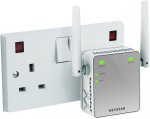
NETGEAR EX2700-100UKS Mini 300 Mbps WiFi Range Extender (Wi-Fi Booster)
- Michalux
Top comments
nanuek to sunpreet
9 Aug 164#12
Don't waste your money on wireless ac unless you have devices that can make use of it.
sunpreet
8 Aug 163#2
Don't waste money on wireless n. Spend a bit more and go for ac
All comments (53)
steve543
8 Aug 16#1
Recently bough this for £10 from sainsburys
Best £10 spent in a long time
sunpreet
8 Aug 163#2
Don't waste money on wireless n. Spend a bit more and go for ac
amuseboy to sunpreet
8 Aug 161#6
I know it's hot but what will AC do for me? joking aside...
yeah AC is way better but more money! £34.99 for the 750AC and £39.99 for the 1200AC.
Not sure if it I need it to be honest... but hey...I suppose if you want or need it super fast. I just want better wifi coverage...
nanuek to sunpreet
9 Aug 164#12
Don't waste your money on wireless ac unless you have devices that can make use of it.
plap to sunpreet
9 Aug 16#25
Not necessarily, ac signals don't carry as far (set up my friend's Wifi and all his walls are concrete and outside his house we can detect the n signal, weak but good enough for basic streaming, but not the ac --> tried it on 2 phones and a laptop and same on all devices / only tried one ac router though so it's hardly scientific ;-)
Preceded by 802.11b,g and n. To be superceded by 802.11ax possibly.
Wireless networking was invented in 1970 by the University of Hawaii. Due to the physics of Wifi it's inferior to Ethernet, although Wireless will eventually supercede Ethernet in most people's experience in the future. It will take some time we're still on TCP/IP and the headache to replace that or piggy back another system is immense. It will need doing someday.
Batmobile543
8 Aug 16#4
I'm seeing this deal every time I go to amazon for last 2 months.
AndyRoyd
8 Aug 16#7
Same price Currys / PCWorld; probably pricematch.
TheHoss
9 Aug 16#8
Is my understanding still correct in saying that home plugs and such half bandwidth?
Nujol to TheHoss
9 Aug 16#9
Not sure but this is not a homeplug product just so you are aware. You just plug it in somewhere that gets good wifi reception but that is closer to your dead spot, and it repeats/extends the wifi from there.
There are other modes but it is not a powerline product.
Thanks OP. To be honest it is regularly this price. We have one and it immediately solved our poor wifi upstairs so happy with it. Recommended.
zx636r to TheHoss
9 Aug 16#10
I'm struggling understanding your understanding.
CaptainSocks to TheHoss
9 Aug 16#21
Yep.
It basically splits your available bandwidth between the booster and your original router.
So if you have a 38MB connection, the router keeps 19MB, and the other 19MB gets pushed to the "booster".
Powerline adapters work differently. They basically just work like a standard ethernet connection would if you plugged that into your router.
xboxsteve
9 Aug 16#11
My android box (Running Terannium.TV, best app out there for me) was struggling with WIFI, its a know problem. Other devices struggled for a signal but not like this. I recievd this booster yesterday which worked fine to a point and well worth the money. I connected the Android box to this booster using an ethernet cable (Port is just underneath) and it ran full speed (tested via "SpeedTest" App). Excellent device and easy to setup.
a8ken
9 Aug 162#13
Could someone advise if this is the product for me.
Basically my Fibre wifi signal has dropped dramatically over the last 2 weeks. I'm getting 40meg into my router but wireless signal is chronic, xbone showing 7meg download speed so I'm regularly kicked out of games and Netflix etc. Sky no use at all saying it's a problem in my home but no way to identify what or why. Minimal devices attached at any time and no changes in circumstances in my house so a bit of a head scratcher.
It seems there something blocking my wifi signal so would this product help?
Thanks
Youngsyr to a8ken
9 Aug 162#14
In your situation I would try the powerline adapters - they turn your home's power cables into network cables (whilst having no impact on their ability to carry electricity as normal).
You can get them in various configurations, but these would be a good set to get at reasonable cost - they are "pass through" meaning they don't use up a power socket and have two ports, meaning you can connect two devices (Xbox and Smart TV?) to one of the adapters.
They're very easy to set up, plug one into a power socket near your router and connect to your router via ethernet cable (supplied). Then plug the other into a power socket near your Xbox and connect your Xbox and other device to it via ethernet (may need an additional ethernet cable). Then hit the sync button on the one by your router and then the one by your devices. They should then auto-sync and have a connection within a minute.
Your speeds should be pretty good, on a 40mb connection I would expect 30mb or more at the device - significantly better than WiFi. :smiley:
nanuek to a8ken
9 Aug 16#15
If nothing in your house has changed then the most likely culprit is going to be a neighbour getting a new router on the same WiFi channel as yours. If you can log onto your router then I would experiment with changing to a new channel each day and see if any of them work better for you. You can also get programs to run on your mobile to see which channels are in use nearby, although I haven't found this as effective as the trial and error approach.
The next thing to look for would be new or moved devices that use the same spectrum as your WiFi. If you or your neighbours have a new baby monitor, IP camera or cordless phone then it might be interfering with your setup.
Finally, have you moved yourself? One of the most effective ways of blocking WiFi signal is to place a large sack of impure water (AKA torso) in the way.
A WiFi repeater might well circumvent your issue but if it has worked well in the past then I would try the free options first.
verbumSapienti to a8ken
9 Aug 16#16
have you tried changing the WiFi channel? you may be experiencing interference from other wireless devices in your locale
..unless you are with Vermin Media whose 'free upgrade' for me to the new DOCSIS cables resulted in dropouts, slower than before download speeds and constant engineer visits - culminating in my leaving them. Are you with the Vermin Media?
plewis00
9 Aug 16#18
What's the struggle, these do slow your transmission speed down as they effectively double the network traffic in the vacinity, maybe not half but they have been known to increase latency and reduce speeds in exchange for more range.
Conc78
9 Aug 16#19
If anyone's offering any technical guidance then I'm all ears!! Bought a wifi extender/adaptor 12 months ago (albeit a relatively cheap one off eBay) to boost signal from house to office in converted garage at back of house. Fine up until recently when Virgin maintenance. Since then won't even pick up the extender & only a feint signal to the regular house wifi signal. Any ideas. Thanks in advance
a8ken
9 Aug 16#20
This sounds pretty good, I presume it'll just impact on the connected devices, so not phones, tablets etc?
Been playing about with the channels the last few days. Things aren't too congested and I'm currently the only one on my chosen channel. I'll have a word with my neighbours to see how they are getting on. Frustrating as we've had a year without a hitch, seemed to come out of nowhere.
LOL at "large sack of impure water" - maybe I try one of these fancy cleansing diets? :laughing:
I'm with Sky and apparently on the most up to date equipment, installed a couple of years ago. Only alternative is BT.
gsj87
9 Aug 16#22
I'm with the Vermin Media.. Wifi signal downstairs where the router is situated is brilliant, however, once you go upstairs to the back rooms, it keeps cutting out and is pretty much non existent!
Will this help me? or should I consider leaving the Vermin Media? I also hate the fact that on peak times (Sundays, evenings etc,) the wifi is just **** wherever I am.
cullies
9 Aug 16#23
This is NOT a powerline plug wifi. Very limited range & next to useless!
Youngsyr
9 Aug 161#24
Yes, they will just give a wired connection from your router to whichever devices you plug into the second powerline adapter. WiFi would be unaffected.
If you want to increase your WiFi as well as have a wired connection, you can get powerline adapters with built in WiFi access points, effectively giving you a second WiFi network at the location of the second powerline adapter. They're more expensive, but work well.
In the kit below you use the larger black box where your Xbox is and you can plug up to 3 devices into it for a very fast wired connection and it also has a WiFi transmitter for an additional WiFi hotspot/access point (essentially a second router).
Does anyone know if this can share the SSID of the router or if this has to act as a separate SSID? It will be annoying to have to disconnect/reconnect to the separate points as you move around the house. Thanks.
Gollywood to juzza1
9 Aug 161#27
This just extends your existing WiFi signal. That's it. Its not a new signal
juzza1
9 Aug 16#28
Thanks Gollywood, but from what I have read, it actually makes a new SSID with a _ext suffix at the end. In that case, I would need to manually change the connection I was on depending where I was in the house. Do you think it will keep the same SSID as my router?
CSmith1010
9 Aug 161#29
I've got this, its great.
Stowgood
9 Aug 16#30
that's good
Stokey90
9 Aug 16#31
I currently have this in my home with Plusnet.
Works great. It does create another secure network with the same SSID but with _ext on the end. The password will be the same as the routers.
Good little device for getting in those black spots of the home.
The booster is passive. I.e. the router has no idea what the boosters function is except that it's another device on the network wanting an IP address.
The booster simply takes whatever signal it gets and amplifies it. Also remember that the signal it's getting is the internal wifi signal so that's running at whatever speed/standard your router wifi is running at. This has little to do with your incoming broadband speed (assuming it's a reasonably new router that's capable of wireless speeds in excess of the incoming broadband connection).
The booster will have an impact on speeds as it's acting as another hop in the connection between any device using it and the router. How much of an impact is very subjective and is impossible to determine remotely given the variables of original wifi strength, original bandwidth, interference, distance from router, distance from device, overall network usage, congestion and more.
CaptainSocks
9 Aug 16#36
Yeah.
I've confused it.
A Wireless N repeater would cut your speed more then adding one more device because it operates on half duplex.
Basically the repeater is only able to send out Signal at Half the speed it receives.
So if it asks for say 19MB, it's going to need to draw 38MB away from the router to provide that.
MrMan2011
9 Aug 161#37
I can't get wifi in my bedroom and wish to use my mobile and laptop in my bedroom. Is this device what I need or can i purchase something better ?
nothingmuch to MrMan2011
9 Aug 16#41
I have the same query
Smartguy1
9 Aug 16#38
Don't be mislead by power line adapters. Tests have proved they can actually be slower than WiFi. I will see if I can find the link. Also to the guy who has carp WiFi with sky, are you using the free one they gave you. If so there could be the answer to your problem. I have what us quite old now better dgnd3300 with the router at the back of my TV in the living room and still get a decent signal at the very far corner of the house and it not a small house. Also you by guys only getting 40gb on fibre. I got 100gb coming at the end of the month and we get 250gb at work. BT are doing it wrong as they only take fibre to the cabinet. Here in Hull they bring the cable to you house.
paradigm to Smartguy1
11 Aug 16#50
I know this post was trying to be helpful but some of the points need highlighting:
"Don't be mislead by power line adapters. Tests have proved they can actually be slower than WiFi"
Yes, they CAN be and the reverse is true too. Both transmission types (wifi and powerline) are highly influenced by the environment they are installed in. Many factors influence their performance. Often the only reliable way to know which is best for your particular situation is to try them.
You highlight this to some degree with the next part of your post. Yes, many ISP supplier routers are at the lower quality end of the performance spectrum. But again, not all. I do agree that poor wifi is often attributable to the router and a good quality third-party router can often make all the difference as can better positioning in the home, channel changes and more.
"BT are doing it wrong as they only take fibre to the cabinet. Here in Hull they bring the cable to you house"
Well, not doing it wrong exactly but they are offering a different product. Fibre to the Cabinet and Fibre to the Home are simply different products. Often full fibre or FttH isn't available as the install cost or environmental cost is too great. However, I think I can say we're all pleased you have a good connection and home and work :wink:
I'd suggest to anyone seeing Powerline or wireless product deals on here or elsewhere to look at the comments, look at other reviews and then maybe give it a go. As I said earlier not all setups suit all situations and not everyone has the same needs or requirements. Some people may see slower connections on wireless boosters, bridges, powerlines but it might not matter for what they need they just need it in that far to reach back room etc. Some need to squeeze every bit through their network in the fastest time possible.
Sorry, don't mean to get ranty and this isn't aimed at Smartguy1. I just think it's important that any purchase swaying advice should look at the value of the deal and be tempered by an understanding that everyone's needs are different.
StanTheIronMan
9 Aug 16#39
The power line adapters must be on the same circuit. So no good you want to extend coverage e.g. upstairs/downstairs, you need to check on your circuit breaker if it's labelled.
M1ckj1m
9 Aug 16#40
Thanks
misterleoni
9 Aug 16#42
My understanding of these is that they don't 'extend' the range of a router as such, but act as a second router that lies within range of the previous router and in turn provides a 'hop' to areas of poor coverage. A bit like if you got a person in a room you couldn't hear from one side of the house to shout some words to another person in the middle of the house and in turn forward those words to you!
The downside of these is that there is invariably some latency and loss of speed in moving that data around, but if you haven't got any signal at all it's better than nothing.
Smartguy1
9 Aug 16#43
That's a good explanation. I perhaps am lucky but I have never had any issues with wifi in our house but I only use Belkin or Netgear. If you think that broadband with BT lines are so competitive between the companies all offering a free router then something has to give somewhere and my guess its in the quality of the router they give you. The router my airtime supplier gave me is still in its box. I live in a large 4 bedroom house that has some solid walls internally. I recently moved the router behind the tv so my skybox, xbox etc can be wired as opposed to wireless and was concerned about reception at the very back of the house but its ok. Obviously not as good as the living room but no dropout on wifi.
My daughter recently had her loft converted and she couldn't get any signal up there using the Zyxel router provided by our airtime supplied. I swapped it for an old Belkin of mine and it works fine. The netgear that I use is quite old now and was about £100.00 when new.
louiselouise
9 Aug 161#44
I would agree with the comment saying that you should look at your ISP router first if you're having wi-fi problems - I've bought a TP-Link Archer VR200 after pulling my hair out with my TalkTalk modem's crappy wi-fi (on Fibre medium, Huawei HG633). I'm in a one bedroom flat that never had problems before!
deshepherd
9 Aug 161#45
A router that supports AC is likely to provide good N coverage as well. But if you have the router in the room where your most likely to use wireless then can get very high sppeds - I've got a Ubiquiti access point in the wall in our living room and can get speeds of 500Mbs between laptop and server and can easily maxout out 200Mbs VM broadband. The 5MHz signal doesn't get far through our houses thick Victorian walls but 2 floors up can still get a 10+Mbs connecton on 2.4MHz N ... though I'll probaly add a second access point in 1st floor landing at some point to provide better coverage for the rest of the house. N.b. my setup is an access point with wired ethernet connection to my main router and not a a wireless extender like this.
deshepherd
9 Aug 161#46
A cheap extender like this probably only has one radio so it has to split its time between receiving packets from router and rebroadcasting them to the wireless device or vice versa - basically it acts as a relay between the router and wireless device. More expensive extenders have multiple radios so can send data at the same rate it receives it at (and can even do things like connect to router and wireless device on different frequencies/protocols).
deshepherd
9 Aug 16#47
Be aware that on 2.4MHz the 11 channels still interfere with neightbouring channels and only 1, 6 and 11 are recommended for usage as these are far enough apart to to interfere. Also, using another channel that interfers then I believe that can be worse than sharing a channel with someone else as the channels will interfere with each other but won't be able to use the transmission control signals that is the basis of channel sharing.
CHAOSEN3
10 Aug 16#48
Do you mean the 2.4GHz/5GHz signals?
plap
10 Aug 16#49
ac is only/always 5Ghz, n can be both 2.4Ghz and 5Ghz.
The point I was making is that ac isn't necessarily faster because signal won't carry through brick walls as well as 2.4Ghz
Shinobei
11 Aug 16#51
before you buy anything to improve your WiFi signal, try a WiFi scanner app which will show you who else is using the same wifi channel as yours. i find there were 4 other neighbours on the same 2.4ghz channel I was on. I switched to the 5ghz channel and my speed etc increased by about 25℅
Smartguy1
11 Aug 16#52
A good follow up and no offence taken. I may have explained or put it better had it not been so late !! BT doing it wrong possibly not the correct saying but here in Hull with KCOM, let's say they are future proofing themselves. We can't have BT here as KCOM have the monopoly of all 01482 telephone codes. We have suffered an awful service at the edge of the exchange sometimes going down to less than 1Mbps and never better than 3.5Mbps but with their new fibre services they are super quick. Not cheap though compared with BT and we still need to keep the phone line.
I agree that each home can be different and I have a set of powerline adapters given to me by my isp. They are still in the box wrapped. A decent make too if I remember rightly but I never fancied the idea of plugging my smart tv or xbox into them. I am sure they are well protected but if something went wrong I was worried that 240 volts would go shooting down the ethernet wire into my appliance.
In the end it was just easier for me to move the router to the back of the tv where most of my wifi needs are now wired, i.e smart tv, skybox, xbox and fire tv box. I do most of my surfing in the living room so works best for me and my family and our bedroom is directly above the router in the living room so decent wifi there too.
This was the link I was referring to about don't be misled by powerline adapters. I am sure decent ones will provide a faster speed over wifi and vice versa depending on the home and set up.

![Fresh Breakfast Meat Box (Using code) @ Campbells Meat [Haggis / Lorne Sausage / Bacon / Black Pudding & More]](/images/topics/208684_1.jpg)




































![[Xbox One] Q. u. b. e: Director's Cut on Deals with Gold](/images/topics/208716_1.jpg)


















Opening post
I have the R7000 router so I hope this works well with it.
Can never have enough Wifi!!!
NETGEAR EX2700-100UKS Mini 300 Mbps WiFi Range Extender (Wi-Fi Booster)
- Michalux
Top comments
All comments (53)
Best £10 spent in a long time
yeah AC is way better but more money! £34.99 for the 750AC and £39.99 for the 1200AC.
Not sure if it I need it to be honest... but hey...I suppose if you want or need it super fast. I just want better wifi coverage...
N is good
AC is described here
http://www.trustedreviews.com/opinions/802-11ac-vs-802-11n-what-s-the-difference
Preceded by 802.11b,g and n. To be superceded by 802.11ax possibly.
Wireless networking was invented in 1970 by the University of Hawaii. Due to the physics of Wifi it's inferior to Ethernet, although Wireless will eventually supercede Ethernet in most people's experience in the future. It will take some time we're still on TCP/IP and the headache to replace that or piggy back another system is immense. It will need doing someday.
There are other modes but it is not a powerline product.
Thanks OP. To be honest it is regularly this price. We have one and it immediately solved our poor wifi upstairs so happy with it. Recommended.
It basically splits your available bandwidth between the booster and your original router.
So if you have a 38MB connection, the router keeps 19MB, and the other 19MB gets pushed to the "booster".
Powerline adapters work differently. They basically just work like a standard ethernet connection would if you plugged that into your router.
Basically my Fibre wifi signal has dropped dramatically over the last 2 weeks. I'm getting 40meg into my router but wireless signal is chronic, xbone showing 7meg download speed so I'm regularly kicked out of games and Netflix etc. Sky no use at all saying it's a problem in my home but no way to identify what or why. Minimal devices attached at any time and no changes in circumstances in my house so a bit of a head scratcher.
It seems there something blocking my wifi signal so would this product help?
Thanks
You can get them in various configurations, but these would be a good set to get at reasonable cost - they are "pass through" meaning they don't use up a power socket and have two ports, meaning you can connect two devices (Xbox and Smart TV?) to one of the adapters.
https://www.amazon.co.uk/TP-LINK-TL-PA4020PKIT-Two-Port-Powerline-Adapter/dp/B00LV41PO4/ref=sr_1_3?ie=UTF8&qid=1470729119&sr=8-3&keywords=powerline+adapter+pass+through
They're very easy to set up, plug one into a power socket near your router and connect to your router via ethernet cable (supplied). Then plug the other into a power socket near your Xbox and connect your Xbox and other device to it via ethernet (may need an additional ethernet cable). Then hit the sync button on the one by your router and then the one by your devices. They should then auto-sync and have a connection within a minute.
Your speeds should be pretty good, on a 40mb connection I would expect 30mb or more at the device - significantly better than WiFi. :smiley:
The next thing to look for would be new or moved devices that use the same spectrum as your WiFi. If you or your neighbours have a new baby monitor, IP camera or cordless phone then it might be interfering with your setup.
Finally, have you moved yourself? One of the most effective ways of blocking WiFi signal is to place a large sack of impure water (AKA torso) in the way.
A WiFi repeater might well circumvent your issue but if it has worked well in the past then I would try the free options first.
https://play.google.com/store/apps/details?id=com.farproc.wifi.analyzer&hl=en_GB
Helps you pinpoint any clashes etc
Been playing about with the channels the last few days. Things aren't too congested and I'm currently the only one on my chosen channel. I'll have a word with my neighbours to see how they are getting on. Frustrating as we've had a year without a hitch, seemed to come out of nowhere.
LOL at "large sack of impure water" - maybe I try one of these fancy cleansing diets? :laughing:
I'm with Sky and apparently on the most up to date equipment, installed a couple of years ago. Only alternative is BT.
Will this help me? or should I consider leaving the Vermin Media? I also hate the fact that on peak times (Sundays, evenings etc,) the wifi is just **** wherever I am.
If you want to increase your WiFi as well as have a wired connection, you can get powerline adapters with built in WiFi access points, effectively giving you a second WiFi network at the location of the second powerline adapter. They're more expensive, but work well.
In the kit below you use the larger black box where your Xbox is and you can plug up to 3 devices into it for a very fast wired connection and it also has a WiFi transmitter for an additional WiFi hotspot/access point (essentially a second router).
https://www.amazon.co.uk/TP-LINK-TL-WPA4230PKIT-Powerline-Extender-Multiple/dp/B00K0MJ30G/ref=sr_1_10?ie=UTF8&qid=1470735823&sr=8-10&keywords=powerline+adapter+pass+through
Works great. It does create another secure network with the same SSID but with _ext on the end. The password will be the same as the routers.
Good little device for getting in those black spots of the home.
The booster is passive. I.e. the router has no idea what the boosters function is except that it's another device on the network wanting an IP address.
The booster simply takes whatever signal it gets and amplifies it. Also remember that the signal it's getting is the internal wifi signal so that's running at whatever speed/standard your router wifi is running at. This has little to do with your incoming broadband speed (assuming it's a reasonably new router that's capable of wireless speeds in excess of the incoming broadband connection).
The booster will have an impact on speeds as it's acting as another hop in the connection between any device using it and the router. How much of an impact is very subjective and is impossible to determine remotely given the variables of original wifi strength, original bandwidth, interference, distance from router, distance from device, overall network usage, congestion and more.
I've confused it.
A Wireless N repeater would cut your speed more then adding one more device because it operates on half duplex.
Basically the repeater is only able to send out Signal at Half the speed it receives.
So if it asks for say 19MB, it's going to need to draw 38MB away from the router to provide that.
"Don't be mislead by power line adapters. Tests have proved they can actually be slower than WiFi"
Yes, they CAN be and the reverse is true too. Both transmission types (wifi and powerline) are highly influenced by the environment they are installed in. Many factors influence their performance. Often the only reliable way to know which is best for your particular situation is to try them.
You highlight this to some degree with the next part of your post. Yes, many ISP supplier routers are at the lower quality end of the performance spectrum. But again, not all. I do agree that poor wifi is often attributable to the router and a good quality third-party router can often make all the difference as can better positioning in the home, channel changes and more.
"BT are doing it wrong as they only take fibre to the cabinet. Here in Hull they bring the cable to you house"
Well, not doing it wrong exactly but they are offering a different product. Fibre to the Cabinet and Fibre to the Home are simply different products. Often full fibre or FttH isn't available as the install cost or environmental cost is too great. However, I think I can say we're all pleased you have a good connection and home and work :wink:
I'd suggest to anyone seeing Powerline or wireless product deals on here or elsewhere to look at the comments, look at other reviews and then maybe give it a go. As I said earlier not all setups suit all situations and not everyone has the same needs or requirements. Some people may see slower connections on wireless boosters, bridges, powerlines but it might not matter for what they need they just need it in that far to reach back room etc. Some need to squeeze every bit through their network in the fastest time possible.
Sorry, don't mean to get ranty and this isn't aimed at Smartguy1. I just think it's important that any purchase swaying advice should look at the value of the deal and be tempered by an understanding that everyone's needs are different.
The downside of these is that there is invariably some latency and loss of speed in moving that data around, but if you haven't got any signal at all it's better than nothing.
My daughter recently had her loft converted and she couldn't get any signal up there using the Zyxel router provided by our airtime supplied. I swapped it for an old Belkin of mine and it works fine. The netgear that I use is quite old now and was about £100.00 when new.
The point I was making is that ac isn't necessarily faster because signal won't carry through brick walls as well as 2.4Ghz
I agree that each home can be different and I have a set of powerline adapters given to me by my isp. They are still in the box wrapped. A decent make too if I remember rightly but I never fancied the idea of plugging my smart tv or xbox into them. I am sure they are well protected but if something went wrong I was worried that 240 volts would go shooting down the ethernet wire into my appliance.
In the end it was just easier for me to move the router to the back of the tv where most of my wifi needs are now wired, i.e smart tv, skybox, xbox and fire tv box. I do most of my surfing in the living room so works best for me and my family and our bedroom is directly above the router in the living room so decent wifi there too.
This was the link I was referring to about don't be misled by powerline adapters. I am sure decent ones will provide a faster speed over wifi and vice versa depending on the home and set up.
https://www.techpowerup.com/forums/threads/network-battle-powerline-1200-vs-powerline-500-vs-wireless-n-vs-wireless-ac-vs-gigabit-ethernet.212628/