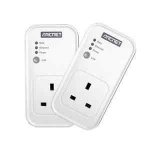
HomePlug AV compatible
- Mains pass-through on both adaptors
- 200Mbps
- 3 status LEDs
- Reset and link buttons
- One 10/100 Ethernet connector
- Universal so will work with any network - not just BT.
All comments (24)
bouncy99
3 Aug 16#1
nice find op, but you will never see 200Mbps out of those puppies, and if you add them to an existing faster network, you will reduce the speed of them all. Can you not get a 500 or 600 set for more?
jiggy.jay to bouncy99
3 Aug 16#2
Thanks for the info.
I saw this was hot when they were £17.99
Thought I'd let everyone know about it being cheaper now.
Had a look again and can't find this model cheaper
stuartconnolly7547
3 Aug 161#3
what do these things do?
kamy786rulz
4 Aug 16#4
Whats better for powerline performance, putting it directly in wall socet or putting it on a surge protected extention cable? .. I have TPLINK AV1200 kit and keep getting drop outs but its inconsistent. some day it wil be fine others, i get yellow triangle on network logo taskbar and it comes back after a while.
2003bluecat to kamy786rulz
4 Aug 16#5
Directly in the wall socket is better, which is why they make with pass through. IDK why it's better, but apparently it is.
GreatBallsofFire to kamy786rulz
4 Aug 16#8
A surge protected extension lead will likely filter out a lot of the data signal so I absolutely wouldn't use them on one of the sockets. They are passthrough so just plug one directly into the wall and plug the extension into it.
A non surge protected extension should be fine though - but watch out for other things on the same extension that produce electrical noise (such as certain phone chargers) as that can degrade the performance. When I buy multi-gang extensions I always look for non surge protected in the event that I ever want to use a powerline adaptor on one of their sockets.
xeroc
4 Aug 16#6
Personally I've never had any issue using them in extension leads. As long as it is well electrically insulated (i.e. made to comply with UK standards) it shouldn't degrade your speed by too much, if at all. However, it is said that the surge protection devices in extensions can cause some interference - whether there is empirical evidence to support that I don't know. So, in short, perhaps avoid extensions with surge protection, but you won't have any issue with standard extension leads.
I think, actually, the primary reason for pass through is so that you don't lose a plug!
Rory Joe
4 Aug 161#7
Am I missing something obvious? How can it be 200Mbps when it's got a 10/100 Ethernet port?
Gollywood to Rory Joe
4 Aug 16#9
You get 10/100 ports in adapters that are 1000Mbps!
Crazy
Gordon Bell to Rory Joe
4 Aug 161#11
If you had several packs of these, the 200Mbps (as mentioned you'll never get this speed) is spread across all computers using the adapters on the powerline network at the same time. So each PC is limited to the 100Mbps port, but there could be a lot more network traffic from multiple computers using the powerline connection simultaneously.
Gords
4 Aug 16#10
I really wanted something a lot faster but how would these handle in home game streaming on Steam and Xbox? I'm using 5ghz AC which has great bandwidth but something local cuts throughs the signal every few minutes making gaming a nightmare.
K0YS
4 Aug 161#12
can you break that down in to layman's terms and how it will affect the normal household?
Gords
4 Aug 162#13
The most speed you can have is 100mbps. But you could have 100mbps going from computer A to computer B whilst simultaneously having 100mbps going from B to A. Or A to B at same time as another pair of devices C to D. Possibly even A sending 100mbps to B and a different 100mbps to C or D. Parallel basically.
Gordon Bell
4 Aug 162#14
What previous post said.
Lets assume the maximum output is available in each case (unrealistic, but its for a point).
With 2 computers linked at 100Mbps - yes the 200Mbps would be pointless. Throughput is 100Mbps
Say, you had 8 devices all linked at maximum speed 100Mbps (ignore the fact they may be talking to mulitple computers).
Computer 1 is speaking to Computer 2 = 100Mbps
Computer 3 is speaking to Computer 4 = 100Mbps
Computer 5 is speaking to Computer 6 = 100Mbps
Computer 7 is speaking to Computer 8 = 100Mbps
The total bandwidth required would be 400Mbps to keep all 4 links at full speed.
These only have a maximum of 200Mbps, so the links would be cut down to accommodate this.
assuming an even spread:
Computer 1 is speaking to Computer 2 = 50Mbps
Computer 3 is speaking to Computer 4 = 50Mbps
Computer 5 is speaking to Computer 6 = 50Mbps
Computer 7 is speaking to Computer 8 = 50Mbps
Again, this example is completely unrealistic networks are more advanced than this, but its to make a point.
The '200Mbps' is shared for all connections using the powerline network, not just a single link between 2 computers.
Another example would be if you had super fast broadband and 3 computers linked to it.
The router has 3 wired 100Mbps connections to computers through the powerline adapters.
It would be impossible for all 3 computers to reach the max 100Mbps speed as that would total 300Mbps in total. These adapters only has 200Mbps bandwidth.
K0YS
4 Aug 161#15
so this shouldnt be a problem for my 10mbit internet connection with 2 phones and 2 pcs connected to the network?
Rory Joe
4 Aug 16#16
Gotchya. Thanks for the clear explanation! Seems a bit tight fisted to put a 10/100 port on there as many people will just use the two.
Then again I had a 10/100 port on my Inspiron 17R Core i7 laptop. Was racking my brain for ages as to why I couldn't get full speed from Virgin, couldn't believe a machine of that age hadn't been given gigabit ethernet! Bloody tight fisted gits at Dell. Sorted via a £10 usb3 gigabit ethernet adaptor...
alera
4 Aug 16#17
The real life performance of these is around 50 - 60mbps depending on wiring run, circuit board and interference. As pointed out things like surge protection and extension leads with multiple it's connectedwill reduce performance.
The figures quoted are best case ie on same circuit short distance . They will work across consumer units but there is a significant dampening factor.
I have been using these for years they are infinitely better than WiFi but obviously no where near as good as a a hardwired ethernet cable.
Get the best speed you can afford my advice.
deathtrap3000 to alera
5 Aug 16#23
Yes people are forgetting that the 200mbps is a theoretical max. Actual real world connections between these power line adapters will be a lot less.
darksleuth
4 Aug 16#18
It's hard to decide which set to get. I keep reading reviews of the TPLink powerlines and most it seems have a limiting 100Mb section, that and random disconnects. But I want the powerlines to replace a TPLink usb adapter, for online gaming, as it has lag and random disconnects.
Anyone any good recommendations, really I need a triple set.
mluton
4 Aug 16#19
I use these, bought them last time. A perfect extension to my network, Runs Xbox 360 for the kids in the other room and streams plex fine to the Xbox 360, throughput is as above 50-60mbps, So fine for HD content.
Gordon Bell
5 Aug 16#20
You would be fine. Also, the phones would being using wireless, not powerline (wired connection). Powerline is for wired connections only. You can use an access point to turn a wired plug back into a wireless transmitter if this was required.
AdamBrunt
5 Aug 16#21
The primary reason for the pass through AFAIK is they are supposed to be the only thing plugged into a wall socket ( even double wall sockets ) and they are faster when this is the case - and there is plenty of evidence to prove it. My own powerline transfer rates doubled when I made sure nothing else was plugged into the wall sockets ( but into the pass through ) at either end
The Power line goes into the wall socket and everything else gets plugged into it's pass through socket.
Anon32
5 Aug 16#22
Can you use these to plug in a freesat/youview box?

![Fresh Breakfast Meat Box (Using code) @ Campbells Meat [Haggis / Lorne Sausage / Bacon / Black Pudding & More]](/images/topics/208684_1.jpg)




































![[Xbox One] Q. u. b. e: Director's Cut on Deals with Gold](/images/topics/208716_1.jpg)


















Opening post
HomePlug AV compatible
- Mains pass-through on both adaptors
- 200Mbps
- 3 status LEDs
- Reset and link buttons
- One 10/100 Ethernet connector
- Universal so will work with any network - not just BT.
All comments (24)
I saw this was hot when they were £17.99
Thought I'd let everyone know about it being cheaper now.
Had a look again and can't find this model cheaper
A non surge protected extension should be fine though - but watch out for other things on the same extension that produce electrical noise (such as certain phone chargers) as that can degrade the performance. When I buy multi-gang extensions I always look for non surge protected in the event that I ever want to use a powerline adaptor on one of their sockets.
I think, actually, the primary reason for pass through is so that you don't lose a plug!
Crazy
Lets assume the maximum output is available in each case (unrealistic, but its for a point).
With 2 computers linked at 100Mbps - yes the 200Mbps would be pointless. Throughput is 100Mbps
Say, you had 8 devices all linked at maximum speed 100Mbps (ignore the fact they may be talking to mulitple computers).
Computer 1 is speaking to Computer 2 = 100Mbps
Computer 3 is speaking to Computer 4 = 100Mbps
Computer 5 is speaking to Computer 6 = 100Mbps
Computer 7 is speaking to Computer 8 = 100Mbps
The total bandwidth required would be 400Mbps to keep all 4 links at full speed.
These only have a maximum of 200Mbps, so the links would be cut down to accommodate this.
assuming an even spread:
Computer 1 is speaking to Computer 2 = 50Mbps
Computer 3 is speaking to Computer 4 = 50Mbps
Computer 5 is speaking to Computer 6 = 50Mbps
Computer 7 is speaking to Computer 8 = 50Mbps
Again, this example is completely unrealistic networks are more advanced than this, but its to make a point.
The '200Mbps' is shared for all connections using the powerline network, not just a single link between 2 computers.
Another example would be if you had super fast broadband and 3 computers linked to it.
The router has 3 wired 100Mbps connections to computers through the powerline adapters.
It would be impossible for all 3 computers to reach the max 100Mbps speed as that would total 300Mbps in total. These adapters only has 200Mbps bandwidth.
Then again I had a 10/100 port on my Inspiron 17R Core i7 laptop. Was racking my brain for ages as to why I couldn't get full speed from Virgin, couldn't believe a machine of that age hadn't been given gigabit ethernet! Bloody tight fisted gits at Dell. Sorted via a £10 usb3 gigabit ethernet adaptor...
The figures quoted are best case ie on same circuit short distance . They will work across consumer units but there is a significant dampening factor.
I have been using these for years they are infinitely better than WiFi but obviously no where near as good as a a hardwired ethernet cable.
Get the best speed you can afford my advice.
Anyone any good recommendations, really I need a triple set.
The Power line goes into the wall socket and everything else gets plugged into it's pass through socket.