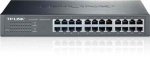
A well-reviewed 24-port gigabit Ethernet switch from TP-Link. CamelCamelCamel alert this opening suggests it's the lowest price yet, hurrah.
Should be great for actually connecting up the new Ethernet ports I've put in everywhere...
Top comments
jasejames
25 Jul 165#6
Problem is, gig + PoE + managed = expensive. TBH any two of those three would be quite pricey. Unrealistic to expect such a device for 60 notes, especially a 24-porter.
craigstephens
25 Jul 163#11
Nope. But that's the way home networking is going.
All comments (34)
craigstephens
25 Jul 162#1
Not a bad price but if I'd just wired my home, I think I'd be putting a poe switch in to power access points and cameras.
kotr to craigstephens
25 Jul 16#4
Do you live in a hotel?
intuder
25 Jul 16#2
Is it managed? If not deffo cold....
iancwatkinson to intuder
25 Jul 16#8
Yeah, totally cold...if you know you could post your managed 24 bit switch that we are saying this is cold against...that would be great. You know otherwise you look well a bit of a berk....
Oneday77 to intuder
25 Jul 16#13
Deffo cold. Exactly why is that? Can you find another 24 port switch for less?
i don't expect you to reply as I suspect you can't justify your claims...will be delighted to be proven wrong.
intuder
25 Jul 16#3
It's unmanaged :disappointed:
bouncy99
25 Jul 161#5
i don't live in a hotel, but i have a poe switch and cameras attached to it.
jasejames
25 Jul 165#6
Problem is, gig + PoE + managed = expensive. TBH any two of those three would be quite pricey. Unrealistic to expect such a device for 60 notes, especially a 24-porter.
bouncy99 to jasejames
25 Jul 161#7
you are quite right. the only way you would see that on hot deals would be somebody gloating that they had taken advantage of a pricing error before they had it delivered, then all hot deals users ordering hundreds of them at that price, and the company realising and cancelling all the orders, including the smug get who posted it in the first place :wink:
arotabi
25 Jul 16#9
I guess it depends on number of PoE cameras/etc but might be cheaper with a normal switch + PoE injectors where required.
This is just a thought and I've not done the sums yet!
jasejames
25 Jul 16#10
Although to be fair it wouldn't surprise me all that much if a gig PoE 24-port smart-switch became available for £100 at some point. As a network engineer (who is used to deploying solutions on big Cisco datacentre switches worth tens, if not hundreds of thousands of pounds) it has amazed me how what were once premium features are now available for a couple of hundred quid. Such is the power of commodity ASICs and Linux-based OSs I guess :smiley:
craigstephens
25 Jul 163#11
Nope. But that's the way home networking is going.
kotr
25 Jul 161#12
yes I agree
Oneday77
25 Jul 16#14
I've been using the TP-Link TL-SG1024DE for a couple of years now, I see it is now £75. Yes it is managed. Though I just let it be dumb, will probably add an 8 port POE Switch at some point as I'm out of sockets :smiley:
bma1445
25 Jul 16#15
Have the 16 port rack mount version of this, great little switch. Never given me any crap - don't think I've ever had to reboot it.
Agree with (some) of the above comments, getting a POE switch is a waste of money in a home. Just get a POE injector and patch through it from the switch when needed. You can get 8 port POE injectors for around £15 (the one I have cost £9 from amazon warehouse) and this config works fine for me.
ople
25 Jul 16#16
I have the 16 port version of this. I got it nearly 4 years ago and it's never had any issues. I paid nearly £60 for it then. I also have a PoE camera and just bought a TP link injector. cheap and also no hassle. Whilst I would have liked a PoE switch I did not see the point for one or two devices. My dad also has this same switch and has had no issues
jasee
25 Jul 16#17
What is the point of a managed switch?, AFAICT they prioritize games, high bandwidth applications, just what I don't want to prioritize, I would want to invert this and give prority to low bandwidth applications
bluenotesmiley to jasee
25 Jul 161#20
I assume that you can manage QoS for traffic types on this switch, so you can prioritise what you desire.
sancheez
25 Jul 161#18
It is.
Guy opposite me at work was saying he wished he'd put 5 network points in behind his TV Wall Mount rather than just the two.
nige182
25 Jul 161#19
If you don't mind second hand, look on eBay for PoE switches, they are not much more than non-PoE. Example, I was looking at buying a 16-port gigabit switch a while ago, searched on eBay for PoE in case I could get a bargain, missed a couple of good priced items but did manage to get a 24 port, managed, gigabit, PoE, rack mount switch for a little over £40 delivered.
Still this looks like a good price for new.
bobthegorilla
25 Jul 16#21
Good link, that's a great price if you need vlans etc. Personally, I'll add a separate switch if I need to do that (got 4 ports that won't be served by this anyway...)
montana78
25 Jul 161#22
I still have a reel left over from 2yrs ago when I did networking and my friend told me 8 port will be ok as iphone provider router has 4 port out anyway. I should've ignored him and ran more cables as now I'm struggling for connections on a few rooms. Of anyone is refurbishing their house then I'd suggest one of these and run 4 lines into each rooms. And get a separate wire going to back of TV.
CouchPotatoe
26 Jul 16#23
POE switches with lots of ports tend to have several fans which makes them noisy. Often this isn't an issue but something to be aware of.
nige182 to CouchPotatoe
26 Jul 16#24
This is true, my PoE switch has three small fans in it, it is also I think noisier than it should be, there is also a version of my switch without PoE that was made, which the specs state is fanless. On a side note I have been thinking about unplugging the fans one by one and then powering it up to see if it is just one fan that is significantly louder than it should be and getting a replacement fan if so, found exact replacements from China for a few quid each.
the__cat
26 Jul 161#25
Although they can do QoS, it's hardly ever used correctly at home. If the traffic is only transferred within the switch it's all good but once you shove marked traffic up to your router you need to honour the traffic markings that were applied at the switch, otherwise the router will simply ignore them and send traffic out of its interfaces using its standard queuing method.
QoS should be used end-to-end or it will only provide limited benefit, and as well as that it will only really do anything when links become saturated. If you're only trying to shift traffic at 100Mbps over a 1Gbps link there's nothing for QoS to do.
seanmorris100
26 Jul 16#26
Who the hell needs a switch for their house??????
jimhuf to seanmorris100
26 Jul 16#27
I know right! i have three
danmed to seanmorris100
26 Jul 16#28
I do.
I have a 24 port gigabit in the garage, a 5 port gigabit in the bedroom, a 5 port gigabit in the frontroom and a router / modem config under the stairs with another 4 ports..
Wired connections are always better than wireless or homeplugs.. full stop. If you rely on high bandwidth streaming to multiple TV's for example, then you will want wired.
Oneday77 to seanmorris100
26 Jul 16#31
I do with 12 locations all having 2x 1Gb Lan connections. Allowing hard wired devices to access my Microserver, 8TB Nas. All stored in my 12u Server cabinet under the stairs.
bma1445 to seanmorris100
26 Jul 16#33
In this day and age, it's surprisingly easy to need them. For me:
1 port to my HP microserver (lan uplink to pfsense). 2 to living room (AP poe/TV), 2 to dining room (AP-poe/TV), 1 to bedroom (TV), 2 to summerhouse (TV/AP-poe), 1 to kitchen (TV), 4 to cameras (with poe), 2 to office (lan switch/AP-poe). All locations have 2 runs even if one is use, the second is just not patched in at the switch, just in case it's needed in the future. A couple of TVs and the office have their own 8 port switch locally too.
As for cost, excluding equipment such as APs, the switch + poe injector + boxes + cable came to less than £200. Did it myself in less than a day (helped by loft access throughout the bungalow!). At the moment I have 65 devices registered with my DHCP server, having a half decent setup makes it a lot easier to manage.
If you're using (or plan to use) poe, don't run CCA. Aluminium has a higher resistance to electricity and can result in voltage drops over longer runs.
bobthegorilla
26 Jul 16#29
And of course, every device that you can get onto a wired connection improves the wireless experience for those that remain. All the phones, tablets and laptops in the house will benefit from not sharing airspace with the desktops, TVs and games consoles.
Mostly though, I managed to do the wiring cheap as part of an electrical rewire, so the cost/benefit equation works out well.
the__cat
26 Jul 16#30
Yeah, you only need a 10Mbps hub at home! :laughing:
nige182
26 Jul 16#32
I hope whoever wired it either used shielded network cable (which is rather expensive) or made sure not to run the cables along with the electrical cables.
Or you can just wire yourself for cost of parts and time only. I have bought my switch for just over £40, Cat6 cable for just under £40 for 305m. Crimping tools and things under £5 easily, wall sockets are just over £1 each, backplates are pence, terminals are a few quid for a large pack. Total cost around £100. For the cable you can get cheaper if you get CCA cable, last time I looked it was under £30 for 300m, and usually pure copper is more, but I managed to get a bargain on my cable which is pure copper. Even assuming you don't manage the bargain price on cable and switch I got, you are still only looking at probably £200 for a self install.
mogsog
5 Aug 16#34
For all those people thinking of poe in house I would recommend an older Cisco catalyst off ebay. They just go on and on, we found some still running in a decommissioned facility going strong for 7 years coated in dust. But if you do get anything more than a 8 port it will have fans and be noisey so a loft space for it is recommended the big stuff.

![Fresh Breakfast Meat Box (Using code) @ Campbells Meat [Haggis / Lorne Sausage / Bacon / Black Pudding & More]](/images/topics/208684_1.jpg)




































![[Xbox One] Q. u. b. e: Director's Cut on Deals with Gold](/images/topics/208716_1.jpg)


















Opening post
Should be great for actually connecting up the new Ethernet ports I've put in everywhere...
Top comments
All comments (34)
i don't expect you to reply as I suspect you can't justify your claims...will be delighted to be proven wrong.
This is just a thought and I've not done the sums yet!
Agree with (some) of the above comments, getting a POE switch is a waste of money in a home. Just get a POE injector and patch through it from the switch when needed. You can get 8 port POE injectors for around £15 (the one I have cost £9 from amazon warehouse) and this config works fine for me.
Guy opposite me at work was saying he wished he'd put 5 network points in behind his TV Wall Mount rather than just the two.
Still this looks like a good price for new.
QoS should be used end-to-end or it will only provide limited benefit, and as well as that it will only really do anything when links become saturated. If you're only trying to shift traffic at 100Mbps over a 1Gbps link there's nothing for QoS to do.
I have a 24 port gigabit in the garage, a 5 port gigabit in the bedroom, a 5 port gigabit in the frontroom and a router / modem config under the stairs with another 4 ports..
Wired connections are always better than wireless or homeplugs.. full stop. If you rely on high bandwidth streaming to multiple TV's for example, then you will want wired.
1 port to my HP microserver (lan uplink to pfsense). 2 to living room (AP poe/TV), 2 to dining room (AP-poe/TV), 1 to bedroom (TV), 2 to summerhouse (TV/AP-poe), 1 to kitchen (TV), 4 to cameras (with poe), 2 to office (lan switch/AP-poe). All locations have 2 runs even if one is use, the second is just not patched in at the switch, just in case it's needed in the future. A couple of TVs and the office have their own 8 port switch locally too.
As for cost, excluding equipment such as APs, the switch + poe injector + boxes + cable came to less than £200. Did it myself in less than a day (helped by loft access throughout the bungalow!). At the moment I have 65 devices registered with my DHCP server, having a half decent setup makes it a lot easier to manage.
If you're using (or plan to use) poe, don't run CCA. Aluminium has a higher resistance to electricity and can result in voltage drops over longer runs.
Mostly though, I managed to do the wiring cheap as part of an electrical rewire, so the cost/benefit equation works out well.
Or you can just wire yourself for cost of parts and time only. I have bought my switch for just over £40, Cat6 cable for just under £40 for 305m. Crimping tools and things under £5 easily, wall sockets are just over £1 each, backplates are pence, terminals are a few quid for a large pack. Total cost around £100. For the cable you can get cheaper if you get CCA cable, last time I looked it was under £30 for 300m, and usually pure copper is more, but I managed to get a bargain on my cable which is pure copper. Even assuming you don't manage the bargain price on cable and switch I got, you are still only looking at probably £200 for a self install.