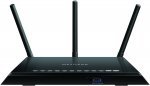
NETGEAR AC1750 (802.11ac) Dual Band Gigabit Smart Wi-Fi Router (External Antennas Boost Wi-Fi Speeds up to 450 Mbps + 1300 Mbps).
Note. This does not have modem built in.
Latest comments (39)
Dougiem
9 Jul 16#39
£102.95 Now
MazingerZ
4 Jul 16#38
Thanks I'll check out the recommended one above.
MazingerZ
4 Jul 16#36
My Virgin hub always randomly disconnects atleast 1-2 a day. I Wonder if switchin routers will make a diff?
dt_matthews to MazingerZ
4 Jul 162#37
Yes it will, the Virgin Super Hubs are very, erm, un-super.
hukd_addict
4 Jul 16#34
£104.33 now? the code doesn't work either?
degsie to hukd_addict
4 Jul 16#35
Yep, expired :disappointed:
OrribleHarry
3 Jul 16#33
Not if you put open-wrt on it! Will give you way more features.
ivadeal
3 Jul 161#14
How does this compare to Asus RT-N66U, is it much better? and at what?
Thanks
BigBlueDot to ivadeal
3 Jul 16#32
I'm thinking of upgrading from the N66U too. This should allow for faster wifi connections, but I think features wise it'll be a downgrade. The upgrade path for the N66U is the AC66U or the AC68U I think, at least that's what I'm planning to get.
bally12345
3 Jul 161#21
This is a cable router. You could buy a much cheaper bridge of wifi access point.
Mildlytight to bally12345
3 Jul 16#23
Any suggestions on make/model Bally?
Wifi from my Virgin hub is really poor in the far side of the house so want to hard wire a repeater router in to improve the wifi coverage. Tried using a wifi booster (plug in to the mains type) but it didn't work very well.
Cheers,
Mark
OrribleHarry to bally12345
3 Jul 16#31
No it's not, it's a plain router (eg no integrated cable or VDSL modem) You can use this with ADSL, VDSL or Cable, just depends what you attach to it. i.e. a VDSL, Cable or ADSL modem.
To be honest it's the most speed efficient way to install as you put your modem where your line comes into the house and your router where your devices are.
OrribleHarry
3 Jul 16#30
Good deal and I'm pretty sure these work with open-wrt too! So you will get proper a proper VPN etc free.
MrWani
3 Jul 16#29
The one you've linked is more expensive. Doesn't that defeat your point?
mikerr
3 Jul 161#28
Wifi is a network connection, more than just a connection to your broadband.
cartman_e
3 Jul 161#27
For most the 1300mbps wifi speeds is just a gimmick, your broadband isn't going to speed up, if you need such high throughput then wired ethernet is always the way to go.
This is just an overpriced Wireless Access Point with 802.11ac support.
Read: The TP-Link VR200 is a Modem Router not just a Wireless Access Point.
bally12345
3 Jul 161#26
Personally I use these Ubiquiti Networks UniFi AP - WLAN access points (Omni, WEP, WPA-PSK, WPA-TKIP, WPA2-AES, 12 - 24, 5 - 80%, -10 - 70 °C, IEEE 802.11b, IEEE 802.11g, IEEE 802.11i, IEEE 802.11n, IEEE 802.1Q) https://www.amazon.co.uk/dp/B00V1QT6SY/ref=cm_sw_r_cp_apa_USqExbY0RSGAM bought a 3 pack and have one in living room and one in loft and my wifi is perfect with seamless roaming
madman9
3 Jul 16#25
What model nighthawk to do you have?
johhno140
3 Jul 161#24
I had a similar problem with my Virgin Hub (given its performance I've omitted the 'super' hub prefix) but managed to pick up a Nighthawk version of the Netgear router from a well known auction site. World of difference. Using the Virgin hub as a modem only, and the Netgear router, the wifi signal now reaches all corners of the house without noticeable loss of speed.
Would this work the same way with my fibre sky router. I get 35mb/s ethernet but terrible wifi. could i just plug this in using ethernet and then hope for better wifi or do you need login details from sky (which i know are notoriously hard to get)?
dougiedonut
3 Jul 16#15
can someone please explain how these routers give better connection speeds than a stock supplied router from a provider?
techsearchuk to dougiedonut
3 Jul 16#19
It should work. You'll need to use your EE box as a modem and connect this to it. It should in theory give you much better signal strength.
hbr12
3 Jul 16#17
I've got the worst internet possible supplied by EE! The signal strength is 1 bar and I am sitting right next to it. Does anyone know if this will work on EE broadband and provide a much better signal?
Thanks
drnkbeer to hbr12
3 Jul 16#18
Speaking from a different ISP (Sky) In the past, you could effectively replace the router you had with another as long as you entered the correct login details for the ISP. However with the adoption of fibre you might have an issue as these won't have a fibre connection nor does it have a modem. So even if it's a standard ADSL line, you'd still need something with a modem.
Best thing to do, would be to buy this and connect it up to the exisiting router and use it in a repeater mode. So effectively you'll have two routers unfortunately, but atleast one will work properly. I'd actually speak to EE and mention the shoddy router and see if you can replace it outright.
bally12345
3 Jul 16#16
They don't if your using a wired connection. They just have better wifi and more advanced features.
jamgin
3 Jul 162#13
This router doesn't show up on radar
pennyfarthing88
2 Jul 16#12
That looks like something out of predator.
gadger100
2 Jul 16#7
Is it possible to just plug an ethernet cable in this from the main router and use in another part of the house?
xela333 to gadger100
2 Jul 16#11
Yes, it will have a repeater option, just make sure you turn it on.
Same CPU, but less Flash and RAM, but that probably doesn't matter much. Worth it for 10 less.
rickbennett1979
2 Jul 16#8
Bought this 1 week ago from currys £129.99 amazing price and yes it takes a ethernet cable from your router. Much better connection than the crap that plusnet provides. Also does vpn but you have to subscribe and set up.
t002236
2 Jul 16#6
Oh I see, I was thinking of using it for VPN access, not sure if it supports it out the box. Will read up...
techsearchuk
2 Jul 16#5
Haven't bought it yet but seriously considering it. Shame it doesn't have a modem built in as was looking to completely get rid of my BT HH5
bouncy99
2 Jul 16#4
that is a good price, nice one op
t002236
2 Jul 16#2
sounds like a silly question but I can't find the dd-wrt software for this... ?
bouncy99 to t002236
2 Jul 16#3
Perhaps none exists. it is a reasonably new router and to be fair, they work pretty well without ddwrt

![Fresh Breakfast Meat Box (Using code) @ Campbells Meat [Haggis / Lorne Sausage / Bacon / Black Pudding & More]](/images/topics/208684_1.jpg)




































![[Xbox One] Q. u. b. e: Director's Cut on Deals with Gold](/images/topics/208716_1.jpg)


















Opening post
NETGEAR AC1750 (802.11ac) Dual Band Gigabit Smart Wi-Fi Router (External Antennas Boost Wi-Fi Speeds up to 450 Mbps + 1300 Mbps).
Note. This does not have modem built in.
Latest comments (39)
Thanks
Wifi from my Virgin hub is really poor in the far side of the house so want to hard wire a repeater router in to improve the wifi coverage. Tried using a wifi booster (plug in to the mains type) but it didn't work very well.
Cheers,
Mark
To be honest it's the most speed efficient way to install as you put your modem where your line comes into the house and your router where your devices are.
This is just an overpriced Wireless Access Point with 802.11ac support.
The average home broadband user is better off buying something like this: TP-LINK Archer VR200 AC750 Wireless Dual Band Gigabit VDSL2/ADSL2+ Modem Router
Read: The TP-Link VR200 is a Modem Router not just a Wireless Access Point.
Thanks
Best thing to do, would be to buy this and connect it up to the exisiting router and use it in a repeater mode. So effectively you'll have two routers unfortunately, but atleast one will work properly. I'd actually speak to EE and mention the shoddy router and see if you can replace it outright.
Yes, it will have a repeater option, just make sure you turn it on.