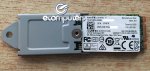
eBay deal but they seem to have lots in stock. 32GB M.2 SSD Not the largest but handy if you want to use a free M.2 slot for cache or to dual boot a laptop (I've got linux on it) £12.99 delivered
To create an ultra-fast, low-latency portable USB drive - up to 450MB/s!
piginabox to malachi
7 Jul 163#2
Sure about that? Plenty tablets come with 32GB. My Linx 10 does and it's fine. Horses for courses.
Latest comments (38)
verbumSapienti
11 Jul 16#38
this is a 32gb drive - why mention 16gb? I have not seen any documentation that advises what you are advising for 32gb drives. they are usually slow anyway i.e. eMMC, and come in devices with processors and batteries that would struggle with the endless decompression. I would not advise compacting this drive unless you are desperate for the ~10% capacity gain, which Windows 10 is fine without.
BubaMan
11 Jul 16#37
I said 16GB.
It's advisable on 32GB though.
verbumSapienti
8 Jul 161#36
not true I'm afraid. here is my HP Stream 32GB eMMC showing version, disk size and that it is not compacted
piginabox
8 Jul 16#35
Phew! Thought I'd missed that when searching, ta.
BubaMan
8 Jul 16#34
Windows will detect the small drive on installation and automatically compact the OS.
All 16GB Win10 devices will be 32 bit and compressed - check with COMPACT.EXE /CompactOS
Windows 8.1 used a technology called WIMBoot instead - the base Windows installation is compressed into a .wim file (hidden by the OS) and changes to that are stored as regular files.
MS Changed this method to compressed system files for Windows 10 as this way, system files can stay compressed when patched.
BubaMan
8 Jul 16#33
Installed, yes... used for 12 months with programs, updates, downloads and cache, less so.
It's not essential but it's highly recommended.
plewis00
8 Jul 16#32
I'm sure he's referring to regular 128GB SSDs (like that Patriot Blast the other day) not M.2 ones.
omgpleasespamme
7 Jul 161#31
That's complete rubbish. I've installed Windows 7 through to 10 a lot in the last few weeks and I've never had to jump through any extra hoops because of a 32GB boot drive.
Picard123
7 Jul 161#30
It should be compatible. C720 takes 2242 sized M.2 drives.
Running 10 Pro with 23 programs installed: firefox, chrome, word 2016 etc. = 18GB
reddragon105
7 Jul 16#27
It's a lovely laptop (HP Envy 17-n065na) and it certainly is thin and light but, having removed the bottom to take a look, it does seem like there would be enough room for a second 2.5" drive bay if other things were shuffled around a bit. Maybe not if it was a 15" model but in the 17" versions there's no excuse really. Maybe I'll get an adapter to put a 2.5" drive in the DVD bay.
What are the different sizes and how do I know which one I need?
Gkains
7 Jul 161#26
Well, that's the thinner + lighter ultrabook obsession. I blame Apple
However, if you are not limited to 2242 the larger physical sizes are cheaper. Not as good as 2.5" SSDs but better than the tiny ones. Plus higher capacities are available.
verbumSapienti
7 Jul 162#25
Windows 10 Pro will sit comfortably on ~16GB. with updates and page file, ~24GB. this drive is fine for a Win 10 boot drive.
To create an ultra-fast, low-latency portable USB drive - up to 450MB/s!
reddragon105
7 Jul 16#23
Yeah, agreed. I'm in the market for one because I've just got a new laptop that stated it had a second HD bay, so I was just going to move over the 2x 2.5" HDs from my old laptop, which were a 120gb SSD and a 2tb mechanical drive - but then I opened up my new laptop to find that the second bay is M.2! So if I want the same setup I'm going to have to replace my 120gb SSD with an M.2. I don't want to compromise on capacity, need more if anything, so if anyone knows of a good price on a 120-256gb M.2 it would be much appreciated. Shame they're not as well priced as 2.5" SSDs - wouldn't have bought this laptop if I'd known about it!
piginabox
7 Jul 16#22
Sorry, typo - corrected. Thanks reddragon
pedrorq
7 Jul 16#20
If 32Gb cost £12.99 and 128Gb cost £24.99... what's the sweet spot for the 64Gb ones?
piginabox to pedrorq
7 Jul 16#21
128GB for £24.99 - where from?
Picard123
7 Jul 161#19
That's not too bad I suppose. Its just that the capacity doesn't make it that useful.
You can get a 128gb 42mm M.2 drive for ~£43 which is probably the better deal:
£12.99 + another £12.99 delivery, and this deal isn't particularly good either.
I'd get a 128gb USB3.0 nano flash drive over something like this. Cheaper, almost as fast and much bigger capacity.
That said, a 42mm M.2 would fit perfectly as a replacement drive for the Acer 720 Chromebook. But that said, is there really much point in spending £26 to replace a 16gb drive with a 32gb one??
reddragon105 to Picard123
7 Jul 161#18
It's £12.99 delivered. Obviously a typo in first post - if you look at the auction the listed price is £12.99 and standard delivery is free, with the option for next day at £6.49.
malachi
7 Jul 16#1
Too small even as a bootable drive for Windows. Great for certain distros of Linux though.
piginabox to malachi
7 Jul 163#2
Sure about that? Plenty tablets come with 32GB. My Linx 10 does and it's fine. Horses for courses.
flamethrower to malachi
7 Jul 16#16
32 bit win 10 should be perfectly fine
rvcshart
7 Jul 16#15
Ya know I've had my hp about 2 years but never tried it so dunno. Most likely bios I expect.
My HP came with a free upgrade to a 1TB SSHD anyway so I never really saw much point in the hassle.
wild_quinine
7 Jul 161#14
The Dell XPS 9550s come with 1TB HDDs, with these 32GB drives for cache, effectively to create an SSHD.
The lower tier i5 9550s can come in around 900 quid if you know where to shop. Stick an SSD in them, and they're 300 quid more at least.
I think I know how these guys are making their money. :smile:
rvcshart
7 Jul 16#4
Ideal as a cache drive tho.
My HP laptop has a slot just for these that can only be used for cache drives. Well, you can use it for boot drive but tediously.
booper to rvcshart
7 Jul 16#13
Would that be done in the bios? Or in the software eg Adobe After effect?
tonyt3rry
7 Jul 161#10
is this compatable with a c720 chromebook?
ollie87 to tonyt3rry
7 Jul 161#12
No.
CampGareth
7 Jul 161#11
Oh yeah you'd be winning, any SSD is far better than a hard drive. I've just gotten used to Intel 335s (which are considered quite slow these days) so I'm a little spoiled :P
xela333
7 Jul 16#9
But does your Dell laptop have the m.2 connection this requires?
HarryFenner
7 Jul 16#8
Thanks for the info on your experience. I'm just looking to replace the OS disk (2007-era 500GB, Western Digital) on my old Vostro 200 MT, so I think I'd still be winning!
piginabox
7 Jul 16#7
What operating system is on it?
HarryFenner
7 Jul 16#5
How long do we reckon these drives might have been in use? Can we estimate how much life they've got left in them? Seller's description says they've been pulled from Dell laptops (and does mention 90 day return policy, which sounds good).
CampGareth to HarryFenner
7 Jul 161#6
Says pulled from new dell laptops so I guess these are cache drives being resold. If the description's accurate though they should have no wear.
Word of warning though they're not fast, I've got a 128GB liteon SSD in my dell venue 11 pro and it's fine most of the time but has poor 4k random performance and sometimes stutters.
BubaMan
7 Jul 16#3
Yeah, you need to compress the Windows installation though (which will slow it down slightly): COMPACT.EXE /CompactOS:always

![Fresh Breakfast Meat Box (Using code) @ Campbells Meat [Haggis / Lorne Sausage / Bacon / Black Pudding & More]](/images/topics/208684_1.jpg)




































![[Xbox One] Q. u. b. e: Director's Cut on Deals with Gold](/images/topics/208716_1.jpg)


















Opening post
32GB M.2 SSD
Not the largest but handy if you want to use a free M.2 slot for cache or to dual boot a laptop (I've got linux on it)
£12.99 delivered
42mm size but comes with a bracket too
Top comments
https://www.amazon.co.uk/ZTC-Thunder-Enclosure-NGFF-M-2/dp/B00KQ4LNJC
To create an ultra-fast, low-latency portable USB drive - up to 450MB/s!
Latest comments (38)
It's advisable on 32GB though.
All 16GB Win10 devices will be 32 bit and compressed - check with COMPACT.EXE /CompactOS
Windows 8.1 used a technology called WIMBoot instead - the base Windows installation is compressed into a .wim file (hidden by the OS) and changes to that are stored as regular files.
MS Changed this method to compressed system files for Windows 10 as this way, system files can stay compressed when patched.
It's not essential but it's highly recommended.
http://www.thessdreview.com/daily-news/latest-buzz/acer-chromebook-c720-ssd-upgrade-mydigitalssd-m-2-ngff-128gb-sc2-ssd-worlds-easiest-upgrade/
https://www.youtube.com/watch?v=-jOHHyJMgWk
What are the different sizes and how do I know which one I need?
However, if you are not limited to 2242 the larger physical sizes are cheaper. Not as good as 2.5" SSDs but better than the tiny ones. Plus higher capacities are available.
https://www.amazon.co.uk/ZTC-Thunder-Enclosure-NGFF-M-2/dp/B00KQ4LNJC
To create an ultra-fast, low-latency portable USB drive - up to 450MB/s!
You can get a 128gb 42mm M.2 drive for ~£43 which is probably the better deal:
https://www.ballicom.co.uk/ts128gmts400-transcend-mts400.p1087814.html?ref=PLA&gclid=CjwKEAjw-_e7BRDs97mdpJzXwh0SJABSdUH0C75nMS9BGWtwdRY18GDpB9SFjvr-Q3wA6SN_PnJ46BoCXEfw_wcB
£12.99 + another £12.99 delivery, and this deal isn't particularly good either.
I'd get a 128gb USB3.0 nano flash drive over something like this. Cheaper, almost as fast and much bigger capacity.
That said, a 42mm M.2 would fit perfectly as a replacement drive for the Acer 720 Chromebook. But that said, is there really much point in spending £26 to replace a 16gb drive with a 32gb one??
My HP came with a free upgrade to a 1TB SSHD anyway so I never really saw much point in the hassle.
The lower tier i5 9550s can come in around 900 quid if you know where to shop. Stick an SSD in them, and they're 300 quid more at least.
I think I know how these guys are making their money. :smile:
My HP laptop has a slot just for these that can only be used for cache drives. Well, you can use it for boot drive but tediously.
But does your Dell laptop have the m.2 connection this requires?
Word of warning though they're not fast, I've got a 128GB liteon SSD in my dell venue 11 pro and it's fine most of the time but has poor 4k random performance and sometimes stutters.
COMPACT.EXE /CompactOS:always