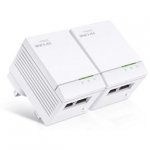
Down by £7. 2 Ethernet ports make this a great deal
All comments (48)
bmz
30 Jun 161#1
Nice find :smiley:
madgeeza
30 Jun 16#2
same price on amazon
CrazyBob
30 Jun 16#3
Bought some last time they were posted, work well.
MrFizzy
30 Jun 16#4
These (like many others) only have 100Mbps interfaces. I just do not understand why manufacturers do this. Are they saying there's no point having Gb interfaces because the devices will never exceed 100Mbps? Is the advertised 500Mbps just a marketing gimmick or are 500Mbps devices just more likely to get closer to 100Mbps than, say, a 200MBps powerline extender? What's going on?
drshak14
30 Jun 16#5
Am I doing something wrong with these? I bought two pair of them but it seems to me that I need to have each of them connected to the router so that makes it only two available to use out of a pack of 4. Am sure I must be doing something wrong. Thanks for any tips.
Musicrab to drshak14
30 Jun 161#6
Connect 1 to router; 2 to a remote point and test it; connect 3rd to remote point - does it work?
You should only need to attach 1 to router and then pair with the others wherever in the house they are placed.
JC82 to drshak14
30 Jun 161#8
Just one of the needs to connect to the router and then you can have a number of them around the house (that's how rest of them work anyway)
JC82
30 Jun 16#9
just beat me :smiley:
taker920
30 Jun 161#10
These have a tendency to go into sleep mode now and again which cuts connection. Plenty of videos about on YouTube showing a fix
notavalidaddress
30 Jun 16#11
Pointless as you only get 100Mbps connection established so you will be limited to that between the source and destination. Much better idea to get something that can establish a 1Gbps connection.
colganraz to notavalidaddress
30 Jun 161#12
How is it pointless ? I have used these for around 2 years now, competitive gaming with a stable connection and a ping of around 60. Downloading big files and streaming video, never encountered a single problem... Really don't understand how you can say they are pointless
mrew42 to notavalidaddress
30 Jun 16#16
Why?
What do you want to do with it?
freakstyler
30 Jun 16#13
With these, would it be beneficial connecting both Ethernet connections into the router?
mrew42 to freakstyler
30 Jun 161#15
No
cheekster to freakstyler
30 Jun 16#18
Two Ethernet connections are provided on the receiving end for use with two different devices requiring an Ethernet connection. The other adaptor containing just one Ethernet port is the one that you connect to the router.
peteivy to freakstyler
30 Jun 16#19
No
cheekster
30 Jun 16#14
If you have two pairs of powerline adaptors by two different manufacturers, will one adaptor from each pair need to be connected directly to the router?
Here's the planned layout. One adaptor from D-Link pair connected to router upstairs, other adaptor is downstairs and feeds a 5-port network switch so that multiple devices can be connected via Ethernet. One adaptor plug from EdiMax pair connected in a remote location (not connected to router) and the second adaptor which has built-in wifi extender/booster in main lounge.
Could not seem to get a working wifi or Ethernet connection from the EdiMax pair, even if one end was connected to the router upstairs.
Anyone able to suggest what might be the issue? Hopefully it's not because two pairs from different manufacturers are being used in same house? All wiring as far as I know is on the same ring main.
Thanks.
supermann
30 Jun 16#17
It's because his brain is limited to 100Mbps.
mrew42
30 Jun 16#20
Except both have two. Which seems a bit odd tbh
notavalidaddress
30 Jun 16#21
You get a theoretical maximum throughput of 12.5 MB per seconds with a 100Mbps home plug. That isn't particularly future proof.
With 1000Mbps you get a theoretical maximum throughput of 125MB per second which allows for you to be able to do more.
If you want to recommend old technology that is fine but personally I can't recommend anyone to use something that is only capable of negotiating and transferring at a maximum of 100Mbps when newer technology offering more future proofing is readily available.
tasman
30 Jun 16#22
I already use these and did wonder what the other ethernet port on the transmitting end is for. I figure it is so you can plug a device into it that you may be using close to where it is located. So essentially you can have 3 devices connected.
cheekster
30 Jun 16#23
Didn't realise that. Wonder if it's the equivalent of a pass-through socket that some homeplugs include so you don't lose use of the wall socket in which you've had to plug the adaptor in? This case you're provided a secondary Ethernet port in the adaptor that is beside the router in case your short of ports, having just taken one of the router's Ethernet ports.
Just thinking out aloud, could be wrong and there maybe another reason both adaptors each have two Ethernet ports?
Bossworld
30 Jun 16#24
That's the only logical conclusion I could come to, would like to know the answer as well.
absami
30 Jun 16#25
Will this adapter recieve wifi signals from router and send out data (internet) through Lan? is that right?
meglaman2000
30 Jun 161#26
Could it not be as simple as keeping the product line simple, perhaps more expensive to produce two different versions of the plug than just include a redundant port. Also means home users who aren't very technically apt can just plug them in willy nilly, and they will work either way around and if they ever want to add extra plugs to their network they just buy one that is the same as the ones they have.
g0z0
30 Jun 16#27
Sorry, cold vote from me - no power pass through on these - would rather spend the extra to keep the power socket functionality -
Amazon: Click, buy, wait....
Argos: Click or walk in, buy, take home, use...
Amazon: still waiting...
Musicrab
30 Jun 161#30
Walk in to a shop. What's that all about?
colganraz
30 Jun 16#31
I don't think most people really care that much, it's a good deal, it's cheap and it works. There's no reason that I would need a faster connection for quite sometime to come so I dare say the average user won't either
mrew42
30 Jun 16#32
Not wifi - just cable
It will extend your home LAN to include extra ports around your property where wifi won't reach - e.g. in my case my office upstairs where i plug in a PC my work laptop and rasp Pi, wllowing them to access the internet and my TV downstairs to view my Plex Server
Highly rated real life 100mbs not like the ones in the listing which will return half as much and only 45.00 for the pair. Bandwidth is essential these days. Rule of thumb is a powerline adapter returns around 10% of suggested top speed. Similar to talk talk and sky bb ouch.
freakstyler
30 Jun 16#34
Hmmmmm it seems I'm not the only one curious why both adapters are fitted twin Ethernet ports. I've not tried connecting both connections to my router, its not really accessible atm. Thought they might have some sort of link aggregation feature or something similar.
Either way as a 500Mb (link) 100Mb (Ethernet) kit they perform well, they out perform the Netgear adapters they replaced and are far more reliable - also had no trouble pairing them up with two other Netgear adapters.
jaques_kalis
30 Jun 16#35
I have these and they work very well.
guvner12
30 Jun 16#36
Are these better than the boosters from sky?
Sam2xp
30 Jun 16#37
just picked mine up and I am really happy with the speeds on my playstation and computer :smile:
CharlesCalthrop
30 Jun 16#38
Most things outperform Netgear. With the exception of the excellent but vastly overpriced Nighthawk, they're somewhere with Monster Cable on my priority list..
R1cbm
30 Jun 16#39
Not voting - but I have TP-links. 2 powerline, and 2 with a WiFi extender. They drop connection. It's a bug - google them and look at the amazon reviews. nightmare.
wayneos
30 Jun 16#40
hi does anybody know if these will work with the 300mbps kit thank you.
Norman-B
30 Jun 16#41
I'm using two TalkTalk Powerline Adapters. I get an average 20mbps on my tablet via Vodafone broadband. Would these be a better idea?
delgado
30 Jun 16#42
I bought these a few weeks ago and I'm really happy with them. For me, they've proven to be more reliable than the Trendnet 500Mbps (single port) ones I had before which were driving me up the wall with constant dropped connections. I didn't really need 2 ports but they were only 19.99 so why not (and the extra port may come in handy one day).
It makes more sense if you're buying them to add to an existing network like I have (i.e. you already have an adapter connected to the router).
freakstyler
30 Jun 16#43
With me it was the other way round, I had four Netgear Plugs but one of them, in a particular room kept losing internet access at night and it was driving me mad....I tried swapping them around but no dice. I suspect it was something plugged in on the same ring main close by causing interference. Anyway I installed one TP-Link in the problem room and the other at the router and things drastically improved. Link speeds between the two TP-Link plugs is double (430Mbs vs 200Mbs) what the Netgears were and dropouts happen once in a blue moon. I ways always put off buying TP-Link Powerlines due to the reported bugs regarding dropouts but they've been perfectly fine for me.
delgado
30 Jun 161#44
Yes, I've tried Netgear ones before and they were terrible. Really unstable connection so they were sent straight back. I was also put off a little in the past by reviews of TP-Link adapters but these have been good. Thing is, there are various models and it may be that these 2 port ones are better for some reason.
aaronlovesfood
3 Jul 16#45
Got one from Argos, It gives me very very close speeds to my ethernet.
17mbps download constantly
tobeyharvey
3 Jul 16#46
Do these come with Ethernet cables? Or will I have to buy some
Sam2xp
4 Jul 16#47
they came with 2
john9999
31 Jul 16#48
i already have a pair of SINGLE ethernet port netgear adapters
-1 plugged in router
-2 other plugged in my pc upstairs
they work great. I GET FULL 50MBPS SPEEDS ON MY PC however..i also need another for my tv cable box
1) Should these work?
2) i believe i just simply need 1 more plug to go into my cable box...ie i dont need 2 for my router now should i?

![Fresh Breakfast Meat Box (Using code) @ Campbells Meat [Haggis / Lorne Sausage / Bacon / Black Pudding & More]](/images/topics/208684_1.jpg)




































![[Xbox One] Q. u. b. e: Director's Cut on Deals with Gold](/images/topics/208716_1.jpg)


















Opening post
All comments (48)
EDIT: Here's the manual. http://www.tp-link.com/resources/document/TL-PA4020_KIT_V1_UG.pdf
What do you want to do with it?
Here's the planned layout. One adaptor from D-Link pair connected to router upstairs, other adaptor is downstairs and feeds a 5-port network switch so that multiple devices can be connected via Ethernet. One adaptor plug from EdiMax pair connected in a remote location (not connected to router) and the second adaptor which has built-in wifi extender/booster in main lounge.
Could not seem to get a working wifi or Ethernet connection from the EdiMax pair, even if one end was connected to the router upstairs.
Anyone able to suggest what might be the issue? Hopefully it's not because two pairs from different manufacturers are being used in same house? All wiring as far as I know is on the same ring main.
Thanks.
With 1000Mbps you get a theoretical maximum throughput of 125MB per second which allows for you to be able to do more.
If you want to recommend old technology that is fine but personally I can't recommend anyone to use something that is only capable of negotiating and transferring at a maximum of 100Mbps when newer technology offering more future proofing is readily available.
Just thinking out aloud, could be wrong and there maybe another reason both adaptors each have two Ethernet ports?
http://www.argos.co.uk/static/Product/partNumber/1090930.htm
Argos: Click or walk in, buy, take home, use...
Amazon: still waiting...
It will extend your home LAN to include extra ports around your property where wifi won't reach - e.g. in my case my office upstairs where i plug in a PC my work laptop and rasp Pi, wllowing them to access the internet and my TV downstairs to view my Plex Server
TP-LINK TL-PA8010PKIT AV1200 Gigabit Pass-through Powerline Adapter Starter Kit
Highly rated real life 100mbs not like the ones in the listing which will return half as much and only 45.00 for the pair. Bandwidth is essential these days. Rule of thumb is a powerline adapter returns around 10% of suggested top speed. Similar to talk talk and sky bb ouch.
Either way as a 500Mb (link) 100Mb (Ethernet) kit they perform well, they out perform the Netgear adapters they replaced and are far more reliable - also had no trouble pairing them up with two other Netgear adapters.
It makes more sense if you're buying them to add to an existing network like I have (i.e. you already have an adapter connected to the router).
17mbps download constantly
-1 plugged in router
-2 other plugged in my pc upstairs
they work great. I GET FULL 50MBPS SPEEDS ON MY PC however..i also need another for my tv cable box
1) Should these work?
2) i believe i just simply need 1 more plug to go into my cable box...ie i dont need 2 for my router now should i?
the ones i already have are
http://uk.tp-link.com/products/details/TL-PA411KIT.html