Lowest iv ever seen for this brand/spec and has great reviews.
I already own this brand and its been fantastic
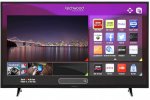
Fantastic price for a 55" Full HD, smart tv
All comments (36)
kay1992
23 Jun 162#1
Bargain!
shalton
23 Jun 16#2
at that price, is it made of wood?
shalton
23 Jun 16#3
How is the browser/smart features on this?
gidsterc
23 Jun 161#4
WTH are 'Techwood'?
paulpso to gidsterc
23 Jun 16#8
Almost certainly Vestel like all cheap crap. might be decent but don't be surprised if it's not.
They probably use the absolute cheapest stuff they can find. It looks about 8 times thicker than my 4 year old LG
thekanester to gidsterc
23 Jun 16#12
Had a 32" techwood in my daughter's room for about 7 years. It's been used daily with no issues whatsoever. It is very reliable with great sound and picture quality.55" for this price is great. It is £30 cheaper than what I paid for the 32" one!
kiwi12
23 Jun 16#5
im after a cheap 3D one about 40-50" any ideas where i can get one please ?
BAGST
23 Jun 16#6
I've just bought one, I'll let you guys know if I was a chump or not on Monday
edz1969 to BAGST
25 Jun 16#19
Please post if tv is ok
Cheers
kristianity77
23 Jun 161#7
This is quite weird, this is an absolute carbon copy of the back of the 55" TV that I bought a couple of months back which is Toshiba. Layout, ports, placement, identical.
paulpso to kristianity77
23 Jun 16#9
Well if it's Vestel like I think it is, then it's no surprise. They do budged versions for various companies, Philips ones are mostly theirs, even some more reputable brands let Vestel do their super budget stuff
I actually had this on my watch list on eBay up until a couple of days ago when it was suddenly pulled from eBay. The price then was £379. Have snapped this up. Many many thanks to the OP. :-)
Does anyone know difference between 55AO3SB £379 and this model 55AO3TSB £269.
shariifi
24 Jun 16#16
Compared the specs: The following are missing from the 55AO3TSB.
DLNA Certified: No
Digital Optical Output: 0
WiFi: No
Audio Processing: No Dolby Digital Plus
longasas
25 Jun 16#17
I bought Techwood 40AO2USB 40" Smart 4K Ultra HD TV 2016 february and today AO took TV back and refund me cause backlight became faulty in settings. It works from 0 to 10 in scale and from 11 to 100 picture going more dark. Faulty backlight or faulty firmware I don't know.
edz1969
27 Jun 16#20
Any news on this TVs before I buy it peeps
Cheers
shariifi
27 Jun 16#21
I have cancelled my order before delivery. TV has no WIFI, only Ethernet.
sammyjc71
27 Jun 161#22
I do have it but not set it up yet as other half not home was hoping to watch football on it
sammyjc71
27 Jun 161#23
All set up and does have wifi great for the money
BAGST
27 Jun 162#24
@edz1969 I've got the tv set up and it's looking pretty great! It's a little bit slow kind of like my other tv (which is a Panasonic!) But other than that it's really good. Picture quality is fine, the sound isn't actually anything to shout home about as expected. Luckily for me I have a sound system so I wasn't too worried about this. The apps work pretty well and there's also your standard web browser. It doesn't have prime but it has a variety of others.
The remote is concave and it's kind of odd. There's a YouTube and Netflix button, and all your basic buttons same as a standard one.
THIS TV DOES HAVE WIFI!!! WHY IT SAYS IT DOESNT IM NOT SURE!!
One thing to note and it's probably the only complaint for me - the legs are REALLY far apart. Like about 10cm from the edges. This means you need quite a wide table to actually sit the television on. Not relevant to everyone, but worth knowing.
All-in-all for this price it would have bought 2 of these instead of the more expensive Panasonic 50" that I own.
I hope this helps you guys.
sammyjc71 to BAGST
28 Jun 16#25
Hiya what sound system would you suggest if you don't mind me asking thanks
loofer to BAGST
28 Jun 16#27
thanks, I might just bite. Anybody know if it's due to (or possible) to get Prime on it?
Been offered a Sony 50W809C for £300 (new)
stu83
28 Jun 16#26
Anyone used it for films or PS4/xbox? Any good?
BAGST
28 Jun 16#28
Hey! I don't think I can be much use here, I have one of these:
That I managed to picked up from Best Buy years ago.
I imagine it would work just as well as it does when watching Netflix on it or anything else. The picture quality is pretty standard but nothing amazing.
It doesn't have Prime on it, I don't know if there's anything hacky you could do though!
sammyjc71
28 Jun 16#29
Ok thanks
thelast_warrior
29 Jun 16#30
Got tv today as mentioned it does have wifi and the sound isnt great but a sound bar etc wil sort that. Im playin on xbox online fone and pics ok no lagging etc.
sammyjc71
29 Jun 16#31
Can anybody recommend a sound bar as I have no idea thanks in advance
topla
29 Jun 162#32
Fantastic tv for the price
it has wifi built in
the legs are quite far apart as another purchaser mentioned, dimensions can be checked on the listing page, also can be mounted on a bracket, bolts already on the back of the TV.
also i may have found a way to increase the volume as others and i have found to be tiny and you have to be near 70 range to get decent sound
i was playing through the settings, and came across 2 things
firsts in the sound setting menu if you Enable, Surround Sound and AVL, i found i only needed 40 range volume to get decent sound, there are other settings that you could experiment with
also just in case anyone has audio to video lag, i found that at the bottom there is a setting which has either PCM or Compressed as Digital Audio Output, the Compressed option got rid of the audio to video lag, and the sound matched up with the display
i should also mention that i have downloaded the Techwood SmartCenter & SmartRemote App from the App store for Iphone 6s and works like a dream.
if any of you are having issue setting up the smartcenter app and linking it to the tv then i found that on the settings menu (on the TV) select more and somewhere down the list there will be smart remote or virtual remote option, select enable and then a popup will appear to 'Pair' Smartcenter app on the phone to the tv via Wifi.
this should change it from demo mode to working mode
the smart center app enables your phone to act has a remote, keyboard and as a mouse (via the touchscreen on the phone), also you can have a 'limited miracast function' which can have your media files (pictures, audio, videos) to be displayed on the TV.
although there is no support of full miracast built in to the TV for IPhone's (i am unsure about android phones etc), you can purchase a dongle which can enable full miracast
bobthecat6153
3 Jul 16#33
could anybody tell me how wide apart the feet are please

![Fresh Breakfast Meat Box (Using code) @ Campbells Meat [Haggis / Lorne Sausage / Bacon / Black Pudding & More]](/images/topics/208684_1.jpg)




































![[Xbox One] Q. u. b. e: Director's Cut on Deals with Gold](/images/topics/208716_1.jpg)


















Opening post
I already own this brand and its been fantastic
Fantastic price for a 55" Full HD, smart tv
All comments (36)
They probably use the absolute cheapest stuff they can find. It looks about 8 times thicker than my 4 year old LG
Cheers
DLNA Certified: No
Digital Optical Output: 0
WiFi: No
Audio Processing: No Dolby Digital Plus
Cheers
The remote is concave and it's kind of odd. There's a YouTube and Netflix button, and all your basic buttons same as a standard one.
THIS TV DOES HAVE WIFI!!! WHY IT SAYS IT DOESNT IM NOT SURE!!
One thing to note and it's probably the only complaint for me - the legs are REALLY far apart. Like about 10cm from the edges. This means you need quite a wide table to actually sit the television on. Not relevant to everyone, but worth knowing.
All-in-all for this price it would have bought 2 of these instead of the more expensive Panasonic 50" that I own.
I hope this helps you guys.
Been offered a Sony 50W809C for £300 (new)
http://uk.yamaha.com/en/products/audio-visual/hometheater-systems/home-theater-package/yht-298_black_l/?mode=model
That I managed to picked up from Best Buy years ago.
I imagine it would work just as well as it does when watching Netflix on it or anything else. The picture quality is pretty standard but nothing amazing.
It doesn't have Prime on it, I don't know if there's anything hacky you could do though!
it has wifi built in
the legs are quite far apart as another purchaser mentioned, dimensions can be checked on the listing page, also can be mounted on a bracket, bolts already on the back of the TV.
also i may have found a way to increase the volume as others and i have found to be tiny and you have to be near 70 range to get decent sound
i was playing through the settings, and came across 2 things
firsts in the sound setting menu if you Enable, Surround Sound and AVL, i found i only needed 40 range volume to get decent sound, there are other settings that you could experiment with
also just in case anyone has audio to video lag, i found that at the bottom there is a setting which has either PCM or Compressed as Digital Audio Output, the Compressed option got rid of the audio to video lag, and the sound matched up with the display
i should also mention that i have downloaded the Techwood SmartCenter & SmartRemote App from the App store for Iphone 6s and works like a dream.
if any of you are having issue setting up the smartcenter app and linking it to the tv then i found that on the settings menu (on the TV) select more and somewhere down the list there will be smart remote or virtual remote option, select enable and then a popup will appear to 'Pair' Smartcenter app on the phone to the tv via Wifi.
this should change it from demo mode to working mode
the smart center app enables your phone to act has a remote, keyboard and as a mouse (via the touchscreen on the phone), also you can have a 'limited miracast function' which can have your media files (pictures, audio, videos) to be displayed on the TV.
although there is no support of full miracast built in to the TV for IPhone's (i am unsure about android phones etc), you can purchase a dongle which can enable full miracast
1 metre according to the listing specs