Most Seagate's last betwen 3 to 4 months. You were just unfortunate. :smile:
Spod
3 Jun 163#29
, therefore I am not? :confused:
sradmad
3 Jun 163#1
Very nice price op, heat added :smiley:
Latest comments (74)
3guesses
10 Jul 16#74
Then yes, it sounds like the NTFS corrupted. As topss said, using Windows to try to repair it was not the best way to go about trying to recover your data.
Best of luck.
a73uk
8 Jul 16#73
Ok. My Computer as in File Explorer, where I drag & drop files to & from my phone. It closed down as I connected my phone to it & when it reopened had lost the Seagate from the locations, then, once the computer was rebooted & the Windows prompted repair carried out, it had returned in File Explorer & Disk Management, but 2 of the partitions were de-named & had changed from NTFS to RAW (all were NTFS beforehand).
3guesses
8 Jul 16#72
Welcome to the wonderful world of technology!
The reason I say it was probably your phone what done it is because it doesn't sound like the hard drive has exhibited any sort of failure - it's just the (key) file system data on it that appears to have been corrupted, and that's most likely down to software (you say "My Computer" - whatever that is - crashed, which is when this most likely occurred).
One question: were the partitions formatted NTFS?
a73uk
8 Jul 16#71
Indeed, the size of the drive is irrelevant, its the `putting all your eggs in 1 basket` thats the concern.
I`ve not had a drive fail for over 5 years, I`d hoped reliability had been improved, & to be fair, I`m not convinced its the mechanical part of the drive thats failed in this instance as part of its still working.
And why didnt I back it up? Because I cant afford to buy numerous large drives as backups & backups of the backups..
a73uk
8 Jul 16#70
Thanks. Why would my phone suddenly affect anything though? Been using the same phone for a couple of years, connecting & transferring files daily, never had a problem, + reconnected it & transferred files with no issue after this event.
I`m hopeful I will be able to resolve it somehow, seeing as 1 of the partitions is still active, so the drive isnt completely dead.
The fact this has happened so early on in the drives life is a worry though.
topss
8 Jul 16#69
Size of drive should be irrelevant. Backup, backup and backup. Doesn't matter if it's 1 file or 4TB's worth.
If you were actually worried, then why didn't you keep a backup? I can only assume you weren't backing up in the past, so a scenario like this was just waiting to happen.
Surely people must know by now that keeping a backup for any important data is essential. Secondly, soon as you realised there was a problem, you should have stopped using the 'defective' drive and pursued whatever recovery method you thought appropriate - not the Win 10 drive recovery options though!
3guesses
8 Jul 16#68
To be fair, that sounds like your phone corrupted the MFT. If you have only re-formatted the original drives, it will probably be easiest to recover the files from them. There's also a good chance of recovering the files from the Seagate. I would suggest trying TestDisk/PhotoRec (you will need another disk to recover files to), but there are quite a few free file recovery suites out there these days.
My commiserations, BTW.
hukdplan
8 Jul 16#67
Hope God pays you well ...
a73uk
8 Jul 16#66
I`ve just had the nightmare scenario happen just 1 month after buying it..
Been transferring all my data over from other external drives since I got it, then formatted the other drives to use with my DVR`s.
I`d partitioned the 4GB into 2x1.5gb & 1x1gb & had filled 2 partitions almost completely & 1 about 1/2 full.
Anyway, today when I got it, I connected my phone to transfer pictures & it crashed "My computer", when it finally came back on, I`d lost the 3 partitions of the Seagate.
Rebooted, W10 came up with a drive error & asked if I wanted to repair it, I did.. After a minute or 2 it said the drive had been repaired, so I opened My Computer, to find 1 of the 3 partitions there, the other 2 had been changed to drive letters (as opposed to Seagate T/U/V beforehand). right clicked the 2 altered ones to be told the 2 missing partitions of the disks were corrupt. Opened "Disk Management", same thing, both showing 100% free.. Properties-Tools-Repair comes up with "windows cannot access the disk".. In disk management, the 2 drives are now RAW, as opposed to NTFS.
I`m not a happy bunny right now.. Nearly 20 years worth of files & 1000`s of hours work, potentially gone.. Exactly what I was worried about when using such a big drive. I`m looking into recovery options now.
hukdplan
2 Jul 16#65
Why go through all that hassle and end up with no warranty(unless you can convincingly fool Seagate's returns dept?). I bought a couple of "Toshiba X300 4TB 7200RPM 128MB 3.5" SATA" drives recently for £90 each including next day delivery from Flubit(I'm an Elite member - excellent value, instant price comparisons, sellers dispatch very quickly, get your fee back if you don't save it over the year).
archie333
4 Jun 16#64
Great finding. Bought one today from Yeovil. Out of stock when in town, but could reserve and pick up after 4pm. And got voucher as well. Heat added. :smile:
neosalad
4 Jun 16#63
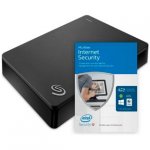
i actually think the one on their website is a newer design as it has the newer seagate logo compared to the older seagates i have.. i've avoided the nobbly ones before as they look awful i thought
zebrum
4 Jun 16#62
The "nobbly" plastic is the 2016 case design, Argos just haven't bothered to update their photo.
neosalad
4 Jun 161#61
Did anyone that buy one of these get the drive in the picture? the drive i got was one of those horrible nobbly looking things.
not the smooth looking one in the picture (that matches my other seagates a lot better!)
i checked their website and Argosarent even advertising the model that is nobbly in the 4TB size.
MadonnaProject
4 Jun 16#60
Haha, sorry past midnight my brain refuses to work properly. We decided to get a high capacity drive for our xbox. One of us went with the desktop version and the other with a portable one. His box seemed sealed but obviously was sealed after being opened as it had a different capacity hard drive in it.
Decentbloke
4 Jun 16#59
So the friend ordered a different hard drive and got a box with a different hard drive in it. Seems like he got what he ordered :smiley:
MadonnaProject
4 Jun 16#58
Be careful guys, this might help someone, a friend ordered a different hard drive at the same time as me, picked it up from the store and the box had a different hard drive in it. Completely different and the store was a real chore to get a refund as they wouldn't trust him. The seal was broken but re-sealed so obviously he didn't look for it.
3guesses
4 Jun 16#57
That is a logical non sequitur.
8-)
westeight
4 Jun 161#56
ROFL. Pass that fatty, bro .. o/
westeight
4 Jun 16#55
Hot?
Nope. 4TB WD for £70.00 deal @ Amazon.co.uk earlier this week was hot ...
Tequila
3 Jun 16#54
Wait until you try a WD external..
Seagate more reliable than WD.
Tequila
3 Jun 16#53
I found WD brand much more scary than Seagate.
Have 3 Seagates all going strong for years..
premium WD failed miserably in just 6 months.
MEDICGUY
3 Jun 16#52
Can these be opened up to get the drive out? Want to get a couple for my home server..
I have both a 4TB and 5TB Seagate drive and they are used to back up Photos that are on main PC and duplicated off site on the other HDD so 3 copies.
Cover all your bases. HDD's now are good but they can still just go bang and die and I still see so many people losing masses of data because they don't back up.
Tempted to buy another but I also have several 1 and 2tb externals already that I should probably make use of first. :stuck_out_tongue:
Graham1979
3 Jun 162#37
Aww that's terrible mate what you going to do having paid a fiver more. Do you want a HUKD campaign to fight for justice?
Nexusfifth
3 Jun 16#36
I mean it has its uses, I am after a portable drive about this big though, as I have a NAS at home (which I only use for local streaming as my net is terrible) and have one portable disk which I carry around if I go somewhere, currently actually 2TB+1TB but they are getting full and would love to have a single disk instead.
I agree I would never have only a 4TB drive and no backups of it.
dazdragon
3 Jun 16#35
Yes, where can we find this deal and more to the point why not post it on here?
pitbullmern
3 Jun 16#34
??
topazz
3 Jun 161#33
Let me google it for you. Here it is!
HOME DELIVERY ORDERS
Place an order for £50 or more on Argos.co.uk to receive a free voucher code to spend on a future purchase on Argos.co.uk!
Spend £50 - £99.99 in a single transaction between 25th May and 4th June and you'll receive:
Free £5 voucher code to use on a future online purchase between 25th May and 15th July
Spend £100 or more in a single transaction between 25th May and 4th June and you'll receive:
Free £10 voucher code to use on a future online purchase between 25th May and 15th July
The voucher code will appear on your order acknowledgement email. To redeem your online voucher code, simply enter a code in the promotion voucher code box on the payment details page when placing your order on Argos.co.uk between the redemption dates specified. You can use multiple voucher codes in a single transaction.
IN-STORE
Spend £50 or more in-store to receive a free voucher to use on your next in-store purchase. Don't forget to reserve!
Spend £50 - £99.99 in a single transaction between 25th May and 4th June when you pay for the item(s) in-store you'll receive:
Free £5 voucher to spend between 25th May and 15th July
Spend £100 or more in a single transaction between 25th May and 4th June when you pay for the item(s) in-store you'll receive:
Free £10 voucher to spend between 25th May and 15th July
DON'T FORGET - YOU HAVE TO COLLECT YOUR RESERVED ITEM(S) BETWEEN THE 25TH MAY AND 4TH JUNE TO QUALIFY FOR THIS OFFER!
How do you get the £5 voucher? I can't see that anywhere.
stephenwhiddett
3 Jun 161#31
Where can I find that deal? And what is a blue/green drive?
2PeteShakur
3 Jun 16#30
nice, ordered! :wink:
Spod
3 Jun 163#29
, therefore I am not? :confused:
Houstieboy
3 Jun 16#28
Lol
pitbullmern
3 Jun 16#27
I think not
Houstieboy
3 Jun 16#26
You'll thank me one day.
pitbullmern
3 Jun 16#25
get a grip you numpty.
Houstieboy
3 Jun 16#24
YOU'RE joking.
nublets2k
3 Jun 16#23
Nah, just got the wrong end of the stick.
nublets2k
3 Jun 16#22
Are you backing up the first drive to the second?
Sphere
3 Jun 16#21
I had to install a modern sata card (PCIE) in my PC (fiver from eBay), as my old PC bios couldn't recognise the capacity of these drives correctly when plugged into the sata on the motherboard. Huge improvement in performance from the USB connection too.
topss
3 Jun 16#20
Ok if your current setup is actually two physically separate drives, then thats good. If it's one 4TB drive split into two, then not a good idea if you're using one half for backups. Same with this 4TB drive. However many partitions you have, if the drive fails, you stand to lose them all.
Never rely on a separate partition for backups.
If you're looking for more storage (from 2 x 2TB) and to replicate the two physically independent drive/backup solution, you will need 2 of the drives in this deal.
5Rivers79
3 Jun 16#19
My current 4tb enclosure has 2x2tb drives. Wouldn't creating two partitions on this cause all data loss if the drive failed?
4tb would be a lot of information to lose.
pitbullmern
3 Jun 16#18
hope your joking with that statement
topss
3 Jun 16#17
To be fair, I was also replying to the original comment. Reading it again it seems like they have a 4TB drive split into 2 x 2TB. One half for 'backups'. For obvious reasons, not really a good idea.
meherenow
3 Jun 16#11
Is this the one that you can prise the drive out of and it's just a standard sata internal drive?
zebrum to meherenow
3 Jun 16#16
All of the desktop USB drives have a standard SATA drives inside including this one. The best deal was the WD 4TB for £70 on Amazon yesterday which contains a WD blue drive (the new green).
nublets2k
3 Jun 161#15
Mybad, if he's just backing up the store drive to the backup drive then a raid 1 enclosure would be best. :smiley:
NotoriousC
3 Jun 16#14
Ffs I bought this for £89.99 with no free £5 voucher -.-
topss
3 Jun 1630#13
:laughing:
Worst backup advice ever.
nublets2k
3 Jun 16#12
Yeah, you just have to create two partitions on the disk.
5Rivers79
3 Jun 161#10
I already have a 4tb drive that has two 2tb hdds inside it. I use one to store stuff and the other as the backup. Can a similar configuration be done on this? Thanks.
catherton
3 Jun 161#9
Great, thanks
DoctorDeals
3 Jun 162#8
I saw it half that price in... nowhere!
Ordered cheers
vassy201187
3 Jun 162#7
Good spot op.. hope ťhis doesn't beat the hot sun :stuck_out_tongue:
gabesdad
3 Jun 162#6
I would avoid the McAfee add on offer though. Always made my PC slower!
zebrum
3 Jun 163#5
Note this isn't the portable version, it's desktop with power brick
philb100
3 Jun 161#4
Voted hot as this is a good price. Personally I'm always a bit wary of HDs this big , all my eggs in one basket type thing :smiley: I suppose if you have other backups its good but should probably do that anyway.
Predikuesi
3 Jun 16#3
Great price.
How long before ... "I saw it half that price in ..."?
reindeer333
3 Jun 161#2
Thanks sradmad, go and enjoy the sun :smiley::smiley::smiley:

![Fresh Breakfast Meat Box (Using code) @ Campbells Meat [Haggis / Lorne Sausage / Bacon / Black Pudding & More]](/images/topics/208684_1.jpg)




































![[Xbox One] Q. u. b. e: Director's Cut on Deals with Gold](/images/topics/208716_1.jpg)


















Opening post
Might pick one of these up!
Moved to computers and heat added, lol.
- mixmixi
Top comments
Worst backup advice ever.
Latest comments (74)
Best of luck.
The reason I say it was probably your phone what done it is because it doesn't sound like the hard drive has exhibited any sort of failure - it's just the (key) file system data on it that appears to have been corrupted, and that's most likely down to software (you say "My Computer" - whatever that is - crashed, which is when this most likely occurred).
One question: were the partitions formatted NTFS?
I`ve not had a drive fail for over 5 years, I`d hoped reliability had been improved, & to be fair, I`m not convinced its the mechanical part of the drive thats failed in this instance as part of its still working.
And why didnt I back it up? Because I cant afford to buy numerous large drives as backups & backups of the backups..
I`m hopeful I will be able to resolve it somehow, seeing as 1 of the partitions is still active, so the drive isnt completely dead.
The fact this has happened so early on in the drives life is a worry though.
If you were actually worried, then why didn't you keep a backup? I can only assume you weren't backing up in the past, so a scenario like this was just waiting to happen.
Surely people must know by now that keeping a backup for any important data is essential. Secondly, soon as you realised there was a problem, you should have stopped using the 'defective' drive and pursued whatever recovery method you thought appropriate - not the Win 10 drive recovery options though!
My commiserations, BTW.
Been transferring all my data over from other external drives since I got it, then formatted the other drives to use with my DVR`s.
I`d partitioned the 4GB into 2x1.5gb & 1x1gb & had filled 2 partitions almost completely & 1 about 1/2 full.
Anyway, today when I got it, I connected my phone to transfer pictures & it crashed "My computer", when it finally came back on, I`d lost the 3 partitions of the Seagate.
Rebooted, W10 came up with a drive error & asked if I wanted to repair it, I did.. After a minute or 2 it said the drive had been repaired, so I opened My Computer, to find 1 of the 3 partitions there, the other 2 had been changed to drive letters (as opposed to Seagate T/U/V beforehand). right clicked the 2 altered ones to be told the 2 missing partitions of the disks were corrupt. Opened "Disk Management", same thing, both showing 100% free.. Properties-Tools-Repair comes up with "windows cannot access the disk".. In disk management, the 2 drives are now RAW, as opposed to NTFS.
I`m not a happy bunny right now.. Nearly 20 years worth of files & 1000`s of hours work, potentially gone.. Exactly what I was worried about when using such a big drive. I`m looking into recovery options now.
i actually think the one on their website is a newer design as it has the newer seagate logo compared to the older seagates i have.. i've avoided the nobbly ones before as they look awful i thought
not the smooth looking one in the picture (that matches my other seagates a lot better!)
i checked their website and Argosarent even advertising the model that is nobbly in the 4TB size.
8-)
Nope. 4TB WD for £70.00 deal @ Amazon.co.uk earlier this week was hot ...
Seagate more reliable than WD.
Have 3 Seagates all going strong for years..
premium WD failed miserably in just 6 months.
Just answered my own question: Yes you can:
https://www.youtube.com/watch?v=IwK3L9JApXw
So the opposite "I think not" would imply "therefore I am not". :man:
WD Blue:
https://www.amazon.co.uk/BLUE-Desktop-Internal-Drive/dp/B013HNYV8I
http://www.wdc.com/en/products/products.aspx?id=770#Tab3
Cover all your bases. HDD's now are good but they can still just go bang and die and I still see so many people losing masses of data because they don't back up.
Tempted to buy another but I also have several 1 and 2tb externals already that I should probably make use of first. :stuck_out_tongue:
I agree I would never have only a 4TB drive and no backups of it.
HOME DELIVERY ORDERS
Place an order for £50 or more on Argos.co.uk to receive a free voucher code to spend on a future purchase on Argos.co.uk!
Spend £50 - £99.99 in a single transaction between 25th May and 4th June and you'll receive:
Free £5 voucher code to use on a future online purchase between 25th May and 15th July
Spend £100 or more in a single transaction between 25th May and 4th June and you'll receive:
Free £10 voucher code to use on a future online purchase between 25th May and 15th July
The voucher code will appear on your order acknowledgement email. To redeem your online voucher code, simply enter a code in the promotion voucher code box on the payment details page when placing your order on Argos.co.uk between the redemption dates specified. You can use multiple voucher codes in a single transaction.
IN-STORE
Spend £50 or more in-store to receive a free voucher to use on your next in-store purchase. Don't forget to reserve!
Spend £50 - £99.99 in a single transaction between 25th May and 4th June when you pay for the item(s) in-store you'll receive:
Free £5 voucher to spend between 25th May and 15th July
Spend £100 or more in a single transaction between 25th May and 4th June when you pay for the item(s) in-store you'll receive:
Free £10 voucher to spend between 25th May and 15th July
DON'T FORGET - YOU HAVE TO COLLECT YOUR RESERVED ITEM(S) BETWEEN THE 25TH MAY AND 4TH JUNE TO QUALIFY FOR THIS OFFER!
The full T&C's are here: CLICK HERE
Never rely on a separate partition for backups.
If you're looking for more storage (from 2 x 2TB) and to replicate the two physically independent drive/backup solution, you will need 2 of the drives in this deal.
4tb would be a lot of information to lose.
Worst backup advice ever.
Ordered cheers
How long before ... "I saw it half that price in ..."?