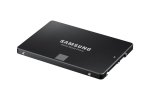
beardsley co are selling it for £99.99 free delivery but isn't fulfilled by amazon https://www.amazon.co.uk/gp/offer-listing/B00P73B1E4/ref=dp_olp_new?ie=UTF8&condition=new
Top comments
GamerJack95 to zebrum
22 Jun 1614#3
zebrum
22 Jun 164#2
still protesting about the missing 12GB on these budget drives
Latest comments (47)
Vikingtons
28 Jun 16#47
I did this today, but I removed the DVD drive, as it was never in use. So now there's an SSD for the OS and applications, and the HDD for archiving media and documents.
Normally you would use the SMART drive analysis to review the drive health. This maybe built into windows these days (not sure) but you can get commercial products to check it like HD Tune
Quicklite
23 Jun 16#42
Yep decided to hold off. SSHD is fine and price will drop into the summer.
T1Cybernetic
23 Jun 16#41
What would you recommend for checking SSD /Hard drive health? (Just curious)
gordo1964
23 Jun 16#40
Now you're talking good music
Quicklite
23 Jun 16#38
Question.
My laptop has 1x1TB Hybrid HD (2.5") and an empty mSata space. Tempted by SSD upgrade.
Currently debating between a 512GB 850 Pro (means I need to get rid of 1TB), or a 850 Evo Msata (keep 1TB drive - but less battery). Assume moderate usage - what would you go for?
RiverDragon8 to Quicklite
23 Jun 16#39
Go with your head and not with your heart.
Tino_G
23 Jun 161#37
The method I planned on using was installing the OS once the hard drive was inside the MacBook. You'll need a USB drive with the OS on it already, alternatively you could take it to the Apple Store as they can install the OS once the hard drive is connected.
minicale
22 Jun 16#14
Tempted although I think I want to get a 1tb next, or a 500gb nvme drive
Cackles to minicale
23 Jun 16#36
I upgraded from one SSD to another. You can see my two different drives below.
One is standard and one top of the range.
No noticeable (to the human) increase. Unless you have an ancient SSD then probably go for the 1TB.
The 4TB Seagate HDD is the one you get in the USB enclosure from Argos.
The RAM is Crucial Ballistix Sport.
vulcanproject
22 Jun 16#35
Had an 830 256gb for about 4 years, hammered it, still got a decade of life left according to a bunch of software that analyses SSD health :smiley:
Have the 1TB version now in a new machine. Superb thing.
nomnomnomnom
22 Jun 16#34
This is some of the most insane tech talk I've ever read on HUKD, and that takes some doing.
You've mentioned 'weed' 3 times in your post, like this somehow backs up what you're saying. I simply can't be bothered to break down all of the insanity you've posted, but I'll just point one thing out:
No. You get what you pay for.
Work out the cost per gig on a 500 drive vs a 512 drive (or 120 vs 128). Job done.
This particular drive works out as one of the best per gig, no matter if you compare against a 500 or 512 drive.
If you don't pay for it (you don't), then you're not entitled to more.
heavywater
22 Jun 16#33
So wait until the drives are 7% off, then you've bagged yourself a bargain.
tomjwalker
22 Jun 16#32
Got mine for less than £100 last year from going through flubit and I've had no trouble with it just in case anyone is worrying about going through them instead of direct from amazon
golo83
22 Jun 16#31
what's the difference with m.2 type SSD?
pete_rawli
22 Jun 16#30
Ha that's great. I was going to do a fresh install too, but I'm not sure on the best method of installing the OS on the new hard drive? Did you install it prior to replacing, or after?
M1sterDeeds
22 Jun 161#4
My first SSD was £120 for 128GB. I should have waited a few years.
fishmaster to M1sterDeeds
22 Jun 16#11
You would have waited a lot longer for your computer to load things, time is something you can't ever get back :smiley: So you were right to buy yourself some time by using an SSD.
loadsavmoney to M1sterDeeds
22 Jun 16#29
snap
GamerJack95
22 Jun 16#28
LOL TL;DR please mate
kowalski
22 Jun 16#27
come on sub-£100 drives!
biuro74
22 Jun 162#26
Nice GIF mate, but you didn't rather understand an issue.
We can laugh as much as we can, but the others (manufacturers) will rip us off anyways laughing that we are laughing from "missing 12 GB". You know, this is like a chain: laughing donkey at the very beginning and laughing wolf at the end. Where would you like to be ? ;-) It's just a picture, and below is an explanation what "missing" gigabyte is.
As far as computer geeks can remember, computer "kilo" meant 1024. Like Kilobyte = 1024 bytes. Noone even was thinking it might be different. It was so obvious, because computers operate at binary system, where 2^10 = 1024. Then development came... and computer "mega" appeared, but mega still meant 1024. Rule was the same, 2^10 * 2^10 = 2^20. And then computer "giga" appeared, and altough it was the same maths (2^10 * 2^10 ^ 2^10 = 2^30), but it started to be so complicated for some people. Maybe they were marketing "geniuses" smoking weed at the evenings too much ? Dunno. But they "invented" one thing... if one giga means 2^30 bytes, so why it must be so complicated ? Let's make it easier. Let's make it like a wholesale bread for everyone ! Yeeea ! A weed for everyone per evening ;-) Since today "giga" will not mean 2^30 bytes, because it's too much pressing "=" at your calculator to count how much it is (1.073.741.824). Would you press it 30 times ? Noo.. too much. Since today count this way: kilo is not 1024, but 1000... so giga is not 1024 mega, but 1000 mega...oh, and mega is 1000 kilos as well. Simple ? Yeeeah ! So "previous computer" giga since today is 1.000.000.000 bytes. Who can remember 1.073.something.something ? Yeeeah ! I am Seagate Marketing Manager, give me more weed ! Since today we sell our harddrives "1 giga" that would contain 1.000.000.000 bytes. not 1.073.741.824. Simple ? As is ! Yeeah, I will get salary premium ! I saved "monies", "alotof" for my boss, which is Seagate, best-company-of-the-giga-year ! Yeah !
So, as you can see, each one gigabyte sold today should contain 7.37% more in fact. When you buy 120 GB drive, it should have 8,8 "GB" more. Or look at this from another point of view: you inspect your bytes and operating system says: it has got.... no, not 120 GB, but 111.76 GB only. Where is the rest (the h*ll) ? Well - you now understand, where is "missing" part.
In the name. GB now does not mean 1024 MB. It is 1000 since somebody in Seagate marketing smoked too much. And rest of manufacturers started to save costs the same way. We've been given with "GiB" which is now what GB was before that silly whole thing, but manufacturers are far away of using it. They prefer to sell their "GB" to dumb users who can only laugh. But, in fact, these laughing dumb users pay for this rip off.
Konpachi
22 Jun 16#25
Ordered one of these 2 days ago at £107 something... just cloned my drive today and installed it in my laptop. So far so good.
Tino_G
22 Jun 16#24
Did a fresh install and put the old hard drive in a external enclosure. It's pretty easy to install the hard drive into the macbook, just be careful not to strip the screws as it's easily done! I ended up buggering one of the small screws and had to take it to the Apple shop to get it out. They took the screw out and offered to install the new hard drive free of charge (even though the apple lad said they technically aren't allowed to). Great service as per from the apple store :smiley:
golo83
22 Jun 16#23
Will this fit in a HP Pavilion Mini PC 300-235na? thanks
DatAlbino
22 Jun 16#22
I wasn't talking about brand either, the read/write speeds for this are great and the reliability compared to this price range (Crucial, Seagate, etc..) is so much better
Altho I have to say, I trust a Samsung Evo over a Toshiba Q300 or a Seagate
This is by far the best upgade possible for a macbook pro (Late 2011). Actually feels faster than when the macbook was brand new. :sunglasses:
pete_rawli to Tino_G
22 Jun 16#19
How did you go about installing it - did you clone your old hard drive or fresh install?
shaunmorgan3994881
22 Jun 16#18
Fab drives.
zebrum
22 Jun 164#2
still protesting about the missing 12GB on these budget drives
GamerJack95 to zebrum
22 Jun 1614#3
DatAlbino to zebrum
22 Jun 161#10
This is not a budget drive xD this is one of the best SSDs around, for reliability, speed and performance, especially if you fork out a little more for an m.2 as well...
If you want a budget, go buy a Seagate or something, this is premium
c-traxx to zebrum
22 Jun 161#17
You have made my day...thank you
czrsiNk
22 Jun 16#15
I flooked bagging one of these on a Warehouse deal last week for a measly £69. Probably the best timing of a search for an 850 EVO that I ever did - it was the only one available at that price. Box turned up slightly squashed but that aside, the drive and driver CD were in original sealed packaging inside.
M1sterDeeds
22 Jun 161#13
As usual, you have a point. Ok I feel a little better now, thanks.
westy125
22 Jun 16#12
I'm thinking of my old 840 500gb, it was when they just come out
Cracking drives, I can remember paying around £260 for one when they came out
Agharta to westy125
22 Jun 161#8
If you paid that price for this exact drive you were robbed as they were never that expensive surely!
gordo1964
22 Jun 16#6
Waiting for black Friday.
Agharta to gordo1964
22 Jun 162#7
Prefer Blue Monday myself, Peter Hook at his best.
javey93
22 Jun 16#5
DO NOT buy it from beardsley co unless you're willing to take the risk of it never arriving. They're a just launched store with no reputation. Scammers use high interest items like these all the time.

![Fresh Breakfast Meat Box (Using code) @ Campbells Meat [Haggis / Lorne Sausage / Bacon / Black Pudding & More]](/images/topics/208684_1.jpg)




































![[Xbox One] Q. u. b. e: Director's Cut on Deals with Gold](/images/topics/208716_1.jpg)


















Opening post
beardsley co are selling it for £99.99 free delivery but isn't fulfilled by amazon https://www.amazon.co.uk/gp/offer-listing/B00P73B1E4/ref=dp_olp_new?ie=UTF8&condition=new
Top comments
Latest comments (47)
For this method, you'll want one of these: https://www.amazon.co.uk/Orico%C2%AE-Storage-Adapter-Laptop-DVD-ROM/dp/B012BAQH8K
Followed this guide to remove the DVD drive and replace it with the adapter.
https://www.ifixit.com/Guide/MacBook+Pro+13-Inch+Unibody+Early+2011+Optical+Drive+Replacement/5122
DON'T unplug your sub woofer or your webcam - it's not necessary.
Done in about 10 minutes. Boots much faster.
My laptop has 1x1TB Hybrid HD (2.5") and an empty mSata space. Tempted by SSD upgrade.
Currently debating between a 512GB 850 Pro (means I need to get rid of 1TB), or a 850 Evo Msata (keep 1TB drive - but less battery). Assume moderate usage - what would you go for?
One is standard and one top of the range.
No noticeable (to the human) increase. Unless you have an ancient SSD then probably go for the 1TB.
UserBenchmarks: Game 101%, Desk 125%, Work 112%
CPU: Intel Core i7-5820K - 95.4%
GPU: Nvidia GTX 970 - 85.5%
SSD: Samsung 950 NVMe PCIe M.2 512GB - 273%
SSD: SanDisk X110 mSATA 256GB - 89.5%
HDD: WD Green 3TB (2011) - 69%
HDD: Seagate Desktop HDD 4TB (2013) - 91.1%
RAM: Unknown 8x8GB - 115.6%
MBD: MSI X99S SLI PLUS (MS-7885)
EDIT:
The 4TB Seagate HDD is the one you get in the USB enclosure from Argos.
The RAM is Crucial Ballistix Sport.
Have the 1TB version now in a new machine. Superb thing.
You've mentioned 'weed' 3 times in your post, like this somehow backs up what you're saying. I simply can't be bothered to break down all of the insanity you've posted, but I'll just point one thing out:
No. You get what you pay for.
Work out the cost per gig on a 500 drive vs a 512 drive (or 120 vs 128). Job done.
This particular drive works out as one of the best per gig, no matter if you compare against a 500 or 512 drive.
If you don't pay for it (you don't), then you're not entitled to more.
We can laugh as much as we can, but the others (manufacturers) will rip us off anyways laughing that we are laughing from "missing 12 GB". You know, this is like a chain: laughing donkey at the very beginning and laughing wolf at the end. Where would you like to be ? ;-) It's just a picture, and below is an explanation what "missing" gigabyte is.
As far as computer geeks can remember, computer "kilo" meant 1024. Like Kilobyte = 1024 bytes. Noone even was thinking it might be different. It was so obvious, because computers operate at binary system, where 2^10 = 1024. Then development came... and computer "mega" appeared, but mega still meant 1024. Rule was the same, 2^10 * 2^10 = 2^20. And then computer "giga" appeared, and altough it was the same maths (2^10 * 2^10 ^ 2^10 = 2^30), but it started to be so complicated for some people. Maybe they were marketing "geniuses" smoking weed at the evenings too much ? Dunno. But they "invented" one thing... if one giga means 2^30 bytes, so why it must be so complicated ? Let's make it easier. Let's make it like a wholesale bread for everyone ! Yeeea ! A weed for everyone per evening ;-) Since today "giga" will not mean 2^30 bytes, because it's too much pressing "=" at your calculator to count how much it is (1.073.741.824). Would you press it 30 times ? Noo.. too much. Since today count this way: kilo is not 1024, but 1000... so giga is not 1024 mega, but 1000 mega...oh, and mega is 1000 kilos as well. Simple ? Yeeeah ! So "previous computer" giga since today is 1.000.000.000 bytes. Who can remember 1.073.something.something ? Yeeeah ! I am Seagate Marketing Manager, give me more weed ! Since today we sell our harddrives "1 giga" that would contain 1.000.000.000 bytes. not 1.073.741.824. Simple ? As is ! Yeeah, I will get salary premium ! I saved "monies", "alotof" for my boss, which is Seagate, best-company-of-the-giga-year ! Yeah !
So, as you can see, each one gigabyte sold today should contain 7.37% more in fact. When you buy 120 GB drive, it should have 8,8 "GB" more. Or look at this from another point of view: you inspect your bytes and operating system says: it has got.... no, not 120 GB, but 111.76 GB only. Where is the rest (the h*ll) ? Well - you now understand, where is "missing" part.
In the name. GB now does not mean 1024 MB. It is 1000 since somebody in Seagate marketing smoked too much. And rest of manufacturers started to save costs the same way. We've been given with "GiB" which is now what GB was before that silly whole thing, but manufacturers are far away of using it. They prefer to sell their "GB" to dumb users who can only laugh. But, in fact, these laughing dumb users pay for this rip off.
Altho I have to say, I trust a Samsung Evo over a Toshiba Q300 or a Seagate
Even better if you can get an m.2 (like me)
http://www.pcworld.com/article/2998497/storage/tlc-nand-ssds-the-crippling-problem-storage-makers-dont-advertise.html
If you want a budget, go buy a Seagate or something, this is premium
http://gizmodo.com/samsungs-16tb-ssd-is-now-an-actual-thing-people-can-buy-1762536707