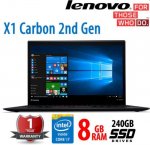
Looks like a good deal for a Lenovo Ultra thin X1 Carbon ultralight laptop.
Good spec for the price
Processor Intel® Core™ i7-4600U Processor
Memory 8GB RAM Soldiered onto the motherboard so no upgrade available
Hard Drive 240GB SSD
Optical Drive NONE
Display 14.0" HD+ (1600x900), 260nit
Graphics Intel® HD Graphics 4400
Navigation TrackPoint® and 5 Button trackpad
Weight Starting at 2.8 lbs
Webcam 1.3MP
Battery 8 Cell 46Wh
- Astec123
Top comments
SUMMONER
10 Jun 165#1
What an abomination, just look at those trackpad buttons/keyboard. It doesn't deserve to call itself a Thinkpad. :disappointed:
fire_emblem
10 Jun 164#8
Having used all generations of the Thinkpad Carbon X1 lineup, I do not recommend this specific generation at all. The capactive function keys are a pain to use, and the trackpad design is poor, the 1st gen or the 3rd gen have better build quality. The keyboard is also very weak coming from a thinkpad lineup. Furthermore, maintenance is a pain on this line up.
Latest comments (60)
FatalSaviour
13 Jun 16#60
The trackpads on the T430s etc *were* pretty decent. The one on the X1 v3 that I'm currently typing on is pretty awful however!
juniper
13 Jun 16#59
Haha. I had a 770, T60 and a couple of others before I got to T400s...
montana78
11 Jun 16#58
I haven't had any issues with it really. My friend still has my old x1 gen 1 and he loves it to bits. He uses it more than the lenovo helix he has.
The keyboard on my new Asus laptop is really annoying. They changed the size and shape of a lot of important keys so will take lot of time to get used to it. But I get bored of laptops very quick.
ELVIS_THE_PELVIS
11 Jun 16#57
Is the keyboard a pain? Please
montana78
11 Jun 161#56
He was prepared to pay £500 for it as I bought the Asus gaming Laptop. But it was his birthday so I let him off £100
ELVIS_THE_PELVIS
11 Jun 16#55
Keyboard backlight meant
ELVIS_THE_PELVIS
11 Jun 16#54
You mean you had his trolleys down..
ELVIS_THE_PELVIS
11 Jun 16#53
Is the key back lite
Please
fayraz
11 Jun 16#52
Track pad looks like the one they use on the X240 and it's a nightmare to use.
montana78
11 Jun 16#51
I sold my x1 gen 3 to my friend for £400 a month back. He knows that was a bargain
montana78
11 Jun 16#50
I had the i7 version of the x230 and a dock. Will be one of my most favourite laptop of all time. The fat battery gave me 8-10hrs battery life even with so much processing power
Sp0oner
10 Jun 16#49
You nippers with your T400s lol I remember having a T20 with NT4 Workstation (no PnP with that those were the days) and what a cracker of a laptop it was at the time then had a T21 with Win 2000 on it and thought it was the best machine ever. They were built like tanks and think I still have a T20 in the loft but not much use now phones have higher specs. I'm just off for my cup of ovaltine and take my dentures out for bed time :smirk:
JackMcg9
10 Jun 16#48
any deals on v1 and v3? as missing the f keys. thanks
Gkains
10 Jun 16#47
For me, it's never been about whether the trackpad is more accurate or whatever, the trackpoint is just faster to use. You can be typing, move the mouse pointer and not take your hands off the home keys. Saves a lot of time. For accurate movements or trying to draw, the trackpad will be better but then a mouse or graphic tablet will be a lot better still.
MrHot
10 Jun 16#46
Some models you can buy the newer pad and install it in the older one.
MrHot
10 Jun 16#45
They back tracked on going buttonless.
I have an x240 with the button trackpad from the x250.
umirza85
10 Jun 16#44
Agreed the nipple is just there to please all the fanbois who would riot if Lenovo removed it.
Trackpad tech has gone miles since those days.
hellomynameistj
10 Jun 16#43
These have defects in the screens. If you're ok with that then hot
erinarenauk
10 Jun 16#42
Oh...mine was the X1 Carbon Touch so the screen fitment may be different...
erinarenauk
10 Jun 16#41
Not sure which version I had but the screen hinges were prone to breaking on the X1 Carbon and the only way to repair was to have a new screen fitted. Also, I have had a couple of bad experiences with Tier 1. I bought several 2.5" SAS drives supposedly refurbished which my server reported bad immediately! A lengthy process to get replacements and appauling communications from a company I had used numerous times before. Never again!
rizlaw
10 Jun 16#40
cold ,pascal and polaris laptops in bound to destroy all laptop gming power
anonimousse
10 Jun 161#39
The clitmouse has been just as important as Scaramanga's third nipple for me in all the Thinkpads I have owned over the last decade or so and not a fan of the recent tacky chiclet type keyboards either!
rd3d2
10 Jun 16#38
Not 1080p mind
FatalSaviour
10 Jun 16#37
I'm currently using a X1 Carbon v3 - keys are certainly as good as my Macbook's. However, the touchpad is pretty awful.
As has been mentioned, watch out for the capacitive function keys on this (v2) generation - I've heard from many colleagues that these can be a pain.
RabbiDreed
10 Jun 16#36
I'm unreservedly a nipple man. It just so happens that I also prefer the TrackPoint. :man:
Muir
10 Jun 16#35
Same. I can't stand touchpads in general. I've mostly had Thinkpads (to use the trackpoint), but when I've had a laptop with only a touchpad, I always bring a mouse wherever I go with it.
juniper
10 Jun 16#34
And on some of them, the plastic had a strange self-healing property so it would look worn next to the TrackPad, but gradually get better. Must have been back in the old IBM days. T700?
Crosshash
10 Jun 16#33
No physical mouse buttons?
What were they thinking?!
plewis00
10 Jun 16#32
There was the Z61t which might have had 'metal' on display with a silver-lid but it was short-lived. I don't think Lenovo or IBM ever used exposed metal commonly on their machines other than the stainless steel hinges. CFRP might be the titanium composite they mentioned before (CFRP reinforced with titanium backing) - they were quite secretive about what it actually was and most people just assumed their machines were black plastic.
Krooner
10 Jun 162#31
You are a monster.
Gkains
10 Jun 16#30
Oh, no I mean the standard Windows Explorer shortcuts, something like this:
That one shows the accelerator key for bringing down the View menu (Alt-V) but does not show that Details is actually Details which meant that Alt-V, D changed the view from icons etc. to Details. That's been there since forever *checks old VM of Win98SE*. Yes, Win98 had it. With Win8 Microsoft changed it for that ribbon toolbar. Now Alt-V gets you the View ribbon, then 'L' gets you the pane with the type of view you want, then using the cursor keys to find 'Details' then press Return. A lot more work and it's pretty much the same for every keyboard shortcuts.
As for my quest to get a keyboard with TrackPoint, I now remember another thing against ThinkPad USB keyboard aside from price: no numeric keypad:
Guess that makes it very compact
Picard123
10 Jun 161#29
The biggest travesty was them getting rid of the original Thinkpad keyboards which were brilliant to type on. Instead, they've got this AccuType crap which are awful in comparison :disappointed:
Cameron92
10 Jun 16#28
Literally typing on the same model now (the photo on the ebay listing suggests this has actually come from my company - a large accountancy - as they use the exact same remember to lock your screen sticker).
Trackpad is terrible, fans get loud when doing virtually anything (this might be as a result of my firm's bloatware I'm not sure) and the F keys are nigh-on unusable.
Edit: also screen has absolutely atrocious viewing angles, terrible for trying to watch iplayer in bed.
fishmaster
10 Jun 16#27
Do you mean these shortcuts changed in Edge browser or Internet Explorer? Both of which are installed as standard in Windows 10 (for those that didn't know). I've never used those shortcuts so I'm interested as to how they're used and how helpful they are.
jasee
10 Jun 16#26
Can't say I've ever seen any of those. The ones I saw were obviously titanium metal which had a coating of plastic of the outside. Carbon reinforced plastic is something else, like glass reinforced plastic but stronger.
plewis00
10 Jun 16#25
I said 'titanium composite', which is a blend of titanium and carbon-fibre, so it won't look like either (silver metal or carbon weave) but more like plastic. It may also have been known as CFRP (carbon-fibre reinforced plastic) with titanium components but this has been used back to early 2000s in the T and X-series machines.
core
10 Jun 16#24
This might be disturbing confession but I actually happen to like it :confused:
And when it comes to Tier1 I bought two laptops from them and both were in great condition (better than described) and both batteries I got still power my laptop for 3-6 hours.
Gkains
10 Jun 161#23
Yes, another TrackPoint fan. Hardly ever us the pad. Same on HP Elitebooks and Dell Latitude. On the smaller ThinkPads (X220 for example) I generally also disable the TrackPad in the BIOS so it doesn't activate if I use the laptop slouched on seat.
When using a computer having to take my hand of the keyboard to use the mouse seems like such an unergonomic thing to do that occasionally I've looked for desktop keyboard with a trackpoint but it seems only Lenovo do those and they are £50+.
I know TrackPoint can be considered old-fashioned (as can the whole black look of ThinkPads), but that's fine with me.
/rant/
Just wish Microsoft weren't so keen to hide keyboard shortcuts. Since XP every OS I install I've had to enable the keyboard shortcuts and menu. The latest Win10 Windows Explorer is particularly bad where changing views has changed from Alt-V, D to Alt-V,L, cursor key which is just typical
/rant/
juniper
10 Jun 16#22
I mostly use a stand (much better for posture / neck ache / back ache) and therefore an external keyboard and mouse, but if I do use it away from a stand, I always use the TrackPoint nipple and hate the TrackPad! That is why I love ThinkPads so much. I keep the TrackPad disabled in settings :smiley:
ICTHUS
10 Jun 16#21
LENOVO is the Chinese manufacturer.
THINKPAD is the model.
relaxedasever
10 Jun 16#3
windows 8 - Home
Astec123 to relaxedasever
10 Jun 16#4
The same price applies to both versions of this machine.
ICTHUS to relaxedasever
10 Jun 16#20
Free Win 10 upgrade available still from MicroSloth
jasee
10 Jun 16#19
I don't remember any carbon-fibre being in the IBM of 10 plus ago! (if that is what you are saying) Some parts were plastic
There is a total difference between a metal such as titanium and carbon-fibre.
I don't think any titanium is used noways in these models.
juniper
10 Jun 16#9
Agree it a horrible trackpad - it's like the T series - T430 good, T440 bad, T450 good again. I am using 2x T430 at the moment (employer and customer site) and got my daughter a T450.
W_jelly1 to juniper
10 Jun 16#18
And I'm typing on my T440 - the missing buttons!!!!!!!!!!!!!!!! was one of the key things I look at when buying a laptop and tell others to try it. Not sure if I've ever used the 'nipple' in 10 years plus of having one!
jpyhyk
10 Jun 161#17
I picked up an X230 (i5-3320M) for £190 including a back-lit keyboard a couple of months ago, and still with under Lenovo warranty until the end of the year. Lovely machine, just getting used to the keyboard. I love the Thinkpad, just can't afford a brand new one!
adamwilko007
10 Jun 16#12
Are thinkpad a good make , relaiable well built? Never heard of them!
juniper to adamwilko007
10 Jun 161#16
Personally, I think they are the best there is, though my experience is based on 20+ years of employer-provided T series - they are pretty expensive. I have noticed the build quality has fallen a little in the years since they were made by Lenovo. Prior to that, they were bullet proof and made by IBM, until they sold the PC business to Lenovo. I also had a refurb X61s for my daughter which was replaced with a T450 from ebay (new, very good spec 8GB RAM and an SSD for £500 - with 3 year warranty). Also an E520 for younger daughter, but this is i3-2nnn, cheaper and less impressive.
fire_emblem
10 Jun 164#8
Having used all generations of the Thinkpad Carbon X1 lineup, I do not recommend this specific generation at all. The capactive function keys are a pain to use, and the trackpad design is poor, the 1st gen or the 3rd gen have better build quality. The keyboard is also very weak coming from a thinkpad lineup. Furthermore, maintenance is a pain on this line up.
ReflexReact to fire_emblem
10 Jun 16#15
Couldn't have said it better myself. It's completely rubbish. Would avoid this
plewis00
10 Jun 16#14
It was never titanium alone, it was titanium composite (which was some titanium and carbon-fibre mix) which should be similar to what they use now. Though it looks and feels plastic, it's far from it - more stiffer and solid.
Rustyk1
10 Jun 16#13
I'm lumbered with the V2 at work and it's the bain of my life. If you use F keys (I do a lot) then definitely avoid this version.
SUMMONER
10 Jun 165#1
What an abomination, just look at those trackpad buttons/keyboard. It doesn't deserve to call itself a Thinkpad. :disappointed:
jasee to SUMMONER
10 Jun 16#11
Well it's not is it? :smiley: Real thinkpads stopped being made must be over ten years now.
And they used to be made of titanium. A real expensive but lightweight metal. Look at the fuss nowadays when they are made of aluminium. At least this one is apparently carbon fibre, though I don't personally think it will compare well with titanium
montana78
10 Jun 161#10
x1 are amazing laptops. i had v1 v2 and v3. However I prefer the v1 and v3 as they have physical F keys where v2 has touch buttons and doesnt have physical mouse buttons which can be annoying. they have rectified both on the v3.
gen 1
gen 2
gen 3
yaszq2001
10 Jun 16#5
what do you mean summoner?
greencat to yaszq2001
10 Jun 161#7
If I were to guess...The keyboards of the early Thinkpads were perhaps the best laptop keyboard you could use - and proper shaped keys. A delight to touch type on. I also used to appreciate that it was designed to survive liquid spills - there were drainage holes built in. The mouse buttons were similarly chunky - almost levers really - but good positive action and well designed. Further, it was possible to get spare parts for practically all of it and DIY those fixes.
Still at least the red mouse nipple survives. My ideal laptop would probably be an old school Thinkpad design with modern processor, screen, fan less design etc - and running OSX.
japes
10 Jun 16#6
Lovely thin, light laptop. Top spec, decent price if in good condition.
sureshot
10 Jun 16#2
Interestingly to get it at that price, select Windows 8, Home or Business.

![Fresh Breakfast Meat Box (Using code) @ Campbells Meat [Haggis / Lorne Sausage / Bacon / Black Pudding & More]](/images/topics/208684_1.jpg)




































![[Xbox One] Q. u. b. e: Director's Cut on Deals with Gold](/images/topics/208716_1.jpg)


















Opening post
Good spec for the price
Processor Intel® Core™ i7-4600U Processor
Memory 8GB RAM Soldiered onto the motherboard so no upgrade available
Hard Drive 240GB SSD
Optical Drive NONE
Display 14.0" HD+ (1600x900), 260nit
Graphics Intel® HD Graphics 4400
Navigation TrackPoint® and 5 Button trackpad
Weight Starting at 2.8 lbs
Webcam 1.3MP
Battery 8 Cell 46Wh
- Astec123
Top comments
Latest comments (60)
The keyboard on my new Asus laptop is really annoying. They changed the size and shape of a lot of important keys so will take lot of time to get used to it. But I get bored of laptops very quick.
Please
I have an x240 with the button trackpad from the x250.
Trackpad tech has gone miles since those days.
As has been mentioned, watch out for the capacitive function keys on this (v2) generation - I've heard from many colleagues that these can be a pain.
What were they thinking?!
That one shows the accelerator key for bringing down the View menu (Alt-V) but does not show that Details is actually Details which meant that Alt-V, D changed the view from icons etc. to Details. That's been there since forever *checks old VM of Win98SE*. Yes, Win98 had it. With Win8 Microsoft changed it for that ribbon toolbar. Now Alt-V gets you the View ribbon, then 'L' gets you the pane with the type of view you want, then using the cursor keys to find 'Details' then press Return. A lot more work and it's pretty much the same for every keyboard shortcuts.
As for my quest to get a keyboard with TrackPoint, I now remember another thing against ThinkPad USB keyboard aside from price: no numeric keypad:
Guess that makes it very compact
Trackpad is terrible, fans get loud when doing virtually anything (this might be as a result of my firm's bloatware I'm not sure) and the F keys are nigh-on unusable.
Edit: also screen has absolutely atrocious viewing angles, terrible for trying to watch iplayer in bed.
And when it comes to Tier1 I bought two laptops from them and both were in great condition (better than described) and both batteries I got still power my laptop for 3-6 hours.
When using a computer having to take my hand of the keyboard to use the mouse seems like such an unergonomic thing to do that occasionally I've looked for desktop keyboard with a trackpoint but it seems only Lenovo do those and they are £50+.
I know TrackPoint can be considered old-fashioned (as can the whole black look of ThinkPads), but that's fine with me.
/rant/
Just wish Microsoft weren't so keen to hide keyboard shortcuts. Since XP every OS I install I've had to enable the keyboard shortcuts and menu. The latest Win10 Windows Explorer is particularly bad where changing views has changed from Alt-V, D to Alt-V,L, cursor key which is just typical
/rant/
THINKPAD is the model.
There is a total difference between a metal such as titanium and carbon-fibre.
I don't think any titanium is used noways in these models.
And they used to be made of titanium. A real expensive but lightweight metal. Look at the fuss nowadays when they are made of aluminium. At least this one is apparently carbon fibre, though I don't personally think it will compare well with titanium
gen 1
gen 2
gen 3
Still at least the red mouse nipple survives. My ideal laptop would probably be an old school Thinkpad design with modern processor, screen, fan less design etc - and running OSX.