Seems like a pretty good deal for a mechanical keyboard with Cherry mx brown keys and LED backlight.
Product Description
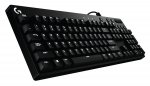
G610 Orion Brown Keyboard delivers a pure gaming experience. Starting with a performance-driven design, the keyboard integrates our most powerful technologies. From the finest details, like fingerprint-masking matte texture and durable braided cable, to the most complex, each aspect is precisely engineered to bring Logitech G's industry-leading technology and quality of construction to the uniquely crafted form. Cherry MX switches are standard in gaming keyboard. Long-life, low-noise Cherry MX Brown switches have a tactile bump for feedback. Logitech Gaming Software allows you to customise the brightness of each individual key light, as well as your settings and F1 to F12 key macros. Some settings require Logitech Gaming Software, available for download at logitech.com/downloads.
12 comments
Chidmas
13 Jun 16#1
Seems a good deal. I'm using the g810 I do like but I definitely prefer cherry switches to the Roma switches. Will probably buy a Corsair k70 over this
crocodilezzz to Chidmas
13 Jun 16#2
i now have 4 different brands of cherry brown keyboards and the corsair definitely comes out as my favourite!
chelseafi
14 Jun 16#3
Hi my son has asked for a keyboard for his 16th birthday. I don't mind price if it's good but don't know what I'm looking for? Amazon reviews don't look good for this one? He uses computer for steam games counter strike, fallout, farcry plus he uses it for school work & Skype any suggestions thanks
rucer07 to chelseafi
14 Jun 161#4
Recommend to look at Corsair keyboards. They are more reliable, less software issues, good building quality. There were few offers on amazon recently for K65 keyboards. I suggest MX Brown switches, they are really good. Hope this helps
fire_emblem to chelseafi
15 Jun 161#5
This keyboard is a great value grab at £70. That being said, as someone else suggested, the Corsair K65 feels better in terms of build quality, but the K65 does not have the numberpad+backlighting. Both are amazing upgrades from a normal silicon membrane keyboard though.
One more thing to note, the K65 comes with red switches, which are mostly oriented for gaming. The G610 comes with brown switches, which are usually more expensive because they balance gaming and office work (I prefer them over reds).
From the Amazon comments. Hmm: :smiley:
"THIS KEYBOARD HAS COIL WHINE!!!!!! YUP a keyboard which has coil whine, it is especially apparent when the keybaord is not at its full brightness"
Edit, beaten to it. Still, odd how tech has come on.
Aced89
27 Sep 16#12
I had the coil whine issue and found a solution to get rid of it:
Background: The coil whine is apparent when you don't have Logitech gaming software installed and press the brightness button+0 to enable static backlighting. When the brightness is on full, no coil whine. Consequently, if you turn the backlights off, no coil whine. However, if you set the brightness to any level between max and off, the coil whine is very apparent.
THE FIX:
Install Logitech gaming software, go to settings (the cog wheel icon), select the general tab and from there see thje graphics properties section. Check first box which says "enable advanced grapics" or something like that (I don't use the sopftware in english). Restart the software and boom, no coil whine.
I also found out that the lowest preset brightness is still too bright for me; you can lower it down more with the software too. Unfortunately I couldn't find any solution to get rid of the coil whine without the Logitech gaming software, that would have been neat.Apparently the advanced graphics acceleration w/e is turned off by default, so you can't switch it on without the software.

![Fresh Breakfast Meat Box (Using code) @ Campbells Meat [Haggis / Lorne Sausage / Bacon / Black Pudding & More]](/images/topics/208684_1.jpg)




































![[Xbox One] Q. u. b. e: Director's Cut on Deals with Gold](/images/topics/208716_1.jpg)


















Opening post
Product Description
G610 Orion Brown Keyboard delivers a pure gaming experience. Starting with a performance-driven design, the keyboard integrates our most powerful technologies. From the finest details, like fingerprint-masking matte texture and durable braided cable, to the most complex, each aspect is precisely engineered to bring Logitech G's industry-leading technology and quality of construction to the uniquely crafted form. Cherry MX switches are standard in gaming keyboard. Long-life, low-noise Cherry MX Brown switches have a tactile bump for feedback. Logitech Gaming Software allows you to customise the brightness of each individual key light, as well as your settings and F1 to F12 key macros. Some settings require Logitech Gaming Software, available for download at logitech.com/downloads.
12 comments
One more thing to note, the K65 comes with red switches, which are mostly oriented for gaming. The G610 comes with brown switches, which are usually more expensive because they balance gaming and office work (I prefer them over reds).
Corsair Link on Amazon!
I'm guessing it hums a bit or something, but somehow doubt it's to do with 'coils' :smile:
http://www.very.co.uk/msi-gk-701-red-led-backlight-cherry-mx-brown/1600054288.prd
Heated!
"THIS KEYBOARD HAS COIL WHINE!!!!!! YUP a keyboard which has coil whine, it is especially apparent when the keybaord is not at its full brightness"
Edit, beaten to it. Still, odd how tech has come on.
Background: The coil whine is apparent when you don't have Logitech gaming software installed and press the brightness button+0 to enable static backlighting. When the brightness is on full, no coil whine. Consequently, if you turn the backlights off, no coil whine. However, if you set the brightness to any level between max and off, the coil whine is very apparent.
THE FIX:
Install Logitech gaming software, go to settings (the cog wheel icon), select the general tab and from there see thje graphics properties section. Check first box which says "enable advanced grapics" or something like that (I don't use the sopftware in english). Restart the software and boom, no coil whine.
I also found out that the lowest preset brightness is still too bright for me; you can lower it down more with the software too. Unfortunately I couldn't find any solution to get rid of the coil whine without the Logitech gaming software, that would have been neat.Apparently the advanced graphics acceleration w/e is turned off by default, so you can't switch it on without the software.