Back-ordered. Due in stock June 16 -- order now to reserve yours
A cracking price for this RAM.AMAZON.CO.UK IS THE SELLER to get it at this price.
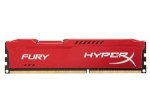
Get in the game with HyperX FURY. Even newbies get up to speed fast, since Fury automatically recognises its host platform and automatically overclocks to up to 1866 MHz*, providing plenty of power for your next death match.
Fury's asymmetric heatspreader design lets you stand out from the crowd. It's available in black, blue, red and for the first time in the HyperX line - white, with a black PCB. So your rig can reflect your style and you can show it off with pride. It's 100 per cent tested and LAN-ready plus it's backed by free technical support.
*HyperX PnP memory will run in most DDR3 systems up to the speed allowed by the manufacturer's system BIOS. PnP cannot increase the system memory speed faster than is allowed by the manufacturer's BIOS.
Latest comments (21)
notavalidaddress
15 Jun 16#21
Got 3 - really wanted 4 but at £19.99 it's a good price (and colour) so will see if I can get another one later as these ones have a dispatch date towards the end of June anyway so plenty of time. If another single one cost a extra couple of pounds I can live with that.
sash
14 Jun 16#19
Thanks just saw this on another deal and ordered 3 sticks for my triple channel rig
dsided to sash
14 Jun 16#20
Looks like you got the last one!
NikNaks12
10 Jun 161#18
Good old Linus will be able to explain it far better than I could about channel and number of RAM sticks:
I wouldn't rush out and replace just one stick. You could buy two, but 16GB (I have 16GB but I run virtual machines so I get good use out of them) isn't really necessary for just gaming either, but these will last you a while and at this price it wouldn't hurt. I personally think that you wouldn't see a big difference between the the old and new. But please anyone who knows more chip in and correct me if I'm wrong!
mchcreations
10 Jun 161#17
I maent shouldn't be slow, not should be slow.
FoX5
10 Jun 16#16
Thanks. I've been thinking about this all wrong. I should have been looking for dedicated graphics not ram for now. I'll see what is compatible with the motherboard and apu and then see whether or not I need a new case.
mchcreations
10 Jun 161#15
A desktop from 2013 should be slow. The processor doesn't look bad. Adding a second 8GB (for a total of 16gb) will help with certain programs such Photoshop and other memory consuming ones.
For playing you need a dedicated graphics card. Integrated ones are not good enough. But that is something you might be able to do without replacing the whole pc. Probably adding that you will be able to play anything out there. But you will need to check your motherboard, pc case and power supply in order to see what can you connect.
FoX5
10 Jun 16#14
Thanks mchcreations. I thought it might speed things up when using photoshop and I would really like to take a dip into gaming but I don't think my system is up to it except for really old games. When I bought the system back in 2013 I really thought the ram with the AMD A6-3670 would be ideal for some reasonable gaming but it really struggles when I've tried demos from steam.
mchcreations
10 Jun 162#13
Replace 1 module of 8gb for another one of 8gb is useless. It doesn't matter the specs. Only replace in case of fault or to increase capacity.
FoX5
10 Jun 161#12
Thanks NikNaks. I used the pcpartpicker and there's no issues/incompatibilities found. Very handy website I will keep that bookmarked. Can I ask you if its a standard thing to do to put in just one 8GB Module? At the moment I have one Module from Crucial:
And I was thinking of replacing it with this Kingston Hyper X Module. Also would there be much difference between the two?
FoX5
10 Jun 16#10
Could anyone tell me how to check my computer to see if this ram is compatible? I have CPU-Z but I'm not sure what all the info means.
NikNaks12 to FoX5
10 Jun 161#11
You could try PC Part picker - add both the motherboard and ram and see if it flags up a conflict. Failing that your motherboard manual will detail what DDR/speed/size ram it's compatible with.
Crucial also have a tool to determine hardware compatibility (it may only recommend crucial products though, never used it myself).
I have a HyperX Savage 8 GB 1600 MHz DDR3 CL9 in my PC and I would like to add a second module. Will I notice strange behaviors if pair it with this one? I know everyone always said to put two the same, but is really important?
Mine: HyperX Savage 8 GB 1600 MHz DDR3 CL9
Here: HyperX Fury 8 GB 1866 MHz DDR3 CL10
Mine is £29.99 now new, thats 50% extra
CHAOSEN3 to mchcreations
10 Jun 16#9
If supported it should be fine, but worth noting that your RAM will run at the lowest speed available, which is 1600 MHz. Not really noticeable unless you run a RAM benchmark.
dsided
10 Jun 16#5
Is this better than the deal from 10 days ago for Crucial Ballistix Tactical 16 GB kit (8 GB x 2) DDR3 PC3-12800 Unbuffered Non-ECC 1.5 V, which was £40. Thinking about returning that and getting 32 gb here
davidfwalsh to dsided
10 Jun 16#7
The Crucial are DDR3-1600 so not as quick. but in reality not a great deal of difference unless you are big into photoshop or other media editing stuff.
davidfwalsh
10 Jun 16#6
Can a mod un-expire this ...it's still on.
fr3dy77_sp33d
10 Jun 16#4
no its not over
davidfwalsh
9 Jun 16#2
This deal is not over ? Why is it marked expired ?
eddyboi to davidfwalsh
9 Jun 16#3
It's over now.
daJago
9 Jun 161#1
Ordered a stick for £28 yesterday but managed to cancel it. Ordered two sticks at this price and looks like I did it just in time.

![Fresh Breakfast Meat Box (Using code) @ Campbells Meat [Haggis / Lorne Sausage / Bacon / Black Pudding & More]](/images/topics/208684_1.jpg)




































![[Xbox One] Q. u. b. e: Director's Cut on Deals with Gold](/images/topics/208716_1.jpg)


















Opening post
A cracking price for this RAM.AMAZON.CO.UK IS THE SELLER to get it at this price.
Get in the game with HyperX FURY. Even newbies get up to speed fast, since Fury automatically recognises its host platform and automatically overclocks to up to 1866 MHz*, providing plenty of power for your next death match.
Fury's asymmetric heatspreader design lets you stand out from the crowd. It's available in black, blue, red and for the first time in the HyperX line - white, with a black PCB. So your rig can reflect your style and you can show it off with pride. It's 100 per cent tested and LAN-ready plus it's backed by free technical support.
*HyperX PnP memory will run in most DDR3 systems up to the speed allowed by the manufacturer's system BIOS. PnP cannot increase the system memory speed faster than is allowed by the manufacturer's BIOS.
Latest comments (21)
https://www.youtube.com/watch?v=-D8fhsXqq4o&ab_channel=Techquickie
And regarding speed...
https://www.youtube.com/watch?v=dWgzA2C61z4&ab_channel=LinusTechTips
I wouldn't rush out and replace just one stick. You could buy two, but 16GB (I have 16GB but I run virtual machines so I get good use out of them) isn't really necessary for just gaming either, but these will last you a while and at this price it wouldn't hurt. I personally think that you wouldn't see a big difference between the the old and new. But please anyone who knows more chip in and correct me if I'm wrong!
For playing you need a dedicated graphics card. Integrated ones are not good enough. But that is something you might be able to do without replacing the whole pc. Probably adding that you will be able to play anything out there. But you will need to check your motherboard, pc case and power supply in order to see what can you connect.
8GB (1x8GB) Crucial Spectek 1333MHz CL9 DDR3 Module [ST102464BA1339].
And I was thinking of replacing it with this Kingston Hyper X Module. Also would there be much difference between the two?
Crucial also have a tool to determine hardware compatibility (it may only recommend crucial products though, never used it myself).
http://www.crucial.com/usa/en/systemscanner
Mine: HyperX Savage 8 GB 1600 MHz DDR3 CL9
Here: HyperX Fury 8 GB 1866 MHz DDR3 CL10
Mine is £29.99 now new, thats 50% extra
Thanks for the tip off :smiley: