I'll leave others to find read the 3 similar reviews on Amazon.
forcedv
8 Jun 162#3
Battery will be just fine for a new (not used product).
A few power cycles will maximise it's endurance.
It's certainly not a device for a power user but for a large, touchscreen, portable device with Microsoft Windows, it'll be just fine for Kodi, web browsing and office applications.
There nothing else like it in this price range that runs Windows.
forcedv
8 Jun 16#4
Removing any bloatware should make it snappy
forcedv
8 Jun 16#5
The Amazon reviews are for the lower spec, non- touchscreen version
djdelmar
8 Jun 16#6
Seems really expensive for what it is. What am I missing?
xela333 to djdelmar
8 Jun 161#11
The size? :confused:
HedgyHoggy
8 Jun 163#7
Oh, it's a Cello.
RUN, YOU FOOLS!
forcedv
8 Jun 16#8
Think of it as a 19.5 inch touchscreen battery powered monitor that runs window.
How much are they going for?
Is that one any better??? £20 more but it's Packard Bell plus has dedicated GFX
cicobuff
8 Jun 16#25
Difficult to be subjective it is better as it is a different product, this is a touchscreen large screen tablet. The Packard Bell you link to is an inbuilt to the display desktop PC instead with no touchscreen. Take a look at the form factors of each as well.
forcedv
8 Jun 161#26
Not the same type of product as it's mains powered only and no mention of a touchscreen.
yoshi
8 Jun 16#27
taken a gamble on this for a laugh. be interesting to see if the HD can be swapped out for a SSD
Jenn101
8 Jun 16#28
Hi, yep, took me a while to find that it's not battery but did find that it's a touchscreen
Looking for something BIG for my dad to use as he's partially sighted, preff dual O.S, decent too as if it's slow or just rubbish he'd get confused.
jumpinoffthbed
8 Jun 16#29
I don't get it why would you want touch screen on something this size? Unless you're looking to get bigger arms maybe? this is a lot less money (not touch screen), is it basically the same?
forcedv
8 Jun 161#30
Again... you're missing the point of this device.
It has a built in battery, to its portable and the touchscreen means you don't need to carry a keyboard and mouse...
jans
8 Jun 16#31
I got the Asus P1801-T with an 18.5" touch screen nearly 2 years ago from a deal on here for £195 and I always use it when I'm lounging in bed watching telly. It has a kickstand that's ideal for just sitting in front of you on the mattress. I really like it and when I'm done I just lie it down on a shelf in my bedside cabinet.
forcedv
8 Jun 16#32
Did you ever find the PC companion that connects to the Asus P1801 making it a Windows desktop / Android tablet?
jumpinoffthbed
8 Jun 16#33
Wouldn't you rather just have a wireless keyboard/touch pad? I've got a 10" tablet and I just think anything bigger I'd want to be further away from so touch screen just wouldn't be practical
pantheruncia
8 Jun 16#34
who bought 3??
jumpinoffthbed
8 Jun 16#35
Surely this is for the house? I can't imagine it gets carried very much. Idk everyone likes different things I suppose I just think this is overkill and not practical.
My kitchen diner is an awkward layout so you can't fit a screen anywhere that you can watch when prepping food & doing the dishes, so having a kodi screen this big linked to the mysql dB the others are would be ace.
Have some heat.
jans
8 Jun 16#40
I had a quick search for one when I first got it, but to be honest, I haven't bothered since.
jans
8 Jun 16#41
Not really. I find it quite comfy using it the way I do. Most of the time I'll be sitting cross legged in front of it and I find the touch keyboard on it to work out fine.
AndyJWS
8 Jun 16#42
Hot! Has anyone tried updating this to Windows 10, curious if it runs that OK?
Zontes
8 Jun 16#43
Anyone got a link to an owners manual for this? Not available on their website. Would like to see how it comes apart. Heat by the way.
Smartguy1
8 Jun 16#44
It's as big as a real Cello. I just wonder what's pulling it's strings, Vestel perhaps.
forcedv
9 Jun 16#45
It's no different (weight/size wise than carrying a 15"+ laptop around but a cooler form factor).
Regarding Cello as a company, it looks like this is more of a one-off product to test the market, so don't expect too much in the way of support (even their product page is basic).
To be honest, at this price is not really a big deal to crack it open and have a look inside to see if it'll take an SSD.
gazupnorth
9 Jun 16#46
OMG can't believe it - I've just bought one of these. God help me. I hate coming on this site and buying things that I don't really need !!!
Seriously though, this should be handy for me watching the Euro Championships in my garage where I have no TV aerial. Just need to get my wi-fi booster out.
Yoshi please will you let me know if you manage to get an SSD drive in it !!
ssjinzo
9 Jun 16#47
Also intrested to see if anyone gets remix os running
forcedv
9 Jun 16#48
Just tried (32bit RemixOS)and it installed without a problem (I think) but it just keeps booting to Windows. Maybe because this device does not have any physical (volume up/down) keys, I can't force it to start with the dual os option screen.
Tried F9 and F12 key press during boot using a wired USB keyboard and... Nothing.
Only really got it hoping to dual boot so am gutted :disappointed:
If anyone gets RemixOS working, let me know.
Zontes
9 Jun 16#49
Update, received mine a wee while ago. All workings can be accessed via a rear panel. 4Gb one piece ram. Hard drive will be a bit of a fiddle, but looks doable. I'll try later when I get back home.
Also, the keyboard and mouse are horrible pieces of crap, but no big deal.
Smartguy1
9 Jun 16#50
Processor has an acceptable 1660 score on benchmark but I just think it's a bit too big to have as a tablet. It would be like having a portable tv sat on your knee lol. Well that's where my tablet is but........I suppose it's a little quirky but not for me. I see the manufacturer does not want to list the product weight.
gazupnorth
10 Jun 16#51
Zontes sorry to be a pain, just waiting for mine to be delivered and getting quite excited about it.
Do you have windows 10 running on yours and did you notice any speed difference with the upgrade.
Also did you remove any bloatware from yours and how is the battery life ??
Sorry for pestering
forcedv
10 Jun 16#52
Not really designed to sit on your knee :smile:
It's more of a grab and go device that you prop up on a table, desk or slant on the bed.
Zontes
10 Jun 16#53
Just tried to install Windows 10 64bit, but refused and will only accept 32 bit. States processor is not a 64 bit processor. Bit of a bummer.
Strange, just checked on Intel website and it states it has a 64 bit instruction set. Any clues? Could be a bios setting?
Zontes
10 Jun 16#54
Giving up with 64 bit install. No matter what I try it just won't do it. Managed to remove hard drive and replace it with another, still no joy with 64 bit!
forcedv
10 Jun 16#55
Have you tried installing Android?
Zontes
10 Jun 16#56
No, not really interested in Android. It is going back, it runs painfully slow, wireless mouse is very laggy, screen not great. But killer for me is the inability to install a 64 bit operating system. It has 4Gb of RAM installed but only 3 is useable because of the 32 bit system. There must be some way to install 64 bit, but looks like BIOS has been locked in some way. My 7 year old laptop performs so much better in every way. Very disappointed.
Jenn101
10 Jun 16#57
Bought one, won't charge past 12% despite being plugged in for 10 hours... I did want to try that dual O.S as the kids have loads of games... looks like it's going back now though.
forcedv
10 Jun 16#58
Try running the device until it switches off and then charge while switched off.
Jenn101
10 Jun 16#59
Hi, yep, not even going to bother as the touch screen is off too, no matter where i touch on the screen it selects just to the right of where i touch, no idea how to re-calibrate it, so just waiting for the seller to get back to start a return...
Smartguy1
11 Jun 16#60
Guys, I am not being funny but don't waste your money on cheap products like this that are not proven. They are cheap for a reason. It's like buying a Polaroid tv. Best spending your money on something decent to start with and if you can't afford the extra then wait. I have had my hand bitten a couple of times by the attraction of bigger screen or whatever for less money. It's not difficult to put something together using decent parts but looking at the reviews as well as some of the issues on this post just buy something else.
forcedv
11 Jun 16#61
Well it not a case of "cheap for a reason"... It's more about, what you want from a device.
Ours is spot on and does exactly what we need it for: A portable, huge screen media player (Kodi, YouTube, films and music off USB sticks, Hard drives, USB Blu-ray player).
Easily handles Microsoft Office and ideal for small training rooms Inc. PowerPoint presentations.
Added bonus, it charges our mobile phones and power banks.
Only thing now is to get dual boot Android working.... the guy's at XDA are going to be useful achieving this.
Might pop it in the back of our van at some point, connect to the bluetooth sound system and enjoy a road trip this summer.
Even found a 19" neoprene case at B&M (clearance item) that fits perfectly.
Cool product that works for us.
Herc
11 Jun 16#62
4gb memory has been addressable using pae as default for years now that's not what will be stealing your memory more than likely the os is reserving it for graphics memory. You can tweak this in msconfig iirc....as for 64 bit os sometimes the bios doesn't contain the right microcode for 64 bit operation, I wouldn't sweat it to be honest on a device like this it would be a smaller footprint and probably faster for most things anyway.....i have ordered one so will give a full report when received.
Zontes
11 Jun 16#63
Good luck getting PAE to work on this item. I gave up.
Jenn101
12 Jun 16#64
Got bored and tried it last night, firstly I tried to switch on with no PSU plugged in - never worked.... Tried it with PSU connected - worked.... Battery did the same thing for a few hours (nothing), switched PSU off and unit switched off... Battery is 100% knackered despite being new... Definitely going back!
forcedv
12 Jun 161#65
That's sucks. Returns are straight forward though.
Zontes
12 Jun 16#66
How are you finding the screen? Very poor for me compared to my old laptop. Text very fuzzy and yellow tinge to images. No matter how I try to calibrate, it is awful, even the wife noticed!.
WuTangClan
13 Jun 16#67
I had the same issue, pulled the power adapter out (at 12%) and it died, restarted with it back in, it all seemed to work after that, I was in the process of upgrading to Windows 10 at the time, not sure if that had something to do with it.
Jenn101
13 Jun 16#68
Wouldn't use Win 10 myself, so not installing on any other devices for the family. Problem is still the same, both problems... No reply from the seller yet but hope to get this resolved ASAP. If anyone finds something similar in the mean time, ideally something with a dual O.S or can be changed to dual O.S then please post up - thanks
Zontes
15 Jun 16#69
How are folks getting on with this item? Must be a few delivered by now. I am not too fussed with it. Cant complain at the price I suppose, give me something to fiddle about with over the coming weeks.
yoshi
15 Jun 16#70
mine is still sat unopened next to two 5tb HD i bought at on the same day from amazon.de - all in deals that i dont need from hotukdeals :-) this site is bankrupting me and my lack of will power or common sense
gazupnorth
15 Jun 16#71
Mine is working okay. The wife had been complaining about our ageing laptop (still running windows XP) so I thought I'd try the cello. I mananged to watch the football in my garage on it streaming on the BBC iplayer and all my mates were pretty impressed. Especially later when I was able to play my downloaded music videos over my home network whilst we played pool and darts in there. I've now got windows 10 on it and all seems well until I pull out the plug. Windows reports a maximum battery live of one hour from a full charge !!!
Its not the fastest thing in the world but its okay for browsing the internet and streaming music, movies and photos over my home network.
WuTangClan
16 Jun 16#72
Working fine for me, but i'm a light user (mainly surfing and streaming), works well with mirroring the screen to my TV, decent quality image. I'm getting a few software issues after upgrading the OS to Win 10, but don't think that's an issue with the device.
The battery lasts maybe a couple of hours, and it can be a bit slow at times, but i knew what I was getting for the price, and hopefully removing some bloatware will help.
gazupnorth
16 Jun 16#73
Wu Tang Clan, what bloatware is it safe to remove ???
I'd be interested to know, I'm also on windows 10, but not sure what is safe to remove.
WuTangClan
16 Jun 16#74
I'm definitely not an expert, so will be doing some googling before i do any more, but a few that i've removed (i think) are the maps, travel, weather, onedrive, skype, music, video and people. There are probably more, but i did it pretty much as soon as the install was complete, so not sure how much benefit it had.
It will also depend on what functionality you're using, e.g i'm guessing if you've elected to sync your data to the cloud, OneDrive might be useful.
Like i say, my next step is to do some googling for what i can remove, and what I can disable at startup (if anything).
gazupnorth
16 Jun 16#75
thanks for the info Wu Tang Clan. I'll get rid of that lot as well.
forcedv
30 Oct 16#76
Trying to swap in a new hard drive but can't figure out how.
I've popped open the small back cover and can access the battery, ram and WiFi/Bluetooth card, but where's the hard drive?
forcedv
31 Oct 16#77
Snapped open the case and got the HDD.
Really dumb construction, had to disconnect lots of stuff.
Next to do: SSD
gazupnorth
1 Nov 16#78
thanks for the updates forcedv. don't suppose you've got any piccies of your efforts? might do mine if I get brave...
I couldn't get windows 10 running stable. did you just stick with windows 8 ??
forcedv
1 Nov 16#79
Firsty, updating to windows 10 was a nightmare using the windows 8 to 10 upgrade.
Downloaded windows 10 on another PC to a USB stick and tried again.... Magic.
Windows 10 works a lot better and love the "project to" feature. Now we can miracast android to this and it's great.
Opening the smaller panel at the back requires removal of the small screws and popping open with a small flat screwdriver using the available indents in the side.
This gives access to the ram and battery.
Opening the rest of the bigger screws and popping open the white back panel beginning at the indents on the outside and working your way all the way round, gives access to the hard drive.
Once our SSD arrives I'll see if the effort was worth it.
Don't make the mistake I made of trying to remove the motherboard and not taking pictures of how it all goes back together.
Not looking forward to reassembly.
All in all, it was well worth the purchase especially as it can be opened and components swapped.
Might put a better WiFi/Bluetooth card in and there is space for a bigger battery.
gazupnorth
1 Nov 16#80
thanks for the tip about windows 10.
forcedv
5 Nov 16#81
Well...popped in an SSD, updated to the latest Windows 10 and this thing flies. Well worth the effort.
gazupnorth
5 Nov 16#82
sounds amazing. think I should try it myself.... bit scary though

![Fresh Breakfast Meat Box (Using code) @ Campbells Meat [Haggis / Lorne Sausage / Bacon / Black Pudding & More]](/images/topics/208684_1.jpg)




































![[Xbox One] Q. u. b. e: Director's Cut on Deals with Gold](/images/topics/208716_1.jpg)


















Opening post
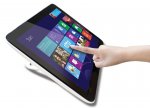
- 19.5" ten point touchscreen
- 4GB Ram
- 1TB hard drive
- Kodi should run smooth
If RemixOS runs on this, then you'll have a huge dual boot Android / Windows tablet.
Top comments
RUN, YOU FOOLS!
All comments (82)
Reviews are limited in quantity and generally underwhelming -
http://www.freemans.com/products/cello-20-ins-touch-all-in-one-pc-aio101/_/A-51X007_
I'll leave others to find read the 3 similar reviews on Amazon.
A few power cycles will maximise it's endurance.
It's certainly not a device for a power user but for a large, touchscreen, portable device with Microsoft Windows, it'll be just fine for Kodi, web browsing and office applications.
There nothing else like it in this price range that runs Windows.
The size? :confused:
RUN, YOU FOOLS!
How much are they going for?
http://www.hotukdeals.com/deals/hp-slate-aio-17-199-from-hp-2459584#post28161455
is similarly priced but only runs Android and is smaller.
With the Cello, install RemixOS and you'll have two large portable PC's in one.
All in One PC's usually are just mains powered.
http://www.celloelectronics.com/products/product_overview/251/AIO101
Is that one any better??? £20 more but it's Packard Bell plus has dedicated GFX
Looking for something BIG for my dad to use as he's partially sighted, preff dual O.S, decent too as if it's slow or just rubbish he'd get confused.
this is a lot less money (not touch screen), is it basically the same?
It has a built in battery, to its portable and the touchscreen means you don't need to carry a keyboard and mouse...
My kitchen diner is an awkward layout so you can't fit a screen anywhere that you can watch when prepping food & doing the dishes, so having a kodi screen this big linked to the mysql dB the others are would be ace.
Have some heat.
Regarding Cello as a company, it looks like this is more of a one-off product to test the market, so don't expect too much in the way of support (even their product page is basic).
To be honest, at this price is not really a big deal to crack it open and have a look inside to see if it'll take an SSD.
Seriously though, this should be handy for me watching the Euro Championships in my garage where I have no TV aerial. Just need to get my wi-fi booster out.
Yoshi please will you let me know if you manage to get an SSD drive in it !!
Tried F9 and F12 key press during boot using a wired USB keyboard and... Nothing.
Only really got it hoping to dual boot so am gutted :disappointed:
If anyone gets RemixOS working, let me know.
Also, the keyboard and mouse are horrible pieces of crap, but no big deal.
Do you have windows 10 running on yours and did you notice any speed difference with the upgrade.
Also did you remove any bloatware from yours and how is the battery life ??
Sorry for pestering
It's more of a grab and go device that you prop up on a table, desk or slant on the bed.
Strange, just checked on Intel website and it states it has a 64 bit instruction set. Any clues? Could be a bios setting?
Ours is spot on and does exactly what we need it for: A portable, huge screen media player (Kodi, YouTube, films and music off USB sticks, Hard drives, USB Blu-ray player).
Easily handles Microsoft Office and ideal for small training rooms Inc. PowerPoint presentations.
Added bonus, it charges our mobile phones and power banks.
Only thing now is to get dual boot Android working.... the guy's at XDA are going to be useful achieving this.
Might pop it in the back of our van at some point, connect to the bluetooth sound system and enjoy a road trip this summer.
Even found a 19" neoprene case at B&M (clearance item) that fits perfectly.
Cool product that works for us.
Its not the fastest thing in the world but its okay for browsing the internet and streaming music, movies and photos over my home network.
The battery lasts maybe a couple of hours, and it can be a bit slow at times, but i knew what I was getting for the price, and hopefully removing some bloatware will help.
I'd be interested to know, I'm also on windows 10, but not sure what is safe to remove.
It will also depend on what functionality you're using, e.g i'm guessing if you've elected to sync your data to the cloud, OneDrive might be useful.
Like i say, my next step is to do some googling for what i can remove, and what I can disable at startup (if anything).
I've popped open the small back cover and can access the battery, ram and WiFi/Bluetooth card, but where's the hard drive?
Really dumb construction, had to disconnect lots of stuff.
Next to do: SSD
I couldn't get windows 10 running stable. did you just stick with windows 8 ??
Downloaded windows 10 on another PC to a USB stick and tried again.... Magic.
Windows 10 works a lot better and love the "project to" feature. Now we can miracast android to this and it's great.
Opening the smaller panel at the back requires removal of the small screws and popping open with a small flat screwdriver using the available indents in the side.
This gives access to the ram and battery.
Opening the rest of the bigger screws and popping open the white back panel beginning at the indents on the outside and working your way all the way round, gives access to the hard drive.
Once our SSD arrives I'll see if the effort was worth it.
Don't make the mistake I made of trying to remove the motherboard and not taking pictures of how it all goes back together.
Not looking forward to reassembly.
All in all, it was well worth the purchase especially as it can be opened and components swapped.
Might put a better WiFi/Bluetooth card in and there is space for a bigger battery.