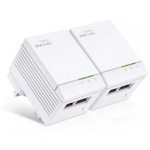
Connect 2 devices simultaneously to a high speed network via the electrical circuit. Ideal for connecting smart TV's, games consoles and computers. Perfect for smooth HD streaming and online chat, plus responsive game play. Works with all Internet Service Providers and routers.
Top comments
brainbug100 to col996s
20 May 1636#10
as long as you lock your front door you should be fine
paradigm
20 May 164#15
Why vote cold just because you (maybe) got a good deal two years ago?
This is below the price this spec of device sells for today. That's a deal. If anything you should be singing their praises for doing such a sterling job for two years. Certainly seems they're good for you if you are prepared to wait on a new spec at this price.
vsh1
20 May 163#14
Good Luck!!
TheUrbis
20 May 163#1
Only 10/100 but twin ports. Not bad for the money, hot!
All comments (60)
TheUrbis
20 May 163#1
Only 10/100 but twin ports. Not bad for the money, hot!
CookieMunzta
20 May 16#2
These are the ones with the ports at the top, too.
Very useful if you have low plug sockets, like I do.
mikedigitales
20 May 16#3
10/100 should be fast enough for these powerlines - good buy thanks for the post :smiley:
noiren
20 May 16#4
Got the single port ones and they're solid, there's a low whine coming out of them but only if you're really close to them other than that no issues, tempted to get the dual port ones now.
col996s
20 May 16#5
How secure are these in a flat?
brainbug100 to col996s
20 May 1636#10
as long as you lock your front door you should be fine
fishmaster
20 May 163#6
You can setup an encryption password on them using the TPLink utility software.
knowitall5
20 May 16#7
it's not a bad deal, arguably just a gimmick selling point with the dual ethernets (even though I would have use for them) but without gigabit the 500mbps is pointless
staffs1959
20 May 16#8
Bought some last week. Mainly to replace a faulty one.. Plugged straight in working in seconds.. I had been looking on ebay for a single unit but people are paying as much when you can have these as a pair plus a guarantee.. 3 years !.
EN1GMA
20 May 16#9
do I need anything else to go with these? ive got devolo one where one unit connects to the super hub and the other which can be placed anywhere giving the signal. so ive got virgin superhub 2 for sownstairs and the devolo connection for upstairs.
moving to a bigger house soon so want to go to a product where it will be cheaper to get more. the devolo ones are expensive.
deeky
20 May 162#11
This ^^ Can anyone explain? Aren't they limited to 100Mbps?
soton26
20 May 16#12
Yes they're limited to 100mbps.
sam_of_london
20 May 16#13
Voted negative. Waiting for av1200 with gigabit lan at this price. Bought these 2 yrs ago at same price from currys. Time the newer ones were cheaper. Were hot 2 yrs ago.
vsh1
20 May 163#14
Good Luck!!
paradigm
20 May 164#15
Why vote cold just because you (maybe) got a good deal two years ago?
This is below the price this spec of device sells for today. That's a deal. If anything you should be singing their praises for doing such a sterling job for two years. Certainly seems they're good for you if you are prepared to wait on a new spec at this price.
jaques_kalis
20 May 16#16
Been at this price for some time now. Brought mine early April
sam_of_london
20 May 16#17
I hope to buy the new ones soon. I do not like antique or vintage electronics. These must have been made 2 yrs ago. In electronics that is a very long time.
pibpob
20 May 162#18
Great - people like you ensure that the rest of us, who understand more about things than how long they've been out for, get the bargains.
spannerzone
20 May 16#19
I dare say the reality is that 500Mbps powerline adaptors will give a connection more likely be around 100 - 150Mbps in many households so the 10/100 ports are unlikely to be a massive restriction. Fine for connecting up a Sky HD box, TV PC, smart TV etc.
Stendhal
20 May 16#20
This might be a silly question but here goes as I'm thinking of buying one of these.
Basically, I already have a Belkin wifi extender which doesn't quite give me the right speed in a particular area of the house. I get 40mb wired, and 20-30mb wireless, but in the blackspot I get 2mb or so.
Given the wifi extender doesn't do anything, why would this be any better? I get that this would be a wired connection, but the two plugs still need to transmit to each other, surely? So if the router can't transmit very well to the wifi extender and to my blackspot, why would this plug fare any differently if I were to place the other end in my blackspot?
smartypant
20 May 16#21
This purely with wire connection nothing to do with wifi connection
This for TV Xbox etc
I have one of these and they are great for smart tv and Xbox in one place.
You put one with router and plug the cable with router and the 2nd where you want to connect it.
Hot for me OP
Siddas
20 May 16#22
I think you have hit the nail on the head there. If your wi-fi extender is connected to your router via a homeplug like these then something is up with it. My guess is that it plugs into your wall but picks up your wi-fi signal and tries to repeat it. The signal to it in the first place may be rubbish and so it is just relaying a rubbish signal. With these if you are hard wiring to the plug in the black-out spot you will get get good speeds. Slight caveat being the distance from your router and the quality of the wiring in your house - but in relaity you will be getting near your max download on your current router download speeds.
Siddas
20 May 16#23
And if you want to be clever look for a wireless router that has AP mode (this means the wireless router acts as just a wi-fi access point) - I am using a Nighthawk R7000 at the moment to do this but you should be able to find cheaper. I plug the R7000 into a homeplug in a wi-fi black spot in AP mode. I now have two wi-fi networks in my house with different names. Eg living room and kitchen. The R7000 connects wired to the homeplug which connects to the main router through the house electric wiring via another homeplug connected to it. It means I get good wi-fi all round the house. You can get apps to seek out the strongest wi-fi and switch accordingly dependant which router is giving the best signal etc.
rob5110
20 May 16#24
If you get the version of these with Wifi (about a tenner more), you can match it to your wifi name automatically so you only have one wifi network throughout your house. They work well and I'd recommend them. This eliminates the need for a separate AP and works in seconds, with almost no setup, assuming you have WPS on your router.
Stendhal
20 May 16#25
Thanks for the reply.
I just had a lightbulb moment and realised that the two plugs don't connect to each other wirelessly, they connect to each other through electrical wiring. That makes a lot more sense. I might give one of these a whirl, the only problem being having to then use my laptop with a wired connect in the blackspot.
Is there anyway to get something like this, but have the blackspot plug become a wifi hotspot?
EDIT: that's what you mean about the wireless AP isn't it? So if I bought a router capable of being an access point, connected that to the plug in my blackspot, then I could have a new wifi hotspot. Interesting!
Second edit: That's exactly what I need I think rob! Can you post a link?
Freddy5150
20 May 16#26
excellent find. thanks for sharing. heat from me
EN1GMA
20 May 161#27
can i use these to extend the range of a vm superhub as oppose to having a separate wife network?
EN1GMA
20 May 161#28
I so wish i could understand what you meant :laughing:
deeky
20 May 16#29
This will extend your superhub as far as your domestic wiring reaches. Like having a long ethernet cable, only without the ethernet cable. Is that what you mean? Sorry if I'm missing your point and I'm trying to teach granny to suck eggs :laughing:
EN1GMA
20 May 16#30
Hey deeks. I've got a devolo powerline adapter but I use them as a separate WiFi. So I plug the devolo router in the socket connecting it to the super hub, then take the unit with the WiFi and ethernet ports and plug it upstairs. So I get two separate WiFi connections. How would this product extend my super hub connection as opposed to what I've got and create 2 separate WiFi connections?
Have I just confused you? :laughing:
daiswans
20 May 16#31
Already got a BT pair. Can these be added around house or does one of these need to be direct Ethernet to my hub like the existing BT one I have?
EN1GMA
20 May 16#32
Do you not have a separate unit which connects to the main router and then these connect to that?
If not, how do these connect to give Internet access?
deeky
20 May 16#33
I'm ok till people bring wifi into the powerline equation :smiley: I just see these powerlines as ways of extending your ethernet without ethernet cables.
deathtrap3000
20 May 161#34
They come as a pair. One end connects to a router or switch and the other end connects to your devices or another router or switch.
DeejayAJ
20 May 16#35
I have these and can only get them to work with one cable plugged in. Maybe I got a defective set, but a cheap ethernet switch works great for more ports if anyone has the same issue.
loadsavmoney
20 May 16#36
but what about the back door and the windows?
SOMEONE's :confused: after a free pair of TP-LINK 500Mbps Powerlines
dragonline77
21 May 16#37
is this worth it for someone with Virgin 200mbps? Our hub3.0 (modem mode) is connected to an Asus rt n66u router in the cellar but I use the laptop on my desk in the converted loft don't know if this is worth
CrazyBob
21 May 16#38
Just what I need, thanks OP
whitey6272
21 May 16#39
I don't understand what people mean by 10/100? If they are 500mbps literally about 5% of uk has over 500mbps speeds
bally12345
21 May 16#40
Sorry but your question makes no sense. I am assuming you mean you are using your laptop in the loft over WiFi? In which case you could put one of these in your cellar and connect an ethernet cable from the Asus router to it, then plug the other one in the loft and connect ethernet cable to laptop. Bingo you have a wired connection and a spare port for something else in the loft.
rob5110
21 May 161#41
No problem - this is what I mean - https://www.amazon.co.uk/TP-LINK-TL-WPA4220KIT-Powerline-Configuration-Smartphone/dp/B00DHB2T44.
So one goes into a plug socket next to your router, a cable goes from router into the non-wifi powerline, then you plug the wifi one into another socket, upstairs\your bedroom\wherever you want a strong wifi signal and then you have wifi at a very good speed. You can optionally then press the WPS button on your router, and press the button on the wifi extender, and it matches your wifi name and password, so you have essentially one large single wifi network throughout your house. I have it and it works perfectly.
Your home wiring basically acts like an ethernet cable.
That's what I want with mine. What do I press on the superhub and my devolo powerline unit to make the powerline have the same name as the superhub?
ianhalling
21 May 16#43
Using these will give you a DIRECT connection to your device via ethernet connections for a better faster more stable throughput of data. Furthermore with 2 ethernet ports , 2 ethernet devices can be connected, for example with most modern households, the smart TV as well as a set-top box - Brilliant ! As a PC Technician I install many of these and they are fast enough and reliable for most people at a very reasonable price WITH a manufacturer 3-year guarantee AND Argos even provide a free technical support telephone helpline if any probs - it's that simple !
ianhalling
21 May 16#44
If using Devolos, just download the Devolo Cockpit app or software to a laptop or Mac and configure from there - it's very simple to set it up directly from the Cockpit Software when connecting a laptop to an adapter. Free telephone technical support by Devolo also.
EN1GMA
21 May 16#45
Thanks for the response. It works fine as a separate WiFi point. So at the moment I have a superhub signal and the devolo signal. What I want to do is convert the devolo signal and extend the superhub signal via the devolo.
Undisclosed2
21 May 16#46
Cheers OP. Decent price, been after some for a while! :smiley:
gimmeDdeal
21 May 16#47
Sorry if this is a stupid question but with one plug connected to the router, what would you use the second port on that plug for?
Or do you make 2 connections from the router to the plug so you have 2 connections on other plug?
wilky67
21 May 16#48
I have these, but the single port, fantastic, that good , I've ordered these too.
joncfc
21 May 16#49
These work fine until they lose connection. in my case I have to clamber underneath the PC table and restart the things. chances are it's something to do with the wiring of my flat but it is quite irritating when it happens.
Kmcmahail
21 May 16#50
Looks good but wanting wifi ones
pibpob
21 May 16#51
Think of the being connected in parallel; you can connect the spare one at the router end to any other device, such as a PC or set-top box, as you can with both at the far end.
pibpob
21 May 16#52
As these are incapable of transmitting more than 100Mbits/sec (due to their 100Mbits/sec ports), you will be unable to use the full bandwidth you are paying for. I'd bite the bullet and put in a real cable so that you can relocate your expensive router to somewhere more sensible than the cellar.
wilky67
21 May 16#53
Also on primenow, same price £22.99, ordered from Argos to pick up in 4 days, won't bother , as I've primenow, delivered in 2 hours, even better .
allginger
21 May 16#54
Thanks ordered from Amazon too
mikedigitales
21 May 161#55
Picked mine up this morning and have just set them up (took 5 mins) - went from the ols skool 200 powerline adaptors to these that are 500. Real world speed increase - I've gone from 5 or 6MB/s to 10MB/s when moving files from PC-PC (or server) using Windows. Duel ethernet port has meant I can get rid of a switch under the desk too :smiley: Also they are very small compared to the old ones. I've also found the old BT provided 200 adapters are happy to join the network still and don't seem to slow the new ones down.
ANewDay
21 May 16#56
How does this work? You plug it in the socket and boom internet available (wired connection)?
richardredvers
21 May 16#57
I have the 300mb.Works perfectly using your mains electric to carry signals to other rooms,computer.I will upgrade to these though as 500mbs may be faster.Also dual ethernet poets much more useful.Voted hot.Thanks.
minsx
22 May 16#58
We just bought one from amazon (sagemcom) that has two ports, powerline and wifi extender for 15 quid. i think it was the 300mbps option. getting it tomorrow, love prime!
I already have BT powerline adaptors at home. One connected to my Virgin superhub and the other to a network switch but I'd like to extend wired connections to another couple of rooms. What are the chances of these working with my current BT units, ie I leave one BT unit connected to the hub and the second BT unit where it is and plug these in sockets in other rooms.
mjrolfe
21 Jun 16#60
Am in the same position as yourself, did you try them?

![Fresh Breakfast Meat Box (Using code) @ Campbells Meat [Haggis / Lorne Sausage / Bacon / Black Pudding & More]](/images/topics/208684_1.jpg)




































![[Xbox One] Q. u. b. e: Director's Cut on Deals with Gold](/images/topics/208716_1.jpg)


















Opening post
Top comments
This is below the price this spec of device sells for today. That's a deal. If anything you should be singing their praises for doing such a sterling job for two years. Certainly seems they're good for you if you are prepared to wait on a new spec at this price.
All comments (60)
Very useful if you have low plug sockets, like I do.
moving to a bigger house soon so want to go to a product where it will be cheaper to get more. the devolo ones are expensive.
This is below the price this spec of device sells for today. That's a deal. If anything you should be singing their praises for doing such a sterling job for two years. Certainly seems they're good for you if you are prepared to wait on a new spec at this price.
Basically, I already have a Belkin wifi extender which doesn't quite give me the right speed in a particular area of the house. I get 40mb wired, and 20-30mb wireless, but in the blackspot I get 2mb or so.
Given the wifi extender doesn't do anything, why would this be any better? I get that this would be a wired connection, but the two plugs still need to transmit to each other, surely? So if the router can't transmit very well to the wifi extender and to my blackspot, why would this plug fare any differently if I were to place the other end in my blackspot?
This for TV Xbox etc
I have one of these and they are great for smart tv and Xbox in one place.
You put one with router and plug the cable with router and the 2nd where you want to connect it.
Hot for me OP
I just had a lightbulb moment and realised that the two plugs don't connect to each other wirelessly, they connect to each other through electrical wiring. That makes a lot more sense. I might give one of these a whirl, the only problem being having to then use my laptop with a wired connect in the blackspot.
Is there anyway to get something like this, but have the blackspot plug become a wifi hotspot?
EDIT: that's what you mean about the wireless AP isn't it? So if I bought a router capable of being an access point, connected that to the plug in my blackspot, then I could have a new wifi hotspot. Interesting!
Second edit: That's exactly what I need I think rob! Can you post a link?
Have I just confused you? :laughing:
If not, how do these connect to give Internet access?
I'm ok till people bring wifi into the powerline equation :smiley: I just see these powerlines as ways of extending your ethernet without ethernet cables.
SOMEONE's :confused: after a free pair of TP-LINK 500Mbps Powerlines
So one goes into a plug socket next to your router, a cable goes from router into the non-wifi powerline, then you plug the wifi one into another socket, upstairs\your bedroom\wherever you want a strong wifi signal and then you have wifi at a very good speed. You can optionally then press the WPS button on your router, and press the button on the wifi extender, and it matches your wifi name and password, so you have essentially one large single wifi network throughout your house. I have it and it works perfectly.
Your home wiring basically acts like an ethernet cable.
I got mine from B&Q where they are only £25 at the moment, if you can find stock. I got mine last week, so they do have some somewhere..
http://www.diy.com/departments/tp-link-2-wireless-extender-kit/806354_BQ.prd
Or do you make 2 connections from the router to the plug so you have 2 connections on other plug?
https://www.amazon.co.uk/Sagemcom-Plug-502W-Powerline-Extender/dp/B00GRRGGMQ?ie=UTF8&ref_=pe_385721_133997141_TE_item
Also on HUKD though so i'll shut up now.