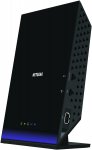
Enjoy fast Wi-Fi speeds for better performance. This AC1600 DSL modem router provides a fast VDSL modem for fibre broadband and also works with ADSL connections.
Compatible with AC Wi-Fi devices and backward compatible with 802.11 a/b/g/n devices, this VDSL/ADSL modem router enables HD streaming throughout your home. With up to 300 + 1300 Mbps and simultaneous dual band Wi-Fi technology, it avoids wireless interference, ensuring top Wi-Fi speeds and reliable connections.
This is a great router. I'm currently in Belgium and using the OpenVPN functionality to allow my kids to watch iPlayer in Europe and access films/music/UK Netflix on the network at home over a public KPN hotspot.
This router/modem never crashes, is fast, rock solid, looks nice, excellent range, guest networks and parental controls. I use with PlusNet with 20Mbps upload (you'll need a decent upload speed for VPN if that interests you). Has a web app too.
I first started working in tech in 1985 in the days of acoustic couplers, 74 logic and 8" floppies and this is the best router I've ever used and the only router/modem where I haven't wished for a firmware update for years. I can't recommend highly enough. It hasn't got lots of fake aerials, etc. but it is superb.
Latest comments (27)
ddaann_99
1 Jan 17#27
Expired
tee_tee
7 Jun 16#26
Expired
raggers
6 Jun 16#25
I've just ordered the SSE fibre deal. Would this literally just be plug and play?
003hungryboys
3 Jun 16#23
Does anyone know if I can use this with BT tv or whether I need to stick to a home hub? Many thanks
tee_tee to 003hungryboys
4 Jun 16#24
Yes it will work with bt tv.
zomg
1 Jun 161#22
Yes, it is a straight swap. All you'll need to do is enter your BT credentials when setting it up. This is
will this require much setting up for talk talk fibre?
jimunix
31 May 161#20
I would quite like to replace th HH5 but one question. With HH5, BT will occasionally update the firmware or, for all I know, log in and do some necessary maintainance. Will Netgear do the same?
You will need to extract the hidden username & password from your existing Sky router, as you will need it when setting up the D6400.
Phil1980
31 May 16#18
Just ordered one of these to see how it compares to my HomeHub5 which is pretty unreliable
jabranali
31 May 16#17
Hey guys, would be interested in your feedback on using these in a large house (~4000sqft 4 storey)
At the moment there is a BT Home hub 5 in the front reception room, the family usually sit in the dining room/lounge at the rear of the house so I connected up another router using ethernet and a hole that was conveniently in the wall used for Sky Digital. There are also two wifi extenders (not powerline) in order to get a signal at the end of the garden and also in the upstairs bedrooms. I am thinking of buying two of these to replace the two routers I already have, using one just as a wireless access point and the other as a modem / wireless access point. I think there is a reason I didn't use powerline for the extenders (perhaps wiring, I don't remember)
The problem at the moment is that in the front reception room you get around 40Mbps over WiFi but in the dining room you get approx 12-15Mbps, obviously with the number of devices in the house and also due to the fact that we are paying for BT Infinity I would like to improve the speed in the dining room.
musical
31 May 163#16
This is a great router. I'm currently in Belgium and using the OpenVPN functionality to allow my kids to watch iPlayer in Europe and access films/music/UK Netflix on the network at home over a public KPN hotspot.
This router/modem never crashes, is fast, rock solid, looks nice, excellent range, guest networks and parental controls. I use with PlusNet with 20Mbps upload (you'll need a decent upload speed for VPN if that interests you). Has a web app too.
I first started working in tech in 1985 in the days of acoustic couplers, 74 logic and 8" floppies and this is the best router I've ever used and the only router/modem where I haven't wished for a firmware update for years. I can't recommend highly enough. It hasn't got lots of fake aerials, etc. but it is superb.
sibeer
31 May 161#15
You could get any of the non-modem routers if you have the white box. They are actually very reliable and it is the hubs that are poor in my experience
sijones855
31 May 16#14
Tempted by this for our small business, where I'm responsible for tech matters, amongst other things. We're on BT Fibreoptic broadband.
Currently we have a white modem box with a black sort-of-dish-shaped business hub router connected to it. Then from there it's a combo of wifi & ethernet cables. I have to reboot these gadgets at least once a week to keep a connection, haven't established if it's the modem or router (or both) at fault.
Looks like this Netgear device would replace both at a stroke - could I expect it to be better than the combo of 2 BT-provided boxes that I'm currently using? Thanks for any advice!
jjay
31 May 16#13
Anyone know if this will work with Sky Fibre? I currently have an old sky supplied router paired with a bt openreach modem.
st8mike
31 May 16#12
Anything is better than a home hub !
delsaber
31 May 16#11
I replaced my BT home hub with this a year ago and it's brilliant! Highly recommended!
skip112
31 May 161#10
Hi forgive my lack of tech know how... but is this a straight swap get rid of the HH5 and plug+play this nothing further needed. Any instructions would be appreciated
Gordonator
31 May 16#9
Not true at all; I'd always go for a better router over a repeater (unless of course the router has already been upgraded).
cigbunt
31 May 16#8
can the fifth internet port be used as normal gigabit port
ollie87
31 May 161#7
You'd be better off with a repeater if it's a range issue.
cigbunt
31 May 16#6
would be nice to get rid of the bt modem!
MazingerZ
31 May 16#5
Can anyone recommend me a router for my Virgin broadband? my one hasn't dropped connection for a long time but occasionally signal is weak in garden when it shouldn't be since the router is on a shelf near the edge of the house. Settings don't change much and plus it looks pretty ugly.
Nuka
31 May 16#4
Netgear website states usb 2.0 ports and amazon usb 3.0?
mrcheesecake
30 May 16#3
Yes this will be much better than the HH5. Recently replaced mine with the Nighthawk X6 and it is fast, but more importantly, hasn't crashed or lost the connection once in over 3 months.
This having the built in modem just makes it easier for you, plug into the wall and phone line, and away you go.
JJMPSP
30 May 16#2
Haven't looked at the home hub 5 but I'd say yes, this is a very high spec router for the price!

![Fresh Breakfast Meat Box (Using code) @ Campbells Meat [Haggis / Lorne Sausage / Bacon / Black Pudding & More]](/images/topics/208684_1.jpg)




































![[Xbox One] Q. u. b. e: Director's Cut on Deals with Gold](/images/topics/208716_1.jpg)


















Opening post
Compatible with AC Wi-Fi devices and backward compatible with 802.11 a/b/g/n devices, this VDSL/ADSL modem router enables HD streaming throughout your home. With up to 300 + 1300 Mbps and simultaneous dual band Wi-Fi technology, it avoids wireless interference, ensuring top Wi-Fi speeds and reliable connections.
This is the D6400 model.
Currently £128.61 at BT Shop
http://www.shop.bt.com/products/netgear-d6400-100uks-ac1600-dual-band-mbps-wireless-vdsl-adsl-router-d6400-100uks-B82G.html?utm_source=google&utm_medium=ppc%20product%20search&utm_campaign=PLA%20|%20Shopping%20|%20All%20Products&gclid=CjwKEAjwya-6BRDR3p6FuY2-u3MSJAD1paxTB_YK5j6blOwLJ49lspDX19JQemcMTQqe9wOTRYPyRhoCYPnw_wcB
Top comments
This router/modem never crashes, is fast, rock solid, looks nice, excellent range, guest networks and parental controls. I use with PlusNet with 20Mbps upload (you'll need a decent upload speed for VPN if that interests you). Has a web app too.
I first started working in tech in 1985 in the days of acoustic couplers, 74 logic and 8" floppies and this is the best router I've ever used and the only router/modem where I haven't wished for a firmware update for years. I can't recommend highly enough. It hasn't got lots of fake aerials, etc. but it is superb.
Latest comments (27)
user: [email protected]
password: BT
for all standard domestic ADSL broadband users.
Link to Netgear user forum
You will need to extract the hidden username & password from your existing Sky router, as you will need it when setting up the D6400.
At the moment there is a BT Home hub 5 in the front reception room, the family usually sit in the dining room/lounge at the rear of the house so I connected up another router using ethernet and a hole that was conveniently in the wall used for Sky Digital. There are also two wifi extenders (not powerline) in order to get a signal at the end of the garden and also in the upstairs bedrooms. I am thinking of buying two of these to replace the two routers I already have, using one just as a wireless access point and the other as a modem / wireless access point. I think there is a reason I didn't use powerline for the extenders (perhaps wiring, I don't remember)
The problem at the moment is that in the front reception room you get around 40Mbps over WiFi but in the dining room you get approx 12-15Mbps, obviously with the number of devices in the house and also due to the fact that we are paying for BT Infinity I would like to improve the speed in the dining room.
This router/modem never crashes, is fast, rock solid, looks nice, excellent range, guest networks and parental controls. I use with PlusNet with 20Mbps upload (you'll need a decent upload speed for VPN if that interests you). Has a web app too.
I first started working in tech in 1985 in the days of acoustic couplers, 74 logic and 8" floppies and this is the best router I've ever used and the only router/modem where I haven't wished for a firmware update for years. I can't recommend highly enough. It hasn't got lots of fake aerials, etc. but it is superb.
Currently we have a white modem box with a black sort-of-dish-shaped business hub router connected to it. Then from there it's a combo of wifi & ethernet cables. I have to reboot these gadgets at least once a week to keep a connection, haven't established if it's the modem or router (or both) at fault.
Looks like this Netgear device would replace both at a stroke - could I expect it to be better than the combo of 2 BT-provided boxes that I'm currently using? Thanks for any advice!
This having the built in modem just makes it easier for you, plug into the wall and phone line, and away you go.