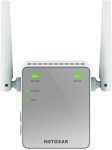
Say goodbye to Wi-Fi dead zones. Convenient, discreet and easy to install, extended Wi-Fi coverage is just an outlet away with this essentials edition extender. Boost your Wi-Fi for mobile devices and connect a wired device such as Smart TVs or game consoles.
- Wi-Fi up to 300 Mbps
- External antennas for better performance
- Convenient wall-plug design
- Works with any Wi-Fi router
- Extend Internet access for wireless devices throughout your home
- Fast Ethernet port to connect home A/V devices to the network
Now £14.99 for non-prime too.
- _g_
Top comments
themadgoose
24 May 163#10
Posting this using this, courtesy of next doors internet.
HOT!
All comments (34)
startimeash
24 May 161#1
Have a couple of TP-Link versions of this and have had mixed success with them. If you have a fairly clear line of sight then they work fine, but if there's a fair amount of material between the main router and the extender then I've found performance to be patchy. For example, I have two currently working to relay the signal down to my office in the garden and they perform very well. On the other hand, I have another relaying the signal upstairs in the house and coverage and connection to the router downstairs is patchy.
That said, these are a great price! Might as well give them a go, and then return them if they're no good...
steviep43
24 May 16#2
Is this just a repeater or can you plug it into a powerline using the ethernet cable and use it as a second access point elsewhere in the house?
amuseboy
24 May 16#3
yes I think so. So extending your wifi signal.
pafelin
24 May 16#4
cheap and good
pafelin
24 May 16#5
why my comment doesn't appear in the app.
hello55060
24 May 16#6
It can be used as an access point as well, so yes you can plug in an Ethernet and set it up as a new WiFi spot.
You can also use this as an access point. You would connect it to your router using an ethernet cable and accessing your network/internet through wireless connection.
BlackCloud
24 May 16#9
Anyone know which one plugs in to a powerline for a Netgear AV500?
themadgoose
24 May 163#10
Posting this using this, courtesy of next doors internet.
HOT!
taker920
24 May 162#11
It refused to work as an access point for me via powerlines. I don't think it's designed to be used like that
abzy7
24 May 16#12
Heat :smiley:
Gollywood
24 May 16#13
I'm pretty certain that this doesn't work via Powerline.
Its just uses you existing WiFi and supposedly boosts it.
BenjyGreen
24 May 16#14
I bought this exact model from Amazon last week and had absolutely no success in getting it working as a range extender.
The wizard worked up until the last stage of the process where I got "404 - file not found issues" on the penultimate wizard screen; the separate network is created and my computersI can see and connect to the new network but none of them can get onto the internet once connected.
I googled the error and other people have recently reported it on Netgear forums but with no resolution provided. Spoke to Netgear - absolutely no use at all.
I returned it to Amazon and bought a TP-Link extender which worked out of the box.
I'd avoid this unless you like spending many frustrating hours next to your router turning it on and off and plugging and unplugging ethernet cables!
Gollywood to BenjyGreen
24 May 16#27
I'm in the process of returning Netgear Powerline adapters. Spent 3 days trying to set it up without any joy.
wildwayz
24 May 16#15
I'm in the process of RMA'ing mine that i've had for 4 months. It now 'sparks' when connected to a power socket (before you ask, our house was re-wired end of last year and adhere's to all safety standards) - if pushed all the way it, it doesn't even power on - you have to 'wiggle' it where you hear static and it comes on.
It was located in an area where it wouldn't get knocked.
I also found it to be a bit... dodgy with its range; the room next to the router gives it full strength but anything further away, drops to 2 bars. No, no aluminium lined walls or thick walls - a 1950's semi.
Can be awkward to set up - but to be honest, I work with routers, switches, extenders all day so I know my way around them.
I'd probably avoid this one.
fishmaster
24 May 161#16
Excellent to see Netgear stuff as cheap as TPLink. TPLink is crap, Netgear been doing this stuff for years and properly. Buy Netgear, don't buy TPLink, simple.
man these are great we have three in a rambling period house with thick walls..it works like a dream
Im out the back now with it plugged into an extender...blistering!
Bejeezus
24 May 161#20
What a mess Amazon has become.. mixing up different products and reviews on the same page.
In case anyone else was wondering this is the 2.4 ghz version not the dual version.
OrribleHarry
24 May 16#21
Stay away from repeaters like these they are terrible. Only ones that are any good are access points.
OrribleHarry
24 May 16#22
No you can't the socket is to connect a wired device to Wi-Fi.
sadman120
24 May 16#23
bought this for £24.99 not long ago and returned it, halfs the speed even when connecting through Ethernet
OrribleHarry
24 May 161#24
They are terrible! Just use an old router in access point mode!
sadman120
24 May 161#25
just bought a router & converted it through dd-wrt
OrribleHarry
24 May 16#26
Most support it out of the box. But yeah DD-Wrt does too which is excellent!
BlackCloud
24 May 16#28
I initially struggled with my Netgear AV500 /+ powerline setup, couldn't get the hang of the security button thing, messing for ages... but once I got it, no problem adding 4 adapters. Works in all sockets of the house.
Heavyweight
24 May 16#29
TPLink has been manufacturing network products for as long as Netgear, in fact they are bigger then Netgear worldwide so must be doing something right. Personally never used their stuff as its not much cheaper then Netgear which is adequate for a home lab.
The mention of Repeaters or Poweline make network guys faceplam. Please avoid
You can get a Meraki AP for free for attending one of their seminars. Much better kit then anything Netgear or TPLink make. If theres one thing the Chinese cant do its a GUI
fishmaster
24 May 16#30
Couple points here:
1.Attending a seminar equals traveling cost and time, neither of which are worth getting a free AP for.
2. Many people find a repeater is adequate for the job and often the only solution due to physical location.
Heavyweight
24 May 16#31
1. Seminar is online, takes 45 minutes and you don't even have to watch. Just call your rep and they send the kit next day. I have an Access Point, Firewall and Switch (the FW is excellent the others are ok). They made back their marketing budget when I bought 30 APs .
2. Very true - ignorance is bliss :smiley:
_g_
25 May 16#32
Now £14.99 for non-prime too.
BargainHunt101
25 May 16#33
Thanks for posting this. Had been looking into getting a wifi extender for a while but was confused as to which to buy.
I ordered this yesterday and it arrived today. It took me about 10 minutes to read instructions and setup and it's working really well. I should have bought one ages ago as it would have saved me loads on my mobile data charges.
Highly recommended!
FYI I am using it to extend my virgin media hub the one extender recommended on their website is about £50 so this is a real bargain for £15.
stevej1976
25 May 16#34
Bought this to extend my VM wifi into my extension which has poor strength.
Unboxed it, plugged it in next to my VM modem and pressed the WPS button on the Netgear then the Modem. It's was paired up in seconds :smiley:
I then moved it to my kitchen and plugged it in... Result! full wifi signal in the extension, yes it's marginally slower than the VM modem but it works great for streaming Netflix etc.

![Fresh Breakfast Meat Box (Using code) @ Campbells Meat [Haggis / Lorne Sausage / Bacon / Black Pudding & More]](/images/topics/208684_1.jpg)




































![[Xbox One] Q. u. b. e: Director's Cut on Deals with Gold](/images/topics/208716_1.jpg)


















Opening post
- Wi-Fi up to 300 Mbps
- External antennas for better performance
- Convenient wall-plug design
- Works with any Wi-Fi router
- Extend Internet access for wireless devices throughout your home
- Fast Ethernet port to connect home A/V devices to the network
Now £14.99 for non-prime too.
- _g_
Top comments
HOT!
All comments (34)
That said, these are a great price! Might as well give them a go, and then return them if they're no good...
"Fast Ethernet port, connect a wired device like a Blu-ray player, game console, TV or streaming player to your Wi-Fi network"
HOT!
Its just uses you existing WiFi and supposedly boosts it.
The wizard worked up until the last stage of the process where I got "404 - file not found issues" on the penultimate wizard screen; the separate network is created and my computersI can see and connect to the new network but none of them can get onto the internet once connected.
I googled the error and other people have recently reported it on Netgear forums but with no resolution provided. Spoke to Netgear - absolutely no use at all.
I returned it to Amazon and bought a TP-Link extender which worked out of the box.
I'd avoid this unless you like spending many frustrating hours next to your router turning it on and off and plugging and unplugging ethernet cables!
It was located in an area where it wouldn't get knocked.
I also found it to be a bit... dodgy with its range; the room next to the router gives it full strength but anything further away, drops to 2 bars. No, no aluminium lined walls or thick walls - a 1950's semi.
Can be awkward to set up - but to be honest, I work with routers, switches, extenders all day so I know my way around them.
I'd probably avoid this one.
http://kb.netgear.com/app/answers/detail/a_id/25226/~/ex2700-faqs
Wifi extender : YES
Access point : NO
It works very well and connects to my other unbranded powerline adapters without problem.
Im out the back now with it plugged into an extender...blistering!
In case anyone else was wondering this is the 2.4 ghz version not the dual version.
The mention of Repeaters or Poweline make network guys faceplam. Please avoid
You can get a Meraki AP for free for attending one of their seminars. Much better kit then anything Netgear or TPLink make. If theres one thing the Chinese cant do its a GUI
1.Attending a seminar equals traveling cost and time, neither of which are worth getting a free AP for.
2. Many people find a repeater is adequate for the job and often the only solution due to physical location.
2. Very true - ignorance is bliss :smiley:
I ordered this yesterday and it arrived today. It took me about 10 minutes to read instructions and setup and it's working really well. I should have bought one ages ago as it would have saved me loads on my mobile data charges.
Highly recommended!
FYI I am using it to extend my virgin media hub the one extender recommended on their website is about £50 so this is a real bargain for £15.
Unboxed it, plugged it in next to my VM modem and pressed the WPS button on the Netgear then the Modem. It's was paired up in seconds :smiley:
I then moved it to my kitchen and plugged it in... Result! full wifi signal in the extension, yes it's marginally slower than the VM modem but it works great for streaming Netflix etc.