UPDATE - now available directly on amazon too - https://www.hotukdeals.com/deals/amazon-fire-tv-stick-with-voice-remote-34-99-amazon-2451950
Top comments
JoeBoy88
22 May 1621#100
AAARRRRGH, I was wondering why mine came with an eye patch, peg leg and a Parrot.
chellexxx
22 May 1616#17
For anyone New to this product and wondering - This is by far one of the or the best value Tv stick out there in my opinion. It has many catch up apps, Iplayer,channel 5, e4, Tvplayer for liveTv and can sub for extra channels for just £5 if u choose to do so, Netflix, prime, Youtube, Plex etc as well as gaming ( but id advise getting the Box version if you want the best experience with gaming from it and more storage. We even Stream Our Pc games to the Tv using the Moonlight App and they play brilliantly.
kissmyfurrybutt
22 May 1610#2
Only worth getting if you load kodi on it
fishmaster
22 May 167#6
Indeed Mobdro wastes Kodi for live TV streams. Kodi is better for movies but nothing about Kodi is find a film and play it easy, Kodi is an exercise in frustration more often than not. I never use Kodi at all, just no need for it in my opinion.
The Firestick also has iPlayer, ITV Hub, Channel 4 and 5 player apps as well. So everything is covered for terrestrial catch up.
All comments (205)
937666
22 May 162#1
kissmyfurrybutt
22 May 1610#2
Only worth getting if you load kodi on it
nitro228 to kissmyfurrybutt
23 May 16#138
Kodi is absolute junk now. Pretty much dead compared to what it used to be. 3 years ago in the days of xbmc it was brilliant. Now everyone is using it finding decent addons/working streams has become too much of a ballache. It's a real shame but was inevitable once hardware like the fire stick became available.
pintman
22 May 16#3
Bought one yesterday, the normal one without voice control for £35!! :disappointed:
fishmaster
22 May 167#4
Definitely not true. Sideload Mobdro on it. Kodi is a piece of junk anyway.
coventgamer
22 May 162#5
more on kodi than mobdro in terms of movies and tv shows
fishmaster
22 May 167#6
Indeed Mobdro wastes Kodi for live TV streams. Kodi is better for movies but nothing about Kodi is find a film and play it easy, Kodi is an exercise in frustration more often than not. I never use Kodi at all, just no need for it in my opinion.
The Firestick also has iPlayer, ITV Hub, Channel 4 and 5 player apps as well. So everything is covered for terrestrial catch up.
DazLFC
22 May 161#7
is it easy to load kodi or mobdro onto this stick?
kroe9 to DazLFC
22 May 163#8
It's easy to do. All the instructions are on tvaddons. Be warned though. My fire stick has just been bricked, Amazon told me it's because of kodi. Although it's not a massive outlay for the stick and I'm not aware of any of my friends sticks doing the same, so way up the risk/reward.
JoeBoy88
22 May 16#9
Are Amazon doing anything about it?
fishmaster
22 May 162#10
Kodi is easy. Mobdro is difficult, although not that difficult. With Mobdro you need to install ES File Explorer from the Amazon store, download the Mobdro apk from Mobdro site and upload it to Google Drive or similar cloud service, then login to the cloud service using ES File Explorer and install the .apk. Once you've used Mobdro you won't touch Kodi again for live streams, leagues ahead of Kodi in that respect.
one2omg
22 May 161#11
If all you want to do is use Kodi or Mobdro on it, you'd be far far better off spending an extra £10 on this:
sorry if this is a stupid question, can I stream youtube to this?
kasam1640 to tomjwalker
22 May 16#94
yes
lisaenglish71
22 May 16#13
TV in bedroom with no aerial, could I use this to watch iplayer/catch up by wifi??
stevenhp1987
22 May 162#14
Yes
Yes
If you have android SDK installed, you can upload any APK directly via adb.
nut14
22 May 16#15
YouTube yes, catch up most of them, and if you have a android device sideloading is easy
nut14
22 May 162#16
if buying for modbro and kodi, save money and buy the no voice version for £30
chellexxx
22 May 1616#17
For anyone New to this product and wondering - This is by far one of the or the best value Tv stick out there in my opinion. It has many catch up apps, Iplayer,channel 5, e4, Tvplayer for liveTv and can sub for extra channels for just £5 if u choose to do so, Netflix, prime, Youtube, Plex etc as well as gaming ( but id advise getting the Box version if you want the best experience with gaming from it and more storage. We even Stream Our Pc games to the Tv using the Moonlight App and they play brilliantly.
quakerphil
22 May 16#18
Has it been bricked or is it just Fire Starter blocked?
sam_of_london
22 May 162#19
Fire TV stick degrades picture due to hardware limitations . Better buy fire TV box or nvidia tv box
houston26 to sam_of_london
22 May 161#33
no, it doesn't. hardware doesn't support 4k but plays everything else perfectly.
quakerphil
22 May 16#20
Both being more expensive of course?
Gallois
22 May 16#21
I have both the box and the stick and I've definitely not noticed any picture degradation on either 1080p screen I run them on. The stick just runs a bit slower.
sam_of_london to Gallois
22 May 16#24
Slow picture = degraded picture. Lots of buffering action
Gallois
22 May 162#22
I've also been running both the box and stick from the start as I got them cheap with my prime account. Kodi is brilliant on both. You don't need fire starter anymore since side loaded apps now appear in recents. For easy updating I'd recommend ES file explorer. Once you get used to it it's a very simple operation. No PC required. Voice remote is far better build quality than non voice remote but both are perfectly acceptable and work equally well. I hardly ever use the voice function but the voice remote feels better in my hand.
swapnilkashyap to Gallois
23 May 16#121
I have a prime account, how can I get the box cheaper ?
anthonynsinclair
22 May 162#23
How does this compare to the Fire HD 4K Amazon box?m for Kodi? I have the box and Kodi runs like a dream
shardie886
22 May 161#25
As soon as I opened the thread i knew people would want mobdro and kodi on their fire TV sticks the easy way to do this if you have an android phone install the app on their then use Apps2Fire to install app on your fire TV
salsheikh to shardie886
22 May 162#35
this :sunglasses:
coventgamer
22 May 16#26
gonna return mine to amazon. and buy this
GNKelly07
22 May 161#27
I think they mean general navigation is slower on the Stick. If you have decent wifi & a decent stream there should not be buffering or any picture degradation.
ANDYwwww987
22 May 16#28
You can do that with a now TV box under £20
dmm1000
22 May 161#29
Kodi has hundreds of addons - movies / tv shows / music / karaoke / photos / internet radio - while mobdro has ... erm let me see .... how about ....... NONE :smiley:
Godspeed
22 May 161#30
If you're only after catchup and being able to watch live tv channels then pick up a cheap black now tv box and stick tvplayer on it - has all the freeview stuff plus Dave, Yesterday, Quest etc.
People have so many boxes these days due to the nowtv voucher/box packages you might even be able to pick up a box from someone for just the postage :smiley:
houston26
22 May 16#31
don't even need that anymore, thanks to ed file explorer and fire starter.
houston26
22 May 161#32
difficult to brick these, but I know latest Amazon update disabled fire starter. simple fix, update fire starter to latest and keep it as one click of home button. seeing double click loads latest apps now
richardharris3762
22 May 16#34
Kodi is amazing. Install one of the schism builds on it and you pretty much have everything!!
coventgamer
22 May 16#36
adb fire on pc is also an easy way
Toon_army
22 May 16#37
Explain what you mean by bricked? Its impossible they'd do anything because you have Kodi or any other app installed, you're allowed to install any third party app as its your device after all and the options there to turn on developer options.
I've got a pretty popular YouTube channel because of Kodi and nobody's has bricked because of it!
Its more than likely a faulty stick or you've used the wrong plug! My friends lass used her Galaxy s6 plug and fried it due to it being a fast charge plug.
If I were you I'd take the stick back to where you bought it and get a replacement if it won't turn on.
merb0786
22 May 161#38
Amazon should be ashamed. Another company undercuts their own branded product.
delboyd
22 May 16#39
Much easier to just FTP from a local PC via ES than faff with Google Drive uploads I've found.
Joe90_guy
22 May 16#40
There's a silly bug with both the TV Fire Box and Fire Stick. They both normally take their Date/Time settings from your wifi signal. However, for reasons unknown, the date randomly resets itself to 2003! This messes certain programs up (like Kodi for example). The problem is easy enough to fix. You just go to Settings/Reset, the box/stick shuts down and restarts and the date corrects itself...until the next time it happens...and it will! I wish I'd known about this earlier. It would have saved me a lot of hassle.
MSURTY
22 May 161#41
got Amazon to price match , went on chat
BalaNaveen: Though Amazon doesn't price match guarantee, I’ve decided to waive this restriction in appreciation for your valuable business as an exception.
BalaNaveen: Please place the order and let me know and I'll ensure that you're charged £34.99 for it.
*let me know the order #
fishmaster
22 May 16#42
1. Upload .apk to Google Drive
2. Install ES File Explorer
3. Login to Google Drive
4. Install .apk
delboyd
22 May 16#43
1: Keep APK on desktop
2: Install ES Explorer
3: Open FTP client on desktop
4: Transfer
No logins, no hassle!
fishmaster
22 May 163#44
1: Keep APK on desktop
2: Install ES Explorer
3: Install FTP client on desktop
4. Setup FTP client on desktop
5. Open FTP client on desktop
5: Transfer
Sorry if I'm being a pedant, that's actually the steps you require to use FTP setup. Many people reading are tech n00bs and won't have a clue what an FTP server is etc. ES File Explorer will remember the login, so even if you want to transfer an .apk again it's simple.
We're at check here I think, you can use either method.
DazLFC
22 May 16#45
can anyone help me with instructions on how I load kodi onto the stick, just bought one today thanks to this post...Im a bit of a technophobe and worried about damaging the stick or "bricking" it (whatever that means) by installing it wrong
I know a couple of folk who have spent £50-£60+ on "fully loaded" sticks only to find they have stopped working probably due to a software update causing the kodi build to fall over.
Told them to wipe the build and reinstall kodi and only the addons they need. Much easier ( and cheaper) in the long run once you know a few basic steps.
SEO Michael is a good site for most tips (see link in post above! :smile: )
themachman
22 May 162#48
I haven't got a smart TV so this is great for me.Watch catch Up,youtube etc,a decent bit of kit
striker33
22 May 163#49
Or you plebs could just have kodi AND modbro instead of crying about which is best.
As others have said, modbro for live TV, for the most part. However Phoenix streams for sports tend to be quite a bit better usually.
johndavidtanner
22 May 161#50
Perfect, thanks for the heads up...loads in Buxton Argos.
ijw0161
22 May 162#51
Really don't see what the fuss is with Kodi etc. I find it all cheap and tacky looking with poor quality streams. Sold mine on within a few days. OK for someone who has prime I suppose, but the devices are slow to boot and response times are slow. I prefer to download a HD movies and watch sports in top quality like on Acestream
shoota70
22 May 161#52
some people have a problem with the arm bit downloading.. once you have clicked it and it doesn't do anything then scroll down to the 3 dots in the left bottom and click then choose open in browser and then it should be fine =)
rowlystravel
22 May 16#53
That's not how u do it at all. Adbfire > click install apk. Done.
toonsquirel
22 May 161#54
Anyone saying get this for KODI is wasting your money, your paying extra for a remote that doesn't work with Kodi anyway so just save the £5 and get the standard remote.
houston26 to toonsquirel
22 May 16#58
agreed. the voice bit is a waste, better to buy off normal version off prime now and use code to get it for 25.
then if you do wanna use voice, download the fire TV app on your phone and use it that way
devlino to toonsquirel
23 May 16#127
There's always this on the apple site Another 1 !! Hook up 4 u lott get it before it gets taken down!!! Free movies etc
Brought but had to pay online to pick up as wouldnt reserve
ijw0161
22 May 161#56
Where did you bring it to?
delboyd
22 May 161#57
We've been through this, several different methods :stuck_out_tongue:
mergleb
22 May 16#59
Can someone in layman's terms explain what is Kodi (from what I can see it is some software) and why it is such a good thing pleasE?
nut14
22 May 16#60
its a means of accessing all tv shows and movies for free
sambrown88
22 May 16#61
Same
JoeBoy88
22 May 161#62
Just bought one, can anyone link me up to a decent tutorial for installing Kodi.
Thank you.
Geemac
22 May 161#63
They brung it home
mjl87
22 May 16#64
Had one for about a year. Great little addition to your entertainment life. Only issue I have with it is that you can't install browsers to surf the internet. It feels quite limited to the films, music and apps.
Anybody know how I can install a browser on this device?!
ganon
22 May 162#65
Good site for kodi stuff including how to install with pics
Thanks Ganon. Much appreciated.
I heard, we can install Kodi on iPhone without jailbreak, can someone guide please ?
Father Christmas
22 May 161#67
Thanks. Just done that.
Daughter having a meltdown here due to nowtv taking the Disney channel off the entertainment pack. At least this will give her a few more channels.
striker33
22 May 162#68
Already got it, and it's turd. You have to go through about 50 bad streams before you think you've got a good one, then 5 mins later it does nothing but buffer.
Phoenix is a lot more limited but at the very least I can get sky sports when I need it whilst I use a decent link on the laptop.
Jaybeam
22 May 16#69
Is this for online only or in store as well?
Mecoconuts
22 May 163#70
Hmmm....no problem with it here ....but am on Virgin 200mbps. :wink:
Have you turned OFF Parental Control on your service provider ?
...e.g. ...
on Virgin it's called Websafe... online account.....
on Sky it's called Sky Shield...online account....
on BT it's called SmartWizard on Router
on EE it's called Orange Safeguard ....online account...
on TalkTalk it's called Home Safe Security..... online account....
........as Parental Control on ALL ISP's blocks 90% of the streams to the Firestick or TV Box.
Bilj
22 May 16#71
Any chance of Amazon price matching?
tarryboy to Bilj
22 May 16#72
Read comments, someone's already done it. Though I don't know why, Argos, in my opinion, have just as good as Amazon customer service.
Kodi IMHO tends to run best on Windows
So if you want to just try it before buying a box (Stick)
Download it to your PC / Laptop Here
Then once installed follow this guide [Phoenix] to install a good test addon
mergleb
22 May 16#76
Why be a smart ****?
I have tried that but I can't make head nor tail of it.
So Kodi is a piece of software you put onto the Firestick, yes?
So where are the free films coming from? The internet? Or are they just for showing films you have downloaded on your computer?
coventgamer
22 May 16#77
google my friend
mergleb
22 May 16#78
I have tried google - all the pages are too complicated and dont reveal HOW the Firestick gets the films.
What is the simple answer?
I thought this was meant to be a helpful and informed community!? :disappointed:
nut14 to mergleb
22 May 16#92
once kodi is on the stick, you install addons to kodi which then provide links to stream films or tv shows from the Internet. think of it as Netflix amazon prime for free also new cinema release movies
pennyfarthing88 to mergleb
22 May 162#93
Stick your stick in your tv's HDMI let it load with all the Amazon stuff and then go to your computer and follow exactly as per this link..
When you've got ares wizard installed you can download a build.
Open ares wizard on your stick under 'add ons ' and chose any one of the top builds under ' browse builds ' once you have downloaded the build will automatically launch every time you open kodi.
Hope this helps! :wink:
kissmyfurrybutt to mergleb
23 May 16#142
Install kodi then read a tutorial on how to load "The Beast" onto kodi. The tutorials are step by step. YouTube will have plenty of tutorial videos. Definitely worth the effort
Bushes
22 May 16#79
If kodi is your thing then I would avoid all Amazon products. They seem to have an update a month on my fire TV to block the launcher I'm using, God knows why they think I want to use their mess of an interface.
Bushes
22 May 161#80
It's totally illegal, maybe the site doesn't want to encourage that.
Petetobin
22 May 16#81
Think of it as the worlds best Netflix plus you can watch live tv.
the voice control will only work if you have prime or amazon movies/music it does not work on kodi
reviewz
22 May 16#83
so sign in and stop using a launcher :confused:
Bushes
22 May 161#84
I use a launcher because I didn't want to wait for adverts to load for films, TV and other crap I'm never going to watch or use. God help us when '3 old men in cars' starts. It's an ugly interface, and Amazon preventing a suitable alternative from being used is a bit crap really. Next stop nvidia!
Dr_Lovegod
22 May 16#85
Will it get now TV?
scimitar
22 May 16#86
The best reason to have firestarter is the update feature which would update kodi for you
Amazon blocked however developers have renamed the app and you can use adbfire to reinstall and continue using update feature
Mecoconuts
22 May 161#87
LOL....they only did it ONCE ....and there's an easy fix.
chrisredmayne
22 May 16#88
generally I think the fire stick works great. probably best off leaving it on all the time though as its a bit sluggish when you first turn it on
Bilj
22 May 16#89
Thanks, I meant more in general on the amazon website and not through chat. I tried to get them to knock the price down through the chat console and they refused.
Bushes
22 May 16#90
And now they've done it again. Do you have a link to THIS Fix?
Jaybeam
22 May 16#91
Me to. Just tried to price match the standard stick (without voice) with Amazon and they replied that it's not their policy to do so - refused! Trying to reduce giving my details to everyone - are well.
pedro1976
22 May 16#95
decent price - have some heat :smiley:
ellabellarella
22 May 16#96
<3 have just ordered one, let's see what all the fuss is about!
Some good tips in this thread, will check back once I pick it up tomorrow!
killerboy32
22 May 161#97
Apologies if already answered but is there a way to get the vhx.tv app on this?
ganon
22 May 162#98
Firestick wouldn't be selling as much had it not been for kodi
tafkas
22 May 163#99
Nice device for pirates and cheapskates.
HJboss to tafkas
23 May 161#117
If ur not interested then fine, but Everyone has got a choice to purchase or not , pls keep ur negative opinions to your self , and it's a deal site ... Deals are suppose to be cheap
Dnt be hater mate :man:
JoeBoy88
22 May 1621#100
AAARRRRGH, I was wondering why mine came with an eye patch, peg leg and a Parrot.
Petetobin
22 May 161#101
All the catchup channels, live TV, Netflix, Spotify plus the Amazon Video ecosystem. Actually even without Kodi it is a damn good toy for the price.
oliverkennedy10
22 May 16#102
No I have one, if you want something for KODI would not recommend a fire stick, very budget device runs kodi, but there are much better devices for a few pounds more like fire TV box
It's strange that to many downloading pirated movies from the internet would seem fraught with danger. Am I going to download a virus? Is my IP address being logged? Will the police knock on my door? etc etc. Yet they happily do the same exact thing using Kodi (with the necessary addons) & don't bat an eyelid.
jimladahah
22 May 161#105
Youtube is the place to go for information on how to do all things useful on the fire TV Stick. Learning how to block the Amazon updates on the fire stick seems to be the way to go for long term security on keeping certain apps from disappearing or not working.
Sebules
22 May 16#106
Hot hot hot. Bought it online, they borked the order and gave me an extra 10% off so managed to get it for £31.50. Super happy. Heat!
GothBoy
22 May 16#107
Beware, a lot of what should be standards (like Miracast, DLNA & WiFi Direct) are implemented in "Amazon Mode" & only work properly with other Amazon hardware. I've had so many issues with mine that I gave up. Anything over 480p is flaky when "cast" from another source. I couldn't recommended one for anything other than Amazon Prime viewing, even YouTube has problems with randomly changing aspect ratios & 720P+ videos. I paid £19.95 for mine & that was too much (without the voice control, obviously).
KongDonkey
22 May 161#108
If you get an Amazon game controller then MAME works well on this for playing classic arcade games.
Petetobin
22 May 161#109
How can we get them to Bork our orders and get 10% off as well?
Mecoconuts
22 May 16#110
No longer works to block updates via your router as Amazon are now releasing the forced updates on shedloads of other servers. :disappointed:
SpudUK
22 May 161#111
I get pirates, but why cheapskates? What should we be using instead for our paid-for, legal streaming?
stiffy93
22 May 16#112
get firestopper... its the same
rowlystravel
23 May 16#113
i have a fairly recent update on mine and the apps are now in the main menu bar so you don't need a launcher anymore. not sure exactly what version it is, its an update from a couple of months ago. all installed apk file show as apps in the proper menu. makes it a bit easier and saves installing launcher
verbumSapienti
23 May 16#114
haha, just tried it. that's funny
Sebules
23 May 16#115
Ordered it online at 20 to 4, turned up to collect but due to a system crash my purchase was refunded. They offered 10% off in store for the inconvenience. Just a fluke I'm afraid!
RiverDragon8
23 May 161#116
I don't think you understand how Kodi with the addons works on the fire stick. It's illegal to download, upload or to copy, your just streaming online content to your fire stick which is perfectly legal.
coventgamer
23 May 16#118
I'll buy 10 for ebay
erikgrimley
23 May 16#119
What's mobdro do?
thedealbreaker
23 May 161#120
HEAT ADDED
Apple fans look away now...
1. Order the non-voice model (then install official Fire TV app from Play Store on ur phone which let's u use voice via ur phone if you so wish)
2. Install latest Kodi on ur phone from Play Store
3. Install Apps2Fire on ur phone from Play Store
4. Open Apps2Fire to simply transfer Kodi to ur Fire Stick. Follow instructions and it will automatically install it.
5. Do the same with Mobdro if u like...
6. Open Kodi on ur Fire Stick (apps). After 1st use Kodi will appear in recents list.
7. In Kodi, go to SYSTEM, FILE MANAGER and click add source.
8. Click on "none" and type http://areswizard.co.uk then click done.
9. Name it "ares".
10. Go to SYSTEM, SETTINGS, ADD ONS
11. Click install from zip file - click "ares" and click the zip file...wait 30 secs to let it install.
12. Go to PROGRAMS, ARES...let it load then browse builds. Install whatever u like - follow instructions on screen. I recommend PULSE LITE for Fire Sticks.
As with most streaming services, if your Internet is fast enough Kodi will run easily on Fire Sticks.
Poplarboy
23 May 16#122
did anyone else noticed the upto 1080i on the description bit for the none voice version.
jamhole
23 May 16#123
Let's be honest here, if you are using the likes of Kodi to only stream legally, then you are 0.0000000000001% of the Kodi using population.
Anyone who pays for movies, tv shows, books, music, etc is an utter mug!
as they say, a fool and his money are easily parted!
The law is a bit of a grey area, which some bunch of over paid 'experts' at the EU are currently deciding what to do.
Many people will say because the law is very clear, it's illegal to store pirated copy or share that with others, the problem with streaming is that in theory you don't store the media, so it's OK, except of course you do, when it's buffering, it's storing part of the file on your local system, even if for a few milliseconds, it's still fundamentally in breach of the storage side of the law, however, there hasn't been a test case, the EU went away and decided the legality needed clarifying, but they would come back with some guidance, at the moment you probably would get away with it (and lets face it how would anyone catch you), but that doesn't mean at some point, someone somewhere in Brussels won't decide it's clearly pirating and therefore illegal.
If a studio decides to bring a test case against someone in the UK, and wins, then the position will be clarified, but of course the risk is, the studio could lose the case, then it would be a free for all.
At the end of the day, I'm extremely doubtful that the loses the studios claim are anywhere near the real loss, there are plenty of films/tv shows I might watch if they were freely available, but I certainly wouldn't pay for them, others I'll watch again having paid for the first showing at a big cinema, but wouldn't pay a second time, and other films worth seeing in the cinema and worth buying the bluray for the vastly superior picture quality over anything streamed - my two boys would put Harry Potter into this category. The amount I would spend is entirely due to the quality of the material, not the availability of pirate or streamed versions.
mike
greatbuy
23 May 16#137
Sorry to sound thick but is kodi working on Amazon Fire or not. People mentioning an update stopping it, does that mean it won't work in the future if u have to continually update the stick or is it a one off update. I don't think I missed any comment explaining it sorry if I have.
Mecoconuts
23 May 16#139
Kodi is NOT dead at all ....far from it !
Are you sure you don't have Parental Control turn ON with your ISP......as this will block 90% of the streams !
Heat added! Reserved on Argos and will pick it up today. Excited as I use Plex and YouTube a lot on the 1st Gen NowTV box which only streams at 720p.
Deal7372
23 May 16#141
Anyone recommend an add-on off Amazon prime so this can be bought for more or less £20?
zerowing
23 May 16#143
wil this run ok installing Kodi, and DL a skin from Ares? eg pulse?
nitro228
23 May 16#144
Yep, quite sure there's no parental restrictions turned on. Kodi has been slowly going downhill as more and more people get on board with it and finding decent, reliable streams is so tedious that it's not worth using. As I said a few years ago when icefilms and 1channel were still working it was brilliant but it's now just a pain sitting there watching things buffer - or trying multiple streams before finding one that works.
spannerzone
23 May 16#145
Yeah I've given up too....it's almost like those pesky copyright holders are actively blocking those streams from working :smile:
trickytree
23 May 16#146
I added a Real Debrid account to mine for a few quid and then the reliability of the links is sorted.
I've not had an issue with any of the links and the quality is massively improved also.
I have the full package on Virgin as it's certainly not a cable cutter but those few extra things not available by other ways (as I have Prime and Netflix also) then it's just a good library of pretty much anything.
Gallois
23 May 16#147
They offered them cheap to prime customers when they launched. Normal price now I'm afraid.
Reflective
23 May 161#148
I installed the Prime Now app and used 30PRIMENOW to get £10 off my first purchase of £30 or more. The Fire Stick with voice control is £35 so that qualifies :smiley:
Fire TV Stick with Voice Remote
Amazon
Sold by Amazon EU S.a.r.L.
£34.99
Item Subtotal: £29.16
Postage & Packing: £0.00
Promotion Applied: -£8.33
Total Before VAT: £20.83
Estimated VAT: £4.16
Tip: £0.00
Order Total: £24.99
mikegahan
23 May 161#149
Another way of doing it is to get a "Kodi " box, the best version is with a linux build rather than android. You can buy them on Ebay They can come preinstalled, the best add on for Films is "Exodus
S1000RR_I_WISH
23 May 16#150
Damn - bought this for £44.99 on the 13th of May from Amazon .... :disappointed:
nut14
23 May 16#151
if you really want to cut the cable add a real debrid account about £10 for 1/2 a year then add a iptv for about £60 a year for every sport channel in HD, pay per views
katestewart9279
23 May 16#152
I'm confused with all these streamers. Kodi,Chromecast,now tv ,firestick.
I've got a smart TV. Do these things add more than a smart TV with free view plz?!
tootricky
23 May 16#153
the free app lets you voice search
coventgamer
23 May 16#154
bought this and took my old remote back to argos haha
charlie brown
23 May 16#155
Thanks for posting the gooner, getting mine tomorrow.
You can also get J Lewis to price match with Argos. :smiley:, they'll deliver free next day to your local J. Lewis/Waitrose store.
Mecoconuts
23 May 16#156
Genesis for Movies was good but has now been replaced with Exodus which runs great ! :wink:
ellabellarella
23 May 16#157
Exodus works perfectly, thanks. Currently watching next weeks Keeping Up With The Kardashians, very happy!! :smile:
cockseye
23 May 16#158
I bought the standard firestick last friday from John Lewis for £34-95,just called into the store
and they have reimbursed me the £4-96 difference,
They said i had up to 28 days to ask for price match.
yav
23 May 16#159
Great deal. Heat added and bought one from Amazon £34.99 + whatever I get from quidco. Already had the non voice model for about two weeks and it's worth having if u have prime.
Its a very slick device in the non voice form. The interface is silky smooth and one of the best for streaming or whatever, 2nd only to the apple itv4 which i've pretty much stopped using as its all stuff u buy form itunes......
So this will be my 2nd! I will donate the 1st to my brother.
jigger1
23 May 161#160
Is this better than using chromecast with showbox or cinemabox?
Exodus might run great but it's still very poor in terms of reliable streams. Also the content for older/British stuff isn't great. I stand by what I said, kodi was brilliant in the days of xbmc but is now nothing like what it used to be. If you're happy to spend ages finding a working stream and looking for new addons as they become blocked/unsupported then fair enough, but it really shouldn't get the hype it does. Far better to just set up sabnzb to download all the shows/films you want as they become available.
jacjacatac
23 May 16#163
Kodi, loaded onto the FireStick, streams the video/audio by looking up a specific URL on the internet.
Basically it finds the page (those random letters and symbols at the top of an internet browser in the address bar) and plays whatever is on there.
Just like YouTube, ever clicked the link at the top of the page and it's something like
htp://youtube.random,tralalalah/thispage1_thatpagenot1
Well that's its location on the internet.
Hope that helps.
thisismyalias
23 May 16#164
Can someone confirm if this runs on wireless channel 13? I'm looking to replace my so's chromecast as it only runs up to channel 11 and this interferes with xbox one streaming!
fishmaster
23 May 16#165
Yes of course it's that simple when you have it setup, but so is my method and any other method lol :smiley:
This looks reasonable quality for the money. There is a school of thought that says you should buy a linux equiped bx - I have one - as they work quicker than Android. The important thing is what build of Kodi this has as for a newbie but this is not obvious from the description
jezwillmar
23 May 16#168
Ah ok thanks. I tried that. It said we do not operate in your area.
westonborn
23 May 16#169
I suggest if you engage in watching streams that it's best to safeguard your IP address by using a safe fast VPN provider, ip vanish is fast and reliable but there are cheaper options available
westonborn
23 May 16#170
I noted there's no way to watch Kodi via a cast at the same time if your vpn is connected any way around this issue?
Petetobin
24 May 16#171
There seems to be a lot of evidence on the net that watching streams is not illegal in the EU as you are not making a copy. I assume it's the same as watching a pirated dvd that you don't own.
Of course that doesn't apply to torrents where you are making a copy and in all likelihood sharing that copy.
gumbarge
24 May 16#172
Can I use a VPN with these sticks/boxes? I am outside the UK but I would like to use i player etc...
Thanks
jigger1 to gumbarge
24 May 16#174
I don't know the answer to your question but if you download filmon hdi player to your pc you can record any uk tv straight onto your hard drive. I was wondering if a non uk ip address would block the installation setup on the firestick. I can watch the iplayer on my pc or phone using hola but if I try to cast it to my chromecast my ip address blocks it.
jigger1
24 May 16#173
Thank you although I'm not living in the uk and I'm wondering if my ip address will block the installation process of the amazon setup.
mbuckhurst
24 May 16#175
The judgement in that case actually referenced "copies on the user’s computer screen and the copies in the internet ‘cache’ of that computer’s hard disk, made by an end-user in the course of viewing a website" which of course isn't what you're doing with Kodi, and that's a big problem when it comes to legality, because they've been pretty specific, the case is not that clear and they supposedly are looking into further rulings.
I'm guessing once everything is installed and running, there's no logical reason why you couldn't use a VPN, but to stream you may want a multi-hop VPN for extra security. But at the moment, it is perfectly legal to stream, at least until the EU (if we're still in it by then ;-) ) comes up with a comprehensive set of laws.
mike
gumbarge
24 May 16#176
So, I can put a VPN app or something like that on the actual stick?
mikeyb83
24 May 16#177
I use exodus every day to watch at least 2 films or 3-4 episodes of TV shows and 99.9% of the time the first link I use works perfectly and is usually HD or 1080p.
I'm not sure what might be going wrong for you but the information you are putting out is incorrect.
Spark
24 May 16#178
It's all irrelevant. EU and UK law restricts ISP's from monitoring user traffic. That is why the film and TV industry lobbied Westminster so hard to force the big ISP's to enable DNS filtering on The Pirate Bay etc. They can't monitor you like they can in America and elsewhere. Having the ISP's filter the URL's at DNS level was the most that could be done without violating another privacy law at the same time.
In some cases, certain entertainment publishers have paid 3rd party firms to watch IP's accessing known sources of their content and then have trace-routed those ISP's and sent warning letters to the users however in those cases you are looking at a civil lawsuit at best and in the vast majority of occasions it never actually comes to that. Certain ISP's like Sky and Virgin use several layers of their own over user access as well in an effort to prevent DDoSing and aid QoS.
In any case, stream URL's on Kodi addons are mostly highly protected and anonomised in themselves these days. That's why addons like Exodus have to use so many scraping scripts before they can load anything. That helps them to a) protect their stream link from being hijacked or reported and b) makes it far harder for anyone to see what the link is for without actually accessing it.
Spark
24 May 16#179
Yes. There are even VPN apps are available on the Amazon App Store.
Spark
24 May 16#180
No, its now better than it used to be. 2 years ago Kodi was a gigantic pain in the **** for this sort of thing. The stream availability and quality is far more reliable these days than it was then.
FrozenFire
24 May 16#181
can we run Kodi on iPhone and then mirror using Apple TV ?
zermattbusby
24 May 16#182
Brilliant little device provided its set up correctly
1. Use the included short HDMI adapter (acts as a WIFI ariel)
2. Keep a shortest distance as possible between Router and Stick (Mines ~ 10mtrs and works fine)
3. Not sure what the minimum internet speed required is but mines ~ 32 Mbps and works great
4. Don't install a fancy build. Keep it simple. Confluence + 5 Add-ons should be enough
5. Install a Maintenance Add-on (here) clear cache - purge packages (I do this after every install / movie)
6. Make sure everything's kept updated in Settings > Add-ons > My Add-ons
mauriceheneghan7
24 May 16#183
Totally agree about keeping it simple. Avoid the builds. Keep to the confluence skin and put on only a small selection of tried and trusted video add ons. The Raw Maintenance add on is also recommended.
zermattbusby
24 May 16#184
Just watched a cracking film on Velocity
13 Hours - The Secret Soldiers of Benghazi
tara
25 May 16#185
4oD does not allow watching on these. Just on laptop. Anyone knows how to get around this?
Teath123
25 May 16#186
Can anyone recommend any decent addons? I've got Exodus/Velocity/Phoenix at the moment, lots of frustrating moments with dead links, or horrific quality. Maybe a good live TV one?
mauriceheneghan7
25 May 16#187
For film, tv shows I would add Specto. For sport I would add Zemtv, Adrian Sports, Xo1000sports, NJM Soccer. For live TV I would add Cosmix and UK Turk playlist.
Petetobin
25 May 16#188
4od is available on the Fire Stick and works great, what's the problem you are having?
Petetobin
25 May 16#189
Maybe we should rename this forum Hotukmovies and we can all discuss pirated material we have watched. In my case it was Captain America Civil War and I found it ok but not great. I would second a cheap subscription to Realdebrid to improve the quality of the links plus it is very easy to run VPN on the stick. I sideloaded mine but I needed a keyboard app on my iPhone to operate it.
zermattbusby
25 May 16#190
Dexter Pro is great for live TV (Sports)
But requires a small sub
whyme
25 May 16#191
got mine yesterday for £19.99 from amazon. going to sort it out this weekend when i get time.
IronGlaive
26 May 16#192
Anyone else notice the stick constantly overheats (gets very hot to touch) and displays the thermometer symbol/splashscreen on restart?
This is just from sitting on the amazon menu screen and not running any apps or videos. It did it it the first 5 minutes after it applied it's automatic update our of the box.
buddn07
27 May 16#193
Or people that pay for Amazon Prime, and want to watch Amazon Prime TV!
FrozenFire
27 May 16#194
apology for my ignorance but i dont understand why people buying this for Kodi because boxes like "4K MXQ Pro Android 5.1 TV Box" comes with Kodi + many more options fully loaded for under £25 ... sorry if i am missing something. can someone shed some light here please . ta.
Kmcmahail
27 May 16#195
Exodus is way forward that Phoenix
IronGlaive
27 May 16#196
These are really poorly built/designed, certainly compared to the Fire TV 4K!
Just received my replacement stick and after 20 minutes of use, it too is reporting it is too hot with a Thermometer splash screen.
neon7871
28 May 16#197
When I'm Using ES File Explorer, I've added kodi. once on Kodi I try to click on the. apk android option but nothing happens. Seems to spin for a split second at the top right, but no download. I've allowed 3rd party downloads. Is anyone else having this problem?

![Fresh Breakfast Meat Box (Using code) @ Campbells Meat [Haggis / Lorne Sausage / Bacon / Black Pudding & More]](/images/topics/208684_1.jpg)




































![[Xbox One] Q. u. b. e: Director's Cut on Deals with Gold](/images/topics/208716_1.jpg)


















Opening post
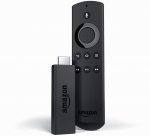
The fire tv stick without the voice remote is discounted to £30 too -
http://www.argos.co.uk/static/Product/partNumber/3929315.htm
UPDATE - now available directly on amazon too - https://www.hotukdeals.com/deals/amazon-fire-tv-stick-with-voice-remote-34-99-amazon-2451950
Top comments
The Firestick also has iPlayer, ITV Hub, Channel 4 and 5 player apps as well. So everything is covered for terrestrial catch up.
All comments (205)
The Firestick also has iPlayer, ITV Hub, Channel 4 and 5 player apps as well. So everything is covered for terrestrial catch up.
http://www.gearbest.com/tv-box-mini-pc/pp_232315.html
Yes
If you have android SDK installed, you can upload any APK directly via adb.
http://blog.artesea.co.uk/2016/01/tvplayer-on-roku-or-now-tv.html
People have so many boxes these days due to the nowtv voucher/box packages you might even be able to pick up a box from someone for just the postage :smiley:
I've got a pretty popular YouTube channel because of Kodi and nobody's has bricked because of it!
Its more than likely a faulty stick or you've used the wrong plug! My friends lass used her Galaxy s6 plug and fried it due to it being a fast charge plug.
If I were you I'd take the stick back to where you bought it and get a replacement if it won't turn on.
BalaNaveen: Though Amazon doesn't price match guarantee, I’ve decided to waive this restriction in appreciation for your valuable business as an exception.
BalaNaveen: Please place the order and let me know and I'll ensure that you're charged £34.99 for it.
*let me know the order #
2. Install ES File Explorer
3. Login to Google Drive
4. Install .apk
2: Install ES Explorer
3: Open FTP client on desktop
4: Transfer
No logins, no hassle!
2: Install ES Explorer
3: Install FTP client on desktop
4. Setup FTP client on desktop
5. Open FTP client on desktop
5: Transfer
Sorry if I'm being a pedant, that's actually the steps you require to use FTP setup. Many people reading are tech n00bs and won't have a clue what an FTP server is etc. ES File Explorer will remember the login, so even if you want to transfer an .apk again it's simple.
We're at check here I think, you can use either method.
Told them to wipe the build and reinstall kodi and only the addons they need. Much easier ( and cheaper) in the long run once you know a few basic steps.
SEO Michael is a good site for most tips (see link in post above! :smile: )
As others have said, modbro for live TV, for the most part. However Phoenix streams for sports tend to be quite a bit better usually.
then if you do wanna use voice, download the fire TV app on your phone and use it that way
https://itunes.apple.com/us/app/playmovies-movie-hd/id1097371071?mt=8 - free movies and tv shows
https://itunes.apple.com/us/app/playmovies-movie-hd/id1097371071?mt=8 - free movies and tv shows
Thank you.
Anybody know how I can install a browser on this device?!
https://seo-michael.co.uk
I heard, we can install Kodi on iPhone without jailbreak, can someone guide please ?
Daughter having a meltdown here due to nowtv taking the Disney channel off the entertainment pack. At least this will give her a few more channels.
Phoenix is a lot more limited but at the very least I can get sky sports when I need it whilst I use a decent link on the laptop.
Have you turned OFF Parental Control on your service provider ?
...e.g. ...
on Virgin it's called Websafe... online account.....
on Sky it's called Sky Shield...online account....
on BT it's called SmartWizard on Router
on EE it's called Orange Safeguard ....online account...
on TalkTalk it's called Home Safe Security..... online account....
........as Parental Control on ALL ISP's blocks 90% of the streams to the Firestick or TV Box.
How does this work please?
So if you want to just try it before buying a box (Stick)
Download it to your PC / Laptop
Here
Then once installed follow this guide [Phoenix] to install a good test addon
I have tried that but I can't make head nor tail of it.
So Kodi is a piece of software you put onto the Firestick, yes?
So where are the free films coming from? The internet? Or are they just for showing films you have downloaded on your computer?
What is the simple answer?
I thought this was meant to be a helpful and informed community!? :disappointed:
https://youtu.be/0sEjYmA3IX0
Once you have done that correctly you will have successfully loaded kodi onto your stick.
The next thing to do is download a 'build' from ares wizard by following exactly the steps shown below...
https://seo-michael.co.uk/tutorial-how-to-install-ares-wizard-kodi/
When you've got ares wizard installed you can download a build.
Open ares wizard on your stick under 'add ons ' and chose any one of the top builds under ' browse builds ' once you have downloaded the build will automatically launch every time you open kodi.
Hope this helps! :wink:
Watch this..
https://www.youtube.com/watch?v=0uZDGHYYWgo
If can't understand it then it's not for you.
Amazon blocked however developers have renamed the app and you can use adbfire to reinstall and continue using update feature
Some good tips in this thread, will check back once I pick it up tomorrow!
Dnt be hater mate :man:
Apple fans look away now...
1. Order the non-voice model (then install official Fire TV app from Play Store on ur phone which let's u use voice via ur phone if you so wish)
2. Install latest Kodi on ur phone from Play Store
3. Install Apps2Fire on ur phone from Play Store
4. Open Apps2Fire to simply transfer Kodi to ur Fire Stick. Follow instructions and it will automatically install it.
5. Do the same with Mobdro if u like...
6. Open Kodi on ur Fire Stick (apps). After 1st use Kodi will appear in recents list.
7. In Kodi, go to SYSTEM, FILE MANAGER and click add source.
8. Click on "none" and type http://areswizard.co.uk then click done.
9. Name it "ares".
10. Go to SYSTEM, SETTINGS, ADD ONS
11. Click install from zip file - click "ares" and click the zip file...wait 30 secs to let it install.
12. Go to PROGRAMS, ARES...let it load then browse builds. Install whatever u like - follow instructions on screen. I recommend PULSE LITE for Fire Sticks.
As with most streaming services, if your Internet is fast enough Kodi will run easily on Fire Sticks.
Anyone who pays for movies, tv shows, books, music, etc is an utter mug!
as they say, a fool and his money are easily parted!
Have just bought a HD projector would this be good to play plex/netflix through?
https://www.hotukdeals.com/deals/amazon-fire-tv-stick-with-voice-remote-34-99-amazon-2451950
thanks both
If all you want to do is use Kodi or Mobdro on it, you'd be far far better off spending an extra £10 on this:
http://www.gearbest.com/tv-box-mini-pc/pp_232315.html
Many people will say because the law is very clear, it's illegal to store pirated copy or share that with others, the problem with streaming is that in theory you don't store the media, so it's OK, except of course you do, when it's buffering, it's storing part of the file on your local system, even if for a few milliseconds, it's still fundamentally in breach of the storage side of the law, however, there hasn't been a test case, the EU went away and decided the legality needed clarifying, but they would come back with some guidance, at the moment you probably would get away with it (and lets face it how would anyone catch you), but that doesn't mean at some point, someone somewhere in Brussels won't decide it's clearly pirating and therefore illegal.
If a studio decides to bring a test case against someone in the UK, and wins, then the position will be clarified, but of course the risk is, the studio could lose the case, then it would be a free for all.
At the end of the day, I'm extremely doubtful that the loses the studios claim are anywhere near the real loss, there are plenty of films/tv shows I might watch if they were freely available, but I certainly wouldn't pay for them, others I'll watch again having paid for the first showing at a big cinema, but wouldn't pay a second time, and other films worth seeing in the cinema and worth buying the bluray for the vastly superior picture quality over anything streamed - my two boys would put Harry Potter into this category. The amount I would spend is entirely due to the quality of the material, not the availability of pirate or streamed versions.
mike
Are you sure you don't have Parental Control turn ON with your ISP......as this will block 90% of the streams !
See my Post here : :wink:
http://www.hotukdeals.com/deals/fire-tv-stick-with-voice-remote-34-99-argos-2451555?p=28053470
I've not had an issue with any of the links and the quality is massively improved also.
I have the full package on Virgin as it's certainly not a cable cutter but those few extra things not available by other ways (as I have Prime and Netflix also) then it's just a good library of pretty much anything.
Fire TV Stick with Voice Remote
Amazon
Sold by Amazon EU S.a.r.L.
£34.99
Item Subtotal: £29.16
Postage & Packing: £0.00
Promotion Applied: -£8.33
Total Before VAT: £20.83
Estimated VAT: £4.16
Tip: £0.00
Order Total: £24.99
I've got a smart TV. Do these things add more than a smart TV with free view plz?!
You can also get J Lewis to price match with Argos. :smiley:, they'll deliver free next day to your local J. Lewis/Waitrose store.
and they have reimbursed me the £4-96 difference,
They said i had up to 28 days to ask for price match.
Its a very slick device in the non voice form. The interface is silky smooth and one of the best for streaming or whatever, 2nd only to the apple itv4 which i've pretty much stopped using as its all stuff u buy form itunes......
So this will be my 2nd! I will donate the 1st to my brother.
https://www.amazon.co.uk/Beelink-Android-Streaming-Ethernet-Bluetooth-Mini-MX/dp/B0186Z0J8S/ref=pd_sim_sbs_23_1?ie=UTF8&dpID=31TMLlyG8VL&dpSrc=sims&preST=_AC_UL160_SR160%2C160_&refRID=4VSDC6GKMQX0ERA77JBM
Basically it finds the page (those random letters and symbols at the top of an internet browser in the address bar) and plays whatever is on there.
Just like YouTube, ever clicked the link at the top of the page and it's something like
htp://youtube.random,tralalalah/thispage1_thatpagenot1
Well that's its location on the internet.
Hope that helps.
Setup guide for the above >
https://seo-michael.co.uk/how-to-push-zip-files-to-fire-stick-with-adbfire/
https://en.wikipedia.org/wiki/Copyright_aspects_of_downloading_and_streaming
Of course that doesn't apply to torrents where you are making a copy and in all likelihood sharing that copy.
Thanks
I'm guessing once everything is installed and running, there's no logical reason why you couldn't use a VPN, but to stream you may want a multi-hop VPN for extra security. But at the moment, it is perfectly legal to stream, at least until the EU (if we're still in it by then ;-) ) comes up with a comprehensive set of laws.
mike
I'm not sure what might be going wrong for you but the information you are putting out is incorrect.
In some cases, certain entertainment publishers have paid 3rd party firms to watch IP's accessing known sources of their content and then have trace-routed those ISP's and sent warning letters to the users however in those cases you are looking at a civil lawsuit at best and in the vast majority of occasions it never actually comes to that. Certain ISP's like Sky and Virgin use several layers of their own over user access as well in an effort to prevent DDoSing and aid QoS.
In any case, stream URL's on Kodi addons are mostly highly protected and anonomised in themselves these days. That's why addons like Exodus have to use so many scraping scripts before they can load anything. That helps them to a) protect their stream link from being hijacked or reported and b) makes it far harder for anyone to see what the link is for without actually accessing it.
1. Use the included short HDMI adapter (acts as a WIFI ariel)
2. Keep a shortest distance as possible between Router and Stick (Mines ~ 10mtrs and works fine)
3. Not sure what the minimum internet speed required is but mines ~ 32 Mbps and works great
4. Don't install a fancy build. Keep it simple. Confluence + 5 Add-ons should be enough
5. Install a Maintenance Add-on (here) clear cache - purge packages (I do this after every install / movie)
6. Make sure everything's kept updated in Settings > Add-ons > My Add-ons
13 Hours - The Secret Soldiers of Benghazi
But requires a small sub
This is just from sitting on the amazon menu screen and not running any apps or videos. It did it it the first 5 minutes after it applied it's automatic update our of the box.
Just received my replacement stick and after 20 minutes of use, it too is reporting it is too hot with a Thermometer splash screen.
Currently running overplay smart DNS (others are available!) in southern spain with all catchup services, no issues.