Looks like there is a decent price for this drive again.
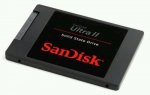
For those, like me, who missed the eBuyer deal a couple of weeks ago here is this drive at £89.99 with free P&P.
it says 'Limited Number Available' but states more than 10.
15 comments
pistachio
22 Feb 16#15
What about the warranty! I am thinking to get one but ebay puts me off as I am not sure if these are genuine imports which qualify for warranty. Any ideas pleas? thanks
piphurst
19 Feb 16#14
Hot deal.
fishmaster
15 Feb 16#13
You can indeed but you still need somewhere to store the image. Far easier to just clone the HDD > SSD using Macrium Reflect or EaseUS Free
Smosekum
15 Feb 16#12
You can clone the boot and system drive into an image, then restore the image on the new drive without reinstalling windows
fishmaster
13 Feb 16#10
It's actually a fairly easy job to change the HDD on an iMac, the screen comes out quite easily, the main issue is making sure no dust gets on the screen and keeping the glass clean.
I've just remembered the other issue, which is the fans will blow at max speed due to not having Apple firmware on the HDD so the temp sensor thinks it's running hot so instructs the fans to ramp up to max speed, this can be solved with free software where you can manage the fan speeds.
robodan918
13 Feb 16#9
I opted for an evo instead, but it's good to know for the future that there's a cheap upgrade option for additional storage that doesn't require hdd.
634miyamoto
13 Feb 16#8
Not trying to be a scaremongerer but good luck getting any refund from Ebay/Paypal if things go wrong:
I've had a couple of refunds from Ebay when things went wrong and the seller didn't sort the issue properly.
The case you link to is a bit of an odd one, as for some reason they refunded one item but not the other, which sounds more like a cock up rather than anything else.
Sure some people have issues getting refunds sometimes, but these sort of issues seem to happen with all big companies.
Anyway, the seller has been selling these at this price for a little while now, and have positive feedback on these transactions. Byt the looks of their other items they probably buy up job lots of remaindered stock, stuff from places that have closed down etc. and sell it on.
Apple imac - I have an apple imac (late 2013) and the family were moaning that it was slow.
It is a nightmare to open and replace the drive on modern imacs because they are a sealed unit.
Bought one of these (previous posting on hotukdeals from Dabs ) and bought a £15 caddy from amazon. This connects using a usb 3 cable. - so it is an external drive
I didnt think this would work but thought that if it didn't, I could sell it on ebay and get my money back
WOW - it has totally transformed my imac. It boots quickly, programs open quickly. I need to use windows and have parallels which used to be really really slow. (waiting 30 seconds to respond to a right click). With this, parallels works immediately. (As fast as my laptop which already has a ssd installed)
I bought some velco pads from amazon and used these to put the caddy on the back of the imac. - if I need to remove it, it quickly lifts off.
You can do a new install. You will need the installation DVD for this or a USB drive with windows installation on it.
You will then need to reinstall software and data.
Alternatively, you can clone your drive. You will need clone software (Free -see below) and you will need to buy a usb to sata adaptor or (better still) get a usb to sata caddy.
If you buy a caddy, then you can put your old drive in the caddy and use it as a handy external drive. (usb 2 caddies are usually cheaper but if your computer supports usb 3, definately get a usb 3 one because it is much quicker at data transfer)
NOTE, if your existing internal drive is larger than your SSD then dont panic because clone software can let you decide what to transfer and what not to transfer.
Use the following link for the 30 day free trial of to-do-backup. The link explains the backup process.
If you replace a hard drive, then you absolutely have to reinstall Windows, as the new drive will not have an installation of Windows on it. To reinstall use the free media creation tool from Microsoft and enter your Windows 7 key when it asks, if your laptop came with Windows 8 or 10 then the setup will read the key from the MSDM table in the BIOS, however in my experience, Dell's don't store the key in the MSDM table in the BIOS, so if you don't have a physical key under the battery or on the underneath of the laptop, then use RW Everything to read the key from the MSDM table, if you don't have that option then you need to clone your existing install form the old drive to the new one or download Generation2's Windows 10 ISO and use the OEM install option.
LewsTherin to tmohammad
13 Feb 16#3
it is very easy to replace. There is very few screws in Dells these days deliberately to make it easy. Backup your files of course. for win10, get a USB with at least 32gb space and run recovery off that. once you have new ssd and try to boot just boot off the USB and all is fine.

![Fresh Breakfast Meat Box (Using code) @ Campbells Meat [Haggis / Lorne Sausage / Bacon / Black Pudding & More]](/images/topics/208684_1.jpg)




































![[Xbox One] Q. u. b. e: Director's Cut on Deals with Gold](/images/topics/208716_1.jpg)


















Opening post
For those, like me, who missed the eBuyer deal a couple of weeks ago here is this drive at £89.99 with free P&P.
it says 'Limited Number Available' but states more than 10.
15 comments
I've just remembered the other issue, which is the fans will blow at max speed due to not having Apple firmware on the HDD so the temp sensor thinks it's running hot so instructs the fans to ramp up to max speed, this can be solved with free software where you can manage the fan speeds.
http://www.theguardian.com/money/2015/jun/13/ebay-money-back-guarantee-refund?CMP=Share_AndroidApp_Gmail
The case you link to is a bit of an odd one, as for some reason they refunded one item but not the other, which sounds more like a cock up rather than anything else.
Sure some people have issues getting refunds sometimes, but these sort of issues seem to happen with all big companies.
Anyway, the seller has been selling these at this price for a little while now, and have positive feedback on these transactions. Byt the looks of their other items they probably buy up job lots of remaindered stock, stuff from places that have closed down etc. and sell it on.
It is a nightmare to open and replace the drive on modern imacs because they are a sealed unit.
Bought one of these (previous posting on hotukdeals from Dabs ) and bought a £15 caddy from amazon. This connects using a usb 3 cable. - so it is an external drive
http://www.amazon.co.uk/product-reviews/B00OB2R2LS/ref=cm_cr_dp_synop?ie=UTF8&showViewpoints=0&sortBy=recent#RCIVZ3OEYO8T4
I didnt think this would work but thought that if it didn't, I could sell it on ebay and get my money back
WOW - it has totally transformed my imac. It boots quickly, programs open quickly. I need to use windows and have parallels which used to be really really slow. (waiting 30 seconds to respond to a right click). With this, parallels works immediately. (As fast as my laptop which already has a ssd installed)
I bought some velco pads from amazon and used these to put the caddy on the back of the imac. - if I need to remove it, it quickly lifts off.
http://www.amazon.co.uk/gp/product/B0017GKK5G?psc=1&redirect=true&ref_=oh_aui_detailpage_o06_s01
It looks really neat.
Installing OS X on an external drive is really easy, even for someone who doesnt know much about computers.
https://support.apple.com/en-gb/HT202796
You will then need to reinstall software and data.
Alternatively, you can clone your drive. You will need clone software (Free -see below) and you will need to buy a usb to sata adaptor or (better still) get a usb to sata caddy.
http://www.amazon.co.uk/External-Enclosure-Laptop-Drive-Powered/dp/B00U91KT7E/ref=sr_1_4?s=computers&ie=UTF8&qid=1455361438&sr=1-4&keywords=usb+sata+caddy
If you buy a caddy, then you can put your old drive in the caddy and use it as a handy external drive. (usb 2 caddies are usually cheaper but if your computer supports usb 3, definately get a usb 3 one because it is much quicker at data transfer)
NOTE, if your existing internal drive is larger than your SSD then dont panic because clone software can let you decide what to transfer and what not to transfer.
Use the following link for the 30 day free trial of to-do-backup. The link explains the backup process.
http://www.todo-backup.com/backup-resource/clone/how-to-migrate-to-a-solid-state-disk-without-reinstalling-windows.htm
i actually have a 2011 dell m301z. Is that easy too?
If so, is it easy to replace the hard disk and data? Will Win10 require reinstallation?
https://www.youtube.com/watch?v=mtC7rFZ3z40
If you replace a hard drive, then you absolutely have to reinstall Windows, as the new drive will not have an installation of Windows on it. To reinstall use the free media creation tool from Microsoft and enter your Windows 7 key when it asks, if your laptop came with Windows 8 or 10 then the setup will read the key from the MSDM table in the BIOS, however in my experience, Dell's don't store the key in the MSDM table in the BIOS, so if you don't have a physical key under the battery or on the underneath of the laptop, then use RW Everything to read the key from the MSDM table, if you don't have that option then you need to clone your existing install form the old drive to the new one or download Generation2's Windows 10 ISO and use the OEM install option.