The Raspberry Pi just got juicer! Now with a Quad-Core 64bit CPU, WiFi & Bluetooth!
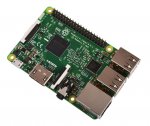
The Raspberry Pi 3 Model B is the third generation Raspberry Pi. This powerful credit-card sized single board computer can be used for many applications and supersedes the original Raspberry Pi Model B+ and Raspberry Pi 2 Model B.
Whilst maintaining the popular board format the Raspberry Pi 3 Model B brings you a more powerful processor, 10x faster than the first generation Raspberry Pi.
Additionally it adds wireless LAN & Bluetooth connectivity making it the ideal solution for powerful connected designs.
Raspberry Pi 3 - Model B Technical Specification
Broadcom BCM2387 chipset
1.2GHz Quad-Core ARM Cortex-A53
802.11 bgn Wireless LAN and Bluetooth 4.1 (Bluetooth Classic and LE)
1GB RAM
64 Bit CPU
4 x USB ports
4 pole Stereo output and Composite video port
Full size HDMI
10/100 BaseT Ethernet socketbr
CSI camera port for connecting the Raspberry Pi camera
DSI display port for connecting the Raspberry Pi touch screen display
Micro SD port for loading your operating system and storing data
Micro USB power source
Raspberry Pi 3 - Model B Features
Now 10x Faster - Broadcom BCM2387 ARM Cortex-A53 Quad Core Processor powered Single Board Computer running at 1.2GHz!
1GB RAM so you can now run bigger and more powerful applications
Fully HAT compatible
40pin extended GPIO to enhance your “real world” projects.
Connect a Raspberry Pi camera and touch screen display (each sold separately)
Stream and watch Hi-definition video output at 1080
Micro SD slot for storing information and loading your operating systems.
10/100 BaseT Ethernet socket to quickly connect the Raspberry Pi to the Internet
Top comments
Unforgettable1
29 Feb 1634#35
Gonna wait for the Pi 3.1415926.....
RexCogidubnus
29 Feb 164#64
You're missing the subtle difference between a b and a B :wink:
USB 2.0 max theoretical 480 Mb/s, typically you won't see more than half of that in actual use. So 240 Mb/s which converted to a B is 30 MB/s. The slowest drive in the graph there is 27.2 MB/s so that would almost max out the USB 2.0 connection....
fishmaster
29 Feb 163#26
Screw Plex, Kodi, media serving, I'm going to use this to make a Robot and a Teasmade and a helicopter and also a Fallout 4 VDU Terminal
praevalens to EN1GMA
29 Feb 163#23
...boobs!
Latest comments (119)
frownbreaker
20 Apr 16#119
Worth noting if using HDMI to a modern TV the TV remote may control Kodi when switched the the RP HDMI .
The arrows, OK, and Back buttons normally work which is fine for simple tasks. For setup a keyboard (any USB wire unit will do though wireless is nice) or KORE (Andriod App) is excellent as you can cut and paste repo names / URL etc...
pengyuan
15 Apr 16#118
The pi is pretty good for its compatibility and low cost ,and not only are there plenty of USB ports ,but also the pi owns built-in wi-fi and bluetooth connection.We now have three ways to connect the pi with other devices;2.4G USB , wifi and bluetooth ,so a mini wireless (bluetooth)keyboard such as ipazzport (with high quality and low cost )or logitech(classic but a bit too expensive)is enough .There is not necessary,I think , to have to turn to kodi just for a remote.
I'm running Kodi on both RASPBERRY PI MODEL A+ 256mb and RASPBERRY PI MODEL B 512mb
pibpob
5 Apr 16#115
Or presumably you could use a USB dongle.
frownbreaker
5 Apr 16#114
Use the HDMI out and connect to an External Decoder (AV Amp etc) All the Model B units Pi1, Pi2 and Pi3 can handled 1080p out. The video core on this new unit is the same as previous units so no issues with software compatibilities. I've noticed that with the RP2 and RP3 video playback on MPEG2 is fine using software decode only. No need to pay those people at the MPEG2 group any money.
Mitch_s_s
8 Mar 16#113
What's the Pi like for emulators?
What can it reasonably handle?
ian47
6 Mar 16#112
Is the audio out any better out of the headphone jack or do you still need a dac?
formsm2000comp
5 Mar 16#111
Having real trouble trying to get Acestream working on the pi3. In terms of football streaming quality you have Flash -> Kodi apps -> Acestream / Sopcast.
Tried Rasbian and OSMC so far. Problem is on wiki says download for Ubuntu 14 and Debian 7. Rasbian uses Debian 8. Ubuntu mate uses Ubuntu 15. The Plexus app doesn't have the relevant advanced options for buffer control to make it usable on Kodi. The OS needs a web browser to find Ace links.
Source code is below if anyone can help? Acestream Source Code
marcins
4 Mar 16#110
micro SD cosket is no more push-pull :disappointed: what a bulshieeet they should add a twizzers to remove microsd card when you pack in enclosure ....
If it works it should be ok, there are no moving parts on the board, not sure it would be less reliable due to packaging.
Link83
3 Mar 162#106
Mine just arrived in exactly the same condition, i'm really not impressed :disappointed:
My mailing sleeve has actually been bent in half and squashed, so i'm not sure yet if the Pi will even work.
It should come in a retail box:- http://blog.mymemory.co.uk/wp-content/uploads/2016/03/Raspberry-Pi-3-box.jpg
I can only guess that thepithut are removing the boxes so that they can get it to fit though Royal Mail's size guide as a 'large letter' to save on postage costs, which is really unacceptable as they dont state that they will do this on the product page.
Ordered on Monday from the PiHut and it arrived today. However, I'm very unimpressed with the packaging. Pi was just in an antistatic bag squeezed inside a thin and flimsy mailing sleeve offering no protection from it being squashed. No kind of box or any documentation. Every other Raspberry Pi I've bought has turned up in a nice retail box with some getting started instructions inside. Shan't be ordering from these amateurs again. Can anybody ordering from CPC or RS please say how their Pi arrives. Thank you.
welshblob
2 Mar 16#103
Thanks for that, will do that later as I'm sure I'll buy some more stuff from the pi hut at some point.
I'm not sure how some people got that. I also find it odd that you confirm £36 (with PSU) on the paypal website and then confirm it at the higher amount inc postage. Must be a glitch with the paypal system or a term/condition I have accepted along the way.
Link83
2 Mar 161#102
Just to let you know, if you now setup an account on the website using the same email address you used to place the order, then you can still see your order history and if its been dispatched or not - even if you didnt originally setup an account and just paid using paypal. I just did this and can see my order is still "unfulfilled" :disappointed:
Also how did some people manage to get it for £30.00? I paid £32.50 as the postage amount was added on at the very final confirmation page (Even though the paypal checkout process said the total was £30.00, when I was redirected back to thepihut website for final confirmation it added the £2.50 delivery charge)
welshblob
2 Mar 16#101
That's good news for you but a bit frustrating for me. Did you order through Paypal? If not then I wonder if they handle the orders differently?
Edit : Just received this from The Pi Hut
Thanks for the email!
We're currently working on getting all order picked, packed and shipped. With the overwhelming success of the Raspberry Pi3, our dispatch times are however suffering. To counteract this, we have brought in a temporary workforce to help! As soon as your order ships, we'll send you a confirmation email.
If your order was placed before 7pm (GMT) on 29/03/16 - rest assured that your order has not gone onto back order and the stock is here in our warehouse, we'll be shipping it out as soon as humanly possible.
If your order was placed after 7pm (GMT) on 29/03/16 - please note that the "buy" button was swapped for a "Back Order" option, we're expecting more Raspberry Pi 3 early next week, and your order will be shipped from this batch.
Edit2 : Another Email
Greetings from ThePiHut!
I just wanted to drop you an email to explain our current order situation.
With the overwhelming success of the Raspberry Pi3, we're currently working on getting all order picked, packed and shipped, however our dispatch times are sadly suffering (usually, we're able to ship within 12 hours of ordering!)
To put things into perspective, in the past 48 hours we have received what was roughly a months orders. To counteract this, and make sure that your order is dispatched as soon as humanly possible, we have brought in a temporary workforce to help us with the picking&packing of orders.
As soon as your order ships, we'll send you a confirmation email.
I'm getting a lot of emails regarding the Pi3 being on back order on the site (each email received is preventing me from packing more orders), and I wanted to help explain this -
> If your order was placed before 7pm (GMT) on 29/02/16 - rest assured that your order has not gone onto back order and the stock is here in our warehouse, we'll be shipping it out as soon as humanly possible.
> If your order was placed after 7pm (GMT) on 29/02/16 - please note that the "buy" button was swapped for a "Back Order" option, we're expecting more Raspberry Pi 3 early next week, and your order will be shipped from this batch.
Just a final note to say thank-you for your support and understanding
Kindest Regards,
Jamie Mann - Owner, ThePiHut
formsm2000comp
2 Mar 16#100
Does anyone know if this will run KODI and more importantly Acestream at HD streams?
Got a HP Proliant but the processor cant handle Acestream in HD.
I googled it before when the Pi2 came out and someone said it wont be able to due to high I/O writes whatever that means?
Think Acestream runs on Windows, Android and Linux according to this Wiki page. Acestream
j8te1
2 Mar 16#99
Ordered mine Monday at around 11am, and got email yesterday saying it's been despatched.
welshblob
2 Mar 16#98
I ordered one at 8am on Monday as the RS site directed me to buy from thepihut. And like you as I ordered it via paypal I have no idea of the status!
Youngy
2 Mar 16#97
Thanks OP, I'd ordered within 2hrs of release. Bargain for what it is. Now on backorder
rinse
2 Mar 16#96
Your comment is meaningless. The product I mentioned has the spec he was after.
trakker1
2 Mar 16#95
I ordered one yesterday about 3pm, paid with PayPal not opening a account so can't log in to track my order. Ive not had any emails other than my first order acknowledgement. Wish I had ordered from RS now!!
boombadoom
1 Mar 16#94
ah excellent, I started drawing one up a couple weeks ago for my Pi2 so I can carry on!
applebyJedi
1 Mar 16#93
Ordered one whilst they were still in stock! Thank you OP!
AlanClarke
1 Mar 16#92
Does anyone know if I can run SkyNet on this?
pibpob
1 Mar 16#91
Yeah, but the requirement was for a 1G port, which certainly isn't meaningless unless there's some horrendous problem (like it sharing the same USB host) preventing you benefiting from it. And 2GB of RAM could be useful too. :smiley:
BarryRiley
1 Mar 16#90
8 cores is meaningless. As are other technical numbers used to inflate the value of cheap crappy products (megapixel springs to mind)
cowmilk
1 Mar 16#89
PI hut is very bad in service. They do not have proper system to receive and track the returns. last time they refused to replace the faulty part as they could not trace my returned packet.
ToneEQ
1 Mar 16#88
Think I'll wait for version 3.14
pibpob
1 Mar 16#87
Good idea, but of course as everything shares one USB host, this will more than halve if the data you are transferring is coming to/from an attached USB device.
If you really want gigabit, you can add a usb-gigabit adaptor
- you do see an improvement although only to 250Mbps or so (2x standard pi)
dar72
1 Mar 16#84
Ah ok, I hadn't seen that, I was looking at github, suppose that's not the official repo that I found on github, don't usually see stuff just released onto a forum like that.
I'll try to get this onto Arch then, might take a bit of messing around because it's a .deb
lumsdot
1 Mar 16#83
Kweb is updated all the time, read the thread. The developer is constantly updating kweb, its the best browser for the pi
dar72
1 Mar 16#82
Thanks but I'm reluctant to use a browser that hasn't been updated for 2 years
It's not for me to use, personally if I want youtube I just use youtube-viewer and play it with mpv but that's on my proper PC. I need a browser that can do the things that less experienced users expect to be able to do, without having a less experienced user using a browser that's so out of date they might as well be using IE.
rinse
1 Mar 161#81
Check out the banana pi which has gigabit lan, 8 cores and 2gb ram for about £42
boombadoom
1 Mar 16#78
does anyone know if they've released a technical drawing of the 3 yet? I want to make a case!
joedredd to boombadoom
1 Mar 161#80
I believe it's the same as the 2 except for the addition of the wireless components?
229mel
1 Mar 16#70
overpriced for what it is... a gutless chip which you need to spend more money on to get it running.
For the same price you can get more powerfull chinese tablet, and it comes with a screen/onboard storage already!
sotomonkey to 229mel
1 Mar 16#71
Good luck getting raspbian or ubuntu to work on your cheap chinese tablet.
joedredd to 229mel
1 Mar 16#79
Been there, tried that.
No more cheap Chinese knock off tat for me.
Babbler
1 Mar 16#77
OOS - Now on backorder.
tech3475
1 Mar 16#76
As a dev board you can expect an ardruino/atmel like system for that price.
I always find these complaints funny considering its intended audience/purpose.
Thats why things like using a weaker but compatible gpu matter, because people have gone low level with these things.
sotomonkey
1 Mar 16#75
They're a non-profit organisation. If they could sell it for 10 quid they would and yes they're produced in China as well as the UK.
229mel
1 Mar 16#74
bla bla... £10 would be an ok price for it.
sotomonkey
1 Mar 16#73
You're failing to grasp why the raspberry pi was made in the first place.
229mel
1 Mar 16#72
I don't need luck when I can run windows on them....
reddragon105
29 Feb 16#69
I mean as far as USB goes you need USB 3.0, not that there aren't other solutions.
pibpob
29 Feb 16#68
Before USB3 came along we used FireWire and eSATA. :smiley:
reddragon105
29 Feb 16#67
You're right, I must be tired because I do understand the difference between megabits and megabytes and for some reason I was thinking USB 2.0 doesn't bottleneck mechanical hard drives, even though I once worked at a place where everyone insisted on working from external hard drives which was slowing everything down and I insisted we get some larger internal drives and move everything over. You do need USB 3.0 in order to not bottleneck mechanical drives.
pibpob
29 Feb 16#66
Yeah - no reason why I should make up the figures I measured, is there?
koalauk
29 Feb 16#65
Overpriced, yes it is my opinion, no I am not trolling.
RexCogidubnus
29 Feb 164#64
You're missing the subtle difference between a b and a B :wink:
USB 2.0 max theoretical 480 Mb/s, typically you won't see more than half of that in actual use. So 240 Mb/s which converted to a B is 30 MB/s. The slowest drive in the graph there is 27.2 MB/s so that would almost max out the USB 2.0 connection....
bird_egg
29 Feb 16#57
Does anyone know if this will now have enough to power to play N64 emulated games?
omgpleasespamme to bird_egg
29 Feb 16#63
I would have thought easily. My old xbox that I think is powered by a 700MHz Pentium chip is a decent N64.
reddragon105
29 Feb 16#62
USB 2.0 may be able to provide speeds of up to 480mb/s but mechanical hard drives max out at about 150mb/s and it's rare that a 2.5" drive would be capable of more than 100mb/s. Just a few benchmarks here, not sure how up to date this is -
liamwill83
29 Feb 16#59
Is it showing out of stock to everyone else?
MrFizzy to liamwill83
29 Feb 16#60
Yes. Looks like it's now on back-order.
OrribleHarry to liamwill83
29 Feb 16#61
Plenty in stock at RS (over 15,000) although it's £32.10 Inc next day delivery.
gabesdad
29 Feb 16#2
Already ordered. Expected more trouble ordering after the Pi Zero supply cockup!
welshblob to gabesdad
29 Feb 161#10
Apparently they have 200k already made and capacity to make 100k a week! Looking at the stats it appears they have sold another 3m devices last year which must have been mostly pi2's.
Just to note that the pi hut also has the upgraded 2.5A psu for £6 so I added one of those to my order.
Element14 seem to be sleeping this morning!
Dav1dF to gabesdad
29 Feb 16#58
Apparently they made 300,000 for the launch and don't anticipate the issues they had with zero
As rev says the Videocore doesn't support the HEVC codec natively. The Pi2 should be able to decode 720p using the arm cores and sometimes up to 1080p but it all depends on bitrates and so its a bit hit or miss. So I'd expect the Pi3 to be better at both of those but not 4k.
rev6
29 Feb 16#54
The GPU is the same like you said so no H.265. I'm not sure if the CPU would handle it. I guess it depends on the bitrate/resolution.
DrJogalog
29 Feb 161#11
Can this hardware decode HEVC? What about a 4K output?
welshblob to DrJogalog
29 Feb 16#15
The Videocore doesn't support the HEVC codec natively. The Pi2 should be able to decode 720p using the arm cores and sometimes up to 1080p but it all depends on bitrates. So I'd expect the Pi3 to be better at both of those but not 4k.
rev6 to DrJogalog
29 Feb 16#40
No.
hugh1988 to DrJogalog
29 Feb 16#53
I'd like to know too. I don't know if the decoding is done on the CPU or GPU. If it's GPU then I doubt it because that hasn't been upgraded. The PINE64 does support h265 4K output however.
wavefront
29 Feb 161#52
Sorry, It charged me 2.50 this morning so I assumed it was the same this evening.
Thanks for the heads up. I've updated the info accordingly
welshy81
29 Feb 16#51
didn't add £2.50 for me either on PayPal checkout
Kev`
29 Feb 16#50
Didn't add that on Paypal checkout.
Kev`
29 Feb 16#48
Now down to £30.
wavefront to Kev`
29 Feb 16#49
+2.50 P&P :disappointed:
dar72
29 Feb 16#47
Thanks, I'll have a look at that. Can't find it in Arch AUR so I'll try to make a PKGBUILD myself
It's a bit out of date? This is the problem with the Pi, most of the community is centred around Debian so everything is years out of date.
joedredd
29 Feb 161#46
Interesting...still, 1Gbps would be overkill for 99% of these devices sold.
Especially when probably 20% will go straight in a drawer :wink:
RedRain
29 Feb 16#45
what are these used for :smiley:
dar72
29 Feb 16#27
Can it play Youtube videos yet?
lumsdot to dar72
29 Feb 16#44
Pi2 can play youtube very well if you install kweb browser
pibpob
29 Feb 16#43
A cheapo spinning 2.5" USB disk (ideal for this application) will produce more than 100Mbits/sec. You would use UDP for streaming, not file transfer - it is quicker and lower latency but not reliable.
I just copied a large file from a 2.5" USB magnetic HD my 2011 plug computer (pre-dates Raspberry Pi), mounted as NFS, using its 1Gbit/sec ethernet port (which does not go via USB internally). The first time it managed about 120Mbit/sec - faster than a 100Mbit/sec port. The second time was more like 200Mbit/sec, because it was buffered in RAM on the plug computer.
Incidentally, using scp it was more like 50Mbits/sec because that's where the CPU is needed - for encryption. You wouldn't use SSHFS to mount a file server.
GwanGy
29 Feb 161#42
"hat COMPATIBLE" does that mean you can wear it on your head? like GGaloway, or Dtrump in the thicket?
10x Faster, Soon be catching up to amd, and then two more years and they will equal Intel!
j8te1
29 Feb 16#41
Ordered.
Thanks op.
tempt
29 Feb 16#30
Does it support Async Compute?
rev6 to tempt
29 Feb 16#39
No but it should support Vulkan. Kodi builds in the future could be interesting.
zinglebarb
29 Feb 16#38
What am I missing RS has these for <£27 or are they different
Argh still no gigabit LAN, what is holding that back?
oliversthomas to BungalowBill
29 Feb 161#7
I think it's mainly down to chipset, compatibility and cost reasons.
Understandably they want to keep the total cost down and maintain backwards compatibility.
This is mainly designed as an educational tool, despite all of its other weird and wonderful implementations!
joedredd to BungalowBill
29 Feb 16#31
I thought that, then realised 100mbps is fast enough for most applications this is designed for and the CPU would be unlikely to process data quick enough to keep up with processing the incoming stream (depending what you're doing with that much data)
rev6 to BungalowBill
29 Feb 16#37
It wouldn't matter as it would never reach those speeds over USB 2.0
joedredd
29 Feb 16#36
There could be plenty of processing required depending on the protocol used, plus I've no idea what the data transfer rate is of attached storage on these devices, but I guess that'll restrict your gigabit file xfer speed too.
You got me curious and I found this:
Unforgettable1
29 Feb 1634#35
Gonna wait for the Pi 3.1415926.....
justanotherpunter
29 Feb 16#29
298 reviews and it's just come out today, hmmmm smells like fish faeces :stuck_out_tongue:
brilly to justanotherpunter
29 Feb 16#34
if you look at them its for all the models of rasp pi
annoying like amazon do
pibpob
29 Feb 16#33
Using it as a file server - no processing required.
marmaluke
29 Feb 16#32
I'm hoping this will be able to emulate N64 games properly!
EN1GMA
29 Feb 163#18
anyone recommend some guides for boobs on how to get the pi set up from scratch? Just wanted it for kodi reasons so would love a guide from initial set up all the way to installing kodi. Which OS are you guys using? for me, the simpler the better.
welshblob to EN1GMA
29 Feb 161#21
mmmm boobs ;-)
I use osmc which is based on Kodi as its well developed/supported by Sam and his team and allows you to install other apps on the OS itself and has clear instructions on set up -> osmc.tv
Others have used Openelec which is another Kodi distribution although a little more restrictive.
praevalens to EN1GMA
29 Feb 163#23
...boobs!
donerkebab to EN1GMA
29 Feb 16#28
Berryboot - one installer does everything multiboot which is handy but not having to wipe everytime you want to put on something else- then config Openelec afterwards with the appz :wink:
Screw Plex, Kodi, media serving, I'm going to use this to make a Robot and a Teasmade and a helicopter and also a Fallout 4 VDU Terminal
RedDwarfIsCool
29 Feb 16#8
Heat added.
I get £30 with free p&p
amour3k to RedDwarfIsCool
29 Feb 16#13
How so please?. :-)
northwales to RedDwarfIsCool
29 Feb 16#25
same here, showing as £30
sratansi
29 Feb 16#24
very tempted to get one and use it as my plex server in the lounge. A small case with ample vents for heat should do the trick i think?
marcins
29 Feb 16#22
ordered 2x :smiley:
stevej1976
29 Feb 162#3
Wonder if this will transcode plex
nublets2k to stevej1976
29 Feb 16#9
It's still using the same videocore gpu.
moelygaer1 to stevej1976
29 Feb 16#19
I have pled server running on a pi b the second
moelygaer1 to stevej1976
29 Feb 161#20
Yes my plex server runs happily on a pi b
welshblob
29 Feb 16#17
I would tend to agree but have bought one anyway to have a play with. Picking up on your decent firmware updates comment I am still impressed by just how much effort the guys put in, the HEVC optimisation being a case in point.
You will probably be better off with an odroid C2 which is being shipped this week I believe. Native HEVC support up to 4k I believe and GBe for not that much more money than a Pi. Plus it has an Android build, 5.1 definitely but I believe they have been testing marshmallow recently. The only thing they don't have now compared to the Pi is wifi/bluetooth.
DrJogalog
29 Feb 16#16
So apart from the dedicated support of a standard OpenElec build, assuming that would happen, and the fact the userbase for prior Pi platforms is massive and decent firmware updates, this offers little, other than a slight speed increase, over an Amlogic S905 chipset with some decent support if used solely for KODI. Obviously used outside of a media server its a different story but I cannot see any benefit for me upgrading the original PiB's I already have.
stevej1976
29 Feb 16#14
That's what I was thinking.
delusion
29 Feb 16#12
As far as I know, plex uses the cpu not gpu for transcoding
oliversthomas
29 Feb 163#6
The Ethernet is still shared over the USB bus for those wondering.
A couple of benchmark shots courtesy of The MagPi:
More benchmarks and details available on their site here:

![Fresh Breakfast Meat Box (Using code) @ Campbells Meat [Haggis / Lorne Sausage / Bacon / Black Pudding & More]](/images/topics/208684_1.jpg)




































![[Xbox One] Q. u. b. e: Director's Cut on Deals with Gold](/images/topics/208716_1.jpg)


















Opening post
The Raspberry Pi 3 Model B is the third generation Raspberry Pi. This powerful credit-card sized single board computer can be used for many applications and supersedes the original Raspberry Pi Model B+ and Raspberry Pi 2 Model B.
Whilst maintaining the popular board format the Raspberry Pi 3 Model B brings you a more powerful processor, 10x faster than the first generation Raspberry Pi.
Additionally it adds wireless LAN & Bluetooth connectivity making it the ideal solution for powerful connected designs.
Raspberry Pi 3 - Model B Technical Specification
Broadcom BCM2387 chipset
1.2GHz Quad-Core ARM Cortex-A53
802.11 bgn Wireless LAN and Bluetooth 4.1 (Bluetooth Classic and LE)
1GB RAM
64 Bit CPU
4 x USB ports
4 pole Stereo output and Composite video port
Full size HDMI
10/100 BaseT Ethernet socketbr
CSI camera port for connecting the Raspberry Pi camera
DSI display port for connecting the Raspberry Pi touch screen display
Micro SD port for loading your operating system and storing data
Micro USB power source
Raspberry Pi 3 - Model B Features
Now 10x Faster - Broadcom BCM2387 ARM Cortex-A53 Quad Core Processor powered Single Board Computer running at 1.2GHz!
1GB RAM so you can now run bigger and more powerful applications
Fully HAT compatible
40pin extended GPIO to enhance your “real world” projects.
Connect a Raspberry Pi camera and touch screen display (each sold separately)
Stream and watch Hi-definition video output at 1080
Micro SD slot for storing information and loading your operating systems.
10/100 BaseT Ethernet socket to quickly connect the Raspberry Pi to the Internet
Top comments
USB 2.0 max theoretical 480 Mb/s, typically you won't see more than half of that in actual use. So 240 Mb/s which converted to a B is 30 MB/s. The slowest drive in the graph there is 27.2 MB/s so that would almost max out the USB 2.0 connection....
Latest comments (119)
The arrows, OK, and Back buttons normally work which is fine for simple tasks. For setup a keyboard (any USB wire unit will do though wireless is nice) or KORE (Andriod App) is excellent as you can cut and paste repo names / URL etc...
https://www.raspberrypi.org/forums/viewtopic.php?f=29&t=136445
What can it reasonably handle?
Tried Rasbian and OSMC so far. Problem is on wiki says download for Ubuntu 14 and Debian 7. Rasbian uses Debian 8. Ubuntu mate uses Ubuntu 15. The Plexus app doesn't have the relevant advanced options for buffer control to make it usable on Kodi. The OS needs a web browser to find Ace links.
Source code is below if anyone can help?
Acestream Source Code
sorry, not thepihut, Modmypi
£29.99
My mailing sleeve has actually been bent in half and squashed, so i'm not sure yet if the Pi will even work.
It should come in a retail box:-
http://blog.mymemory.co.uk/wp-content/uploads/2016/03/Raspberry-Pi-3-box.jpg
I can only guess that thepithut are removing the boxes so that they can get it to fit though Royal Mail's size guide as a 'large letter' to save on postage costs, which is really unacceptable as they dont state that they will do this on the product page.
Not sure what to do now - I would prefer to return it for a refund and order elsewhere (Given how much mines been bashed about even if it does turn on i'm not sure how reliable it would be) but I have a feeling thepihut returns process would be a nightmare given these reviews:-
https://uk.trustpilot.com/review/thepihut.com
https://uk.trustpilot.com/review/thepihut.com/555656f30000ff0002e5d39d
Wish I had researched more before I ordered now :disappointed:
I'm not sure how some people got that. I also find it odd that you confirm £36 (with PSU) on the paypal website and then confirm it at the higher amount inc postage. Must be a glitch with the paypal system or a term/condition I have accepted along the way.
Also how did some people manage to get it for £30.00? I paid £32.50 as the postage amount was added on at the very final confirmation page (Even though the paypal checkout process said the total was £30.00, when I was redirected back to thepihut website for final confirmation it added the £2.50 delivery charge)
Edit : Just received this from The Pi Hut
Thanks for the email!
We're currently working on getting all order picked, packed and shipped. With the overwhelming success of the Raspberry Pi3, our dispatch times are however suffering. To counteract this, we have brought in a temporary workforce to help! As soon as your order ships, we'll send you a confirmation email.
If your order was placed before 7pm (GMT) on 29/03/16 - rest assured that your order has not gone onto back order and the stock is here in our warehouse, we'll be shipping it out as soon as humanly possible.
If your order was placed after 7pm (GMT) on 29/03/16 - please note that the "buy" button was swapped for a "Back Order" option, we're expecting more Raspberry Pi 3 early next week, and your order will be shipped from this batch.
Edit2 : Another Email
Greetings from ThePiHut!
I just wanted to drop you an email to explain our current order situation.
With the overwhelming success of the Raspberry Pi3, we're currently working on getting all order picked, packed and shipped, however our dispatch times are sadly suffering (usually, we're able to ship within 12 hours of ordering!)
To put things into perspective, in the past 48 hours we have received what was roughly a months orders. To counteract this, and make sure that your order is dispatched as soon as humanly possible, we have brought in a temporary workforce to help us with the picking&packing of orders.
As soon as your order ships, we'll send you a confirmation email.
I'm getting a lot of emails regarding the Pi3 being on back order on the site (each email received is preventing me from packing more orders), and I wanted to help explain this -
> If your order was placed before 7pm (GMT) on 29/02/16 - rest assured that your order has not gone onto back order and the stock is here in our warehouse, we'll be shipping it out as soon as humanly possible.
> If your order was placed after 7pm (GMT) on 29/02/16 - please note that the "buy" button was swapped for a "Back Order" option, we're expecting more Raspberry Pi 3 early next week, and your order will be shipped from this batch.
Just a final note to say thank-you for your support and understanding
Kindest Regards,
Jamie Mann - Owner, ThePiHut
Got a HP Proliant but the processor cant handle Acestream in HD.
I googled it before when the Pi2 came out and someone said it wont be able to due to high I/O writes whatever that means?
Think Acestream runs on Windows, Android and Linux according to this Wiki page.
Acestream
RS still in stock http://uk.rs-online.com/web/p/processor-microcontroller-development-kits/8968660/
- you do see an improvement although only to 250Mbps or so (2x standard pi)
I'll try to get this onto Arch then, might take a bit of messing around because it's a .deb
It's not for me to use, personally if I want youtube I just use youtube-viewer and play it with mpv but that's on my proper PC. I need a browser that can do the things that less experienced users expect to be able to do, without having a less experienced user using a browser that's so out of date they might as well be using IE.
For the same price you can get more powerfull chinese tablet, and it comes with a screen/onboard storage already!
No more cheap Chinese knock off tat for me.
I always find these complaints funny considering its intended audience/purpose.
Thats why things like using a weaker but compatible gpu matter, because people have gone low level with these things.
USB 2.0 max theoretical 480 Mb/s, typically you won't see more than half of that in actual use. So 240 Mb/s which converted to a B is 30 MB/s. The slowest drive in the graph there is 27.2 MB/s so that would almost max out the USB 2.0 connection....
USB 2.0 may be able to provide speeds of up to 480mb/s but mechanical hard drives max out at about 150mb/s and it's rare that a 2.5" drive would be capable of more than 100mb/s. Just a few benchmarks here, not sure how up to date this is -
Just to note that the pi hut also has the upgraded 2.5A psu for £6 so I added one of those to my order.
Element14 seem to be sleeping this morning!
https://www.raspberrypi.org/forums/viewtopic.php?t=40860
Thanks for the heads up. I've updated the info accordingly
Is this it?
https://github.com/ekapujiw2002/kweb
It's a bit out of date? This is the problem with the Pi, most of the community is centred around Debian so everything is years out of date.
Especially when probably 20% will go straight in a drawer :wink:
You would use UDP for streaming, not file transfer - it is quicker and lower latency but not reliable.
I just copied a large file from a 2.5" USB magnetic HD my 2011 plug computer (pre-dates Raspberry Pi), mounted as NFS, using its 1Gbit/sec ethernet port (which does not go via USB internally). The first time it managed about 120Mbit/sec - faster than a 100Mbit/sec port. The second time was more like 200Mbit/sec, because it was buffered in RAM on the plug computer.
Incidentally, using scp it was more like 50Mbits/sec because that's where the CPU is needed - for encryption. You wouldn't use SSHFS to mount a file server.
10x Faster, Soon be catching up to amd, and then two more years and they will equal Intel!
Thanks op.
http://uk.rs-online.com/web/p/processor-microcontroller-development-kits/8968660/?cm_mmc=UK-PPC-_-google-_-2_UK_EN_LS_Raspberry_Pi_Exact-_-Raspberry_Pi_3&mkwid=sGyhjQRtw_dc|pcrid|85318714406|pkw|raspberry%20pi%203|pmt|e|prd|&gclid=CPXTzJ3tnMsCFakfwwodGcYHgg it is plus VAT me bad
£32.10 RS
Understandably they want to keep the total cost down and maintain backwards compatibility.
This is mainly designed as an educational tool, despite all of its other weird and wonderful implementations!
You got me curious and I found this:
annoying like amazon do
I use osmc which is based on Kodi as its well developed/supported by Sam and his team and allows you to install other apps on the OS itself and has clear instructions on set up -> osmc.tv
Others have used Openelec which is another Kodi distribution although a little more restrictive.
Berryboot guide
I get £30 with free p&p
You will probably be better off with an odroid C2 which is being shipped this week I believe. Native HEVC support up to 4k I believe and GBe for not that much more money than a Pi. Plus it has an Android build, 5.1 definitely but I believe they have been testing marshmallow recently. The only thing they don't have now compared to the Pi is wifi/bluetooth.
A couple of benchmark shots courtesy of The MagPi:
More benchmarks and details available on their site here:
https://www.raspberrypi.org/magpi/raspberry-pi-3-specs-benchmarks
https://www.raspberrypi.org/blog/raspberry-pi-3-on-sale/
Nice to see another (mostly) fully compatible hardware update.
Built in wifi & Bluetooth will go down well with the kodi team, even if it's wifi-n only. Great for remote controls!