Currently an extra 10% off to bring it down to this price - automatically at checkout. Pretty decent price for a basic light weight laptop. Webcam, SD Card slot, USB 3.0, micro-HDMI, WiFi etc. The usual 12 Month Argos Guarantee.
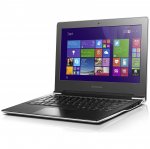
This thin, lightweight design is the perfect travel companion. So whether you're off to another meeting or another country, this latop means portabilty is a walk in the park.
CPU, Memory and Operating System:
Intel Pentium n3540 quad core processor.
32GB eMMC hard drive.
Microsoft Windows 8.1.
This device can be upgraded to Windows 10 for free.
Display features:
11.6 inch screen.
High definition display.
Resolution 1366 x 768 pixels.
Graphics:
Shared graphics card.
Interfaces and connectivity:
SD media card reader.
1 USB 2.0 port.
1 USB 3.0 port.
Wi-Fi enabled.
Multimedia features:
VGA webcam.
Built-in mic.
Dolby sound system.
General features:
Up to 5 hours battery life.
Size H1.89, W29.5, D21.24cm.
Weight 1.15kg.
All comments (66)
cruisecars
5 Feb 16#1
is this any good anyone got one ?
Kayote
5 Feb 16#2
The CPU is not bad for the system & the price, my main concern (& I say this ignoring the price) is the RAM. 2GB definitely needs upgrading. However, when you factor in the price & the CPU (no idea about the screen quality, which should be an important factor to consider), I think its an awesome deal for a casual laptop.
Overall, a MUCH better deal than some posted over the past few days.
pgilc1
5 Feb 16#3
I have one!
Using it now actually. I gave £124.99 for mine in Nov from Argos running Windows 8 and upgraded it with a free upgrade to Windows 10 (a horror story to do because of lack of free space)
Good little laptop for casual use and light office use.
Things to bear in mind :-
* From what i can tell you cant upgrade the memory
* From what i can tell you cant upgrade the main drive.
* You can add extra storage via the SD card slot though.
* Storage space is TIGHT. Theres very little left with Windows 10 on there.
* Decent enough display - i've watched 720p movies no problems.
Its not slug slow by any means, but likewise dont overload it.
Think of it like a city car - nimble around town for the purpose it was intended, but load it up or long motorway runs and its going to struggle.
zaheer2003 to pgilc1
5 Feb 16#4
what's battery life like?
Think of it as like a linx tablet with an attached k/board. there is a review of this on notebookreview/check IIRC - have a look at that before making up your mind.
Smartguy1 to pgilc1
6 Feb 161#6
There won't be much hard drive space left because you will still have the recovery partition for 8.1 taking up a massive 5.8gb space. What you need to do is make a system image back up of the windows 10 OS onto a usb drive and then boot it from usb. It will then install a fresh windows 10 without the Lenovo bloatware and it will remove the windows 8.1 partition. You will have up to 20gb of space after the install.
pgilc1
5 Feb 16#5
Battery life is very good - by virtue of the fact it doesnt have a moving hard disk to power or a power hungry processor.
Sure I checked the benchmarks on that and this processor has twice the rating of the Yoga.
I wish they'd just stick 4GB in these. For a few extra quid I don't know why they don't and would future proof it a bit.
Lakeside
6 Feb 16#9
Thanks for that, I've ordered this one.
Agree on memory but this will do for the odd night away.
davidg_croydon
6 Feb 16#10
Is this the same laptop..? This shows the SSD/RAM being upgraded...
pgilc1
6 Feb 16#11
No, sadly thats a completely different machine.
pgilc1
6 Feb 16#12
They do offer a 64GB version, but not a 4GB RAM version.
Dont forget these machines have an RRP of £179.99 (and were being sold on Argos site for that up to Nov), so i'd say from Lenovos point of view, adding more RAM and disk space would push the RRP significantly over £200 and effectively price it out of the market.
I like mine and for the £124.99 i paid for a brand new one from Argos, i'm happy enough. Wouldnt want to be paying £150 or over though.
pgilc1
6 Feb 16#13
Yes, i've done that already.
The drive only ever formats to 22GB though, so take your Windows O/S into account and you end up with 12GB free from memory.
I''ve Office installed, Google Chrome, Antivirus and Paint.net installed and thats about it and theres probably 6GB or so free.
northlondon01
6 Feb 16#14
Yeah, I get they have to draw the line somewhere. The CPU is a lot better than the celerons and atoms in terms of performance.
I'm not sure there's a single one of these machines with 4GB RAM, some of the Chromebooks seem to but I've got no interest in them!
Looking at reviews of this model, people should be aware at performance was criticised in reviews I saw, but the version that was reviewed had a Celeron N2840, which I think was the same as the Yoga, and benchmarks at 1053, rather than 1958 for the Pentium N3540.
topss
6 Feb 16#15
A 32GB drive should have around 29GB free after formatting. So it may be that you're not getting rid of the recovery partition. On a 32GB drive, after a clean install of Win 10, you should have around 20GB free.
You may also need to run the Win 10 Drive clean up process to free up space that is taken up by temp files that sometimes don't automatically get deleted after an install.
northlondon01
6 Feb 16#16
Have you looked at Disk Management to see what's there? Don't think that should behave any differently on eMMC storage over HDD/SSD.
Lakeside
6 Feb 16#17
Would staying with Win8 be a bad move?
northlondon01 to Lakeside
6 Feb 16#18
Depends how you feel about W8. I much prefer 10, but there are annoying factors like automatic updates, privacy concerns etc.
I've got an ancient netbook and it runs better on W10 than it ever did on W8, so that might be worth factoring in on a relatively weak system like this.
Does anybody know the maximum SD storage for this? Couldn't find it on the Lenovo specs (although did see there is apparently a 4GB version, not seen one though!).
RockStyle
6 Feb 16#19
After spending several hours trying to decide between this and the YOGA 300 I've gone for this primarily because of the far superior CPU benchmark.
Unless you really want a touchscreen/tablet this has got to be the better option............(IMHO).
cruisecars
6 Feb 16#20
can you plug this into a screen ?
topss to cruisecars
6 Feb 16#21
States a micro HDMI out in the spec, so with the appropriate cable, yes.
More tempted for this then any other little notebook, primarily because of the CPU, although still holding out for the elusive small, cheap and slightly more powerful machine!
pgilc1 to cruisecars
6 Feb 16#23
I'll have a look again.
I did remove all the temp files from the install and created a USB recovery disk.
It might be coming back to me now - if you remove the recovery partition the machine crashes on startup?
You cant do a straight window 10 install after a disk format on these, because it came with Windows 8 to start with, therefore you need to put 8 back on first. (i've had some machines let you - Dell & HP but this Lenovo didnt)
I'll maybe have another crack at it. Its all working fine now and wont be an issue with the machines here as they come with Win10 anyway.
pgilc1
6 Feb 16#24
Yes, it has a micro HDM port, so presumably you can get a micro HDMI to HDMI cable?
paulandpam1
6 Feb 16#25
Your doing it wrong, you need to download the windows 10 image onto a USB flash drive and very importantly boot the PC from the flash drive and not the windows already on the PC.
You may need to first go into the bios settings to change the boot order, once it boots do an advance full clean install and delete ALL partitions and create a new simple volume then let windows install automatically.
Afterwards you will have about 21gb of free space.
pgilc1
6 Feb 16#26
However, you're then trying to activate a new Windows 10 install with a Windows 8 key? I tried that and it failed.
All grand if you have windows 10 installed already.
cruisecars
6 Feb 16#27
Looks OK but would prefer a i3 power
pgilc1 to cruisecars
6 Feb 16#28
I'm sure you would.
Smartguy1
6 Feb 16#29
I have chrome on my miix3, office 365 and a couple of other programmes and I have 14gb free space. I think you still have the windows 8.1gb recovery partition on it. You can check by looking in disk management. I can never remember how to find its something like this.
Go to My PC
Computer
Manage (it's in the top title bar next to the setting symbol)
Computer Management
Disk Management
In disk management what does it say. It should give the drive space about 29gb then drive C 28gb and then about 450mb for the recovery partition. These figure are only approximate.
You can also type in disk management in the search bar and it will take you straight through it.
Smartguy1
6 Feb 16#30
Sorry I didn't see that others had replied also. Too many people wanting to help lol. Why can't they all work where I do.
On the subject of the key you just ignore it when it asks for a product key. The windows key is embedded in the motherboard. On my Lenovo it didn't ask me for a key but it did on my wife's Acer. I just ignored it and it loaded as normal. You can obtain the windows product key by using a tool. I will see if I can find the link. Let us all know what it says in disk management,
We could all follow this well enough if you guys didn't quote the entire previous conversation with every post :smile:
pgilc1
7 Feb 16#33
Its showing a 29GB disk, a 450MB recovery partition and a 6.66GB Recovery Partition.
I've removed this before and the machine then crashes on boot up, and i've had to do a full restore.
pgilc1
7 Feb 16#34
Yes, i did just ignore it, and then Windows 10 came up as unactivated, and prompted me to activate it. The Windows 8 key - which i previously used discovery software to find - wouldnt activate windows 10.
Previously when i've done this on Dell and HP kit it works as you say, but not on this S21E.
I even contacted Microsoft and the said that was normal functionality. It was a free upgrade, not a free install
topss
7 Feb 16#35
How are you managing to do a full restore if you have removed the recovery partitions?
pgilc1
7 Feb 16#36
...providing you install Windows 8 again first, and upgrade.
Nowhere on that list does it say you can activate a fresh install of windows 10 with a windows 7 or 8 key.
The very first option is the one you need to do "How you got Windows 10 - You upgraded to Windows 10 for free from an eligible device running a genuine copy of Windows 7 or Windows 8.1."
It doesnt at any point say you can do a fresh Win 10 install and expect a Win 8 key to activate it.
pgilc1
7 Feb 16#37
From a USB drive image.
If i didnt have that, the only think that works is an install of Win8 from USB, then upgrade to Win10.
A full install of Win10 without a Win8 base does not work on this.
Has done on other machines for me, like Dell, but i think they work on different licencing regimes.
Smartguy1
7 Feb 16#38
Ok there is something wrong here. Making a recovery image and re-installing windows 10 is quite an easy process although a bit long winded. I don't mean that to be condescending as I understand fully why something should work and doesn't. It worked perfectly for me and on my wife's Acer although both machines were slightly different in installing.
I have some questions.
1. I assume when you got the laptop it was running windows 8.1 with no problem of booting etc.
2. Did you register the laptop with a valid microsoft account.
3. What software did you use to generate the windows 8.1 product key.
4. How did you first install windows 10 on it, i.e. windows update or from microsoft's download section using the creation tool.
5. If downloaded using the creation tool did you download the correct version of windows 10, i.e. 32-bit or 64-bit. My guess is it should be 64-bit .Windows 10 is free to all but ONLY if you have a registered copy of a previous version, i.e. 8.1, 8 or 7. I am not sure about older versions.
6. If you are still showing a recovery partition of 6.66gb that means you still have windows 8.1 in there. The recovery partition for my Lenovo running a 32-bit operating system was 5.8gb. You have 6.66 so assume it is the 64-bit version. The 450mb recovery partition is for windows 10.
I assume you know most of the above but it will be something stupid. Assuming you did everything correctly after installing windows 10 from usb did you change the bios back to boot from drive c.
pgilc1 to Smartguy1
8 Feb 16#41
Answers above.
And i genuinely thank you - and the others who have posted - for taking the time to help me with this.
I've got stability now, so i'm not too bothered but it was a pig of a thing to get to do the upgrade. If i have some free time i might attempt a clean run again, but TBH i'm more likely to upgrade the machine to something else. Its been a fine winter stop gap, and i've a company laptop for work stuff (i'm an IT contractor) but when this contract comes to an end i'll get myself something heavy duty again.
BDawg
8 Feb 16#39
Is it possible to put a new SSD in this laptop?
pgilc1 to BDawg
8 Feb 16#42
No
BDawg
8 Feb 16#40
Is it possible to fit one of these to a Lenovo S21E-20 laptop?
BDawg
8 Feb 16#43
If I'm basically looking to browse the net and use it for I-tunes will this pretty much do me do you think?
Smartguy1
8 Feb 16#44
Answers above.
And i genuinely thank you - and the others who have posted - for taking the time to help me with this.
I've got stability now, so i'm not too bothered but it was a pig of a thing to get to do the upgrade. If i have some free time i might attempt a clean run again, but TBH i'm more likely to upgrade the machine to something else. Its been a fine winter stop gap, and i've a company laptop for work stuff (i'm an IT contractor) but when this contract comes to an end i'll get myself something heavy duty again.[/quote]
Thank you for your determination. Strange isn't it how my Lenovo Miix3 was ok yet another model of Lenovo isn't. The Acer was a little more troublesome but now happily running windows 10. You have tried everything I have and possibly more. My only guess is the lack of initial drive space and the extra files associated with 64-bit. I am also confused that you only have the ability now to make a system recovery on a dvd when the machine does not have a dvd drive. I am certain that was different on the original issue of windows 10.
I guess its just another windows mystery. I only purchased my miix 3 to use when going away for weekends and was going to re-install from scratch just in case there was some I had missed. The software I used to find the windows product key was RW-Everything. This is different to another one which I used. It could be useful. This program came recommended by another member called 'wenttoabetterplace'. Check it out on the hotdeals link below. It's on the first page.
Thank you for your determination. Strange isn't it how my Lenovo Miix3 was ok yet another model of Lenovo isn't. The Acer was a little more troublesome but now happily running windows 10. You have tried everything I have and possibly more. My only guess is the lack of initial drive space and the extra files associated with 64-bit. I am also confused that you only have the ability now to make a system recovery on a dvd when the machine does not have a dvd drive. I am certain that was different on the original issue of windows 10.
I guess its just another windows mystery. I only purchased my miix 3 to use when going away for weekends and was going to re-install from scratch just in case there was some I had missed. The software I used to find the windows product key was RW-Everything. This is different to another one which I used. It could be useful. This program came recommended by another member called 'wenttoabetterplace'. Check it out on the hotdeals link below. It's on the first page. http://www.hotukdeals.com/deals/lenovo-miix-3-10-tablet-keyboard-dock-intel-atom-windows-8-1-microsoft-office-365-2251840[/quote]
I made a recovery disk to USB stick not DVD.
I guess the only other difference is - i assume - yours is a 32 bit machine and this one is 64 bit. Plus i "think" the version of Win10 for tablets is smaller. I could be wrong.
Anyways, thanks for your help. If i've some free time i might give it another go and see what happens this time.
:smiley:
Smartguy1
9 Feb 16#46
[/quote]I made a recovery disk to USB stick not DVD.
I guess the only other difference is - i assume - yours is a 32 bit machine and this one is 64 bit. Plus i "think" the version of Win10 for tablets is smaller. I could be wrong.
Anyways, thanks for your help. If i've some free time i might give it another go and see what happens this time.:smiley:[/quote]
Ah yes, sorry about the dvd. I was referring to another post. Yes mine is 32-bit and did notice there was a difference when I downloaded them. I downloaded both 32-bit for my miix and 64-bit for the wife's acer using my mac. Not that what you use to download makes a difference but on the miix I cold actually open the file I had downloaded. Not sure how this was but I initially installed windows 10 on the miix 3 from the usb stick from the desktop and NOT by using usb as the boot. It had unpackaged the downloaded file on the usb stick and just ran it from there. This was different on the 64-bit version which was an image file and couldn't get the acer to run or boot from usb so transferred the file onto dvd and ran it from the dvd drive.
I hope you get it sorted. It's been fun.....sort of lol. Have given up with windows now, apart from when at work or when the wife has an issue, as just bought the Lenovo A2 10 tab with the HD screen from Tesco and will be selling the Miix.
Lakeside
10 Feb 16#47
Hi - can anyone help...
I have messed mine up trying to do the upgrade to Win 10 as detailed in this thread - I took the Windows key using a prog and I have a USB flash installation made using the media creation tool.
All starts well in the windows set up but it rejects the CD key (which I have no reason to believe isn't correct). Windows setup gives the message "the product key entered does not match any of the windows images available for installation. Enter a different product key"
Any thoughts much appreciated - thanks!!
topss to Lakeside
10 Feb 16#48
Check the Lenovo stick PC deal for details of a workaround. Sorry I'm not at a PC, so can't really help with any details, but its all there in that discussion.
Smartguy1 to Lakeside
10 Feb 16#49
On my Lenovo Miix it didn't ask me for a key. On all of these machines the windows product key is locked to the motherboard. On my wife's acer it did ask for the key. I didn't have it to hand as the software I had at the time wouldn't generate it. I can't remember exactly what I did. I either just clicked next without entering the key or I clicked back and chose another option. I'm sorry I can't be more help but it was 6 months ago when I did hers. Whichever option I chose it worked because it continued to load windows 10 and it's been working fine. Normally with all windows products you have 30 days to try products so my guess is I didn't try try enter a key and when windows loads it finds the key itself.
Lakeside
10 Feb 16#50
Thanks both - I don't have the option to leave it blank, the only choice is to type it in - the next box is greyed out till the whole key is entered. Then it rejects it.
topss to Lakeside
10 Feb 16#53
Yes I know, but there is a workaround to skip the product key entry page. It's a Microsoft workaround, and detailed on the Lenovo stick PC thread.
Smartguy1
10 Feb 16#51
You created media and performed a clean installation of Windows 10, instead of first upgrading from your previous version of Windows
In order to upgrade to Windows 10 using the ISO image or upgrade media that you created using the media creation tool, you need to select the Upgrade this PC now option.
If you performed a clean installation instead of an upgrade, you’ll be asked to enter a Windows 10 product key or buy a new licence in order to activate Windows 10. This is because we weren’t able to register your free upgrade entitlement with the activation servers, because you didn’t upgrade to Windows 10. To fix this, you’ll need to go back to your previous version of Windows, make sure that the previous version is activated, and then upgrade to Windows 10.
Sadly I don't seem able to get back to the previous version of Windows.
pgilc1 to Lakeside
13 Feb 16#58
You need to download the "correct" version of windows onto a memory stick, do a complete refresh of your machine with the native version its expecting, enter your serial number, activate it, then do an upgrade to Win10.
All of which is a PITA because you'll most likely need to download and install your network or wireless drivers so you can activate windows on the original version.
All a bit fiddly. I lost days of my life trying to get mine sorted. First and only time i've had any real problems.
Lakeside
11 Feb 16#54
Thanks - where can I find this Lenovo stick PC thread - can anyone point me to it? Ta..!
Thanks topss for your help. It might be a bit beyond me, I can't even work out what editionID it is. But I appreciate your input, thanks.
pgilc1
13 Feb 16#57
Yeah its good to get another perspective and i appreciate you and others taking the time.
Having said that i took the head staggers on friday morning and bought a HP Envy 13. Once i've got over the novelty factor of this machine i'll have a crack at sorting the Lenovo, even if its just so i can sell it knowing its optimised!
:smiley:
Smartguy1
13 Feb 16#59
I just remembered something .........doh, how stupid am I. On both my machines I downloaded windows 10 update via Microsoft's windows update FIRST. I actually had windows 10 on both machines BEFORE I downloaded the image versions from Microsoft. I only experimented a bit more with the miix as it was new and wanted to get rid of the 8.1 recovery partition and that's why I downloaded the image file so I could do a fresh install. The bloody thing already had my product key associated with windows 10 !!!!
On the Acer I didn't notice any particular improvement when I put 10 on it. The Acer was still a little laggy so ran the image file from the dvd drive but same thing again I had actually got 10 on there via windows update before I did a fresh install.
It all makes sense now......I think. Anyway decided am going to sell the miix 3. I find the screen a bit small to use as a windows laptop and it won't run my car diagnostic software properly. That could be something to do with windows 7 drivers or because it has a slow processor. It's fine for browsing but bought a tablet for that which hopefully will fill my needs and looking for a decent pro book or something similar thats on windows 7 for the car diagnostic software.
Lakeside
14 Feb 16#60
Thanks - I think I have done this but never get past the "enter CD key" part. It doesnt recognise the code I have at all
I think this may be starting its journey back to Argos very soon.
Lakeside
14 Feb 16#61
To save me hours, can someone take a minute to tell me where to find a Windows 8.1 with Bing version for download? I have tried many such as http://windows.microsoft.com/en-us/windows-8/create-reset-refresh-media but always end up with the media creation tool and when I try to install the CD Key is rejected as wrong.
I realise it is easy for some people, sadly I am not one of those people.
Yes a couple of times in fact - can't get past CD key bit, it says it is wrong.
Lakeside
14 Feb 16#64
I downloaded Windows 8.1 64bit - not 8.1N or 8.1 Pro or Single language.
CountFilth
14 Feb 16#65
I've just had a look myself. As Windows with Bing was free to manufacturers of low cost devices in order to compete with Android they do not allow redistribution of the iso. Obviously this is very annoying if you ever need to reinstall as Microsoft's own guides will not work as it uses different keys. I've had a search and apparently the required files are named X19-57134_SW_DVD9_NTRL_Win_with_Bing_8.1_32BIT_English_OEM.img and X19-57272_SW_DVD9_NTRL_Win_with_Bing_8.1_64BIT_English_OEM.img so it may be possible to find these somewhere.
Smartguy1
26 Feb 16#66
For those struggling getting windows 10 with it asking for a licence key try this.

![Fresh Breakfast Meat Box (Using code) @ Campbells Meat [Haggis / Lorne Sausage / Bacon / Black Pudding & More]](/images/topics/208684_1.jpg)




































![[Xbox One] Q. u. b. e: Director's Cut on Deals with Gold](/images/topics/208716_1.jpg)


















Opening post
This thin, lightweight design is the perfect travel companion. So whether you're off to another meeting or another country, this latop means portabilty is a walk in the park.
CPU, Memory and Operating System:
Intel Pentium n3540 quad core processor.
32GB eMMC hard drive.
Microsoft Windows 8.1.
This device can be upgraded to Windows 10 for free.
Display features:
11.6 inch screen.
High definition display.
Resolution 1366 x 768 pixels.
Graphics:
Shared graphics card.
Interfaces and connectivity:
SD media card reader.
1 USB 2.0 port.
1 USB 3.0 port.
Wi-Fi enabled.
Multimedia features:
VGA webcam.
Built-in mic.
Dolby sound system.
General features:
Up to 5 hours battery life.
Size H1.89, W29.5, D21.24cm.
Weight 1.15kg.
All comments (66)
Overall, a MUCH better deal than some posted over the past few days.
Using it now actually. I gave £124.99 for mine in Nov from Argos running Windows 8 and upgraded it with a free upgrade to Windows 10 (a horror story to do because of lack of free space)
Good little laptop for casual use and light office use.
Things to bear in mind :-
* From what i can tell you cant upgrade the memory
* From what i can tell you cant upgrade the main drive.
* You can add extra storage via the SD card slot though.
* Storage space is TIGHT. Theres very little left with Windows 10 on there.
* Decent enough display - i've watched 720p movies no problems.
Its not slug slow by any means, but likewise dont overload it.
Think of it like a city car - nimble around town for the purpose it was intended, but load it up or long motorway runs and its going to struggle.
Think of it as like a linx tablet with an attached k/board. there is a review of this on notebookreview/check IIRC - have a look at that before making up your mind.
This one or this one http://www.hotukdeals.com/deals/lenovo-yoga-300-11-6-intel-cel-2gb-32gb-convertible-laptop-win10-webcam-ac-wifi-2390122 though
I wish they'd just stick 4GB in these. For a few extra quid I don't know why they don't and would future proof it a bit.
Agree on memory but this will do for the odd night away.
No, sadly thats a completely different machine.
Dont forget these machines have an RRP of £179.99 (and were being sold on Argos site for that up to Nov), so i'd say from Lenovos point of view, adding more RAM and disk space would push the RRP significantly over £200 and effectively price it out of the market.
I like mine and for the £124.99 i paid for a brand new one from Argos, i'm happy enough. Wouldnt want to be paying £150 or over though.
The drive only ever formats to 22GB though, so take your Windows O/S into account and you end up with 12GB free from memory.
I''ve Office installed, Google Chrome, Antivirus and Paint.net installed and thats about it and theres probably 6GB or so free.
I'm not sure there's a single one of these machines with 4GB RAM, some of the Chromebooks seem to but I've got no interest in them!
Looking at reviews of this model, people should be aware at performance was criticised in reviews I saw, but the version that was reviewed had a Celeron N2840, which I think was the same as the Yoga, and benchmarks at 1053, rather than 1958 for the Pentium N3540.
You may also need to run the Win 10 Drive clean up process to free up space that is taken up by temp files that sometimes don't automatically get deleted after an install.
I've got an ancient netbook and it runs better on W10 than it ever did on W8, so that might be worth factoring in on a relatively weak system like this.
Does anybody know the maximum SD storage for this? Couldn't find it on the Lenovo specs (although did see there is apparently a 4GB version, not seen one though!).
Unless you really want a touchscreen/tablet this has got to be the better option............(IMHO).
More tempted for this then any other little notebook, primarily because of the CPU, although still holding out for the elusive small, cheap and slightly more powerful machine!
I'll have a look again.
I did remove all the temp files from the install and created a USB recovery disk.
It might be coming back to me now - if you remove the recovery partition the machine crashes on startup?
You cant do a straight window 10 install after a disk format on these, because it came with Windows 8 to start with, therefore you need to put 8 back on first. (i've had some machines let you - Dell & HP but this Lenovo didnt)
I'll maybe have another crack at it. Its all working fine now and wont be an issue with the machines here as they come with Win10 anyway.
You may need to first go into the bios settings to change the boot order, once it boots do an advance full clean install and delete ALL partitions and create a new simple volume then let windows install automatically.
Afterwards you will have about 21gb of free space.
All grand if you have windows 10 installed already.
Go to My PC
Computer
Manage (it's in the top title bar next to the setting symbol)
Computer Management
Disk Management
In disk management what does it say. It should give the drive space about 29gb then drive C 28gb and then about 450mb for the recovery partition. These figure are only approximate.
You can also type in disk management in the search bar and it will take you straight through it.
On the subject of the key you just ignore it when it asks for a product key. The windows key is embedded in the motherboard. On my Lenovo it didn't ask me for a key but it did on my wife's Acer. I just ignored it and it loaded as normal. You can obtain the windows product key by using a tool. I will see if I can find the link. Let us all know what it says in disk management,
I've removed this before and the machine then crashes on boot up, and i've had to do a full restore.
Previously when i've done this on Dell and HP kit it works as you say, but not on this S21E.
I even contacted Microsoft and the said that was normal functionality. It was a free upgrade, not a free install
Nowhere on that list does it say you can activate a fresh install of windows 10 with a windows 7 or 8 key.
The very first option is the one you need to do "How you got Windows 10 - You upgraded to Windows 10 for free from an eligible device running a genuine copy of Windows 7 or Windows 8.1."
It doesnt at any point say you can do a fresh Win 10 install and expect a Win 8 key to activate it.
If i didnt have that, the only think that works is an install of Win8 from USB, then upgrade to Win10.
A full install of Win10 without a Win8 base does not work on this.
Has done on other machines for me, like Dell, but i think they work on different licencing regimes.
I have some questions.
1. I assume when you got the laptop it was running windows 8.1 with no problem of booting etc.
2. Did you register the laptop with a valid microsoft account.
3. What software did you use to generate the windows 8.1 product key.
4. How did you first install windows 10 on it, i.e. windows update or from microsoft's download section using the creation tool.
5. If downloaded using the creation tool did you download the correct version of windows 10, i.e. 32-bit or 64-bit. My guess is it should be 64-bit .Windows 10 is free to all but ONLY if you have a registered copy of a previous version, i.e. 8.1, 8 or 7. I am not sure about older versions.
6. If you are still showing a recovery partition of 6.66gb that means you still have windows 8.1 in there. The recovery partition for my Lenovo running a 32-bit operating system was 5.8gb. You have 6.66 so assume it is the 64-bit version. The 450mb recovery partition is for windows 10.
I assume you know most of the above but it will be something stupid. Assuming you did everything correctly after installing windows 10 from usb did you change the bios back to boot from drive c.
And i genuinely thank you - and the others who have posted - for taking the time to help me with this.
I've got stability now, so i'm not too bothered but it was a pig of a thing to get to do the upgrade. If i have some free time i might attempt a clean run again, but TBH i'm more likely to upgrade the machine to something else. Its been a fine winter stop gap, and i've a company laptop for work stuff (i'm an IT contractor) but when this contract comes to an end i'll get myself something heavy duty again.
And i genuinely thank you - and the others who have posted - for taking the time to help me with this.
I've got stability now, so i'm not too bothered but it was a pig of a thing to get to do the upgrade. If i have some free time i might attempt a clean run again, but TBH i'm more likely to upgrade the machine to something else. Its been a fine winter stop gap, and i've a company laptop for work stuff (i'm an IT contractor) but when this contract comes to an end i'll get myself something heavy duty again.[/quote]
Thank you for your determination. Strange isn't it how my Lenovo Miix3 was ok yet another model of Lenovo isn't. The Acer was a little more troublesome but now happily running windows 10. You have tried everything I have and possibly more. My only guess is the lack of initial drive space and the extra files associated with 64-bit. I am also confused that you only have the ability now to make a system recovery on a dvd when the machine does not have a dvd drive. I am certain that was different on the original issue of windows 10.
I guess its just another windows mystery. I only purchased my miix 3 to use when going away for weekends and was going to re-install from scratch just in case there was some I had missed. The software I used to find the windows product key was RW-Everything. This is different to another one which I used. It could be useful. This program came recommended by another member called 'wenttoabetterplace'. Check it out on the hotdeals link below. It's on the first page.
http://www.hotukdeals.com/deals/lenovo-miix-3-10-tablet-keyboard-dock-intel-atom-windows-8-1-microsoft-office-365-2251840
I guess its just another windows mystery. I only purchased my miix 3 to use when going away for weekends and was going to re-install from scratch just in case there was some I had missed. The software I used to find the windows product key was RW-Everything. This is different to another one which I used. It could be useful. This program came recommended by another member called 'wenttoabetterplace'. Check it out on the hotdeals link below. It's on the first page. http://www.hotukdeals.com/deals/lenovo-miix-3-10-tablet-keyboard-dock-intel-atom-windows-8-1-microsoft-office-365-2251840[/quote]
I made a recovery disk to USB stick not DVD.
I guess the only other difference is - i assume - yours is a 32 bit machine and this one is 64 bit. Plus i "think" the version of Win10 for tablets is smaller. I could be wrong.
Anyways, thanks for your help. If i've some free time i might give it another go and see what happens this time.
:smiley:
I guess the only other difference is - i assume - yours is a 32 bit machine and this one is 64 bit. Plus i "think" the version of Win10 for tablets is smaller. I could be wrong.
Anyways, thanks for your help. If i've some free time i might give it another go and see what happens this time.:smiley:[/quote]
Ah yes, sorry about the dvd. I was referring to another post. Yes mine is 32-bit and did notice there was a difference when I downloaded them. I downloaded both 32-bit for my miix and 64-bit for the wife's acer using my mac. Not that what you use to download makes a difference but on the miix I cold actually open the file I had downloaded. Not sure how this was but I initially installed windows 10 on the miix 3 from the usb stick from the desktop and NOT by using usb as the boot. It had unpackaged the downloaded file on the usb stick and just ran it from there. This was different on the 64-bit version which was an image file and couldn't get the acer to run or boot from usb so transferred the file onto dvd and ran it from the dvd drive.
I hope you get it sorted. It's been fun.....sort of lol. Have given up with windows now, apart from when at work or when the wife has an issue, as just bought the Lenovo A2 10 tab with the HD screen from Tesco and will be selling the Miix.
I have messed mine up trying to do the upgrade to Win 10 as detailed in this thread - I took the Windows key using a prog and I have a USB flash installation made using the media creation tool.
All starts well in the windows set up but it rejects the CD key (which I have no reason to believe isn't correct). Windows setup gives the message "the product key entered does not match any of the windows images available for installation. Enter a different product key"
Any thoughts much appreciated - thanks!!
In order to upgrade to Windows 10 using the ISO image or upgrade media that you created using the media creation tool, you need to select the Upgrade this PC now option.
If you performed a clean installation instead of an upgrade, you’ll be asked to enter a Windows 10 product key or buy a new licence in order to activate Windows 10. This is because we weren’t able to register your free upgrade entitlement with the activation servers, because you didn’t upgrade to Windows 10. To fix this, you’ll need to go back to your previous version of Windows, make sure that the previous version is activated, and then upgrade to Windows 10.
http://windows.microsoft.com/en-gb/windows-10/why-activate-windows-10
Sadly I don't seem able to get back to the previous version of Windows.
All of which is a PITA because you'll most likely need to download and install your network or wireless drivers so you can activate windows on the original version.
All a bit fiddly. I lost days of my life trying to get mine sorted. First and only time i've had any real problems.
Having said that i took the head staggers on friday morning and bought a HP Envy 13. Once i've got over the novelty factor of this machine i'll have a crack at sorting the Lenovo, even if its just so i can sell it knowing its optimised!
:smiley:
On the Acer I didn't notice any particular improvement when I put 10 on it. The Acer was still a little laggy so ran the image file from the dvd drive but same thing again I had actually got 10 on there via windows update before I did a fresh install.
It all makes sense now......I think. Anyway decided am going to sell the miix 3. I find the screen a bit small to use as a windows laptop and it won't run my car diagnostic software properly. That could be something to do with windows 7 drivers or because it has a slow processor. It's fine for browsing but bought a tablet for that which hopefully will fill my needs and looking for a decent pro book or something similar thats on windows 7 for the car diagnostic software.
I think this may be starting its journey back to Argos very soon.
I realise it is easy for some people, sadly I am not one of those people.
Thanks!
https://www.microsoft.com/en-gb/software-download/windows8
https://www.microsoft.com/en-gb/software-download/windows10ISO