But I picked out what I though was great value @ £143.00 (collected) + £9.95 delivery
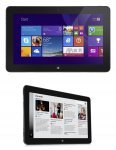
Venue 11 Pro (7130) Tablet
Intel Core i3-4020Y 1.5GHz
4Gb DDR3
128Gb SSD
Intel HD Graphics
10.8″ FHD 1920 x 1080
2MP Front Camera
8MP Rear Camera
mini HDMI
Full size USB 3.0.
Micro-SD Card Reader
36Whr Swappable Battery
They are refurbished and come without an operating system but you can add Windows 10 for just £20!
Total price with VAT & Delivery and code is £154.98
- spoony100
Top comments
spoony100
14 Oct 153#37
If buying without an OS, the Windows 8.1 media creation tool from microsoft is here
Product keys are embedded in the BIOS, and provided the correct version of 8.1 is installed it will auto activate (tip: If the install asks for a product key you are installing the wrong version of Windows 8.1 ).
If you want Windows 10 you will need to install 8.1 first then run the Windows 10 media creation tool and upgrade.
£154.98 delivered using the code and including VAT :man:
EDIT: Weren't the i3 models the ones with problems or am I thinking of something else?
Bendown
14 Oct 15#3
Do you need to add the wllan card?
dillo1982 to Bendown
14 Oct 15#5
You don't need the WWAN it's for mobile connection. The tablet has built in wifi as standard.
gimmeDdeal
14 Oct 15#4
Is it easy to add Windows to these?
Is it just an USB install?
dillo1982 to gimmeDdeal
14 Oct 15#6
Just create a usb installation should be fine. You'll probably need to plug in a mouse whilst you do it.
Bendown
14 Oct 15#7
Seems like a good buy, very tempted
gavinlew
14 Oct 15#8
The Stylus, WWAN module and Dock are also available from them - I built the same combo but with an i5 recently and its quite a nice portable solution.
teerex
14 Oct 15#9
Looks good to me
stokietom1
14 Oct 15#10
do these i3 versions have issues I read the atom ones were the better ones
stewie
14 Oct 15#11
Comes to £174.18 with Windows 10 - seems a lot of hardware for the money.
Dave_c
14 Oct 15#12
will there be much difference from the 13 4030 and the 4020 with .1ghz faster?
becknise
14 Oct 15#13
Looks like the code works with any order on the website as long as a dell venue tablet is included in the basket. I tried adding a laptop and a tablet to my basket and the 20% off was added to the laptop's price as well. They have some nicely priced laptops too.
Boopop
14 Oct 151#14
Severely tempted. I have a HP Touchpad and a 7 year old Macbook currently. This could replace both! I'd like a Surface Book but for something that gets used once every couple of months £1000~ isn't really an appropriate amount of money to pay.
CampGareth
14 Oct 15#15
I have an i3 model, seems fine. I think you're thinking of the i5 model.
Dave_c
14 Oct 15#16
is the fan noisy?
CampGareth
14 Oct 151#17
I think so, for general light duty you probably won't notice it but it seems to turn on at low CPU temperatures like 60C so it spins up for things like opening a few tabs in a web browser at once. Really wish there was some way to adjust the fan curve, I'm fine with a tablet hitting 90C so long as it doesn't throttle and remains quiet.
SavageDonkey
14 Oct 15#18
Interested tthat it can run Bioshock Infinite on Low settings at 26fps LOL
I've ordered one because I can see it being useful to me (tabletless at moment). I ordered the OS free with the Broadband thingy (£10 for this looked canny in case I need it). I have my own keys for windows & which I hope will be a fairly easy route to a clean win 10 install (think I have to go 7 then upgrade and then can clean install 10 or a meringue?)
kingchris
14 Oct 151#19
SSD is removable easily on these standard M.2 drive. Which can be useful.
martyn_3000
14 Oct 15#20
I had the i5 version of this and it was the most temperamental thing I've ever owned.
Would randomly freeze and crash on a regular basis. Other times the screen would just become unresponsive.
Not sure if the i3 and Atom version are any different. Build quality is good, just a shame it doesn't work as well as it looks (for the i5 version at least)
coolhotcold
14 Oct 15#21
Please Note, the T&C state that you are buying from a trade supplier and so agree to purchasing as a business, meaning you have reduced consumer rights.
But for £150, it's a pretty good deal.
jamgin to coolhotcold
14 Oct 152#59
Lol. Like to see them getting that to stand up in court.
They can't ask you to pretend to be a business to suspend your consumer rights. Tricks that companies get up to....
rcdicky
14 Oct 15#22
There's no way to get Windows 10 for free with the big upgrade push they've got on atm?
Rickardo to rcdicky
14 Oct 15#46
The key fact there is free upgrade, but these don't have an OS installed to upgrade from, although a couple of posts above suggest 8 can be activated.
d_1999
14 Oct 15#23
I have the atom version and have recently updated to Windows 10 (upgrade from 8.1 and then a clean install after). I really like the device and use it connected up to one of the official keyboards (in German). I think the atom version has a soldered emmc so can't be upgraded but I've just stuck in a 64GB micro SD card.
The screen is really nice. Main issues are that Dell didn't seem to do a particularly good job with some of the drivers to start with, though this should mostly be sorted by now (although it could be something you have to sort out when you receive it).
m1keyp1key
14 Oct 15#24
Any of these passive or do they all have cooling fans?
Dr Zoidberg to m1keyp1key
14 Oct 151#27
The Atoms are passive. i3 and i5 have fans.
Kaj
14 Oct 15#25
Would Football Manager run on this? Could it replace my desktop?
m1keyp1key to Kaj
14 Oct 15#26
Spec for football manager 2016 :-
OS: Windows Vista, 7, 8, 10
Processor: Intel Pentium 4 Intel Core AMD Athlon 2.2GHz+
Memory: 2 GB RAM
Graphics: NVidia GeForce FX 5900 Ultra ATI Radeon 9800 Pro Intel GMA X3100 256MB VRAM
DirectX: Version 9.0c
Hard Drive: 3 GB available space
So yes the i3 and i5 will
Towelie to Kaj
14 Oct 15#41
I run 2014 (I think it is) on an Atom processor and it runs.
Obviously you can't have all the full details etc but for playing the basic games and still watching the games the Atom did the job so this should be fine.
Bobbite
14 Oct 15#28
Nearly got one but then realised that my reason for selling my Surface Pro 1 was that it was too heavy. So that would be just the same.
These tablets are great, just make sure you update all the drivers as most of the early issues are now sorted. I can also recommend the docking station.
m1keyp1key
14 Oct 15#30
Thanks Dr Zoidberg. If only the i3 was passive and i'd buy it now. Got to think it over now.
2StepSteve
14 Oct 15#31
I have the atom version of this, it's a lot more stable than the i3 or i5 models, there were lots of unhappy i3/i5 owners out there, random lock ups and reboots. Not sure if Dell ever did address the issues properly with a firmware update... seems like they just kinda gave up with these and moved on with another range of the Venue Pro series.
My atom Venue Pro doesn't get much use anymore these days, it's a little long in the tooth. Placed an order for the Surface Pro 4 though!
Didn't need one, but given the price couldnt say no. I have owned Surface Pro 1 and Latitude ST2 (with dock) before but cant justify buying SPro 3 when £80 Atom tablets do the same job, only slower.
Would recommed the dock (only 7 left now) as it is a great docking/charging unit.
I paid £182.46 for the tablet + dock + mini to full HDMI
SteadVex
14 Oct 151#35
Didn't these come with windows initially? I would of thought a dell oem key would activate with 8?
Agharta to SteadVex
14 Oct 15#39
It doesn't work the same way with Windows 8 so you may well be out of luck.
Really pleased with it and have now upgraded to Win10. Great customer service. Don't take my word for it read the thread to see how many people agree.
d_1999
14 Oct 15#36
Yes the dock is quite good as well (although I found the ports were a bit loose).
I don't think any one has mentioned the fact that these also support the use of an active stylus. Apparently the early model of these wasn't very good but the more recent stylus is supposed to be a lot better. I managed to pick one up from dabs for quite a lot less than everywhere else was selling them (several months ago) so it may be worth checking there for anyone interested.
spoony100
14 Oct 153#37
If buying without an OS, the Windows 8.1 media creation tool from microsoft is here
Product keys are embedded in the BIOS, and provided the correct version of 8.1 is installed it will auto activate (tip: If the install asks for a product key you are installing the wrong version of Windows 8.1 ).
If you want Windows 10 you will need to install 8.1 first then run the Windows 10 media creation tool and upgrade.
Ive had a few items from them, always been great. I had an Atom Venue 11 too and it was plenty powerful enough for normal use. Battery life was good too and no noise. Heat added :smiley:
Bendown
14 Oct 15#42
So which is the better bet out of the atom and i3
spackhead
14 Oct 15#43
I bought the i5 version when this deal 20% off was last out and its a brilliant machine
There was a bios upgrade which solved a lot of the early issues I believe
Anyway I upgraded it to Win 10 and it runs it a treat. Battery life could be slightly better, but I bought the stand so it just sits powered on my desk at work in daytime and has enough charge then to cover any travel/evening browsing/work etc
The 7130 is a very nice machine indeed. Heat added
I use MCS quite a bit and they have always been excellent too
Harryisme
14 Oct 15#44
Can you get a KEyboard for this? I'm trying to convince my sister in law to get this over a cheap asus transformerfor my neices birthday, but my neice wants one with a keyboard.
neoboy
14 Oct 15#45
How likely is the Windows key to be embedded into the BIOS on this, surely wouldn't make sense for them to sell it for a fee if the key is in there?
McMike
14 Oct 15#47
I have the 5130 version of this from MCS and have now taken the plunge on the 7130 (one of the last few remaining).
The 5130 shipped with a faulty micro USB charger so MCS sent out the dock charger instead so can't really fault their CS.
Had a few (known) niggles with the 5130 with waking from sleep and a slightly loose fit on the keyboard with battery - hopeful both solved with some insulation tape and turning off connected standby.
if money were no object it'd be a Surface Pro 3 all the way, but these refurbs are a great price for the spec.
stokietom1 to McMike
14 Oct 15#48
Last few? It's showing as 40 in stock - Did you order the i3-4030y version
huangxq2
14 Oct 15#49
I bought a XPS 13 9333 from them few months ago for £400.
Absolutely loved it.
The colour of screen is so rich, and keyboard feels much better than a normal laptop.
At £400, I could not be happier.
mrluke
14 Oct 15#50
Just bought one of the top spec i5 versions , great stuff thank you for the post.
Might be able to get rid of my iPad Air now !
TaylorLuke94
14 Oct 15#51
I'm thinking of buying the atom version for the increased battery life. My main uses will be watching films and browsing the web. Is there much of a performance difference between the atom and i3 versions?
Agharta to TaylorLuke94
14 Oct 15#52
For video viewing and web browsing atom will be fine.
McMike
14 Oct 15#53
sorry, my bad. it was the 7139 - i5, 8gb/256gb model. was showing as 4 remaining at the time.
smr1
14 Oct 15#54
If they had the newer z3795 version with 64 bit windows and 4gb of mem I'd have bought one but they only seem to have older versions.
I don't want to put up with a slow 58gb emmc disk and 32bit Windows.
Bertz99 to smr1
14 Oct 15#55
With 4GB then you really aren't going to gain much from a 64 bit OS
alifff
14 Oct 15#56
Hi guy do you need to buy a separate power adapter for the dock?
Agharta to alifff
14 Oct 15#57
Yes.
adamkaty
14 Oct 15#58
how much would the turbo boost help in the i5 over the i3?
Agharta to adamkaty
14 Oct 15#61
Depends on:
1. Maximum Turbo Boost clock speed.
2. Thermal throttling.
They're not asking. It's not like it's a consumer site that business and consumer stuff could be mixed up.
Everything is advertised without VAT.
T&C are quite clear it's Business to Business.
Shipping and Paying ask for the business address.
They offer bulk buy discounts and are registered under companies house as "46510 - Wholesale of computers, computer peripheral equipment and software".
I think their premise that they supply businesses and trade only is valid and their T&C are not egregious.
alifff
14 Oct 15#62
Thanks for replying. Do you know where i can buy it from? I couldnt see it on mcs?
adamkaty
14 Oct 151#63
thanks for that link , seems like i3 is the way to go
someperson
14 Oct 15#64
These are refurbished, does anyone know what condition these come in.
steffcip to someperson
15 Oct 15#70
like new was mine
anubispearl
14 Oct 15#65
Just picked up the last cheaper (£179 shipped) i5 Version. Much of the problems they did have were fixed with Bios updates.
CampGareth
15 Oct 15#66
I have the i3 model and it's not throttling, it's just spinning the fan up to full speed at low temperatures. Right now it's at 60% CPU load and the CPU's at full speed (1.6GHz) so the CPU is at 65C but the fan is spinning fairly hard. Not absolute fastest but it's still spinning. I'd much prefer it if 80C triggered fast fan speed and below that it was silent (which low fan speed is), then say 90 or 95 triggered full speed.
*edit* for reference I have an 11" laptop with 90W of CPU and GPU, the fan doesn't even turn on until the CPU hits 60C making it silent until you start a game or continuous heavy CPU load.
SmilingCrow
15 Oct 15#67
Tablets and laptops use different temperature points for throttling because with tablets you are more likely to be affected by high surface temperatures as you are usually holding them whereas with laptops they tend to be on a desk or on your lap.
This is set by the manufacturer at the BIOS level and not by Intel as the actual chip throttling point is fixed regardless.
It’s annoying that there isn’t more flexibility as I have a convertible laptop/tablet which is rarely used in tablet mode and usually sits in a dock so could safely run as high temperature wise as a desktop.
The manufacturers choose safety first due to the ignorance of consumers and the tendency of scumbag lawyers that like to sue due to their client’s ignorance; especially true in the USA.
Tablets and laptops use different temperature points for throttling because with tablets you are more likely to be affected by high surface temperatures as you are usually holding them whereas with laptops they tend to be on a desk or on your lap.
This is set by the manufacturer at the BIOS level and not by Intel as the actual chip throttling point is fixed regardless.
It’s annoying that there isn’t more flexibility as I have a convertible laptop/tablet which is rarely used in tablet mode and usually sits in a dock so could safely run as high temperature wise as a desktop.
The manufacturers choose safety first due to the ignorance of consumers and the tendency of scumbag lawyers that like to sue due to their client’s ignorance; especially true in the USA.
The best solution is the Intel Core M as it offers very good performance aimed at a fan-less chassis but it cost a lot though.
Easy2BCheesy
15 Oct 15#68
Great price, but I think I can wait however long it takes for these guys to get the next-gen Core M versions. Haswell-Y is best described as an 'almost, nearly, but not quite' product.
brookheather
15 Oct 151#69
I tried a couple of these i5 models last year and in addition to the various lockups and touchscreen freezes that have already been mentioned I found that Windows 8.1 was frequently busy doing something while idling causing the fan to spin up with a noticeable noise. I found this tablet to annoying to use and returned them.
adam1
15 Oct 15#71
yhcbry
repouk
15 Oct 15#72
I'd get one of the i3 models and pass my Linx 10 onto my son but I not sure about the fan business. I sometimes used mine to watch stuff in bed while the missis is asleep and I can see the fan noise being a problem :disappointed:
rendeverance to repouk
15 Oct 15#75
Because of the fan and extra battery life, along with the various reports about some issues with the i3 and i5 that need to be addressed by the user and that I have other PCs (inc a Vaio Duo 13 convertable) for more demanding stuff I went with the Atom Z3770 version with FHD screen AND WWAN GSM Modem here for £116.58
Yes, for an extra £48 (as I want WWAN modem) I could have had the slightly more powerful i3, 2gb extra ram and a better larger SSD - but I would suffer 2 or so less hours battery life and still have spent an extra 41% (of the 116.58) on what is likely to be a web browser and movie streamer for the most part.
This should suit you better INHO and its cheaper :wink:
Boringgit
15 Oct 15#73
Anybody know what version of Windows 8.1 these shipped with - Home or Pro?
Agharta to Boringgit
15 Oct 15#74
You will need to check them individually as they can come with either.
SavageDonkey
16 Oct 15#76
Mine arrived this morning, as new condition no signs of ware.... however it will not charge :neutral_face:
brookheather to SavageDonkey
16 Oct 15#77
Are you using the proper Dell Venue 11 24W charger?
SavageDonkey
16 Oct 15#78
Yes it's the 24 watt charger they supplied (light comes on) and the cable they supplied too.
genieuk2008
16 Oct 15#79
Got mine. Didn't go for any OS, when turned on it has an un-activated win 8.1.
Craps! They must have de-activated it. Any idea how I can re-activate?
coolhotcold
16 Oct 15#80
I do believe the Venue 11 Pro's were sold with Windows 8 Pro.
The one I received this morning came with a unactivated 8.1 Home version.
All you "Should" need to do is to create a 8.1 Pro installation USB. So far, everything works absolutely fine, good condition and all working so far.
genieuk2008
16 Oct 15#81
Thanks @coolhotcold.
I'll give that a try. Is there anything else you did other then install it off USB. Did you do a clean install (boot from USB) or upgrade to 8.1 pro by clicking setup.exe
Agharta
16 Oct 15#82
Yes, buy a genuine key and enter it.
djdope
16 Oct 15#83
get the keyboard dock for this and its a great little laptop
Version A00, so should be the latest version with all the fixes that existed in the previous ones. For £10 it's cheapest you'll find.
mrluke
16 Oct 15#85
I bought the 7139 for 180 inch postage, came with a smartcard and finger print reader which is good . Condition was very good . Came with windows 8.1 unactivated preinstalled which I removed and went to windows 10.
great tablet, actually getting rid of an iPad air because of how good it is .
bullymong
16 Oct 15#86
Mine came today - really pleased with it. The speed (windows 10)is excellent. One question - I bought the dock but it doesn't have a charger. Searched Amazon and eBay and no luck. Also contacted the seller who wasn't too helpful and just pointed me to eBay. Anyone know where I can get the ac for the dock?
Agharta to bullymong
16 Oct 15#87
If it's the same as this dock ask the seller as they sell the dock+charger for £35 - LINK.
coolhotcold
16 Oct 151#88
It's one reason why I didn't buy the dock from them.
The part number with my dock is 3RG0T which is the same as LINK.
metalheadkicks
17 Oct 15#90
I was hoping the dock would take the standard DELL charger, now I have to buy a charger too....
My tablet has got excessive screen bleeds and is running hot whilst not being used.
Agharta to metalheadkicks
18 Oct 15#92
It is the weekend so I'd wait until Monday for a reply!
alifff
18 Oct 15#91
whats the best way to contact the seller? I emailed through the website and through reply to order email but no reply
SavageDonkey
18 Oct 15#93
They sent me a new charger and I'm very happy. Wish I'd bought it with windows as I had a bit of bother.
As I only had a Win 7 code I had to try Win7 to Win 10 but I couldn't even get Win 7 installed... Anyway, the new preview build of Win 10 10565 allows you to enter a win 7 key in now (so easy in the end).
genieuk2008
18 Oct 15#94
Got my core i5 upgraded to win 10 pro and updated to latest A16 bios. So far quite buttery smooth.
HDD space is a bit limiting so will likely install a 128GB micro sd card.
BigYoSpeck
19 Oct 15#95
Mine arrived Friday. Ordered it without the OS thinking I'd be clever and that the Windows product key would just be embedded in the bios to install on my own but it's not. Straight from Dell it would have a Windows 8.1 Pro key in it but doing a diagnostic on it there is no ACPI MSDM table so Windows 8.1 won't activate for any version.
Bizarrely though it has a Windows 7 SLIC code. So installing Windows 7 on it followed by the Dell certificate and OEM product key for Windows 7 Pro did result in an activated copy of 7 which then upgraded to a fully activated version of 10 Pro but it was a nightmare to do as there are no touchscreen, USB 3 or wifi drivers for Windows 7. My advice just pay the extra to get it with the OS.
Has anyone on here got either of the keyboards for it? I bought the slim travel keyboard of Ebay but it's not working. Does anyone with a keyboard know if it works in the bios or if it only works in Windows?
metalheadkicks to BigYoSpeck
19 Oct 15#98
Thats exactly what I intended when I purchased this without OS, hoping it would have license embedded. It didnt and worst of all mine has got an incorrect service tag for an Optiplex, which is even annoying. Had to waste one of my retail licenses to get it finally on windows 10. Seems good after the BIOS update, but keeps crashing every now and then. I am seeing two batteries and the in-use one is listed as #2 and it crashes when am running media apps and unplug or plug power supply.
Is anyone seeing two batteries in Windows 10 on i3 version?
genieuk2008
19 Oct 15#96
I plugged a wireless keyboard dongle into the usb port and the keyboard has a touchpad, didn't have to do anything in bios to activate it. The slim keyboard you have shouldn't need anything extra to turn on afaik.
BigYoSpeck to genieuk2008
19 Oct 15#97
Yeah like yourself I've had no problem with a USB attached device I just want to confirm that either of the official available keyboards do also work in the bios for it.
Boringgit
19 Oct 15#99
Thank goodness you posted this - I wouldn't have even thought about this. Agreed though - for £20 quid anyone who is not really quite techie should just buy the OS. Mine is still on order, but I have a friend who bought the Acer the other day and no - as you say, - it's only supported in Windows. a Cheap USB hub is the only option.
BigYoSpeck
19 Oct 15#100
The crashing, is it sdstor.sys? If so it's a known fault if you remove or attach the power when there is an SD card inserted. I'm still looking for a solution other than taking the SD card our every time I attach or remove the power cable.
Anyone who is going to try installing Windows 7 on it you need to disable secure boot and enable legacy roms in the bios and also disable USB3. The USB port still works as a USB2 for windows 7. The WiFi is a Dell DW1537 with an Atheros 6004 chip, there are no Windows 7 drivers for this so you need WiFi dongle or failing that if your phone supports tethering you can get an internet connection from that to make sure it's all activated.
VimesUK
19 Oct 15#101
Has anyone been able to find a case for these tablets, just ordered one of the i5's from this seller, via their eBay shop, seemed cheaper.
Thanks.
McMike
19 Oct 15#102
yes, travel keyboard works in the bios on both the 5130 and 7139
BigYoSpeck
19 Oct 15#103
Thanks. Looks like I'll return it then. Gutted as it was only £25.
genieuk2008
19 Oct 15#104
Hard keyboard is quite expensive. Really want to get it, but all these extras are starting to add up! I guess we all want that ultra book experience without shelling out loads of money.
BigYoSpeck to genieuk2008
19 Oct 151#106
Yeah I've got one coming tomorrow. £105 for a brand new one. You can get a refurbished one for £100 off ebay. So all in just under £280. You won't find anything with a full HD display for that price short of a cheap Chinese tablet.
coolhotcold
19 Oct 15#105
The touchscreen works in Bios.
At least, it does on mine.
genieuk2008
19 Oct 15#107
Cool. Let us know how you get on with the new keyboard. I'm strongly considering it myself too.
dave74
19 Oct 15#108
I have one of these I bought a while ago - i5, 4gb, 128gb SSD - brilliant machine. I bought one of the hard keyboards and the mouse pad occasionally stops working. It's a known fault, just open the keyboard and disconnect the battery. It means you obviously lose the 2nd battery but atleast the mouse will work every time ;-)
Boringgit
19 Oct 15#109
So yeah, just to say that as much of a faff as it was to set up, when it is working it is brilliant!
I got the cheaper of the two keyboards because it was cheaper - perhaps that was a poor choice because key travel is really shallow, but it beats typing on screen.
Also if you bought without an OS, as per the previous poster, you have to use Windows 7 in order to get an OEM offline activation, then upgrade to 10 - there is no way to activate Windows 8.1. Took me about a day - then I re-installed so I could enable secure boot and use bitlocker!
McMike
19 Oct 15#110
My current issue with the new venue pro is with the display port connector on the dock. Have been unable to get it to work, although HDMI works OK. Have read it needs an "active" display port cable although I thought the Belkin cable I had - DP to DVI - was (has a large bulge in the middle), although it was from Poundland. Flashed the dock bios to latest, but still no joy. Anyone know of a DP cable which definitely works. Could really do with two monitors working with the 7139.
alifff
20 Oct 15#111
can anyone confirm whether the dell xps chargers work on the docks please?
BigYoSpeck
20 Oct 15#112
Well the K12A Dell Tablet Keyboard arrived. Looks a nice quality unit. Keys aren't exactly Lenovo quality but you can touch type on it which I would say isn't possible on the K11A Dell Slim Tablet Keyboard. I see that more as a folio cover with keys on it for when you need it rather than something you could do any real work on.
But the bad news is this keyboard doesn't work with the tablet either, doesn't detect the keyboard or battery in either the BIOS or Windows so it must be a fault with my tablet unit from MCS.. I've emailed them so lets see how they handle faults.
genieuk2008 to BigYoSpeck
20 Oct 15#116
Thanks for the update, and sorry you had to send it back due to keyboard not working with it. I have the hard keyboard on order as well, will let you know how I get on.
masterbruce
20 Oct 15#113
Is the i5 model good enough to use as a desktop? Will a full hd monitor work with this? Thanks
BigYoSpeck to masterbruce
20 Oct 151#114
Yes*
*but you should be aware that as it's a Y model processor it's ultra low wattage. That doesn't mean it's some clever design or uber efficient, it means it throttles once the power usage hits a certain wattage regardless of heat. So in games or things like video encoding it works, but it's power limited. I don't really think there is any point in the i5 because of this as it's going to throttle just like the i3 does anyway. Unless you want it for the 8gb memory I struggle to see the benefit. Read some reviews to see how you feel but from my own experience the i3 happily runs Windows 10, web browses, plays videos and I even had a dabble on Civ V on it. It's not going to replace my gaming rig but it works.
But to just use Windows on casually it's completely fine. The HDMI port will give you a full HD output, and I've run it with a wireless keyboard and mouse dongle. It will do everything a PC will do so long as you don't need to do anything very demanding.
Happily plays HD and even 4k video so long as the 4k is h264, googles VP9 wasn't watchable.
Mark at MCS got back to me straight away and they're replacing my faulty unit tomorrow so provided that all goes well it's great service.
masterbruce
20 Oct 15#115
Excellent reply, appreciated!
samburrows
21 Oct 15#117
Just been and collected mine (really ummed and arred between the Atom and the i3, plumped for the i3 in the end)
Think I will grab the keyboard and stylus too if either come up at a good price.
My i5 Dell Venue Pro 11 turned up today, refurbished. Looks like new and with Windows 10 activated it seems a good buy with the Folio type case I bought.
BigYoSpeck
21 Oct 15#120
Well my replacement arrived and all seems in working order with the keyboard now. Actually a little happier with this unit as it runs cooler and doesn't ramp the fan as much. The old unit as well as throttling to 6W like all Y series cpu's do did thermal throttle and ramp the fan speed up (sounded like an optical drive at times) This one doesn't get as hot and I've only got it to thermal throttle by running a something GPU intensive on it. Also the battery wear is lower. The old unit was showing 11% battery wear, this one only 4%.
But the saga hasn't completely ended. The K12A tablet keyboard which I ordered somewhere else not from MCS is faulty. The trackpad on it is raised in the bottom right corner, still works but it's an accident waiting to happen because it sticks up. And the battery also doesn't work in it. First the tablet says it cannot communicate with it then pops up saying it no longer operates and needs to be replaced.
I know Dell batteries if they fall below 5% won't work as they can't verify it's a genuine safe product to start delivering charge to. It has a micro USB input on the keyboard itself to charge if this happens and when you connect power it initially begins drawing charge and pops the LED on to indicate it's charging but then it stops. So it won't take a charge from the wall charger (or any other charger) and won't connect to the tablet.
Seriously Dell how ropey is your quality control? I understand now why there are so many refurb units.
genieuk2008
22 Oct 151#121
Sorry to hear that @BigYoSpeck.
Got my brand new K12A hard keyboard yesterday. My experiences are a little more positive. I hope you get your keyboard sorted, after that you'll love it.
So I ordered the i5-4220Y version without OS. It came pre-loaded with Win 8.1, but unactivated, I thought it would be easy to use my Win 7 key to upgrade to Win 10, but I thought I'd leave all the hassle of connecting a USB hub and keyboard and messing with the bios and making a bootable Win 7 USB would be a waste of time.
So instead I bought a cheap Win 8.1 pro OEM licence. Upgraded the unactivated Win 8.1 to 8.1 pro. Then activated it with my new key.
Then I upgraded to Win 10 Pro, applied the latest A16 bios. and all seems fine. After getting the keyboard, I connected the Venue to the keyboard and it started working. I plugged in the charger to the Venue whilst connected to the keyboard, folded it, and let it charge overnight. In the morning both batteries show at 100% in Windows 10, battery 1 is going down as I use it, and battery 2 (which I assume is the tablet battery is still 100%).
The keyboard does feel quite heavy and at the same time premium. Weight of both tablet and keyboard is heavier than I'd expected, but I can live it it.
McMike to genieuk2008
22 Oct 15#126
The travel keyboard I bought about 8 months ago for my 5130 also has the raised bit on the track pad, bottom right.
Thanks for the SD card info. Have recently bought the 128gb Sandisk from Argos and was seeing unexpected shutdowns in the event logs since it was installed. Strange that the dell update utility doesn't pick the sdstor.sys driver issue up and offer an install.
BigYoSpeck
22 Oct 15#122
The process of activating the Windows 7 SLIC code on it once you have a keyboard is actually fairly straight forward once I'd figured it out. In the bios (volume up on boot) you need to disable secure boot and USB 3, then enable legacy rom boot.
You obviously need a Windows 7 ISO which aren't easily available anymore since Microsoft killed the digital Digital River distributions and then I used Rufus to create a UEFI bootable USB stick:
Options needed are GPT partition scheme for UEFI and FAT32 formatted.
Windows 7 installs fairly straight forwardly providing you have a mouse and keyboard, but there are no touchscreen, USB 3 or WiFi drivers available. Once it's installed you also need the DELL.xrm-ms certificate file and a Dell OEM Windows 7 Pro key and from the command prompt use slmgr.vbs to install the key and do the OEM offline activatio like on this guide:
Once that's done you need a USB network adapter to go on line as I like to authenticate Windows as genuine just to be sure the Windows 10 upgrade will work:
I installed Windows 10 with the option to keep nothing and then once that's done you want to run a disk cleanup to get rid of the previous Windows backup as it's no use.
The device is definitely glitchy without all the latest firmware and bios installed. I did all that from Windows 8.1 before I wiped it. And even when fully patched and upgraded, Windows 10 has a bug in the SD card reader driver. With an SD card in attaching or detaching the power cable often blue screens because of the sdstor.sys driver file. Only way round it is to eject the card before doing so.
VimesUK
22 Oct 15#123
Thanks for noting this, in regards to the sdstor.sys driver file and W10 causing a BSOD. I thought that I had an issue unique to mine and whilst I am sort of glad that I don't, per se, I am a bit miffed at the driver causing a BSOD as you have noted when a SD card i used and the power cable attached and detached.
Have you not found a more elegant solution with a driver update etc...?
BigYoSpeck
22 Oct 152#124
I have yeah. You need to download the deployment pack for Windows 10 from here:
Then you need to extract the files, I use 7-zip. With that you just right click the 7130-Win10-A00-FXC3H.CAB file and select 7-Zip followed by Extract to "7130-Win10-A00-FXC3H.CAB\"
Once that's done right click the start menu and click device manager. Double click SD host adapters. It should then list two SDA Standard Compliant SD Host Controller devices. On my system the bottom of those two was the one to update the driver on but your system may have them the other way round. Either way it will only let you update the driver for the correct one.
Start with the bottom one then and double click it, then go to the Driver tab and click Update Driver. Click Browse my computer for driver software and browse to the directory to extracted the 7130-Win10-A00-FXC3H.CAB file into. Then make sure Include subfolders is checked and click next. It should then update the driver to a BayhubTech/O2Micro driver and this one no longer crashes when connecting or removing the power cable.
It's also worth doing the same for the IDE ATA/ATAPI controllers entry if it's just using the standard Microsoft driver. Changing this to the Intel 8 Series driver gives a reasonable speed boost to the onboard SSD.
VimesUK
22 Oct 15#125
^^^ Thanks for the above. I have followed your well detailed instructions and updated (bottom one for me also with the SD controller) both the SD and IDE controller. Now the drivers are as you describe and I'll test out the SD card functionality in a little while.
When I ran the Dell auto detect function, using IE and not Edge nor another browser, from the Dell Venue 11 pro it returned it as some strange device and not the tablet, thus their auto detection of drivers failed from Windows 10.
I have been looking at the thermal throttling of the CPU on CPU intensive games etc and I see that there could be solutions for that. Maybe I'll look into that one day when I'm sure the tablet is stable enough as it should be, having just acquired it.
Thanks again :smiley:
Boringgit
22 Oct 15#127
Brilliant - cheers for your hard work!
gb1999
23 Oct 15#128
Ok mines arrived with Windows 10 installed but not activated... Unfortunately I only bought a Windows 8.1 key! Any idea how I can downgrade as I cannot boot to usb flash drive as far as I can tell...
VimesUK to gb1999
23 Oct 151#129
Really...?
You should have W 10 installed and not activated, as you noted, but with a W 10 key packaged separately. I only see the option to either buy it with W 10 or no OS at all.
Mine came, albeit from their ebay store, with W10 that also needed activating.
You can boot from a USB key by first making sure that Secure boot is turned off in the BIOS. Just press the volume up key to enter the BIOS when the Dell logo in a circle shows on the screen during boot. Navigate to the option to disable it and save and exit. Next time, with a bootable USB stick inserted you can choose the stick as the boot option when pressing Vol up again to enter the options screen, if that makes sense.
BigYoSpeck to gb1999
23 Oct 151#132
Will Windows 10 not activate with the Windows 8.1 key? Try contacting MS support using the app in Windows 10 (app is just called contact support) and see if they will activate it for you.
Otherwise you'll need to install 8.1, activate and upgrade. You can download the media creation tool and make a bootable USB here:
I will give that a try thank you! I purchased without an OS but it came installed but no key unfortunately....
VimesUK
23 Oct 15#131
ah ok. I suppose it had to come with something installed. As noted I got mine from ebay as it was much cheaper than their website and came with the broadband card fitted and W 10, just with a key for it to activate packed in the box.
Vol up to get into the BIOS options (and scroll through options) and Vol down to select it, BTW.
gb1999
24 Oct 15#133
It took some time, but the help centre activated it for me. Thanks, you saved me a lot of time. Just need to update the bios & I should be set
brookheather
24 Oct 15#134
The next update to Windows 10 due early November will allow you to activate using a Windows 7 or 8 licence key.
VimesUK
25 Oct 15#135
Has anyone noticed touch screen sensitivity issues and duplication of letters when typing...? Sometimes I find it difficult to log into sites etc due to this. Scrolling when browsing can bring up menus that I didn't mean to.
A bit annoying really.
Using a BT keyboard and it is perfect so it does seem to be a screen issue. I am reading a few similar posts in Dell's own forum.
The Dell detect driver utility seems useless as it detects my tablet as a Optiplex GX240
brookheather to VimesUK
25 Oct 15#140
That's because these "refurbished" tablets have all been flashed with the same dummy service tag which actually belongs to an old Optiplex GX240 as you've discovered.
Boringgit
25 Oct 15#136
Same problem with driver detect.
This is my second Windows tablet and I think the issue is Windows, not the tablet. I was just browsing a webpage, when an email (from the app which was running underneath), decided it had been clicked on and popped open - but the web page was entirely covbering the relevant part of the email app..
What I can say is that at least it's better than Windows 8 - that was truly a work in progress - this is nearly there!
VimesUK to Boringgit
25 Oct 15#137
I think that it is very much the tablet.
My Linx 10 (ten inch Windows 10 tablet) is perfect as is my Acer 8" Windows 10 tablet. My daughters Windows tablets are also fine, in respects of the screen sensitivity.
When using a BT keyboard there is no issue at all.
If it wasn't for us having several other Windows tablets I would agree but I am reading more about this issue of screen sensitivity and erratic behaviour which has caused issues for other and their Dell tablets from the Windows 8.1 to 10.
LOL - I know what you mean, regarding the Windows platform. If it hadn't have been for Staples selling the Linx tablets last Christmas time (IIRC) very cheaply we would not have had any..! The Acer was bought very cheaply as well. I tend to prefer a Windows tablet over that of our Androids unless needing specific apps or games etc..
Thanks for the link but I think that I might have just resolved the issue.
I completely reset Windows 10 and set it up again as a new tablet. This time I only installed the SD card drivers and the normal Windows updates. It now seems fine. I will not bother with any of the other Dell drivers as the auto detect thing is fubar and the drivers listed might have caused or contributed to the problem in the first place.
I'll test each app etc as I have installed it just to check if the issue then returns.
I have just calibrated the screen as well, thanks for the link
VimesUK
26 Oct 15#141
Good to know that it isn't the utility at fault, as such.
Tablet seems much less erratic now with typing since the reset. Might well have been one of the drivers I had installed manually from the Dell site.
Must remember that it is my Android devices which can swipe when typing, I miss that.
pmja
27 Oct 15#142
I've got one myself. The top spec. one. Im looking for a keyboard now. I wanted a Portuguese oficial keyboard but there is no evidence that it exists so any other will also work imo. A cheap one would be rather nice too.
SavageDonkey
9 Nov 15#143
Anyone help me with this piece of crap as MCS are just full of excuses.
So first it will not charge with the charger provided and they send me the charger that plugs in the bottom.
I have installed Windows 10 but need to select legacy boot from the bios otherwise it does not recognise an operating system... all well and good however it keeps losing the settings in the bios (this even happens when it has plenty of battery left).
Is there a way to install windows so the default secure boot works?
VimesUK to SavageDonkey
9 Nov 15#144
Seems like you have got a problem tablet there.
I bought mine through ebay, cheaper than the shop, so I would have both ebay and PP protection if needed.
Mine does not have secure boot enabled by default and I have left it that way as it works fine and retains all of its settings.
It doesn't bode well if you can't charge it from the port and the tablet keeps losing its settings.
I assume that you got a genuine Dell 23w charger for the tablet, mine still had its shrink wrap on it.
BigYoSpeck to SavageDonkey
9 Nov 15#145
If you've created your USB Windows 10 installer it should work with the UEFI secure boot enabled. Then it's just a case of the USB drive being the top option under Boot Sequence:
Then during installation Windows should change the bios settings automatically to put Windows Boot Manager first again.
plap
4 Dec 15#146
Only problem am having with my i3:
In BIOS the Service Tag is set as "DLL730" and the Express Service Code is a string of numbers....
Means that the automated Dell tool to check form model/drivers etc. doesn't work because these codes are unrecognized by DELL +
when I enter these on the Dell website http://www.dell.com/support/home/uk/en/ukdhs1 they show as invalid
Does anyone else have the issue with an unexisting service code/tag?
Can we change the Service tag and Express Service Code on the tablet?
You can check yours by going into the BIOS (switch off, then press and hold Power button until you get haptic feedback and then immediately press and hold volume down button.
But the sticker behind the removable panel has a service code which is valid.
When I enter mine in http://www.dell.com/support/home/uk/en/ukdhs1/products/?app=warranty
it shows that the tablet has next business day warranty until 2017 (at least that's what I think that means):
Also worth noting that Dell did a recall on those, wonder if some of the refurbs are repaired recalled tablets.
Just wanted to make folks aware there have been issues with those which should have been resolved by Dell:

![Fresh Breakfast Meat Box (Using code) @ Campbells Meat [Haggis / Lorne Sausage / Bacon / Black Pudding & More]](/images/topics/208684_1.jpg)




































![[Xbox One] Q. u. b. e: Director's Cut on Deals with Gold](/images/topics/208716_1.jpg)


















Opening post
http://mcscom.co.uk/shop/dell-tablets/
But I picked out what I though was great value @ £143.00 (collected) + £9.95 delivery
Venue 11 Pro (7130) Tablet
Intel Core i3-4020Y 1.5GHz
4Gb DDR3
128Gb SSD
Intel HD Graphics
10.8″ FHD 1920 x 1080
2MP Front Camera
8MP Rear Camera
mini HDMI
Full size USB 3.0.
Micro-SD Card Reader
36Whr Swappable Battery
They are refurbished and come without an operating system but you can add Windows 10 for just £20!
Total price with VAT & Delivery and code is £154.98
- spoony100
Top comments
http://windows.microsoft.com/en-gb/windows-8/create-reset-refresh-media
Product keys are embedded in the BIOS, and provided the correct version of 8.1 is installed it will auto activate (tip: If the install asks for a product key you are installing the wrong version of Windows 8.1 ).
If you want Windows 10 you will need to install 8.1 first then run the Windows 10 media creation tool and upgrade.
http://windows.microsoft.com/en-gb/windows-10/media-creation-tool-install
All comments (146)
EDIT: Weren't the i3 models the ones with problems or am I thinking of something else?
Is it just an USB install?
Notebook Check
I've ordered one because I can see it being useful to me (tabletless at moment). I ordered the OS free with the Broadband thingy (£10 for this looked canny in case I need it). I have my own keys for windows & which I hope will be a fairly easy route to a clean win 10 install (think I have to go 7 then upgrade and then can clean install 10 or a meringue?)
Would randomly freeze and crash on a regular basis. Other times the screen would just become unresponsive.
Not sure if the i3 and Atom version are any different. Build quality is good, just a shame it doesn't work as well as it looks (for the i5 version at least)
But for £150, it's a pretty good deal.
They can't ask you to pretend to be a business to suspend your consumer rights. Tricks that companies get up to....
The screen is really nice. Main issues are that Dell didn't seem to do a particularly good job with some of the drivers to start with, though this should mostly be sorted by now (although it could be something you have to sort out when you receive it).
OS: Windows Vista, 7, 8, 10
Processor: Intel Pentium 4 Intel Core AMD Athlon 2.2GHz+
Memory: 2 GB RAM
Graphics: NVidia GeForce FX 5900 Ultra ATI Radeon 9800 Pro Intel GMA X3100 256MB VRAM
DirectX: Version 9.0c
Hard Drive: 3 GB available space
So yes the i3 and i5 will
Obviously you can't have all the full details etc but for playing the basic games and still watching the games the Atom did the job so this should be fine.
http://en.community.dell.com/support-forums/mobile-devices/f/3824/t/19576995
These tablets are great, just make sure you update all the drivers as most of the early issues are now sorted. I can also recommend the docking station.
My atom Venue Pro doesn't get much use anymore these days, it's a little long in the tooth. Placed an order for the Surface Pro 4 though!
http://mcscom.co.uk/product/dell-venue-11-pro-7139-tablet-intel-core-i5-4300y-1-6ghz-8gb-ram-256gb-ssd-hdd-smartcard-reader-10-8-full-hd-touch-panel-win-8-1-1yr-wty/?attribute_pa_choice-of-os=no-operating-system
bargain price with the 20% code now
Didn't need one, but given the price couldnt say no. I have owned Surface Pro 1 and Latitude ST2 (with dock) before but cant justify buying SPro 3 when £80 Atom tablets do the same job, only slower.
Would recommed the dock (only 7 left now) as it is a great docking/charging unit.
I paid £182.46 for the tablet + dock + mini to full HDMI
Really pleased with it and have now upgraded to Win10. Great customer service. Don't take my word for it read the thread to see how many people agree.
I don't think any one has mentioned the fact that these also support the use of an active stylus. Apparently the early model of these wasn't very good but the more recent stylus is supposed to be a lot better. I managed to pick one up from dabs for quite a lot less than everywhere else was selling them (several months ago) so it may be worth checking there for anyone interested.
http://windows.microsoft.com/en-gb/windows-8/create-reset-refresh-media
Product keys are embedded in the BIOS, and provided the correct version of 8.1 is installed it will auto activate (tip: If the install asks for a product key you are installing the wrong version of Windows 8.1 ).
If you want Windows 10 you will need to install 8.1 first then run the Windows 10 media creation tool and upgrade.
http://windows.microsoft.com/en-gb/windows-10/media-creation-tool-install
There was a bios upgrade which solved a lot of the early issues I believe
Anyway I upgraded it to Win 10 and it runs it a treat. Battery life could be slightly better, but I bought the stand so it just sits powered on my desk at work in daytime and has enough charge then to cover any travel/evening browsing/work etc
The 7130 is a very nice machine indeed. Heat added
I use MCS quite a bit and they have always been excellent too
The 5130 shipped with a faulty micro USB charger so MCS sent out the dock charger instead so can't really fault their CS.
Had a few (known) niggles with the 5130 with waking from sleep and a slightly loose fit on the keyboard with battery - hopeful both solved with some insulation tape and turning off connected standby.
if money were no object it'd be a Surface Pro 3 all the way, but these refurbs are a great price for the spec.
Absolutely loved it.
The colour of screen is so rich, and keyboard feels much better than a normal laptop.
At £400, I could not be happier.
Might be able to get rid of my iPad Air now !
I don't want to put up with a slow 58gb emmc disk and 32bit Windows.
1. Maximum Turbo Boost clock speed.
2. Thermal throttling.
Note regarding throttling:
http://www.notebookcheck.net/Dell-Venue-11-Pro-7130-Tablet-Review-Update.132423.0.html
Everything is advertised without VAT.
T&C are quite clear it's Business to Business.
Shipping and Paying ask for the business address.
They offer bulk buy discounts and are registered under companies house as "46510 - Wholesale of computers, computer peripheral equipment and software".
I think their premise that they supply businesses and trade only is valid and their T&C are not egregious.
*edit* for reference I have an 11" laptop with 90W of CPU and GPU, the fan doesn't even turn on until the CPU hits 60C making it silent until you start a game or continuous heavy CPU load.
This is set by the manufacturer at the BIOS level and not by Intel as the actual chip throttling point is fixed regardless.
It’s annoying that there isn’t more flexibility as I have a convertible laptop/tablet which is rarely used in tablet mode and usually sits in a dock so could safely run as high temperature wise as a desktop.
The manufacturers choose safety first due to the ignorance of consumers and the tendency of scumbag lawyers that like to sue due to their client’s ignorance; especially true in the USA.
Tablets and laptops use different temperature points for throttling because with tablets you are more likely to be affected by high surface temperatures as you are usually holding them whereas with laptops they tend to be on a desk or on your lap.
This is set by the manufacturer at the BIOS level and not by Intel as the actual chip throttling point is fixed regardless.
It’s annoying that there isn’t more flexibility as I have a convertible laptop/tablet which is rarely used in tablet mode and usually sits in a dock so could safely run as high temperature wise as a desktop.
The manufacturers choose safety first due to the ignorance of consumers and the tendency of scumbag lawyers that like to sue due to their client’s ignorance; especially true in the USA.
The best solution is the Intel Core M as it offers very good performance aimed at a fan-less chassis but it cost a lot though.
http://mcscom.co.uk/product/dell-venue-11-pro-5130-intel-atom-z3770-1-46ghz-2gb-ram-64gb-ssd-hdd-wwan-10-8-full-hd-touch-panel-win-8-1-1yr-wty/
Yes, for an extra £48 (as I want WWAN modem) I could have had the slightly more powerful i3, 2gb extra ram and a better larger SSD - but I would suffer 2 or so less hours battery life and still have spent an extra 41% (of the 116.58) on what is likely to be a web browser and movie streamer for the most part.
This should suit you better INHO and its cheaper :wink:
Craps! They must have de-activated it. Any idea how I can re-activate?
The one I received this morning came with a unactivated 8.1 Home version.
All you "Should" need to do is to create a 8.1 Pro installation USB. So far, everything works absolutely fine, good condition and all working so far.
I'll give that a try. Is there anything else you did other then install it off USB. Did you do a clean install (boot from USB) or upgrade to 8.1 pro by clicking setup.exe
http://www.ebay.co.uk/itm/DELL-11-TABLET-STYLUS-/331678852255?hash=item4d3999a49f:g:ONEAAOSwwbdWGkl-
Version A00, so should be the latest version with all the fixes that existed in the previous ones. For £10 it's cheapest you'll find.
great tablet, actually getting rid of an iPad air because of how good it is .
But according to eBay listing
http://www.ebay.com/itm/Genuine-Dell-Venue-11-Pro-Tablet-Docking-Station-FACTORY-PACKED-/321828945125?hash=item4aee7ffce5:g:MHoAAOSwrklVJV4t
The charger should be 4H6NV which further investigation is the same that charges the XPS 12
Which leads me to
http://www.ebay.co.uk/itm/Genuine-DELL-XPS-11-12-13-AC-Adapter-Charger-Power-Supply-45W-UK-Cable-CDF57-NEW-/351503167082
My tablet has got excessive screen bleeds and is running hot whilst not being used.
As I only had a Win 7 code I had to try Win7 to Win 10 but I couldn't even get Win 7 installed... Anyway, the new preview build of Win 10 10565 allows you to enter a win 7 key in now (so easy in the end).
HDD space is a bit limiting so will likely install a 128GB micro sd card.
Bizarrely though it has a Windows 7 SLIC code. So installing Windows 7 on it followed by the Dell certificate and OEM product key for Windows 7 Pro did result in an activated copy of 7 which then upgraded to a fully activated version of 10 Pro but it was a nightmare to do as there are no touchscreen, USB 3 or wifi drivers for Windows 7. My advice just pay the extra to get it with the OS.
Has anyone on here got either of the keyboards for it? I bought the slim travel keyboard of Ebay but it's not working. Does anyone with a keyboard know if it works in the bios or if it only works in Windows?
Is anyone seeing two batteries in Windows 10 on i3 version?
Mine is still on order, but I have a friend who bought the Acer the other day and no - as you say, - it's only supported in Windows. a Cheap USB hub is the only option.
Anyone who is going to try installing Windows 7 on it you need to disable secure boot and enable legacy roms in the bios and also disable USB3. The USB port still works as a USB2 for windows 7. The WiFi is a Dell DW1537 with an Atheros 6004 chip, there are no Windows 7 drivers for this so you need WiFi dongle or failing that if your phone supports tethering you can get an internet connection from that to make sure it's all activated.
Thanks.
At least, it does on mine.
I got the cheaper of the two keyboards because it was cheaper - perhaps that was a poor choice because key travel is really shallow, but it beats typing on screen.
Also if you bought without an OS, as per the previous poster, you have to use Windows 7 in order to get an OEM offline activation, then upgrade to 10 - there is no way to activate Windows 8.1. Took me about a day - then I re-installed so I could enable secure boot and use bitlocker!
But the bad news is this keyboard doesn't work with the tablet either, doesn't detect the keyboard or battery in either the BIOS or Windows so it must be a fault with my tablet unit from MCS.. I've emailed them so lets see how they handle faults.
*but you should be aware that as it's a Y model processor it's ultra low wattage. That doesn't mean it's some clever design or uber efficient, it means it throttles once the power usage hits a certain wattage regardless of heat. So in games or things like video encoding it works, but it's power limited. I don't really think there is any point in the i5 because of this as it's going to throttle just like the i3 does anyway. Unless you want it for the 8gb memory I struggle to see the benefit. Read some reviews to see how you feel but from my own experience the i3 happily runs Windows 10, web browses, plays videos and I even had a dabble on Civ V on it. It's not going to replace my gaming rig but it works.
But to just use Windows on casually it's completely fine. The HDMI port will give you a full HD output, and I've run it with a wireless keyboard and mouse dongle. It will do everything a PC will do so long as you don't need to do anything very demanding.
Happily plays HD and even 4k video so long as the 4k is h264, googles VP9 wasn't watchable.
Mark at MCS got back to me straight away and they're replacing my faulty unit tomorrow so provided that all goes well it's great service.
Think I will grab the keyboard and stylus too if either come up at a good price.
Can't comment on the condition but have had no problems with cex and the price is exceptional!
But the saga hasn't completely ended. The K12A tablet keyboard which I ordered somewhere else not from MCS is faulty. The trackpad on it is raised in the bottom right corner, still works but it's an accident waiting to happen because it sticks up. And the battery also doesn't work in it. First the tablet says it cannot communicate with it then pops up saying it no longer operates and needs to be replaced.
I know Dell batteries if they fall below 5% won't work as they can't verify it's a genuine safe product to start delivering charge to. It has a micro USB input on the keyboard itself to charge if this happens and when you connect power it initially begins drawing charge and pops the LED on to indicate it's charging but then it stops. So it won't take a charge from the wall charger (or any other charger) and won't connect to the tablet.
Seriously Dell how ropey is your quality control? I understand now why there are so many refurb units.
Got my brand new K12A hard keyboard yesterday. My experiences are a little more positive. I hope you get your keyboard sorted, after that you'll love it.
So I ordered the i5-4220Y version without OS. It came pre-loaded with Win 8.1, but unactivated, I thought it would be easy to use my Win 7 key to upgrade to Win 10, but I thought I'd leave all the hassle of connecting a USB hub and keyboard and messing with the bios and making a bootable Win 7 USB would be a waste of time.
So instead I bought a cheap Win 8.1 pro OEM licence. Upgraded the unactivated Win 8.1 to 8.1 pro. Then activated it with my new key.
Then I upgraded to Win 10 Pro, applied the latest A16 bios. and all seems fine. After getting the keyboard, I connected the Venue to the keyboard and it started working. I plugged in the charger to the Venue whilst connected to the keyboard, folded it, and let it charge overnight. In the morning both batteries show at 100% in Windows 10, battery 1 is going down as I use it, and battery 2 (which I assume is the tablet battery is still 100%).
The keyboard does feel quite heavy and at the same time premium. Weight of both tablet and keyboard is heavier than I'd expected, but I can live it it.
Thanks for the SD card info. Have recently bought the 128gb Sandisk from Argos and was seeing unexpected shutdowns in the event logs since it was installed. Strange that the dell update utility doesn't pick the sdstor.sys driver issue up and offer an install.
You obviously need a Windows 7 ISO which aren't easily available anymore since Microsoft killed the digital Digital River distributions and then I used Rufus to create a UEFI bootable USB stick:
https://rufus.akeo.ie/
Options needed are GPT partition scheme for UEFI and FAT32 formatted.
Windows 7 installs fairly straight forwardly providing you have a mouse and keyboard, but there are no touchscreen, USB 3 or WiFi drivers available. Once it's installed you also need the DELL.xrm-ms certificate file and a Dell OEM Windows 7 Pro key and from the command prompt use slmgr.vbs to install the key and do the OEM offline activatio like on this guide:
https://techdoors.wordpress.com/2012/09/26/activating-windows-7-oem-way/
Once that's done you need a USB network adapter to go on line as I like to authenticate Windows as genuine just to be sure the Windows 10 upgrade will work:
http://windows.microsoft.com/en-us/windows/genuine
Don't install any Windows 7 updates, you'll be at it for hours.
Once that's done you can just run a Windows 10 upgrade from a USB and it will activate genuine.
http://www.microsoft.com/en-gb/software-download/windows10
I installed Windows 10 with the option to keep nothing and then once that's done you want to run a disk cleanup to get rid of the previous Windows backup as it's no use.
The device is definitely glitchy without all the latest firmware and bios installed. I did all that from Windows 8.1 before I wiped it. And even when fully patched and upgraded, Windows 10 has a bug in the SD card reader driver. With an SD card in attaching or detaching the power cable often blue screens because of the sdstor.sys driver file. Only way round it is to eject the card before doing so.
Have you not found a more elegant solution with a driver update etc...?
http://downloads.dell.com/FOLDER03235453M/1/7130-Win10-A00-FXC3H.CAB
Then you need to extract the files, I use 7-zip. With that you just right click the 7130-Win10-A00-FXC3H.CAB file and select 7-Zip followed by Extract to "7130-Win10-A00-FXC3H.CAB\"
Once that's done right click the start menu and click device manager. Double click SD host adapters. It should then list two SDA Standard Compliant SD Host Controller devices. On my system the bottom of those two was the one to update the driver on but your system may have them the other way round. Either way it will only let you update the driver for the correct one.
Start with the bottom one then and double click it, then go to the Driver tab and click Update Driver. Click Browse my computer for driver software and browse to the directory to extracted the 7130-Win10-A00-FXC3H.CAB file into. Then make sure Include subfolders is checked and click next. It should then update the driver to a BayhubTech/O2Micro driver and this one no longer crashes when connecting or removing the power cable.
It's also worth doing the same for the IDE ATA/ATAPI controllers entry if it's just using the standard Microsoft driver. Changing this to the Intel 8 Series driver gives a reasonable speed boost to the onboard SSD.
When I ran the Dell auto detect function, using IE and not Edge nor another browser, from the Dell Venue 11 pro it returned it as some strange device and not the tablet, thus their auto detection of drivers failed from Windows 10.
I have been looking at the thermal throttling of the CPU on CPU intensive games etc and I see that there could be solutions for that. Maybe I'll look into that one day when I'm sure the tablet is stable enough as it should be, having just acquired it.
Thanks again :smiley:
You should have W 10 installed and not activated, as you noted, but with a W 10 key packaged separately. I only see the option to either buy it with W 10 or no OS at all.
Mine came, albeit from their ebay store, with W10 that also needed activating.
You can boot from a USB key by first making sure that Secure boot is turned off in the BIOS. Just press the volume up key to enter the BIOS when the Dell logo in a circle shows on the screen during boot. Navigate to the option to disable it and save and exit. Next time, with a bootable USB stick inserted you can choose the stick as the boot option when pressing Vol up again to enter the options screen, if that makes sense.
Otherwise you'll need to install 8.1, activate and upgrade. You can download the media creation tool and make a bootable USB here:
http://windows.microsoft.com/en-gb/windows-8/create-reset-refresh-media
Put the Dell WiFi drivers on that USB as well so you can get online to activate http://downloads.dell.com/FOLDER02286818M/1/7130_Network_Driver_7NTPT_WN_3.7.2.59_A05.EXE
Install 8.1, activate then make a Windows 10 bootable usb
http://windows.microsoft.com/en-gb/windows-10/media-creation-tool-install
Vol up to get into the BIOS options (and scroll through options) and Vol down to select it, BTW.
A bit annoying really.
Using a BT keyboard and it is perfect so it does seem to be a screen issue. I am reading a few similar posts in Dell's own forum.
The Dell detect driver utility seems useless as it detects my tablet as a Optiplex GX240
This is my second Windows tablet and I think the issue is Windows, not the tablet. I was just browsing a webpage, when an email (from the app which was running underneath), decided it had been clicked on and popped open - but the web page was entirely covbering the relevant part of the email app..
What I can say is that at least it's better than Windows 8 - that was truly a work in progress - this is nearly there!
My Linx 10 (ten inch Windows 10 tablet) is perfect as is my Acer 8" Windows 10 tablet. My daughters Windows tablets are also fine, in respects of the screen sensitivity.
When using a BT keyboard there is no issue at all.
If it wasn't for us having several other Windows tablets I would agree but I am reading more about this issue of screen sensitivity and erratic behaviour which has caused issues for other and their Dell tablets from the Windows 8.1 to 10.
Going back to Jan of last year....
http://en.community.dell.com/support-forums/mobile-devices/f/4586/p/19538274/20511036#20511036
I have put a screen protector on but that hasn't helped not made the issue worse, it is just not that good at all.
If it's a know issue I can't see it helping, but have you tried to calibrate the screen?
http://windows.microsoft.com/en-gb/windows-8/touch-pen-settings-faq
(I'm on my non-touch laptop now, so I can't verify if the same setting exists in Win10 but it seems likely...)
Thanks for the link but I think that I might have just resolved the issue.
This is how bad it was.....
https://www.youtube.com/watch?v=CKygm1QZU58&feature=youtu.be
I completely reset Windows 10 and set it up again as a new tablet. This time I only installed the SD card drivers and the normal Windows updates. It now seems fine. I will not bother with any of the other Dell drivers as the auto detect thing is fubar and the drivers listed might have caused or contributed to the problem in the first place.
I'll test each app etc as I have installed it just to check if the issue then returns.
I have just calibrated the screen as well, thanks for the link
Tablet seems much less erratic now with typing since the reset. Might well have been one of the drivers I had installed manually from the Dell site.
Must remember that it is my Android devices which can swipe when typing, I miss that.
So first it will not charge with the charger provided and they send me the charger that plugs in the bottom.
I have installed Windows 10 but need to select legacy boot from the bios otherwise it does not recognise an operating system... all well and good however it keeps losing the settings in the bios (this even happens when it has plenty of battery left).
Is there a way to install windows so the default secure boot works?
I bought mine through ebay, cheaper than the shop, so I would have both ebay and PP protection if needed.
Mine does not have secure boot enabled by default and I have left it that way as it works fine and retains all of its settings.
It doesn't bode well if you can't charge it from the port and the tablet keeps losing its settings.
I assume that you got a genuine Dell 23w charger for the tablet, mine still had its shrink wrap on it.
Then during installation Windows should change the bios settings automatically to put Windows Boot Manager first again.
In BIOS the Service Tag is set as "DLL730" and the Express Service Code is a string of numbers....
Means that the automated Dell tool to check form model/drivers etc. doesn't work because these codes are unrecognized by DELL +
when I enter these on the Dell website http://www.dell.com/support/home/uk/en/ukdhs1 they show as invalid
Does anyone else have the issue with an unexisting service code/tag?
Can we change the Service tag and Express Service Code on the tablet?
You can check yours by going into the BIOS (switch off, then press and hold Power button until you get haptic feedback and then immediately press and hold volume down button.
But the sticker behind the removable panel has a service code which is valid.
When I enter mine in http://www.dell.com/support/home/uk/en/ukdhs1/products/?app=warranty
it shows that the tablet has next business day warranty until 2017 (at least that's what I think that means):
Also worth noting that Dell did a recall on those, wonder if some of the refurbs are repaired recalled tablets.
Just wanted to make folks aware there have been issues with those which should have been resolved by Dell:
http://windowsitpro.com/hardware/dell-clarifies-venue-11-pro-recall
http://windowsitpro.com/hardware/dell-recalling-venue-pro-11-tablet-some