The Seagate Expansion Portable USB Hard Drive offers an instant solution to add storage to your computer or take files on the go. With USB 3.0, data transfer is high-speed while built in power management ensures energy efficiency. This removable storage device is easy to use; simply plug in to your computer and drag-and-drop your files to save them.
Don't forget this is the drive people use for their ps4 upgrades. Crack open remove drive and drop into the ps4.
I believe the £59 price tag has always been there so I won't be voting either way.
sharkyo01
24 Mar 16#2
maybe not!!! and £5 voucher!!!
adamsafu
24 Mar 16#4
Are you sure? It looks like the thicker one which won't fit
PFC Hudson to adamsafu
24 Mar 16#9
This IS the one which fits in a PS4, I bought one myself and upgraded my PS4 with it only 2 weeks ago
Psychic to adamsafu
24 Mar 162#11
Purchased today cracked it open and it fits perfectly.
MrFizzy
24 Mar 16#5
Also £1 off if you pay and collect.
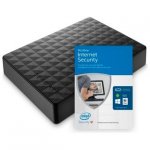
Picture implies you get the McAfee software included but then it's down as an add on special offer further down. Anybody know if it is/isn't included?
hotbydegrees to MrFizzy
24 Mar 161#6
I do hope not
sickly sweet
24 Mar 16#7
I just paid £69 for a 3TB version on Amazon.
MrFizzy to sickly sweet
24 Mar 161#8
Are sure that wasn't the desktop version rather than the portable one? If it was the portable one please post a link as I'll go for that. Thanks
Seagate are getting sued for the failure of their 3TB desktop drives, they are noisy too since they already got sued for their acoustic management (what makes it quiet). So you are much better off with the 2TB portable which contains a silent Samsung drive, Seagate acquired Samsung for their excellent portable drives. Also if you want a 4TB portable, that's £105 on Amazon, same thing - Seagate branding with a Samsung disk inside.
Sancho
24 Mar 16#13
Is it possible to re-use an old PS4 500gb hard drive in the case of this?
zebrum to Sancho
25 Mar 16#18
yes, but the LED won't work for different drives
sradmad
24 Mar 16#14
good find op, heat added
DanielDarko
24 Mar 16#15
can anyone tell me if it's possible to copy the entire Ps4 Hard drive onto this new one? I have so much Data that I wouldn't want to Re-downalod...
Why would anyone buy a Seagate drive? Literally a ticking time bomb
me_lee
27 Mar 16#21
Sounds dangerous. Are you sure you mean literally?
coolio887
27 Mar 16#22
me_lee
27 Mar 16#23
I don't think you understand what the word 'literally' literally means...
paulwilliams1
27 Mar 16#24
just ordered for click and collect for ps4 upgrade is it simple enough to open up?
me_lee
28 Mar 16#25
Apparently a bit trickier than the older version but still possible - not sure if you can easily reuse (a lot of people using the older one for PS4 upgrades put the PS4 drive back in the caddy to make a smaller portable drive).
paulwilliams1
28 Mar 16#26
just been tucked right up can't install into the ps4 as the data connection is not there the USB is soldered to the board Your text here
Sancho
28 Mar 16#27
I've installed the 2TB version on my PS4 and have had nothing but problems. Corrupted installs on COD, Battlefield won't install and many more issues. Anybody else having problems?
Edit: Currently re-installing the old HD. Hopefully my PS4 isn't bricked.
Sancho
28 Mar 16#28
The old hard drive appears to be working ok. I've now researched this drive and there appears to be lots of problems with the PS4, maybe it should be avoided. I now feel like I've wasted £60.
me_lee
28 Mar 16#29
It seems to be the recommended one for 2Tb upgrades... unless maybe they changed the drive?
It's almost impossible to properly brick a PS4 - they can be revived with a usb stick and an empty hard drive, albeit without your data intact.
Is it possible your corrupted installs have to do with the copying of the data from your old drive to your new? If the partitions / file system were malformed it could explain the issues.
cb-uk
28 Mar 16#30
Can't you just return it under the Arogs "try for free" guarantee?
me_lee
29 Mar 16#31
He will have had to mangle the casing of the caddy a bit to get the drive out...
Sancho
29 Mar 16#32
It's the same Samsung drive inside, ST2000LM003 if I remember correctly.
I've tried installing it numerous times. Once with the back up and restore option and then with downloading the game/installs again. The HDD was formatted to exFAT and USB to FAT32 with the 800mb PUP file in PS4>UPDATE.
As discussed, Battlefield wont install. Driveclub freezes after the intro. Disc games install but when they start I get the "data is corrupted, please remove disc, delete game and re-install" message. Numerous other issues.
I bought the 1TB purely for this as we have just filled up the PS4 with games.
Should I not bother and take back and just buy the correct bare drive ?
Sancho
29 Mar 16#35
There are many reviews saying this drive is compatible. I can't understand why my drive doesn't work. It'll probably work for you but I've currently given up on the one I bought.
me_lee
29 Mar 16#36
I seem to remember reading some people have had problems with the 1Tb in a PS4.
As for the link about problems with the 2Tb - it doesn't seem related to Sancho's problem. It's about booting and the 'solved' answer is:
Version 1.7 solves the PS4 cold boot problem with the Samsung Spinpoint M9T 2TB (ST2000LM003). I want to personally thank everyone on this forum post for making this issue publicly known. It appears Sony has actually listened and solved our problem. I can finally enjoy my 2TB hard drive without worrying about my PS4 not booting properly.
me_lee
29 Mar 16#37
See my post #36.
Also, I wouldn't have the drive pre-formatted with the pup file on there. If you want to give it another go at some point I would have the pup file on a USB stick and use a PC to remove all of the partitions on the drive so that the PS4 creates them properly itself.
Your pup file sounds a little small - make sure it's the most up-to-date one from the Sony website as this is required for your drive. It should be around a gigabyte.
The pup file was on a FAT32 USB stick and not on the new HDD. The HDD was blank but formatted in exFAT. Could this be the problem? Should I totally remove the exFAT volume in Disk Management and try with an unformatted hard drive? That's probably the one option I haven't tried.
The install was also carried out in safe mode with initialise and re-install software option.
I did also use the latest pup file from the Sony UK website. The install did seem to work fine until I tried to use/install games.
I realise the link doesn't relate to my issue but just wanted to highlight there has been issues in the past.
me_lee
29 Mar 16#39
I would file it under "Worth a try if I have the time free" - maybe use Windows diskpart (or equivalent) to do a 'clean' of the disk. There's also the chance that you have a dodgy drive - you could try a chkdsk /r (again from Windows) and some SMART diagnostics to make sure the drive is healthy.
cb-uk
29 Mar 16#40
So just for confirmation, are the actual drives inside these Seagate Expansion boxes Samsungs or are they (totally c.rap) Seagates?
Sancho
29 Mar 16#41
Mine was a Samsung.
Sancho
29 Mar 16#42
Thanks, will do.
Sancho
30 Mar 161#43
I managed to get the drive replaced at Argos and the new one appears to work. Thanks for the help.
jonmac73
1 Apr 16#44
Will be taking mine back sealed for refund just in case doesn't work - got a bare 1Tb drive from ebay with 20% off voucher yesterday for just over £30.
mrunderhill2
10 May 16#45
Here's another picture:-
MrFizzy to mrunderhill2
10 May 16#46
Also, don't forget that 87% of statistics are made up.:wink:

![Fresh Breakfast Meat Box (Using code) @ Campbells Meat [Haggis / Lorne Sausage / Bacon / Black Pudding & More]](/images/topics/208684_1.jpg)




































![[Xbox One] Q. u. b. e: Director's Cut on Deals with Gold](/images/topics/208716_1.jpg)


















Opening post
The Seagate Expansion Portable USB Hard Drive offers an instant solution to add storage to your computer or take files on the go. With USB 3.0, data transfer is high-speed while built in power management ensures energy efficiency. This removable storage device is easy to use; simply plug in to your computer and drag-and-drop your files to save them.
All comments (46)
http://www.argos.co.uk/static/Product/partNumber/2489935.htm
I believe the £59 price tag has always been there so I won't be voting either way.
Picture implies you get the McAfee software included but then it's down as an add on special offer further down. Anybody know if it is/isn't included?
I picked up the 2TB today for £59 and received a £5 voucher towards my next argos purchase.
The same one on amazon is currently £76.99
Edit: Currently re-installing the old HD. Hopefully my PS4 isn't bricked.
It's almost impossible to properly brick a PS4 - they can be revived with a usb stick and an empty hard drive, albeit without your data intact.
Is it possible your corrupted installs have to do with the copying of the data from your old drive to your new? If the partitions / file system were malformed it could explain the issues.
I've tried installing it numerous times. Once with the back up and restore option and then with downloading the game/installs again. The HDD was formatted to exFAT and USB to FAT32 with the 800mb PUP file in PS4>UPDATE.
As discussed, Battlefield wont install. Driveclub freezes after the intro. Disc games install but when they start I get the "data is corrupted, please remove disc, delete game and re-install" message. Numerous other issues.
Edit: An old topic discussing issues.
http://community.us.playstation.com/t5/Consoles-Peripherals/PS4-Not-Compatible-with-New-Samsung-Spinpoint-M9T/td-p/42842075
Should I not bother and take back and just buy the correct bare drive ?
As for the link about problems with the 2Tb - it doesn't seem related to Sancho's problem. It's about booting and the 'solved' answer is:
Version 1.7 solves the PS4 cold boot problem with the Samsung Spinpoint M9T 2TB (ST2000LM003). I want to personally thank everyone on this forum post for making this issue publicly known. It appears Sony has actually listened and solved our problem. I can finally enjoy my 2TB hard drive without worrying about my PS4 not booting properly.
Also, I wouldn't have the drive pre-formatted with the pup file on there. If you want to give it another go at some point I would have the pup file on a USB stick and use a PC to remove all of the partitions on the drive so that the PS4 creates them properly itself.
Your pup file sounds a little small - make sure it's the most up-to-date one from the Sony website as this is required for your drive. It should be around a gigabyte.
Instructions here is you need them (the safe mode bit is useful to know).
The pup file was on a FAT32 USB stick and not on the new HDD. The HDD was blank but formatted in exFAT. Could this be the problem? Should I totally remove the exFAT volume in Disk Management and try with an unformatted hard drive? That's probably the one option I haven't tried.
The install was also carried out in safe mode with initialise and re-install software option.
I did also use the latest pup file from the Sony UK website. The install did seem to work fine until I tried to use/install games.
I realise the link doesn't relate to my issue but just wanted to highlight there has been issues in the past.